AULA F81 vs F81
This is a comparison of the same keyboard, the AULA F81, against itself.
KeebFinder may earn a commission when you buy through these links, at no extra cost to you.

Which one should you get?
Get the
AULA F81
Build quality in the bottom 20% of 75% boards under $100.
- Triple-mode connectivity (wired, Bluetooth 5.0, 2.4 GHz) for versatile device pairing.
- Hot-swappable PCB supports most 3-pin and 5-pin mechanical switches.
- Gasket mount design with sound-absorbing foam and silicone pad for a softer typing feel.
Get the
AULA F81
Build quality in the bottom 20% of 75% boards under $100.
- Triple-mode connectivity (wired, Bluetooth 5.0, 2.4 GHz) for versatile device pairing.
- Hot-swappable PCB supports most 3-pin and 5-pin mechanical switches.
- Gasket mount design with sound-absorbing foam and silicone pad for a softer typing feel.
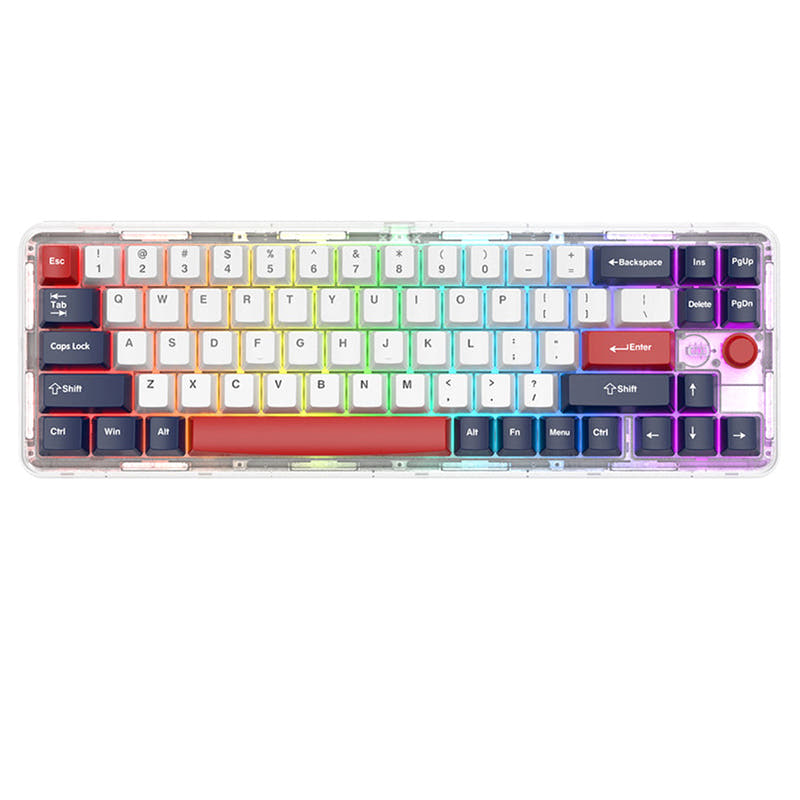
You are not choosing between two different keyboards. The AULA F81 is a single product. Your decision should be based on whether its specific features—a transparent 75% layout, wireless connectivity, and gasket-mount design—meet your needs. Consider it if you value aesthetics and modding potential in a compact form factor.
The differences that matter
Skip the 40-row spec sheet. These are the specs that change how each board feels, sounds, and fits your desk.
- AULA F81
- AULA F81
- Performance
- 5151
- Build quality
- 5050
- Productivity
- 7474
- Customizability
- 6868
- Portability
- 7676
- Layout size: 75%
- Connection: Bluetooth, 2.4 GHz, Wired
- Hot-swappable
- Battery: 4,000 mAh
- Case material: Acrylic
- Mount style: Gasket Mount
What will you mostly use it for?
Since this is a comparison of the same product, all use case evaluations are identical. The AULA F81 presents a consistent profile: a mod-friendly, wireless-capable 75% keyboard with a transparent aesthetic. Its strengths in connectivity and customizability apply uniformly, while its specific material choices and weight are constant factors across all scenarios.
It's a tie
- Both listings are for the same keyboard with N-key rollover.
- Both offer the same 2.4 GHz wireless and wired connectivity options for low-latency play.
- The 75% layout provides more mouse space, a benefit for both.
AULA F81 vs F81 specs
Every tracked spec, side by side. Rows marked with a dot differ between the boards.
0 of 15 specs differ
AULA F81
AULA F81
Hot-swappable
Mount style
Sound dampening
Layout size
Layout standard
Ergonomics
Knob
Display
Connection
Battery
Case material
Keycaps
Backlight
Mac & Windows
Released
Compare prices
Live prices from the stores we track, cheapest in-stock offer first.
Prices in USD are converted to your currency and can change at any time. KeebFinder may earn a commission when you buy through these links, at no extra cost to you.
Lowest price across stores, Amazon excluded.


AULA F81 vs F81: your questions
Yes. The AULA F81 supports triple-mode connectivity, including a Type-C wired connection, Bluetooth, and 2.4 GHz wireless using an included dongle.
According to the vendor description, the 4000mAh battery provides approximately 23 hours of use with RGB lighting on and over 114 hours with RGB lighting turned off.
Yes. The keyboard features a hot-swappable PCB that is compatible with most 3-pin and 5-pin mechanical switches, allowing for easy switch replacement without soldering.
The AULA F81 uses a gasket mount design. The vendor states this design stabilizes keystrokes and uses sound-absorbing foams and a silicone pad to improve acoustics.
The keyboard comes with transparent keycaps in the GDA profile, made from PC (polycarbonate) material.
Yes. The product listing includes Mac support, and the vendor description highlights dedicated buttons for switching between operating systems including Mac OS.
According to the vendor page, the box contains the keyboard, a manual, a combined keycap and switch puller, a 2.4 GHz receiver, and a Type-C cable.
The AULA F81 weighs 969 grams (approximately 2.14 pounds), as listed in its specifications.
The case is made from transparent acrylic, which showcases the internal components of the keyboard.
The vendor description mentions that the sides of the keyboard feature detachable metal pieces that come with three default sticker designs, allowing for some visual personalization.
The technical specifications section on the vendor page lists a downloadable driver for the AULA F81, suggesting software is available for further customization.
Not sold on either?




Still torn?
Answer a few quick questions and the keyboard finder ranks 2,000+ boards by how you will actually use yours.