Nuphy NuPhyX BH65 Keyboard vs Keychron Lemokey P1Hall Effect Gaming vs Versatile Custom
Choose the Nuphy BH65 HE for competitive gaming with Hall Effect switches, or the Keychron P1 for versatile wireless use and deep customization.
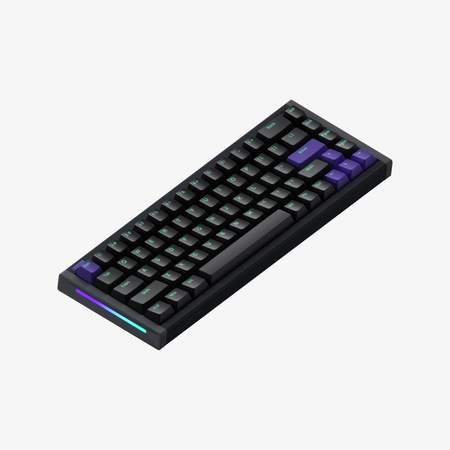

Which one should you get?
Get the
Nuphy NuPhyX BH65 Keyboard
Hall Effect Gaming
- Ultra-low 0.125ms latency and 8000 Hz polling rate for competitive gaming.
- Hall Effect magnetic switches allow for adjustable actuation points down to 0.01mm.
- All-aluminum CNC body provides a solid, stable base.
- Wired-only connectivity limits placement and device switching.
- 65% layout lacks dedicated function row and some navigation keys.
- Uses a tray mount design, which typically offers less typing flex than gasket mounts.
Get the
Keychron Lemokey P1
Versatile Custom
- Tri-mode connectivity with Bluetooth, 2.4 GHz, and wired options.
- Gasket mount design with multiple acoustic foam layers for a cushioned typing feel.
- Full support for QMK and VIA open-source firmware for unlimited customization.
- Lower 1000 Hz polling rate compared to the BH65 HE's 8000 Hz.
- Heavier weight (1650g) may reduce portability despite wireless features.
- Uses standard mechanical switches, lacking the adjustable actuation of Hall Effect.
Your primary need dictates the choice. For dedicated competitive gaming where every millisecond and customizable actuation point counts, the wired Nuphy BH65 HE is the focused tool. For virtually any other scenario—including office work, programming, travel, or hobbyist modding—the Keychron P1's wireless freedom, flexible layout, and superior customizability make it the more practical and versatile daily driver.
The differences that matter
Skip the 40-row spec sheet. These are the specs that change how each board feels, sounds, and fits your desk.
Nuphy NuPhyX BH65 Keyboard
Keychron Lemokey P1
Layout size
65%
75%
Hall effect (magnetic)
Yes
No
Rapid trigger
Yes
No
Connection
Wired
Bluetooth, 2.4 GHz, Wired
Max polling rate
8,000 Hz
1,000 Hz
- Nuphy NuPhyX BH65 Keyboard
- Keychron Lemokey P1
- Performance
- 9682
- Build quality
- 6688
- Productivity
- 6897
- Customizability
- 6196
- Portability
- 7381
- Hot-swappable
- Case material: Aluminum
- Sound dampening
- Keycaps: PBT
What will you mostly use it for?
The Keychron P1 wins in most categories due to its versatile wireless connectivity, flexible 75% layout, and strong foundation for customization with its gasket mount and open-source firmware. The Nuphy BH65 HE is the decisive choice specifically for competitive gaming, where its Hall Effect technology, ultra-high polling rate, and specialized driver software provide a measurable edge. For programmers, office workers, or modding enthusiasts, the P1's feature set is more broadly applicable.
Pick the Nuphy NuPhyX BH65 Keyboard
- Features an 8000 Hz polling rate and a 0.125ms latency, as stated by Nuphy.
- Uses Hall Effect magnetic switches with adjustable actuation points down to 0.01mm.
- Includes gaming-specific firmware features like Rapid Trigger and SOCD cleaning.
What owners say
Ratings and quotes collected from verified store reviews, including the critical ones.
Nuphy NuPhyX BH65 Keyboard
No owner reviews collected yet.
Keychron Lemokey P1
10 owner reviews
“Love the keyboard, i got the red switches, i also got a silicon palm rest, feels super nice, super high quality, super heavy. No complaints It looks great with any setup, my friends were shocked when they found out the price.”
Nuphy NuPhyX BH65 Keyboard vs Keychron Lemokey P1 specs
Every tracked spec, side by side. Rows marked with a dot differ between the boards.
16 of 28 specs differ
Nuphy NuPhyX BH65 Keyboard
Keychron Lemokey P1
Switch options
Hall effect (magnetic)
Rapid trigger
Hot-swappable
Mount style
Sound dampening
Screw-in stabilizers
Layout size
Layout standard
Ergonomics
Knob
Display
Connection
Max polling rate
Battery
USB-C
Case material
Plate material
Keycaps
Weight
Dimensions
Typing angle
Backlight
QMK
VIA
N-key rollover
Mac & Windows
Released
Compare prices
Live prices from the stores we track, cheapest in-stock offer first.
Lowest price across stores, Amazon excluded.



Prices in USD are converted to your currency and can change at any time. KeebFinder may earn a commission when you buy through these links, at no extra cost to you.
Nuphy NuPhyX BH65 Keyboard vs Keychron Lemokey P1: your questions
The Nuphy BH65 HE is designed for this use case. Its manufacturer cites an 8000 Hz polling rate, 0.125ms latency, and Hall Effect switches with features like Rapid Trigger that allow you to set the reset point as low as 0.01mm. This level of adjustable, low-latency input is targeted at competitive gaming.
Yes. The Keychron P1 Pro variant offers Bluetooth and 2.4 GHz wireless connectivity. The manufacturer states it supports up to 3 device connections with on-the-fly switching in Bluetooth mode. The standard P1 model is wired-only.
Both keyboards list Mac and Windows support in their specifications. The Keychron P1 includes extra keycaps for both operating systems in its fully assembled version, while the Nuphy BH65 HE is listed as compatible with macOS, Windows, Linux, Android, and iOS.
The Keychron P1 has a stronger foundation for customization. It uses a gasket mount design with IXPE, PET, and absorbing foam layers, a polycarbonate plate, and screw-in stabilizers. It also offers a barebones kit and supports most 3-pin and 5-pin MX switches, allowing you to build the sound and feel from the ground up.
Yes, both keyboards are hot-swappable, meaning you can change switches without soldering. The Nuphy BH65 HE uses its proprietary magnetic switches, while the Keychron P1 is compatible with a wide range of standard 3-pin and 5-pin MX-style mechanical switches from brands like Gateron and Cherry.
Yes, the Nuphy BH65 HE uses the NuPhy.IO web-based software for customization. The vendor description mentions you can adjust RGB lighting, program macros, and customize the 6 advanced keys with features like Rapid Trigger and Rapid Shift.
The Nuphy BH65 HE uses a tray mount, where the PCB is screwed directly into the case. The Keychron P1 uses a gasket mount, where the PCB and plate are suspended by rubber or silicone gaskets. Gasket mounts are generally associated with a more cushioned, consistent typing feel and better sound dampening.
The Keychron P1 features south-facing RGB backlighting with 22 preset modes. The Nuphy BH65 HE specifications list a backlight but do not specify RGB; its vendor description and specs mention 'top-emitting LED' backlighting, and a reviewer noted the lack of shine-through keycaps, suggesting it may be single-color backlighting.
Yes. Keychron offers the P1 in a 'Barebone' kit version, which includes the aluminum case, PCB, and polycarbonate plate, but does not include keycaps or switches. This is ideal for users who want to install their own preferred components.
For the Nuphy BH65 HE, firmware updates are done through the NuPhy.IO web platform. For the Keychron P1, customization is done through the Lemokey Launcher web app or the open-source VIA/QMK software, which also allow for firmware updates and key remapping.
The 65% layout of the Nuphy BH65 HE is more compact, as it removes the function row, navigation cluster, and some editing keys. The 75% layout of the Keychron P1 squeezes the function row and navigation keys (like Home, End) into a more condensed layout than a full-size board but retains more keys than a 65%.
Not sold on either?



Still torn?
Answer a few quick questions and the keyboard finder ranks 2,000+ boards by how you will actually use yours.