Coolkiller Balloon84 vs Lofree Flow84Battery Life vs Typing Feel
Choose the Coolkiller Balloon84 for its superior battery and triple connectivity, or the Lofree Flow84 for its premium gasket-mounted typing feel.
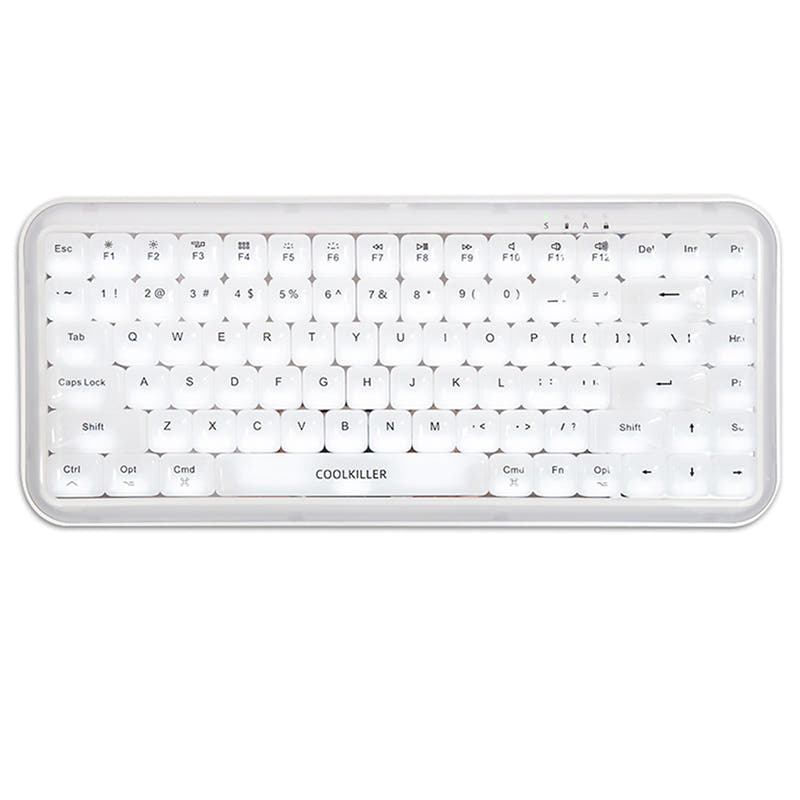

Which one should you get?
Get the
Coolkiller Balloon84
Battery Life
- Substantially larger 3500mAh battery capacity.
- Offers triple connectivity: wired, Bluetooth, and 2.4 GHz wireless.
- Includes a 2.4G receiver and extra keycaps/switches in the box.
- Heavier at 870g, making it less portable.
- Uses PC keycaps which may show shine more quickly than PBT.
- Lacks the gasket mount design found in the Flow84.
Get the
Lofree Flow84
Typing Feel
- Gasket mount design with IXPE and Poron foam for a softer typing feel.
- Uses dye-sublimated PBT keycaps for better durability and texture.
- Lighter weight (594g) and slimmer profile for better portability.
- Smaller 2000mAh battery.
- Lacks a 2.4 GHz wireless mode, connecting only via Bluetooth or wired USB-C.
- Vendor reviews mention some users found the return process difficult.
Your priority dictates the choice. If you need the most flexible wireless setup with a 2.4G dongle and the longest possible battery life, the Coolkiller Balloon84 is the clear pick. If you value a premium typing experience with a gasket mount, durable PBT keycaps, and a lighter, sleeker build, the Lofree Flow84 is the better investment, especially if you primarily use Bluetooth or wired connections.
The differences that matter
Skip the 40-row spec sheet. These are the specs that change how each board feels, sounds, and fits your desk.
Coolkiller Balloon84
Lofree Flow84
Connection
Bluetooth, 2.4 GHz, Wired
Bluetooth, Wired
Battery
3,500 mAh
2,000 mAh
Case material
Aluminum, Plastic
Aluminum
Switch options
Linear
Linear, Tactile
Weight
870 g
594 g
- Coolkiller Balloon84
- Lofree Flow84
- Performance
- 5564
- Build quality
- 6167
- Productivity
- 7866
- Customizability
- 6369
- Portability
- 8382
- Layout size: 75%
- Hot-swappable
- Low profile
What will you mostly use it for?
The Lofree Flow84 takes the lead for programming and modding due to its PBT keycaps and detailed gasket-mount construction. It's also the lighter option for travel. The Coolkiller Balloon84 is better suited for gaming and content creation, thanks to its 2.4G wireless option and substantially larger battery. For general office use, both keyboards are equally capable with their low-profile designs and multi-device Bluetooth.
Pick the Coolkiller Balloon84
- Includes a 2.4 GHz wireless mode for a potential latency advantage over Bluetooth-only connectivity.
- Larger 3500mAh battery supports longer untethered gaming sessions.
- Vendor description mentions a 'tri-connect mode' for flexible wired and wireless use.
Coolkiller Balloon84 vs Lofree Flow84 specs
Every tracked spec, side by side. Rows marked with a dot differ between the boards.
10 of 21 specs differ
Coolkiller Balloon84
Lofree Flow84
Switch options
Hot-swappable
Mount style
Low profile
Sound dampening
Layout size
Layout standard
Ergonomics
Display
Media keys
Connection
Battery
USB-C
Case material
Keycaps
Weight
Dimensions
Typing angle
Backlight
Mac & Windows
Released
Compare prices
Live prices from the stores we track, cheapest in-stock offer first.
Lowest price across stores, Amazon excluded.



Prices in USD are converted to your currency and can change at any time. KeebFinder may earn a commission when you buy through these links, at no extra cost to you.
Coolkiller Balloon84 vs Lofree Flow84: your questions
The Coolkiller Balloon84 has a significantly larger 3500mAh battery compared to the Lofree Flow84's 2000mAh. While the Flow84's manufacturer claims up to 40 hours of use, the Balloon84's larger capacity suggests it will last longer between charges.
No. According to its specifications and vendor description, the Lofree Flow84 connects only via Bluetooth 5.0 or a wired USB-C cable. It does not include a 2.4 GHz wireless dongle.
The Coolkiller Balloon84 uses keycaps made from PC (polycarbonate) material. The Lofree Flow84 uses dye-sublimated PBT (polybutylene terephthalate) keycaps, which are generally more resistant to wear and oil shine.
A gasket mount uses rubber or silicone gaskets to suspend the plate and PCB inside the case, aiming to reduce vibration and create a softer typing feel. The Lofree Flow84 features a gasket mount design with IXPE and Poron foam, while the Coolkiller Balloon84 does not specify this mounting style.
Yes, both the Coolkiller Balloon84 and the Lofree Flow84 support hot-swappable switches. This allows you to change switches without soldering.
The Lofree Flow84 is notably lighter at 594 grams and has a slimmer profile (25mm height). The Coolkiller Balloon84 weighs 870 grams, making the Flow84 the more portable option.
The Coolkiller Balloon84 features white backlighting. The Lofree Flow84 has white backlighting with adjustable levels and also includes RGB sidelighting with eight colors and three modes.
Both keyboards are compatible with low-profile mechanical switches. The Balloon84 uses Coolkiller's Ice-Blade MINI switches. The Flow84 uses Kailh full POM switches and is also listed as compatible with separately purchased Wizard (clicky) switches.
According to the vendor listing, the Balloon84 includes the keyboard, a USB-C cable, a switch puller, a 2.4G receiver, a user manual, five replacement Windows keycaps, and four replacement switches.
The Lofree product page lists the box contents as the Flow84 keyboard, a USB-C cable, and a user guide. It does not list a switch puller or extra switches.
Yes, both manufacturers state Mac support. The Coolkiller Balloon84 description mentions a one-click switch for MAC/WIN and includes Mac multimedia key restoration. The Lofree Flow84 lists macOS and iPadOS compatibility in its tech specs.
Both have sound-dampening features, but their approaches differ. The Balloon84 vendor mentions silicone pads for noise reduction. The Flow84 uses a gasket mount with specific IXPE and Poron foams to isolate switches and reduce vibrations, which is a design often associated with a more controlled acoustic profile.
Not sold on either?


Still torn?
Answer a few quick questions and the keyboard finder ranks 2,000+ boards by how you will actually use yours.