Ducky One 3 Aura vs Monka 6102RGB or Aluminum
Choose the Ducky for a prebuilt RGB keyboard with sound dampening, or the Monka for an aluminum gasket-mount DIY kit.
KeebFinder may earn a commission when you buy through these links, at no extra cost to you.

Which one should you get?
Get the
Ducky One 3 Aura
Sound dampening
Build quality in the bottom 50% of 100% boards under $150.
- Prebuilt 100% ANSI keyboard with USB-C connectivity.
- RGB lighting, with per-key programmable RGB specified by the vendor.
- Vendor lists dual-layer silicone and EVA foam sound dampeners.
Get the
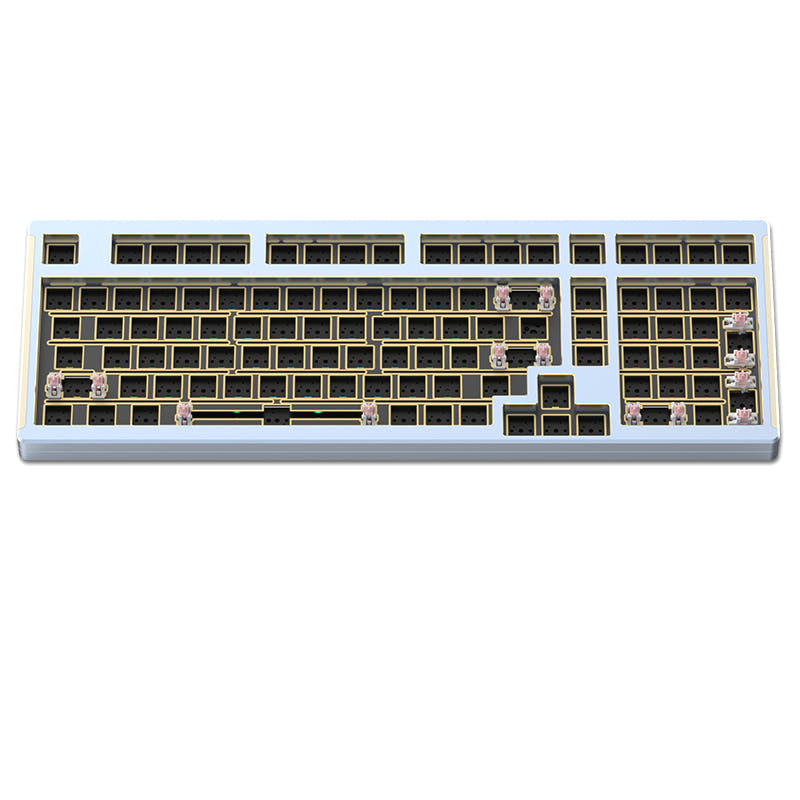
Monka 6102
Build quality in the top 20% of 100% boards under $150.
- Aluminum case with gasket mount.
- Barebones DIY kit with hot-swap support for 3-pin and 5-pin switches, according to the vendor.
- Vendor identifies an FR4 position plate.
Choose the Ducky One 3 Aura if you want a prebuilt full-size keyboard with RGB, multimedia keys, and listed sound dampening. Choose the Monka 6102 if your priority is an aluminum gasket-mount kit that leaves switch selection and installation to you. Both are wired and hot-swappable, so the decision is mainly between a feature-equipped prebuilt and a DIY starting point.
The differences that matter
Skip the 40-row spec sheet. These are the specs that change how each board feels, sounds, and fits your desk.
Ducky One 3 Aura
Monka 6102
Case material
ABS, Plastic
Aluminum
Switch options
Clicky, Linear, Silent, Tactile
Linear
Mount style
Plate Mount
Gasket Mount
Sound dampening
Yes
No
Backlight
RGB
None
RGB for looks and low light rather than speed
- Ducky One 3 Aura
- Monka 6102
- Performance
- 6450
- Build quality
- 5370
- Productivity
- 7666
- Customizability
- 6962
- Portability
- 4646
- Layout size: 100%
- Connection: Wired
- Hot-swappable
What will you mostly use it for?
The Ducky has an edge for office and content-creation setups that benefit from multimedia keys, RGB, and its prebuilt configuration. It also suits gaming and programming buyers who want a ready-to-use board with several listed switch types. The Monka stands out for modding because it is sold as a barebones kit with a gasket mount and support for 3-pin and 5-pin switches. Travel is a draw, since both are full-size and wired, and only the Monka's weight is specified.
Pick the Ducky One 3 Aura
- The Ducky has RGB lighting, including per-key programmable RGB in its vendor description.
- The Ducky is listed with clicky, tactile, linear, and silent switch options, while the Monka is listed as linear.
- The Monka's vendor describes its gasket mount as cushioning keypresses, which may appeal to players who prefer a softer feel.
Ducky One 3 Aura vs Monka 6102 specs
Every tracked spec, side by side. Rows marked with a dot differ between the boards.
7 of 18 specs differ
Ducky One 3 Aura
Monka 6102
Switch options
Hot-swappable
Mount style
Sound dampening
Layout size
Layout standard
Ergonomics
Display
Media keys
Connection
USB-C
Case material
Keycaps
Weight
Dimensions
Backlight
Mac & Windows
Released
Compare prices
Live prices from the stores we track, cheapest in-stock offer first.
Prices in USD are converted to your currency and can change at any time. KeebFinder may earn a commission when you buy through these links, at no extra cost to you.
Lowest price across stores, Amazon excluded.


- Check on Amazon
Amazon
Check price

Ducky One 3 Aura vs Monka 6102: your questions
The Ducky One 3 Aura is listed as prebuilt. The Monka 6102 is listed as a barebones DIY kit.
Yes, the Ducky One 3 Aura is listed with RGB. Its vendor description specifies per-key programmable RGB and translucent keycap sides.
The Monka 6102 is listed without RGB. The Ducky One 3 Aura is the RGB option in this comparison.
The Monka 6102 has an aluminum case, and its vendor describes it as CNC aluminum. The Ducky One 3 Aura is listed with a plastic ABS case.
The Monka 6102 is listed with a gasket mount. Its vendor describes the mount as cushioning keypresses and providing a softer typing experience.
Both are listed as hot-swappable. The Monka vendor specifies support for 3-pin and 5-pin switches, while the Ducky vendor identifies Kailh Yellow hot-swap sockets.
Both support hot-swapping, but the Monka 6102 is sold as a barebones DIY kit and its vendor specifies 3-pin and 5-pin switch support. The Ducky is a prebuilt keyboard with several switch types listed.
The Ducky One 3 Aura is listed as prebuilt, with multiple switch types listed. The Monka 6102 is a barebones kit, so buyers should treat it as a DIY starting point rather than a prebuilt keyboard.
Both are listed as 100% keyboards with ANSI layouts. The Monka vendor also describes its kit as a 102-key layout.
Both product listings specify Mac and Windows support. The Monka vendor also lists iOS and Android compatibility.
Both are full-size and wired-only, which limits their appeal for buyers seeking a compact wireless keyboard. The Monka is listed at 2150g, while no weight is listed for the Ducky.
The Ducky One 3 Aura is listed with sound dampening and multimedia keys. Its vendor names silicone plate and EVA foam case dampeners; the Monka's listed features do not include multimedia keys or sound dampening.
Not sold on either?


Still torn?
Answer a few quick questions and the keyboard finder ranks 2,000+ boards by how you will actually use yours.