Ducky One 2 SF vs Keychron K6 ProWired vs Wireless 65% Choice
Choose the Keychron K6 Pro for wireless flexibility and deep customization, or the Ducky One 2 SF for a simpler, wired pre-built experience.

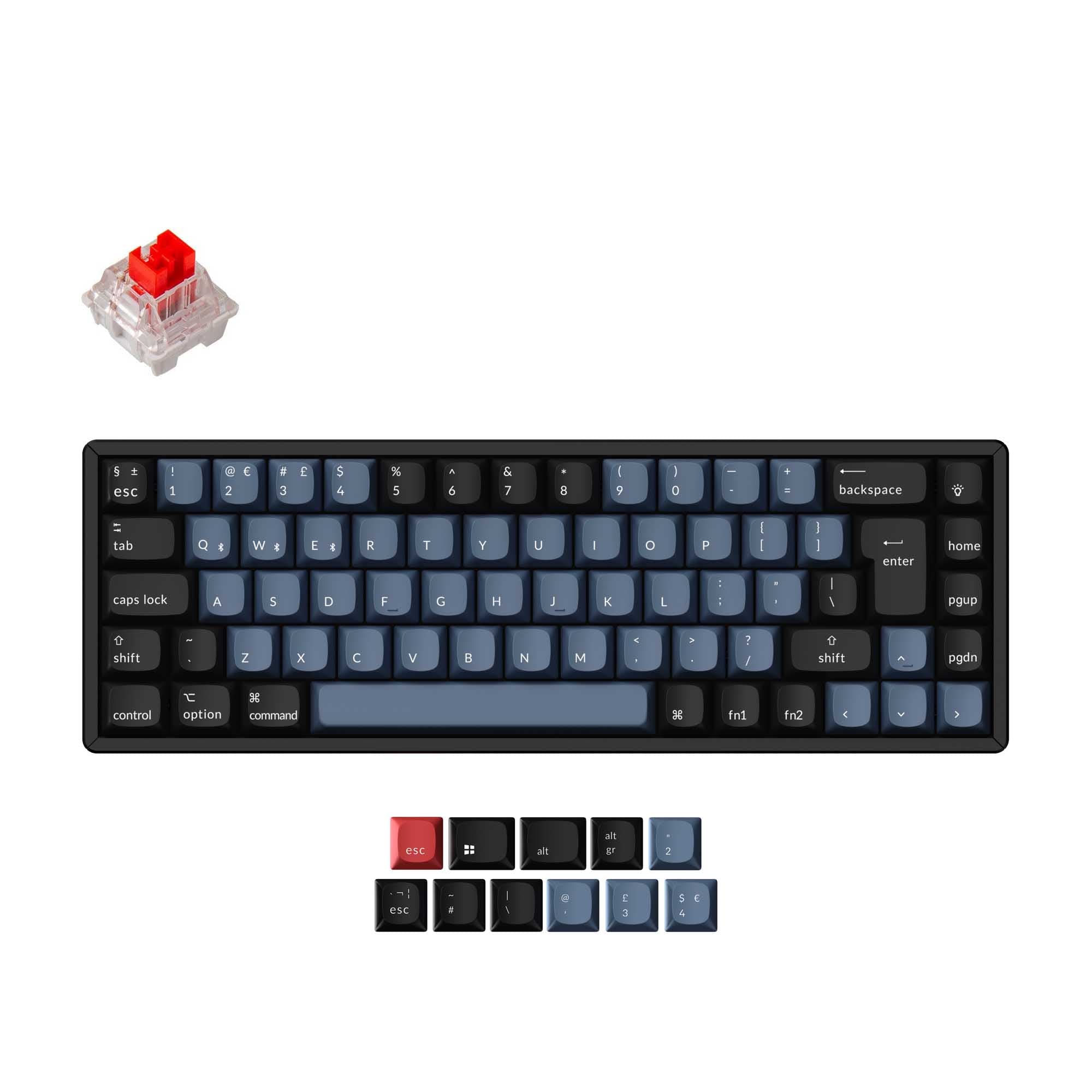
Which one should you get?
Get the
Ducky One 2 SF
Wired
- Includes double-shot PBT keycaps for durability.
- Comes with 10 additional colored PBT keycaps and a potential zodiac spacebar.
- Features a detachable USB-C cable.
- Wired-only connectivity limits placement and device switching.
- Switches are soldered (plate mount), preventing easy replacement.
- The case and plate are plastic, which may feel less premium.
Get the
Keychron K6 Pro
Wireless 65% Choice
- Offers Bluetooth and wired connectivity for multi-device use.
- Hot-swappable sockets allow easy switch customization.
- Supports QMK and VIA firmware for deep programmability.
- Base keycaps are listed as ABS, though PBT options are available.
- The aluminum frame version may be more expensive.
- Some user reviews mention minor software quirks with VIA.
For most users, the Keychron K6 Pro is the recommended choice. Its combination of wireless freedom, hot-swappable design, and robust programmability through QMK/VIA offers significantly more long-term value and flexibility. Choose the Ducky One 2 SF only if you are certain you want a purely wired, pre-configured keyboard with high-quality PBT keycaps and have no plans to modify switches.
The differences that matter
Skip the 40-row spec sheet. These are the specs that change how each board feels, sounds, and fits your desk.
Ducky One 2 SF
Keychron K6 Pro
Connection
Wired
Bluetooth, Wired
Hot-swappable
No
Yes
Case material
Plastic
ABS, Aluminum, Plastic
Switch options
Clicky, Linear, Silent, Tactile
Clicky, Linear, Tactile
Mount style
Plate Mount
PCB Mount, Tray Mount
- Ducky One 2 SF
- Keychron K6 Pro
- Performance
- 6874
- Build quality
- 4589
- Productivity
- 5491
- Customizability
- 5496
- Portability
- 6888
- Layout size: 65%
- Max polling rate: 1,000 Hz
What will you mostly use it for?
The Keychron K6 Pro is the more versatile choice, winning in office, programming, travel, modding, and content creation due to its wireless connectivity, programmability, and hot-swap design. The Ducky One 2 SF's strengths are more niche, appealing to users who specifically want a simple, wired pre-built with PBT keycaps. For gaming, both are capable, leaving the choice to a preference for wired reliability or wireless freedom.
It's a tie
- Both keyboards offer a 1000Hz polling rate for responsive input.
- Both support full N-key rollover.
- The Ducky's wired-only connection ensures consistent latency, while the K6 Pro's wireless offers desk flexibility.
What owners say
Ratings and quotes collected from verified store reviews, including the critical ones.
Ducky One 2 SF
No owner reviews collected yet.
Keychron K6 Pro
8 owner reviews
“This is my first serious mechanical keyboard. It sounds and feels great stock. You don't really need to mod it, but if you do, i think it will sounds amazing. 0 regrets, im very satisfied.”
“I received this item broken: switches, plate, box, stabilizers- everything was either broken or not assembled properly.”
Ducky One 2 SF vs Keychron K6 Pro specs
Every tracked spec, side by side. Rows marked with a dot differ between the boards.
14 of 26 specs differ
Ducky One 2 SF
Keychron K6 Pro
Switch options
Hot-swappable
Mount style
Sound dampening
Screw-in stabilizers
Layout size
Layout standard
Ergonomics
Display
Media keys
Connection
Max polling rate
Battery
USB-C
Case material
Plate material
Keycaps
Weight
Dimensions
Typing angle
Backlight
QMK
VIA
N-key rollover
Mac & Windows
Released
Compare prices
Live prices from the stores we track, cheapest in-stock offer first.
Lowest price across stores, Amazon excluded.




Prices in USD are converted to your currency and can change at any time. KeebFinder may earn a commission when you buy through these links, at no extra cost to you.
Ducky One 2 SF vs Keychron K6 Pro: your questions
No, the Ducky One 2 SF is not hot-swappable. Its switches are soldered onto the PCB using a plate mount style, as confirmed by its product listing. Changing switches would require desoldering and soldering equipment.
Yes, the Keychron K6 Pro supports both Bluetooth wireless and a USB-C wired connection. You can use it in wired mode for gaming or to charge its 4000mAh battery.
The Ducky One 2 SF comes with double-shot PBT keycaps standard, which are known for their durability and resistance to shine. The Keychron K6 Pro listing shows it comes with OSA profile keycaps, with material options including ABS or PBT depending on the configuration.
Yes, the Keychron K6 Pro is listed as compatible with both Mac and Windows. Its vendor description notes it includes keycaps for both operating systems.
Both the Ducky One 2 SF and the Keychron K6 Pro have a 1000Hz polling rate, as stated in their specifications. This provides a 1ms report rate for responsive input.
The product data for the Ducky One 2 SF does not mention software-based key reprogramming, QMK, or VIA support. Its customization appears limited to hardware dip switches and onboard shortcuts for lighting and basic functions.
According to its product page, the Keychron K6 Pro is available with pre-lubed Keychron K Pro mechanical switches in Red, Blue, or Brown variants. It also offers a barebones version without switches or keycaps.
The Keychron K6 Pro is designed with sound dampening in mind. Its vendor description highlights added sound-absorbing foam and a thick silicone dampening bottom pad to create a more peaceful typing sound compared to a standard build.
Yes, the Keychron K6 Pro uses screw-in PCB stabilizers. The manufacturer states these provide a smoother experience and that the board also supports third-party screw-in PCB stabilizers for customization.
The Ducky One 2 SF uses north-facing RGB LEDs. The Keychron K6 Pro uses south-facing RGB LEDs, which its vendor page states prevents interference with Cherry-profile keycaps and better illuminates from the typist's angle.
The Ducky One 2 SF is listed as compatible with Mac. However, unlike the Keychron K6 Pro, its description does not mention included Mac-specific keycaps, so you may need to rely on keyboard shortcuts or software remapping.
Not sold on either?


Still torn?
Answer a few quick questions and the keyboard finder ranks 2,000+ boards by how you will actually use yours.