Dot Works Layer75 vs KBDFans KBD75 V3Gasket or RGB
Choose the Layer75 for gasket mounting and broader firmware customization, or the KBD75 V3 for RGB and a top-mount design.
KeebFinder may earn a commission when you buy through these links, at no extra cost to you.

from$199at ClickClack

from$197at MK
90-day lowLowest price in 90 days
Which one should you get?
Get the
Dot Works Layer75
QMK
Build quality in the top 10% of 75% boards under $200.
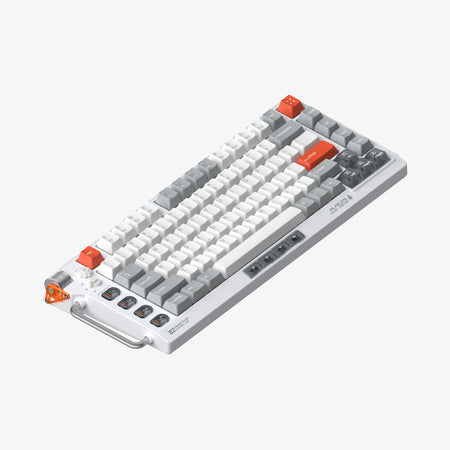
- Gasket mount and aluminum case, with aluminum and FR4 plate options.
- QMK, VIA and VIAL support, plus a hot-swappable PCB.
- The kit lists Poron foams, IXPE switch shims, a brass weight and a stainless-steel logo accent.
Get the
KBDFans KBD75 V3
Build quality in the top 40% of 75% boards under $200.
- Top-mount aluminum case with an RGB-lit acrylic mid-layer, according to the vendor description.
- Hot-swappable PCB, USB-C interface and wired-only connectivity are listed.
- Vendor description specifies PCB foam, case foam and Cherry screw-in stabilizers.
Choose the Dot Works Layer75 if gasket mounting and QMK, VIA and VIAL support are your priorities, especially if you want its listed plate and foam options. Pick the KBDFans KBD75 V3 if RGB lighting and a top-mount build matter more. Both offer a hot-swappable 75% ANSI layout, so make the choice around those specific differences.
The differences that matter
Skip the 40-row spec sheet. These are the specs that change how each board feels, sounds, and fits your desk.
Dot Works Layer75
KBDFans KBD75 V3
Case material
Aluminum
Acrylic, Aluminum
Mount style
Gasket Mount
Top Mount
QMK
Yes
No
The deep option when you want to remap every key
VIA
Yes
No
GUI remapping without compiling firmware
Plate material
Aluminum, FR4
Aluminum, Brass, Polycarbonate
- Dot Works Layer75
- KBDFans KBD75 V3
- Performance
- 5165
- Build quality
- 8773
- Productivity
- 7374
- Customizability
- 8963
- Portability
- 6064
- Layout size: 75%
- Hot-swappable
- Sound dampening
What will you mostly use it for?
The KBD75 V3 has the clearer gaming-oriented feature set here, with wired-only connectivity and RGB lighting explicitly listed. The Layer75 is the stronger fit for buyers who prioritize firmware customization or changing plate and foam components. Office use is close because both share the same layout size, typing angle and sound-dampening feature. Neither has a clear travel advantage, given the Layer75’s listed weight and the KBD75 V3’s wired-only connection.
Pick the KBDFans KBD75 V3
- The KBD75 V3 listing specifies wired-only connectivity.
- It has RGB lighting, while the Layer75 has no RGB.
- Both are hot-swappable 75% keyboards with a 7° typing angle.
Dot Works Layer75 vs KBDFans KBD75 V3 specs
Every tracked spec, side by side. Rows marked with a dot differ between the boards.
10 of 20 specs differ
Dot Works Layer75
KBDFans KBD75 V3
Switch options
Hot-swappable
Mount style
Sound dampening
Screw-in stabilizers
Layout size
Layout standard
Ergonomics
Display
Connection
USB-C
Case material
Plate material
Weight
Typing angle
Backlight
QMK
VIA
VIAL
Released
Compare prices
Live prices from the stores we track, cheapest in-stock offer first.
Prices in USD are converted to your currency and can change at any time. KeebFinder may earn a commission when you buy through these links, at no extra cost to you.
- Check on Amazon
Amazon
Check price


- Check on Amazon
Amazon
Check price

Dot Works Layer75 vs KBDFans KBD75 V3: your questions
The Layer75 uses a gasket mount and supports QMK, VIA and VIAL. The KBD75 V3 uses a top mount and has RGB lighting.
Yes. Both are listed as ANSI 75% keyboards with a normal ergonomic layout.
The Layer75 explicitly lists QMK, VIA and VIAL support. The KBD75 V3 product details here do not specify firmware support.
Yes, both are listed as hot-swappable. The KBD75 V3 vendor description also says it includes a hot-swap PCB.
The Layer75 vendor description says the kit does not come with switches and keycaps. It lists cases, plates, foams, a PCB, a daughter board, gaskets and other assembly components.
Yes, RGB is listed for the KBD75 V3, and its vendor description specifies an RGB-lit acrylic mid-layer. The Layer75 is listed without RGB.
The Dot Works Layer75 uses a plate gasket mount. The KBDFans KBD75 V3 uses a top mount.
The Layer75 lists aluminum and FR4 plates. The KBD75 V3 metadata lists aluminum, polycarbonate and brass, while its vendor description specifically identifies an aluminum plate.
The Layer75 kit lists Poron foams and IXPE switch shims. It also includes stabilizer shims and gaskets.
Its vendor description lists PCB foam, case foam and Cherry screw-in stabilizers. These are separate details from the Layer75 kit, which lists Poron foams and stabilizer shims.
The Layer75 is listed at 2000g. The KBD75 V3 listing does not give a weight, and it specifies wired-only connectivity, so the available details do not establish a clear travel-weight comparison.
Yes, both are listed with a 7° typing angle. That shared specification does not distinguish one model from the other.
Not sold on either?


Still torn?
Answer a few quick questions and the keyboard finder ranks 2,000+ boards by how you will actually use yours.