Keychron B1 Pro vs J1Ultra-Slim vs Feature-Rich 75%
Choose the B1 Pro for extreme portability and battery life, or the J1 for deep customization with QMK and hot-swappable switches.
KeebFinder may earn a commission when you buy through these links, at no extra cost to you.

4.0 (8)4.0 · 8 reviews
from$37at MK

3.0 (5)3.0 · 5 reviews
from$59at Keychron
Which one should you get?
Get the
Keychron B1 Pro
Ultra-Slim
Build quality in the bottom 5% of 75% boards under $50.
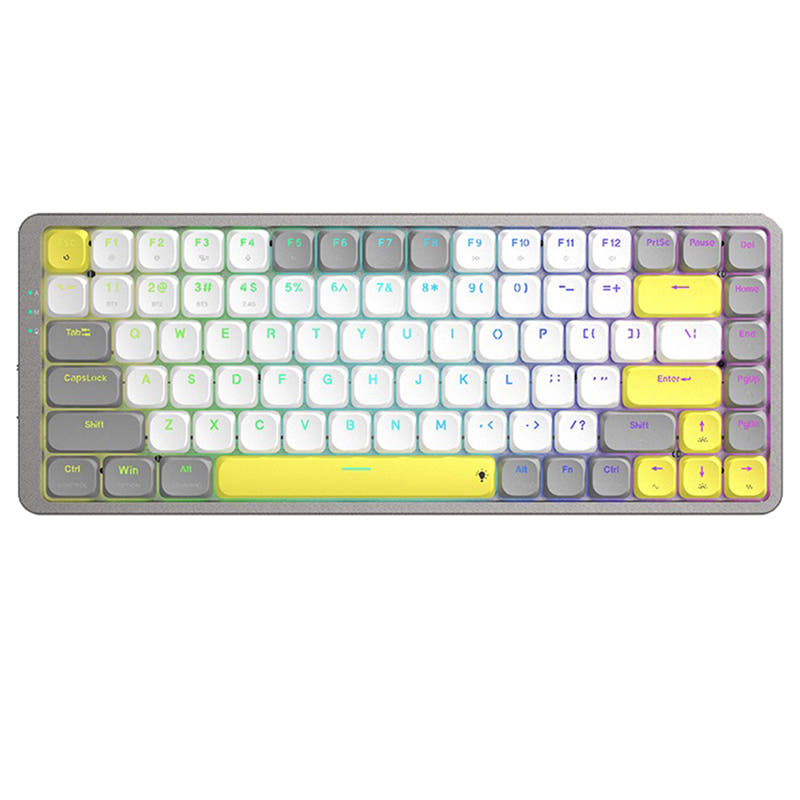
- Ultra-lightweight at 425g with a slim 3° typing angle, highly portable for travel and desk mobility.
- Exceptional battery life rated at up to 1200 hours on a single charge, reducing need for frequent charging.
- Protective silicone skin included in the box to guard against spills, dust, and everyday wear.
- Switches are soldered. Swapping them means soldering.
- Low-profile switches and keycaps only. Standard MX keycaps will not fit.
Get the
Keychron J1
Feature-Rich 75%
Build quality in the top 40% of 75% boards under $100.
- Hot-swappable PCB (optional version) allows easy switch changes without soldering, compatible with Gateron/Keychron low-profile mechanical switches.
- Full QMK and VIA support for deep customization of keymaps, macros, and RGB lighting through Keychron Launcher web app.
- Features advanced IXPE and latex acoustic foam for improved sound dampening and a more responsive typing experience.
- Low-profile switches and keycaps only. Standard MX keycaps will not fit.
- North-facing LEDs. Cherry-profile keycaps can hit the switch housing.
- No ISO layout. ISO-DE, UK, and other ISO variants are not offered.
For most users, the Keychron J1 offers a more capable and customizable mechanical experience with QMK, hot-swap switches, and RGB lighting, making it the better choice for enthusiasts and power users. However, if your top priority is a lightweight keyboard with near-endless battery life for travel or office use, the B1 Pro delivers an unmatched combination of portability and longevity. Choose based on whether you value deep programmability or extreme convenience.
The differences that matter
Skip the 40-row spec sheet. These are the specs that change how each board feels, sounds, and fits your desk.
Keychron B1 Pro
Keychron J1
Hot-swappable
No
Yes
Switch changes without soldering
Battery
800 mAh
2,000 mAh
A larger battery means fewer cables during the day
Case material
ABS, Plastic
ABS
Weight
425 g
661 g
Heavier boards stay planted and lighter ones travel
QMK
No
Yes
The deep option when you want to remap every key
- Keychron B1 Pro
- Keychron J1
- Performance
- 5082
- Build quality
- 4271
- Productivity
- 6889
- Customizability
- 4686
- Portability
- 7880
- Layout size: 75%
- Connection: Bluetooth, 2.4 GHz, Wired
- Low profile
- Max polling rate: 1,000 Hz
- Switch options: Clicky, Linear, Tactile
What will you mostly use it for?
The Keychron J1 wins in four of six use cases, particularly where customization, key rollover, and acoustics matter. It dominates gaming with NKRO and LKP, programming with QMK and hot-swap, modding with its open firmware, and content creation with macro support. The Keychron B1 Pro takes the lead in office and travel, leveraging its ultra-light 425g weight, 1200-hour battery, and spill-resistant silicone cover. The tie is avoided as each product clearly excels in distinct scenarios.
Pick the Keychron J1
- Features N-Key Rollover (NKRO) for both wireless and wired modes, ensuring all key presses are registered during fast gameplay.
- Offers Last Key Priority (LKP) for seamless directional changes in competitive titles like Valorant.
- Includes advanced IXPE and latex acoustic foam for a quieter, more responsive keystroke during intense sessions.
- B1 Pro lacks NKRO and user reviews report key rollover issues at speeds above 70 WPM.
What owners say
Ratings and quotes collected from verified store reviews, including the critical ones.
Keychron B1 Pro
8 owner reviews
“I really like this keyboard, particularly due to its ISO PT layout. For the next iteration, I suggest using a higher-quality plastic, as the keycaps feel a bit cheap. I would easily pay 20/30 EUR more if the keyboard felt more premium.”
“I bought this keyboard from Amazon and I thought I love it. A little over a year later (15ish months) the keyboard starts glitching like the shift key is stuck and would randomly type in ALL CAPS and add weird punctuations. The keyboard made my…”
Keychron J1
5 owner reviews
“I like everything about this keyboard: the keys, their profile, the typing sound of the banana switch, the shape of the keyboard itself, and its size. There are no battery issues either; it holds a charge surprisingly long, and I don't remember the last time…”
“Almost perfect keyboard for me, low profile, etc., but battery dies too fast, i'd say 2-3 days max. and when it dies it does not reconnect when charging cable is plugged in, you have to toggle wired mode, plug in the cable and then toggle wireless mode for it…”
Keychron B1 Pro vs J1 specs
Every tracked spec, side by side. Rows marked with a dot differ between the boards.
15 of 24 specs differ
Keychron B1 Pro
Keychron J1
Switch options
Hot-swappable
Low profile
Sound dampening
Layout size
Layout standard
Ergonomics
Display
Media keys
Connection
Max polling rate
Battery
USB-C
Case material
Keycaps
Weight
Dimensions
Typing angle
Backlight
QMK
VIA
N-key rollover
Mac & Windows
Released
ISO layouts by store
Which stores sell ISO-DE, UK, and the other regional layouts.
Keychron B1 Pro
Keychron
ISO
In stockShips to you
Keychron (DE)
ISO
In stockDoes not ship to you
Keychron J1
No ISO layout at the stores we track.
Compare prices
Live prices from the stores we track, cheapest in-stock offer first.
Prices in USD are converted to your currency and can change at any time. KeebFinder may earn a commission when you buy through these links, at no extra cost to you.
Lowest price across stores, Amazon excluded.



Keychron B1 Pro vs J1: your questions
The Keychron B1 Pro has significantly better battery life, rated at up to 1200 hours on a single charge, which equates to roughly 8 months at 5 hours of daily use. In contrast, the J1 has a 2000mAh battery but user reviews report it lasting only 2-3 days even without backlight, suggesting higher power consumption from its mechanical components and RGB support.
Yes, both keyboards support customization but through different firmware. The B1 Pro uses ZMK firmware and the Keychron Launcher web app for key remapping and macros. The J1 uses QMK firmware with VIA support, also accessible via the Keychron Launcher, offering more advanced options for developers and power users including per-key RGB control.
Only the J1 offers a hot-swappable version, which allows you to change low-profile mechanical switches without soldering. It is compatible with Gateron and Keychron low-profile mechanical switches. The B1 Pro is a pre-built keyboard with non-swappable membrane-style switches, so you cannot change them after purchase.
The J1 is the stronger choice for gaming due to its N-Key Rollover (NKRO) support for both wireless and wired modes, which ensures every key press is registered. It also features Last Key Priority (LKP) for smoother directional changes in competitive games. The B1 Pro lacks NKRO, and user reviews note key rollover issues at typing speeds above 70 WPM.
Both keyboards support triple connectivity: Bluetooth 5.2, 2.4 GHz via a dedicated dongle, and wired USB-C. Both offer a 1000 Hz polling rate in 2.4 GHz and wired modes. The J1 includes a built-in receiver compartment at the top right for storing the 2.4 GHz Type-A dongle, while the B1 Pro does not have this feature.
The B1 Pro comes with concave ABS keycaps designed for precise input and comfort. The J1 features low-profile double-shot PBT keycaps, which are more resistant to oil and shine over time. The J1's keycaps also include shine-through options for RGB backlighting and separate keycaps for both macOS and Windows.
The B1 Pro is far more portable, weighing only 425g with a slim 3° typing angle and compact dimensions of 296 x 130 mm. The J1 is heavier at 661g and thicker with a 19° typing angle, measuring 327 x 144 mm. The B1 Pro's lighter weight and smaller footprint make it the better choice for travel.
The J1 features north-facing RGB backlighting with more than 22 settings, including a static white backlight option, per-key RGB, and Mix RGB zones. It also has a hot-swappable version with RGB. The B1 Pro has no backlight or RGB at all, which can make it difficult to use in dark environments as noted in user reviews.
The B1 Pro uses a plastic ABS case with a 3° fixed typing angle and has a protective silicone skin included. The J1 uses an ABS frame with a steeper 19° typing angle and includes advanced acoustic foam layers (IXPE and latex) for better sound dampening and rigidity. User reviews for the J1 report occasional bending issues, while B1 Pro reviews note the protective cover can stain.
Yes, both keyboards offer Mac layout support while remaining compatible with Windows. They include keycaps for both operating systems, with the J1 providing additional keycaps for macOS and Windows plus extra esc and enter keys. Both support switching keymaps via the Keychron Launcher for seamless OS switching without changing caps.
The J1 has better sound dampening, as it features advanced IXPE acoustic foam and resilient latex foam in its construction. These materials are designed to reduce noise and provide a quieter, more comfortable typing experience. The B1 Pro does not have such foam layers, though its membrane-switch design is inherently quiet, as noted in user reviews.
The B1 Pro has a 4.2/5 rating from 15 reviews, with users praising its value, quiet typing, and battery life but noting key rollover issues and lack of backlight. The J1 has a 2.8/5 rating from 8 reviews, with common complaints about Bluetooth connection drops, fast battery drain (2-3 days), and some units arriving bent or with intermittent shutdowns.
Not sold on either?




Still torn?
Answer a few quick questions and the keyboard finder ranks 2,000+ boards by how you will actually use yours.