Keychron J1 vs J2 HE75% Wireless vs Wired Magnetic
Choose the J2 HE if you prioritize raw gaming performance and Hall Effect magnetic switches; choose the J1 if you need wireless versatility and low-profile keys.
KeebFinder may earn a commission when you buy through these links, at no extra cost to you.

3.0 (5)3.0 · 5 reviews
from$59at Keychron

1.0 (2)1.0 · 2 reviews
from$99at Keychron
Which one should you get?
Get the
Keychron J1
75% Wireless
Build quality in the top 40% of 75% boards under $100.
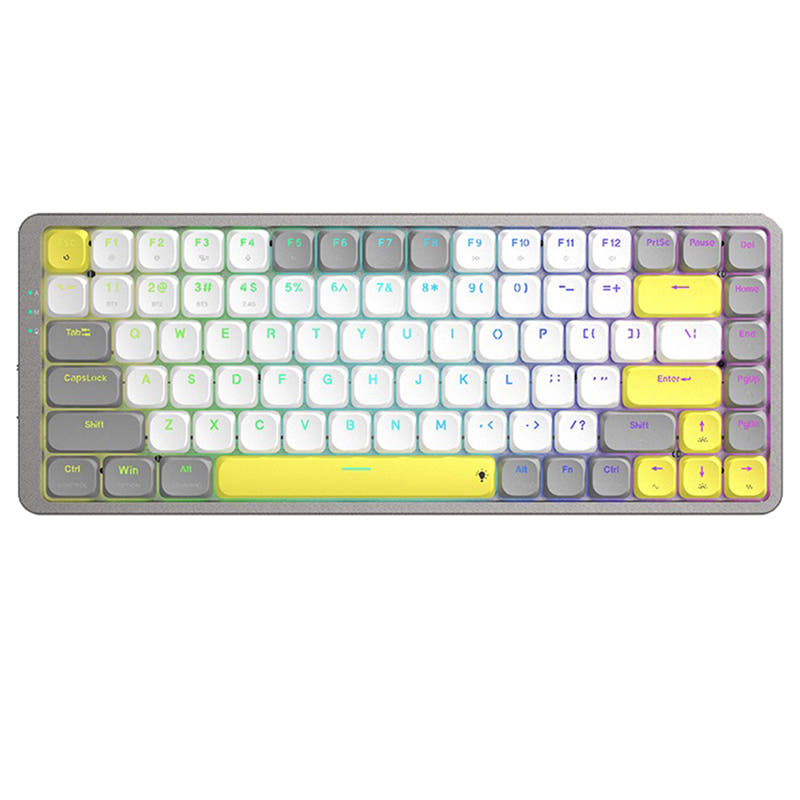
- Wireless connectivity with 2.4 GHz, Bluetooth, and wired modes.
- Low-profile double-shot PBT keycaps and 19° typing angle for ergonomic typing.
- Lightweight at 661g with built-in receiver compartment for travel.
- Low-profile switches and keycaps only. Standard MX keycaps will not fit.
- North-facing LEDs. Cherry-profile keycaps can hit the switch housing.
Get the
Keychron J2 HE
Wired Magnetic
Build quality in the top 10% of 75% boards under $100.
- 8000 Hz polling rate provides minimal input lag for competitive gaming.
- Hall Effect magnetic switches with adjustable actuation for precise control.
- Gasket mount and steel plate deliver stable, responsive typing feedback.
- Magnetic switches only. Standard MX switches will not fit.
- North-facing LEDs. Cherry-profile keycaps can hit the switch housing.
If you value wireless freedom, a low-profile typing feel, and lighter weight for travel, the Keychron J1 is the better choice. If wired gaming performance and cutting-edge Hall Effect magnetic switches with 8000 Hz polling are your priority, the Keychron J2 HE is the clear winner. Let your need for portability versus raw speed guide the decision.
The differences that matter
Skip the 40-row spec sheet. These are the specs that change how each board feels, sounds, and fits your desk.
Keychron J1
Keychron J2 HE
Hall effect (magnetic)
No
Yes
Adjustable actuation helps in games and not in normal typing
Connection
Bluetooth, 2.4 GHz, Wired
Wired
Wireless for several devices and wired for lower latency
Low profile
Yes
No
Max polling rate
1,000 Hz
8,000 Hz
Higher polling helps competitive FPS and does nothing for typing
Case material
ABS
Plastic
- Keychron J1
- Keychron J2 HE
- Performance
- 8289
- Build quality
- 7183
- Productivity
- 8987
- Customizability
- 8689
- Portability
- 8061
- Layout size: 75%
- Hot-swappable
- Switch options: Clicky, Linear, Tactile
- QMK
- VIA
- Sound dampening
What will you mostly use it for?
The J2 HE wins decisively for gaming and modding thanks to its 8000 Hz polling, Hall Effect switches, and gasket mount. The J1 takes the lead in office, programming, travel, and content creation due to its wireless flexibility, low-profile design, and lighter weight. Neither keyboard covers all use cases, making the choice clear based on whether wired speed or wireless convenience matters more.
Pick the Keychron J2 HE
- 8000 Hz polling rate delivers lower input lag in wired mode.
- Hall Effect magnetic switches with adjustable actuation offer precise control.
- Gasket mount and steel plate provide stable feedback.
What owners say
Ratings and quotes collected from verified store reviews, including the critical ones.
Keychron J1
5 owner reviews
“I like everything about this keyboard: the keys, their profile, the typing sound of the banana switch, the shape of the keyboard itself, and its size. There are no battery issues either; it holds a charge surprisingly long, and I don't remember the last time…”
“Almost perfect keyboard for me, low profile, etc., but battery dies too fast, i'd say 2-3 days max. and when it dies it does not reconnect when charging cable is plugged in, you have to toggle wired mode, plug in the cable and then toggle wireless mode for it…”
Keychron J2 HE
2 owner reviews
“Worked perfectly, best keyboard I've ever owned. For one hour. After that all RGB turned off, and the main function of the keyboard (Typing), no longer works. I can't type with it, the web launcher doesn't detect it either, just don't waste your money.”
Keychron J1 vs J2 HE specs
Every tracked spec, side by side. Rows marked with a dot differ between the boards.
13 of 28 specs differ
Keychron J1
Keychron J2 HE
Switch options
Hall effect (magnetic)
Hot-swappable
Mount style
Low profile
Sound dampening
Screw-in stabilizers
Layout size
Layout standard
Ergonomics
Display
Media keys
Connection
Max polling rate
Battery
USB-C
Case material
Plate material
Keycaps
Weight
Dimensions
Typing angle
Backlight
QMK
VIA
N-key rollover
Mac & Windows
Released
Compare prices
Live prices from the stores we track, cheapest in-stock offer first.
Prices in USD are converted to your currency and can change at any time. KeebFinder may earn a commission when you buy through these links, at no extra cost to you.
Lowest price across stores, Amazon excluded.


Keychron J1 vs J2 HE: your questions
The Keychron J2 HE has an 8000 Hz polling rate out of the box, which significantly reduces input lag compared to the J1's 1000 Hz in wired and 2.4 GHz modes. This makes the J2 HE better suited for competitive gaming where every millisecond counts.
Yes, the J1 supports Bluetooth 5.2 and can connect to up to three devices like a computer, phone, and tablet. It also offers a 2.4 GHz wireless mode for lower latency gaming on a single device.
The J1 uses low-profile mechanical switches compatible with Gateron/Keychron low-profile mechanical switches. The J2 HE uses Keychron Ultra-fast Lime Magnetic Switches, which are Hall Effect magnetic switches with adjustable actuation points.
Yes, both the J1 and J2 HE are hot-swappable. The J1 allows swapping low-profile mechanical switches without soldering, while the J2 HE supports hot-swapping Hall Effect magnetic switches.
The J1 offers a low-profile design with a 19° typing angle and double-shot PBT keycaps that may reduce finger strain. The J2 HE provides a Cherry profile and three-level adjustable typing angle, but its wired-only nature could limit desk flexibility.
Yes, both the Keychron J1 and J2 HE support QMK firmware and VIA/Keychron Launcher web app for key remapping, macros, and lighting adjustments. This makes them highly customizable for power users.
The J1 weighs 661g, making it lighter and more portable. The J2 HE weighs 780g, which adds stability but reduces portability for travel or desk rearrangement.
Yes, the J2 HE features advanced sound absorbing foam and a gasket mount design that helps reduce noise and provide a more pleasant typing sound. The steel plate also adds responsive feedback.
The J1 comes with low-profile double-shot PBT keycaps with shine-through and non-backlight options. The J2 HE comes with Cherry profile double-shot PBT keycaps, which offer a more sculpted shape for ergonomic typing.
The J1 has mixed reviews with reports of Bluetooth disconnections and battery drain issues. The J2 HE has only one review which describes a complete failure after one hour. Both have reliability concerns, so research carefuly before purchase.
Not sold on either?




Still torn?
Answer a few quick questions and the keyboard finder ranks 2,000+ boards by how you will actually use yours.