Keychron J2 HE vs K6 Pro8K Hall Effect vs Wireless 65%
Choose the J2 HE for wired 8000 Hz Hall Effect gaming, or the K6 Pro for wireless versatility and a smaller 65% footprint.
KeebFinder may earn a commission when you buy through these links, at no extra cost to you.

1.0 (2)1.0 · 2 reviews
from$99at Keychron
4.4 (8)4.4 · 8 reviews
from$67at Keychron
Which one should you get?
Get the
Keychron J2 HE
8K Hall Effect
Build quality in the top 10% of 75% boards under $100.
- 8000 Hz polling rate in Type-C wired mode, adjustable among 1000 Hz, 4000 Hz and 8000 Hz via the Keychron Launcher web app.
- Hall Effect magnetic switches are hot-swappable and support adjustable actuation through Launcher.
- Gasket mount with sound absorbing foam and a steel plate.
- Magnetic switches only. Standard MX switches will not fit.
- North-facing LEDs. Cherry-profile keycaps can hit the switch housing.
- No ISO layout. ISO-DE, UK, and other ISO variants are not offered.
- No numpad.
Get the
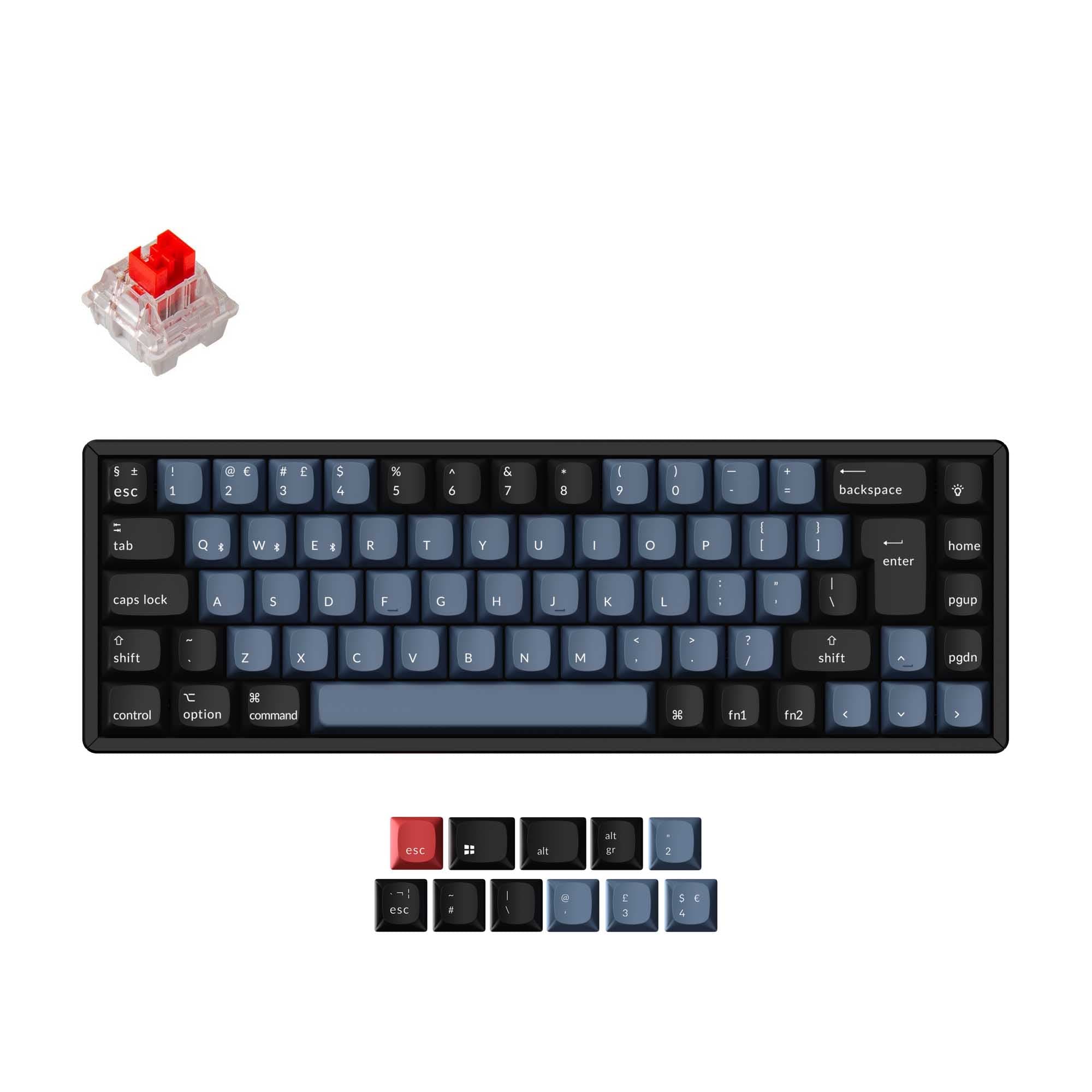
Keychron K6 Pro
Wireless 65%
Build quality in the top 5% of 65% boards under $100.
- Bluetooth 5.1 connects up to 3 devices, alongside USB Type-C wired mode.
- 4000 mAh battery supports wireless use, with N-key rollover listed for both wireless and wired modes.
- PCB-mounted hot-swap sockets accept 3-pin and 5-pin MX style switches, and a barebone version is available.
- South-facing LEDs. Shine-through legends stay dark, and some sculpted keycaps can clip the LED.
- 65% layout. No function row and no numpad.
Pick the Keychron J2 HE if your priority is wired competitive gaming, where the 8000 Hz polling rate and Hall Effect magnetic switches are the main draw. Pick the Keychron K6 Pro if you need Bluetooth, a 4000 mAh battery, a smaller 65% body and broad MX hot-swap support. The choice comes down to whether untethered flexibility or wired Hall Effect response matters more to your daily use.
The differences that matter
Skip the 40-row spec sheet. These are the specs that change how each board feels, sounds, and fits your desk.
Keychron J2 HE
Keychron K6 Pro
Layout size
75%
65%
Hall effect (magnetic)
Yes
No
Adjustable actuation helps in games and not in normal typing
Connection
Wired
Bluetooth, Wired
Wireless for several devices and wired for lower latency
Max polling rate
8,000 Hz
1,000 Hz
Higher polling helps competitive FPS and does nothing for typing
Case material
Plastic
ABS, Aluminum, Plastic
- Keychron J2 HE
- Keychron K6 Pro
- Performance
- 8973
- Build quality
- 8389
- Productivity
- 8791
- Customizability
- 8996
- Portability
- 6188
- Hot-swappable
- Switch options: Clicky, Linear, Tactile
- QMK
- VIA
- Sound dampening
- Plate material: Steel
What will you mostly use it for?
The J2 HE takes gaming on wired polling rate and Hall Effect switches. The K6 Pro wins on office, programming, travel and modding because of Bluetooth, the 4000 mAh battery, a smaller 65% body and broad MX switch compatibility with a barebone option. Content creation is a tie, since both boards cover hot-swap, programming and sound dampening with different keycap and lighting orientations. The split is essentially wired Hall Effect speed versus untethered flexibility.
Pick the Keychron J2 HE
- 8000 Hz polling rate is set out of the box in wired Type-C mode, with switching among 1000 Hz, 4000 Hz and 8000 Hz in the Keychron Launcher web app.
- Keychron Ultra-fast Lime Magnetic Switches are pre-lubed and support adjustable actuation points through Launcher.
- Hall Effect magnetic switches detect presses without physical contact, which suits rapid repeated inputs.
What owners say
Ratings and quotes collected from verified store reviews, including the critical ones.
Keychron J2 HE
2 owner reviews
“Worked perfectly, best keyboard I've ever owned. For one hour. After that all RGB turned off, and the main function of the keyboard (Typing), no longer works. I can't type with it, the web launcher doesn't detect it either, just don't waste your money.”
Keychron K6 Pro
8 owner reviews
“This is my first serious mechanical keyboard. It sounds and feels great stock. You don't really need to mod it, but if you do, i think it will sounds amazing. 0 regrets, im very satisfied.”
“I received this item broken: switches, plate, box, stabilizers- everything was either broken or not assembled properly.”
Keychron J2 HE vs K6 Pro specs
Every tracked spec, side by side. Rows marked with a dot differ between the boards.
15 of 27 specs differ
Keychron J2 HE
Keychron K6 Pro
Switch options
Hall effect (magnetic)
Hot-swappable
Mount style
Sound dampening
Screw-in stabilizers
Layout size
Layout standard
Ergonomics
Display
Media keys
Connection
Max polling rate
Battery
USB-C
Case material
Plate material
Keycaps
Weight
Dimensions
Typing angle
Backlight
QMK
VIA
N-key rollover
Mac & Windows
Released
ISO layouts by store
Which stores sell ISO-DE, UK, and the other regional layouts.
Keychron J2 HE
No ISO layout at the stores we track.
Keychron K6 Pro
Keychron
ISO-DE, ISO-UK, ISO-FR, ISO-ES, ISO-SW
In stockShips to you
Keychron (DE)
ISO-DE, ISO-UK, ISO-FR, ISO-ES, ISO-SW
In stockDoes not ship to you
Compare prices
Live prices from the stores we track, cheapest in-stock offer first.
Prices in USD are converted to your currency and can change at any time. KeebFinder may earn a commission when you buy through these links, at no extra cost to you.
Lowest price across stores, Amazon excluded.



Keychron J2 HE vs K6 Pro: your questions
No, the J2 HE is a wired keyboard with a Type-C connection. Its 8000 Hz polling rate is delivered in Type-C wired mode, and the vendor notes that polling rate is 8000 Hz out of the box. There is no Bluetooth or battery listed for this model.
Yes, the K6 Pro uses Bluetooth 5.1 and can connect with up to 3 devices wirelessly. It also has a USB Type-C wired connection for when you prefer a cable. The vendor lists a 4000 mAh battery to support wireless use.
The J2 HE lists an 8000 Hz polling rate, and you can switch among 1000 Hz, 4000 Hz and 8000 Hz in the Keychron Launcher web app. The K6 Pro lists a 1000 Hz polling rate. That is the clearest hardware gap between the two for gaming.
Yes, both are hot-swappable, but the socket types differ. The K6 Pro uses PCB-mounted sockets for 3-pin and 5-pin MX style mechanical switches and is also sold as a barebone version. The J2 HE hot-swaps compatible Hall Effect magnetic switches rather than standard MX mechanical switches.
The K6 Pro is the more natural fit because it lists QMK firmware, the Keychron Launcher web app, and macOS, Windows and Linux support for remapping and macros. Its 65% layout also frees desk space. That said, the J2 HE also supports remapping and macros through Launcher if you prefer its 75% layout.
Yes, the K6 Pro is listed with ISO, ISO-UK, ISO-DE, ISO-SW, ISO-FR, ISO-ES, ANSI and JIS layout standards. The vendor page notes the ISO collection ships fully assembled with UK, German, Nordic, Swiss, French and Spanish layouts. The J2 HE is listed as ANSI only.
The J2 HE has a plastic case, steel plate and Cherry profile double-shot PBT keycaps, with sound absorbing foam inside. The K6 Pro lists a steel plate and double-shot PBT keycaps, with case options in ABS, ABS plus aluminum frame, and an aluminum frame version, plus sound-absorbing foam and a thick silicone dampening bottom pad.
The K6 Pro is the more portable option because it measures 317 mm wide against the J2 HE's 332 mm, and it lists a weight of about 762 g versus 780 g. More importantly, it has Bluetooth and a 4000 mAh battery, so you can leave the cable at home. The J2 HE is wired only.
Yes, the K6 Pro is offered with Keychron K Pro Mechanical Red, Blue or Brown switches, plus a barebone option. The vendor page lists the K Pro switches as pre-lubed except the clicky ones and notes the sockets accept almost all 3-pin and 5-pin MX style switches. The J2 HE ships with Keychron Ultra-fast Lime Magnetic Switches.
The K6 Pro explicitly lists QMK firmware and the Keychron Launcher web app, and the product is named as a QMK/VIA wireless custom keyboard. The J2 HE lists QMK and VIA support in its specifications and is configured through the Keychron Launcher web app. Launcher is a browser tool, and the vendor recommends the latest Chrome, Opera or Edge.
The fully assembled J2 HE includes the keyboard PCB, plate, case and foams, Windows keycaps, and the adjustable-actuation-point Keychron Ultra-fast Lime Magnetic Switches. It also ships with a Type-C cable and a Type-A to Type-C adapter. The vendor page notes the Launcher web app is used for key remapping and macros.
Yes, both offer adjustable typing angles, but the settings differ. The J2 HE supports three angles at 4.5, 6.4 and 8.8 degrees, while the K6 Pro lists 3.5, 8.5 and 12 degrees. The J2 HE pairs these with Cherry profile keycaps, and the K6 Pro uses a curved OSA profile.
Not sold on either?




Still torn?
Answer a few quick questions and the keyboard finder ranks 2,000+ boards by how you will actually use yours.