Not sure which keyboard to choose? Try the Keyboard Finder now!

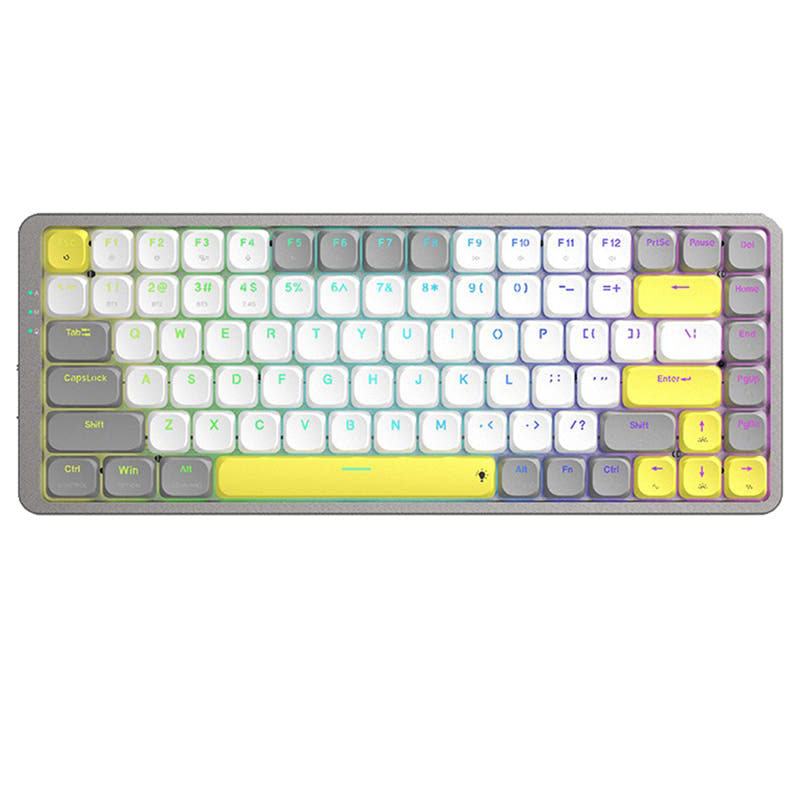
Compare Keychron K1 SE V5 vs K3 Pro Differences Side by Side

This comparison is for buyers deciding between two of Keychron's popular low-profile wireless keyboards. The choice is difficult because both share core features like hot-swappable low-profile switches, Bluetooth, and an aluminum frame. The K1 SE V5 is typically more affordable and has a larger 80% layout, while the K3 Pro commands a higher price for pro-grade features like QMK/VIA support, a 2.4 GHz wireless dongle, and a wider selection of international layouts.

69
Keychron K1 SE Wireless Mechanical Keyboard (Version 5)
87
Keychron K3 Pro QMK/VIA Wireless Mechanical Keyboard ISO Layout Collection

Select a keyboard to compare

2.4 (166)
4.6 (54)
  • Released in 2021
  • Available in a 80% layout
  • Built with the ANSI, JIS layout standard
  • Supports Bluetooth, Wired, Wireless connectivity
  • Equipped with a 2000 mAh battery
  • Made with a Aluminum, Plastic case
  • Features ABS keycaps
  • Offers Yes, Rgb, White, North-face, Rgb North-face, White North-face RGB lighting
  • Released in 2022
  • Available in a 75% layout
  • Built with the ISO, JIS, ISO-DE, ISO-ES, ISO-FR, ISO-Nordic, ISO-SW, ISO-UK, ANSI layout standard
  • Supports QMK firmware
  • Supports VIA configuration
  • Features N-key rollover
  • Supports Bluetooth, Wired, Wireless, 2.4 GHz connectivity
  • Runs at a 1000 Hz polling rate
  • Equipped with a 1550 mAh battery
  • Weighs about 930 g
  • Sized at 15 x 306 x 116 mm
  • Made with a Aluminum, Plastic, ABS case
  • Features ABS, PBT keycaps
  • Offers Yes, Rgb, South-face, Rgb South-face, White, North-face, Rgb North-face, White North-face RGB lighting
Scores
  • Performance: 64.2
  • Build Quality: 67.8
  • Productivity: 68.5
  • Customizability: 71
  • Portability: 74
Scores
  • Performance: 80.9
  • Build Quality: 81.3
  • Productivity: 79.8
  • Customizability: 89.1
  • Portability: 77.2
Name
Keychron K1 SE V5
Name
Keychron K3 Pro
Release year
2021
Release year
2022
Switch Options
Linear, Tactile, Clicky
Switch Options
Linear, Tactile, Clicky
Profile
Low Profile
Profile
Low Profile
Hot Swappable
 
Hot Swappable
 
Layout Size
80%
Layout Size
75%
Layout Standard
ANSI, JIS
Layout Standard
ISO, JIS, ISO-DE, ISO-ES, ISO-FR, ISO-Nordic, ISO-SW, ISO-UK, ANSI
Layout Ergonomics
Normal
Layout Ergonomics
Normal
Knob Support
 
Knob Support
 
Display Support
 
Display Support
 
Mac/Win Support
 
Mac/Win Support
 
Multi-Media Keys
 
Multi-Media Keys
 
USB-C
 
USB-C
 
USB passthrough
 
USB passthrough
 
Connection
Bluetooth, Wired, Wireless
Connection
Bluetooth, Wired, Wireless, 2.4 GHz
Polling Rate
-
Polling Rate
1000 Hz
Battery capacity
2000 mAh
Battery capacity
1550 mAh
Hall Effect Support
 
Hall Effect Support
 
QMK Support
 
QMK Support
 
VIA Support
 
VIA Support
 
VIAL Support
 
VIAL Support
 
N-Key Rollover
 
N-Key Rollover
 
Rapid Trigger
 
Rapid Trigger
 
Mount Style
Tray Mount
Mount Style
Tray Mount
Screw in Stabilizers
 
Screw in Stabilizers
 
Sound Dampening
 
Sound Dampening
 
Backlight
 
Rgb, White, North-face
Backlight
 
Rgb, South-face, White, North-face
Case Colors
Case Colors
Case Material
Aluminum, Plastic
Case Material
Aluminum, Plastic, ABS
Keycaps Material
ABS
Keycaps Material
ABS, PBT
Dimensions
-
Dimensions
15 x 306 x 116 mm
Weight
-
Weight
930g
*Something incorrect or missing? Please
let me know
!

Pros and Trade-offs

Your budget and need for advanced features are the deciding factors. If you want the most affordable low-profile Keychron with a larger layout, the K1 SE V5 is a solid pick. If you are willing to pay more for professional-grade customization via QMK/VIA, need a 2.4 GHz dongle for gaming, or require a specific ISO layout, the K3 Pro is the justified upgrade. Prioritize the K3 Pro for its software and connectivity, or the K1 SE for its value and size.

Keychron K1 SE V5

  • +Larger 80% tenkeyless layout provides more dedicated keys.
  • +Larger 2000mAh battery capacity compared to the K3 Pro's 1550mAh.
  • +Offers a hot-swappable option for both Gateron mechanical and Keychron optical low-profile switches.
  • +Typically available at a lower price point than the K3 Pro.
  • +Includes two-level adjustable rubber feet for ergonomic support.

  • Lacks QMK/VIA programmability support mentioned for the K3 Pro.
  • Does not include a 2.4 GHz wireless connection, relying solely on Bluetooth and wired modes.
  • Only available in ANSI and JIS layouts, with no ISO options listed.
  • Keycaps are ABS only, with no PBT option stated.

Keychron K3 Pro

  • +Supports QMK and VIA firmware for extensive key remapping and macros.
  • +Includes a 2.4 GHz wireless connection in addition to Bluetooth and wired.
  • +Available in a wide array of ISO layouts (UK, DE, FR, Nordic, etc.).
  • +Offers a choice between shine-through ABS and double-shot PBT keycaps.
  • +Features south-facing RGB LEDs to avoid interference with Cherry-profile keycaps.

  • Smaller 1550mAh battery compared to the K1 SE V5.
  • Generally commands a higher price than the K1 SE V5.
  • The 75% layout requires more use of function layers for some keys.
  • According to its vendor page, hot-swap is currently compatible with Gateron low-profile mechanical switches only.

Which Keyboard Is Better for Your Needs?

The K3 Pro is the clear choice for users who prioritize advanced customization, whether through hardware with its PBT keycap option and south-facing RGB, or through software with QMK/VIA support. It also wins for gaming due to its specified polling rate and 2.4 GHz wireless. The K1 SE V5 is a competent all-rounder that wins for content creation primarily due to its larger layout and is a strong value option for office use. For travel, the K3 Pro's slightly smaller size gives it an edge.

GamingKeychron K3 Pro
  • The K3 Pro lists a 1000 Hz polling rate in wired mode for potentially lower latency.
  • The K3 Pro includes a 2.4 GHz wireless connection, which can offer a more stable, low-latency connection compared to Bluetooth alone.
  • The K3 Pro's vendor description states its 1000 Hz polling rate is engineered for competitive gaming.
OfficeTie
  • Both keyboards offer Bluetooth for connecting to multiple devices and multi-OS compatibility.
  • Both are low-profile designs which some users find more comfortable for long typing sessions.
  • The K1 SE V5 has a larger 80% layout with more dedicated keys, while the K3 Pro's 75% layout saves more desk space.
ProgrammingKeychron K3 Pro
  • The K3 Pro supports QMK and VIA firmware for deep key remapping and macro creation, a feature not mentioned for the K1 SE V5.
  • The K3 Pro is available in numerous ISO layouts (UK, DE, FR, etc.), which is crucial for programmers using non-ANSI key legends.
  • A user review for the K3 Pro specifically mentions remapping missing keys for programming using the VIA app.
TravelKeychron K3 Pro
  • The K3 Pro is a more compact 75% layout, making it slightly smaller than the K1 SE V5's 80% form factor.
  • The K3 Pro's listed weight is 930g, providing a concrete measurement for portability consideration.
  • Both have similar wireless capabilities and batteries, but the smaller footprint of the K3 Pro is an advantage for travel.
ModdingKeychron K3 Pro
  • The K3 Pro explicitly supports QMK/VIA open-source firmware, allowing for extensive software customization.
  • The K3 Pro offers a choice between ABS and double-shot PBT keycaps from the factory, with PBT being more durable.
  • The K3 Pro features south-facing RGB LEDs, which, according to its vendor page, prevents interference with Cherry-profile keycaps.
Content CreationKeychron K1 SE V5
  • The K1 SE V5's 80% layout retains more navigation and function keys without layers, which can be useful for shortcut-heavy workflows.
  • It typically carries a lower price point, freeing budget for other peripherals.
  • Its larger form factor may provide a more familiar typing experience for those transitioning from a full-size keyboard.

Frequently Asked Questions (FAQ)


Discover similar products

You might also like similar products in that price range:

86
$67
Keychron K1 Pro QMK/VIA Wireless Custom Mechanical Keyboard ISO Layout Collection
Keychron K1 Pro
80%,
Hotswap,
Wireless,
Wired,
RGB/ White LEDs,
VIA,
QMK,
Alu case,
Tray Mount

83
$94
Keychron K3 QMK Wireless Mechanical Keyboard (ISO Layout) - Version 3
Keychron K3 V3
75%,
Hotswap,
Wireless,
Wired,
RGB/ White LEDs,
VIA,
QMK,
Alu case,
Top Mount

85
$106
Keychron K1 Max QMK Wireless Custom Mechanical Keyboard ISO Layout Collection
Keychron K1 Max
80%,
Hotswap,
Wireless,
Wired,
RGB/ White LEDs,
VIA,
QMK,
Alu case,
PCB Mount

94
$84
Keychron K3 Max QMK/VIA Wireless Custom Mechanical Keyboard ISO Layout Collection
Keychron K3 Max
75%,
Hotswap,
Wireless,
Wired,
RGB/ White LEDs,
VIA,
QMK,
Alu case,
Plate Mount

84
$94
Keychron K1 QMK Wireless Mechanical Keyboard (ISO Layout) - Version 6
Keychron K1 V6
80%,
Hotswap,
Wireless,
Wired,
RGB/ White LEDs,
VIA,
QMK,
HE,
Alu case,
Top Mount

68
$96
Keychron K3 Ultra-slim Wireless Mechanical Keyboard (Version 2)
Keychron K3 V2
75%,
Hotswap,
Wireless,
Wired,
RGB/ White LEDs,
Alu case,
Tray Mount

87
$67
Keychron K13 Pro QMK/VIA Wireless Custom Mechanical Keyboard ISO Layout Collection
Keychron K13 Pro
80%,
Hotswap,
Wireless,
Wired,
RGB/ White LEDs,
VIA,
QMK,
Alu case,
Tray Mount

88
$69
Keychron K5 Pro QMK/VIA Wireless Custom Mechanical Keyboard ISO Layout Collection
Keychron K5 Pro
100%,
Hotswap,
Wireless,
Wired,
RGB/ White LEDs,
VIA,
QMK,
Alu case,
Tray Mount

98
$94
Keychron V1 Max QMK Wireless Custom Mechanical Keyboard ISO Layout Collection
Keychron V1 Max
75%,
Hotswap,
Wireless,
Wired,
RGB,
Knob,
VIA,
QMK,
Gasket Mount

71
$49
MK LowKey70 Black Aluminum 75% Hotswap Bluetooth RGB Low Profile Mac Mechanical Keyboard
MK LowKey70
75%,
Hotswap,
Wireless,
Wired,
RGB,
Alu case,
Plate Mount