Keychron K10 HE vs LemoKey P1 HEFull vs 75%
Choose the K10 HE for a full-size layout and numpad, or the P1 HE for a more compact 75% layout with a programmable knob.
KeebFinder may earn a commission when you buy through these links, at no extra cost to you.

4.2 (18)4.2 · 18 reviews
from$134at MK

5.0 (1)5.0 · 1 reviews
from$169at Keychron
Which one should you get?
Get the
Keychron K10 HE
Full
Build quality in the top 5% of 100% boards under $150.
- 100% layout with a numpad.
- Bluetooth, 2.4 GHz, and wired connectivity, with 1000 Hz polling listed for 2.4 GHz and wired modes.
- Rapid Trigger, adjustable actuation, Dynamic Keystrokes, and Analog Mode.
- Magnetic switches only. Standard MX switches will not fit.
- North-facing LEDs. Cherry-profile keycaps can hit the switch housing.
Get the
Keychron LemoKey P1 HE
75%
Build quality in the top 5% of 75% boards under $200.
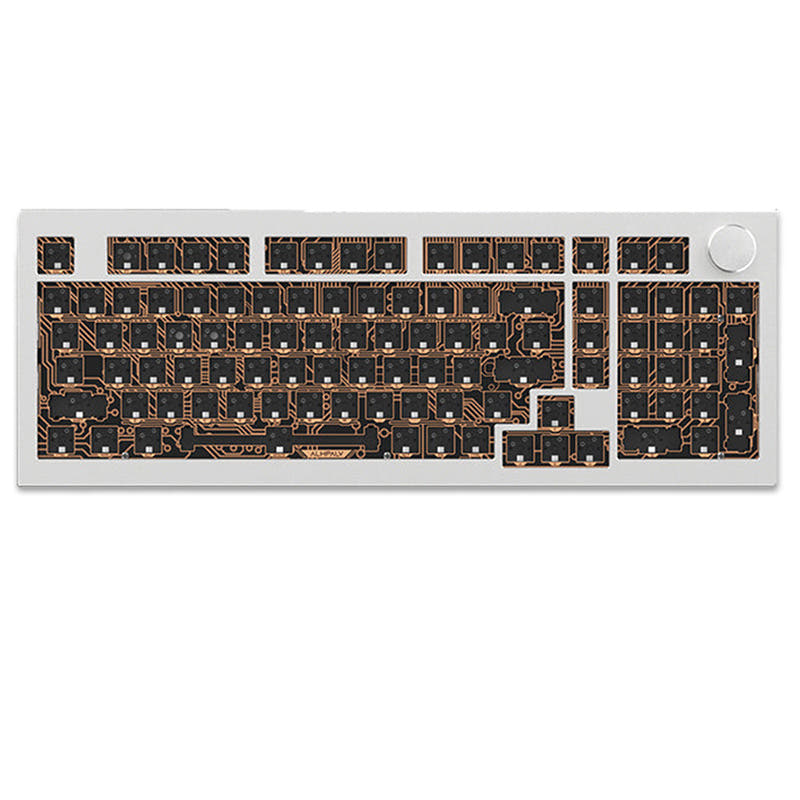
- 75% layout with a programmable knob.
- Gasket mount with a full-metal body and aluminum plate.
- Rapid Trigger, adjustable actuation, Dynamic Keystrokes, and Analog Mode.
- Magnetic switches only. Standard MX switches will not fit.
- North-facing LEDs. Cherry-profile keycaps can hit the switch housing.
- South-facing LEDs. Shine-through legends stay dark, and some sculpted keycaps can clip the LED.
- Missing ISO-UK. The other board is sold in those layouts.
- No numpad.
Pick the Keychron K10 HE if you need a numpad or prefer a full-size keyboard. Choose the Lemokey P1 HE if you want a smaller layout and a programmable knob. Both deliver magnetic-switch gaming features, but neither accepts standard MX switches, so confirm switch and keycap compatibility before buying.
The differences that matter
Skip the 40-row spec sheet. These are the specs that change how each board feels, sounds, and fits your desk.
Keychron K10 HE
Keychron LemoKey P1 HE
Layout size
100%
75%
Case material
ABS, Aluminum, Plastic, Wood
Aluminum, Metal
Switch options
Clicky, Linear, Magnetic, Silent, Tactile
Clicky, Linear, Magnetic, Tactile
Mount style
Tray Mount
Gasket Mount
Knob
No
Yes
- Keychron K10 HE
- Keychron LemoKey P1 HE
- Performance
- 9293
- Build quality
- 8988
- Productivity
- 9497
- Customizability
- 9496
- Portability
- 5682
- Hall effect (magnetic)
- Rapid trigger
- Connection: Bluetooth, 2.4 GHz, Wired
- Hot-swappable
- Battery: 4,000 mAh
- Max polling rate: 1,000 Hz
What will you mostly use it for?
The K10 HE is the more practical fit when a full-size layout and numpad matter, particularly for office tasks. The P1 HE takes the edge for a smaller desk footprint and for users who want a programmable knob. Gaming and programming are close calls because both share core magnetic-switch features and customization support. For switch changes, check the compatibility limits carefully on either model.
It's a tie
- Both list Hall Effect magnetic switches, Rapid Trigger, adjustable actuation, and 1000 Hz polling over 2.4 GHz and wired connections.
- Both vendor descriptions specify Dynamic Keystrokes and Analog Mode for variable or layered inputs.
- The P1 HE adds a programmable knob, while the K10 HE keeps a full-size layout.
What owners say
Ratings and quotes collected from verified store reviews, including the critical ones.
Keychron K10 HE
18 owner reviews
“Fantastically smooth design with sturdy make, elegant look and satisfying typing experience. The clicking is just right, and the keyboard feels incredible to type with.”
“caps lock, num lock and win/mac indicators don't work. Keychron support has no fix and a no free return policy that will cost me to return. Not worth it to send it back. One of the worst keyboards I have ever used and will wind up putting it in the trash.”
Keychron LemoKey P1 HE
1 owner reviews
“As a survivor with 4800 hours on chernarus i need this keyboard, getting this asap. DayZ was a second life investment of time and im not regretful. The opportunities it allows are countless, ive learned how to read some russian by the map where i now know…”
Keychron K10 HE vs LemoKey P1 HE specs
Every tracked spec, side by side. Rows marked with a dot differ between the boards.
10 of 28 specs differ
Keychron K10 HE
Keychron LemoKey P1 HE
Switch options
Hall effect (magnetic)
Rapid trigger
Hot-swappable
Mount style
Sound dampening
Screw-in stabilizers
Layout size
Layout standard
Ergonomics
Knob
Display
Connection
Max polling rate
Battery
USB-C
Case material
Plate material
Keycaps
Weight
Dimensions
Typing angle
Backlight
QMK
VIA
N-key rollover
Mac & Windows
Released
ISO layouts by store
Which stores sell ISO-DE, UK, and the other regional layouts.
Keychron K10 HE
Keychron (DE)
ISO-DE, ISO-UK
In stockDoes not ship to you
Keychron LemoKey P1 HE
Input Gear
ISO-DE
Out of stockShips to you
Keychron
ISO-DE
Out of stockShips to you
Compare prices
Live prices from the stores we track, cheapest in-stock offer first.
Prices in USD are converted to your currency and can change at any time. KeebFinder may earn a commission when you buy through these links, at no extra cost to you.
Lowest price across stores, Amazon excluded.




Keychron K10 HE vs LemoKey P1 HE: your questions
The K10 HE is a 100% keyboard with a numpad, while the Lemokey P1 HE uses a 75% layout and includes a programmable knob. Both have magnetic switches, Rapid Trigger, and wireless and wired connectivity.
No, the P1 HE uses a 75% layout and its compatibility rules specify that it has no numpad. Choose the K10 HE if a numpad is important to your workflow.
The P1 HE is listed at 322 x 140 mm, while the K10 HE listing gives dimensions of 40 x 445 x 129 mm. The P1 HE's 75% layout also omits the numpad.
Yes, both list Rapid Trigger and adjustable actuation for their magnetic switches. Both vendor descriptions also describe Dynamic Keystrokes and Analog Mode.
No. Both keyboards require magnetic switches, and standard MX switches will not fit.
The K10 HE is available in versions for Keychron Ultra-fast Lime or Gateron Double-Rail magnetic switches. The vendor says each version supports only its matching switch type.
The P1 HE is compatible exclusively with Gateron Double-Rail magnetic switches. The vendor specifically says it does not support other magnetic switches such as Gateron Magnetic Jade or KS-20.
The P1 HE has a knob that can be remapped to functions or macro commands through the Lemokey Launcher web app. The K10 HE's listed features do not include a knob.
Both list Bluetooth and 2.4 GHz wireless, as well as wired connectivity. Their vendor descriptions specify 1000 Hz polling for 2.4 GHz and wired modes.
Both list QMK and VIA support. Their vendor descriptions also identify a web app for key remapping and macros, Keychron Launcher for the K10 HE and Lemokey Launcher for the P1 HE.
Both have north-facing LEDs, and their compatibility rules warn that Cherry-profile keycaps can hit the switch housing. The P1 HE also lists south-facing LEDs, which can leave shine-through legends dark and may conflict with some sculpted keycaps.
The Lemokey P1 HE is listed with a gasket mount and full-metal body. The K10 HE is listed with a tray mount.
Not sold on either?



Still torn?
Answer a few quick questions and the keyboard finder ranks 2,000+ boards by how you will actually use yours.