Keychron K14 Pro vs K6 Pro
Choose the K14 Pro for its 70% layout, and the K6 Pro for its 65% footprint, ISO layout options, and PCB-mount configuration.
Prices checked Nov 20, 2026. KeebFinder may earn a commission when you buy through these links, at no extra cost to you.

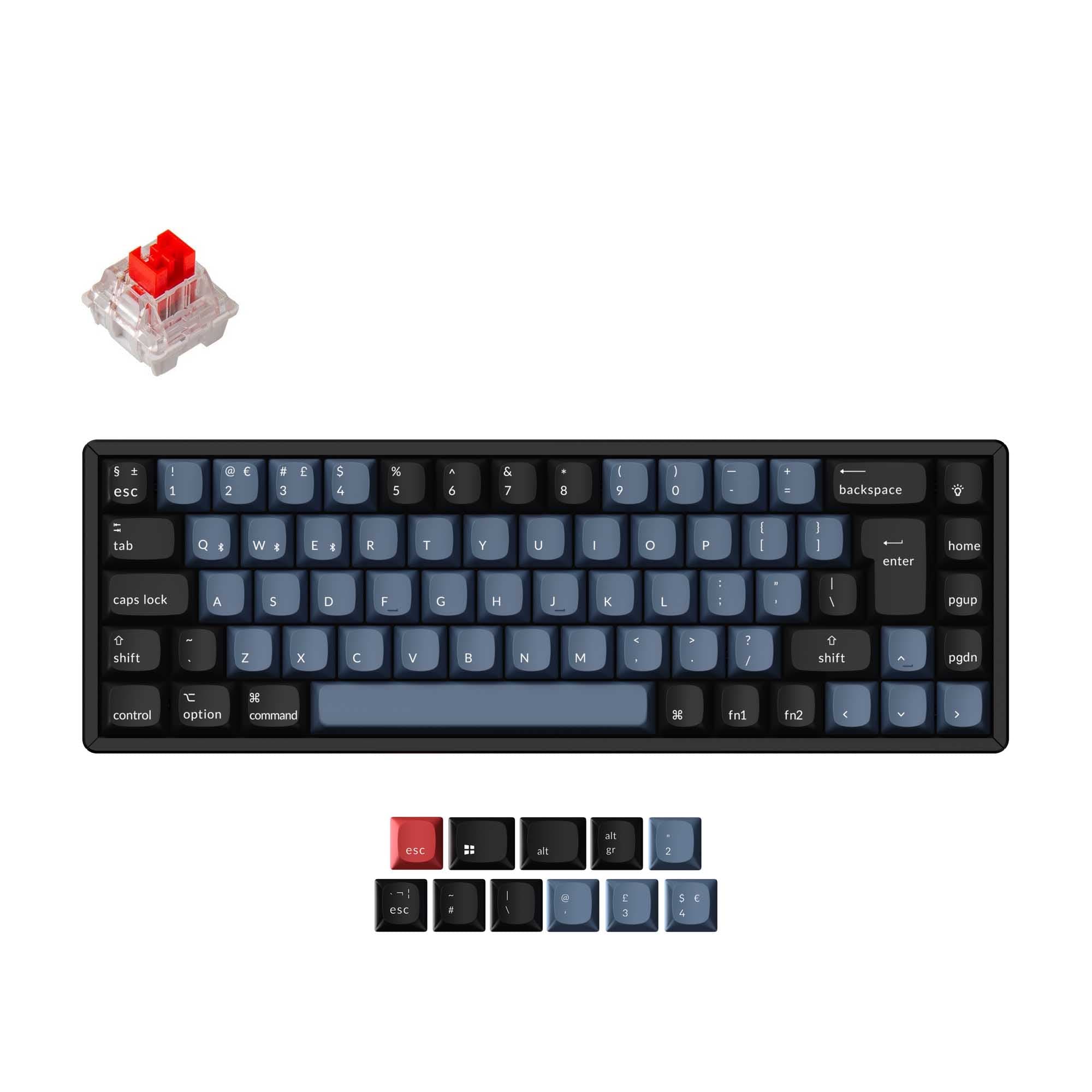
Which one should you get?
Get the
Keychron K14 Pro
If you want
- 70% layout for buyers who prefer its key arrangement.
- Double-shot PBT keycaps are specified, and the vendor describes them as non-shine-through.
Rules this board out
- South-facing LEDs. Shine-through legends stay dark, and some sculpted keycaps can clip the LED.
- No ISO layout. ISO-DE, UK, and other ISO variants are not offered.
Get the
Keychron K6 Pro
Build quality in the top 10% of 65% boards under $100.
If you want
- ISO layout options include ISO-UK, ISO-DE, ISO-SW, ISO-FR, and ISO-ES.
- PCB-mount configuration is listed alongside tray mount.
- Listed weight is 890 g.
Rules this board out
- South-facing LEDs. Shine-through legends stay dark, and some sculpted keycaps can clip the LED.
- 65% layout. No function row and no numpad.
Bottom line
Get the K14 Pro if its 70% layout and specified double-shot PBT keycaps fit your preferences. Choose the K6 Pro if you want a 65% layout, ISO choices, or a PCB-mount configuration, and its lower listed weight is useful for carrying it.
The differences that matter
- Layout size
70%
65%
- Mount style
Tray Mount
PCB Mount, Tray Mount
- Weight
978 g
890 g
Heavier boards stay planted and lighter ones travel - Layout standard
ANSI
ANSI, ISO, ISO-DE, ISO-ES, ISO-FR, ISO-SW, ISO-UK, JIS
ISO and JIS exist so regional layouts fit - Keycaps
PBT
ABS, PBT
KeebFinder scores
How we score- Keychron K14 Pro
- Keychron K6 Pro
- Performance
- 7372
- Build quality
- 8789
- Productivity
- 9191
- Customizability
- 9696
- Portability
- 8087
What they share
- Connection: Bluetooth, Wired
- Hot-swappable
- Battery: 4,000 mAh
- Max polling rate: 1,000 Hz
- Case material: ABS, Aluminum, Plastic
- Switch options: Clicky, Linear, Tactile
What will you mostly use it for?
For gaming, pick the Keychron K14 Pro
- Both list a 1000 Hz polling rate and wired connectivity.
- The K14 Pro uses a 70% layout, while the K6 Pro uses a 65% layout.
Keychron K14 Pro vs K6 Pro specs
8 of 26 specs differ
 |  | |
| Keychron K14 Pro$62 | Keychron K6 Pro$62 | |
|---|---|---|
| Typing & switches | ||
| Switch options | Clicky, Linear, Tactile | Clicky, Linear, Tactile |
| Hot-swappable | Yes | Yes |
| Mount style (differs) | Tray Mount | PCB Mount, Tray Mount |
| Sound dampening | Yes | Yes |
| Screw-in stabilizers | Yes | Yes |
| Layout | ||
| Layout size (differs) | 70% | 65% |
| Layout standard (differs) | ANSI | ANSI, ISO, ISO-DE, ISO-ES, ISO-FR, ISO-SW, ISO-UK, JIS |
| Ergonomics | Standard | Standard |
| Display | None | None |
| Media keys | Yes | Yes |
| Connectivity & battery | ||
| Connection | Bluetooth, Wired | Bluetooth, Wired |
| Max polling rate | 1,000 Hz | 1,000 Hz |
| Battery | 4,000 mAh | 4,000 mAh |
| USB-C | Yes | Yes |
| Build & materials | ||
| Case material | ABS, Aluminum, Plastic | ABS, Aluminum, Plastic |
| Plate material | Steel | Steel |
| Keycaps (differs) | PBT | ABS, PBT |
| Weight (differs) | 978 g | 890 g |
| Dimensions (differs) | 40 x 336 x 102 mm | 27 x 317 x 107 mm |
| Typing angle (differs) | 4° | 4°, 6° |
| Backlight | RGB, south-facing | RGB, south-facing |
| Firmware & software | ||
| QMK | Yes | Yes |
| VIA | Yes | Yes |
| N-key rollover | Yes | Yes |
| Mac & Windows | Yes | Yes |
| Extras | ||
| Released (differs) | 2023 | 2022 |
Compare prices
Prices in USD are converted to your currency and can change at any time. KeebFinder may earn a commission when you buy through these links, at no extra cost to you.
Lowest price across stores, Amazon excluded.
- Lowest price now
- $62
- Lowest in range
- $62Nov 20 at Keychron K14 Pro
- Highest in range
- $67Aug 21 at Keychron K14 Pro
Price in USD
- Check on Amazon
AmazonGlobal
Check price - Extra 5% off


- Check on Amazon
AmazonGlobal
Check price - Extra 5% off

ISO layouts by store
Keychron K14 Pro
No ISO layout at the stores we track.
Keychron K6 Pro
- Go to Keychron
Keychron
ISO-DE, ISO-UK, ISO-FR, ISO-ES, ISO-SW
In stockShips to you - Go to Keychron (DE)
Keychron (DE)
ISO-DE, ISO-UK, ISO-FR, ISO-ES, ISO-SW
In stockDoes not ship to you


