Keychron K15 Max vs K17 ProAlice 75% or 96% with Knob
Choose the K15 Max for its Alice layout and lighter frame, or the K17 Pro for a wider 96% layout with knob support.
KeebFinder may earn a commission when you buy through these links, at no extra cost to you.

4.9 (16)4.9 · 16 reviews
from$99at Keychron

5.0 (2)5.0 · 2 reviews
from$69at Keychron
Which one should you get?
Get the
Keychron K15 Max
Build quality in the top 15% of 75% boards under $100.
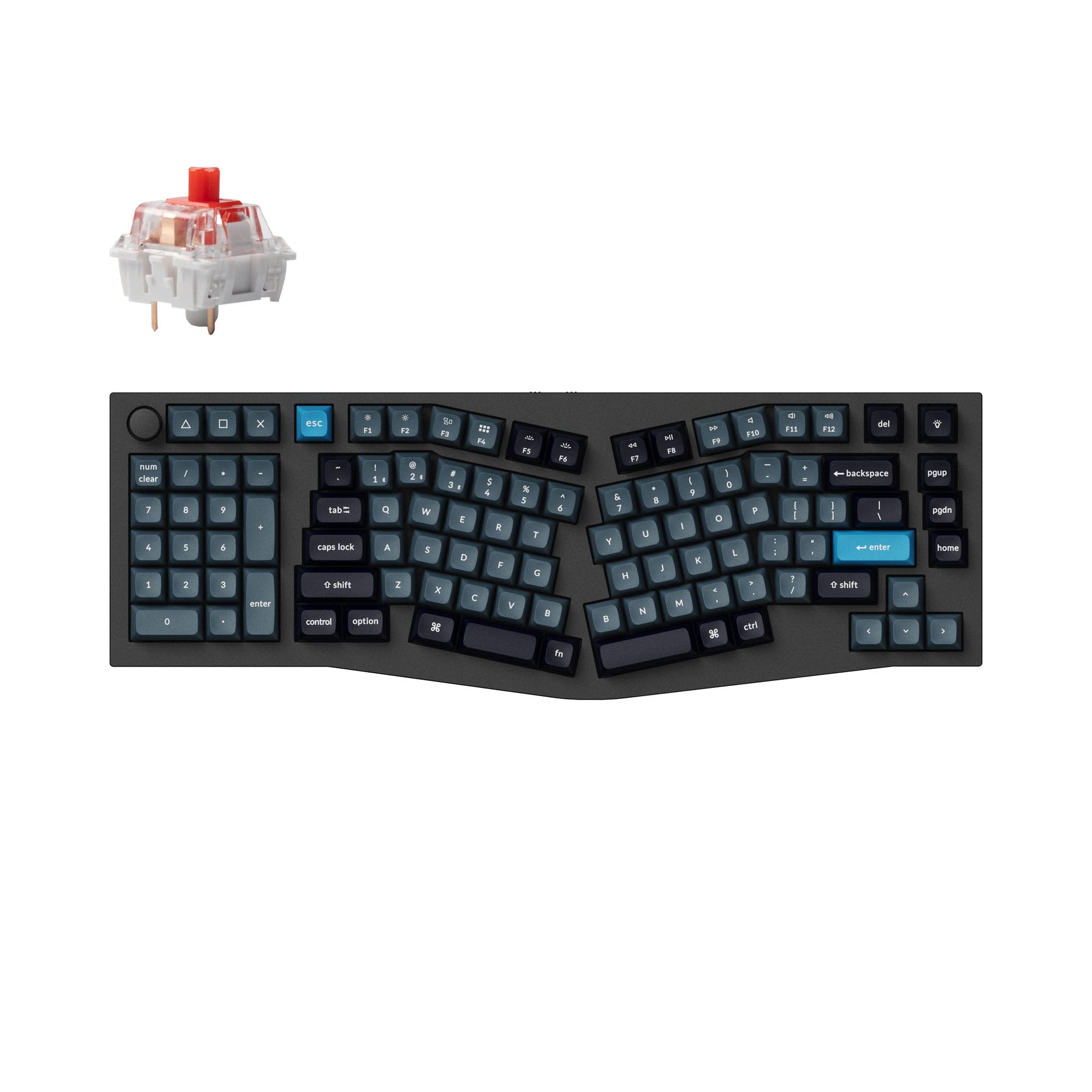
- Alice 75% layout with a split cluster supports a more open wrist posture.
- PCB mount plus IXPE acoustic foam and latex foam target a quieter, more cushioned typing feel.
- Three adjustable typing angles, starting from a 3 degree baseline, allow fine-tuning desk comfort.
- Low-profile switches and keycaps only. Standard MX keycaps will not fit.
- No numpad.
Get the
Keychron K17 Pro
Build quality in the top 15% of 96% boards under $100.
- 96% layout keeps a wider key set in a low-profile frame, with a knob option for quick control.
- At 679 g it is lighter than the K15 Max, which helps when moving between desks.
- QMK and VIA support allow key remapping and macros through Keychron Launcher.
- Low-profile switches and keycaps only. Standard MX keycaps will not fit.
- North-facing LEDs. Cherry-profile keycaps can hit the switch housing.
- Compact full-size layout. The numpad is present, the gaps of a full-size board are not.
Pick the Keychron K15 Max if the Alice 75% layout, adjustable typing angles, and foam-damped feel matter most for desk work and programming. Pick the Keychron K17 Pro if you want a wider 96% key set, knob support, and a slightly lighter frame. Both share low-profile Gateron switches, PBT caps, QMK, and 1000 Hz polling, so the layout and mounting style should decide it.
The differences that matter
Skip the 40-row spec sheet. These are the specs that change how each board feels, sounds, and fits your desk.
Keychron K15 Max
Keychron K17 Pro
Layout size
75%
96%
Connection
Bluetooth, 2.4 GHz, Wired
Bluetooth, Wired
Wireless for several devices and wired for lower latency
Ergonomics
Alice
Standard
Case material
ABS, Aluminum
ABS, Aluminum, Plastic
Mount style
PCB Mount
Tray Mount
- Keychron K15 Max
- Keychron K17 Pro
- Performance
- 8183
- Build quality
- 8081
- Productivity
- 9386
- Customizability
- 8891
- Portability
- 7954
- Hot-swappable
- Battery: 2,000 mAh
- Low profile
- Max polling rate: 1,000 Hz
- Switch options: Clicky, Linear, Tactile
- QMK
What will you mostly use it for?
The K15 Max leans toward ergonomic desk work, coding, and long office sessions thanks to its Alice 75% layout and adjustable typing angle. The K17 Pro suits wider workstreams and creative editing with a 96% layout, knob support, and a lighter 679 g frame. Gaming is a near tie because both share 1000 Hz polling, N-Key Rollover, and 2.4 GHz wireless. Travel and modding favor the K17 Pro for its lighter weight and knob, while portability remains limited on both due to their 2000 mAh batteries and larger footprints.
It's a tie
- Both list a 1000 Hz polling rate and N-Key Rollover for wired and wireless modes.
- Both support 2.4 GHz wireless alongside Bluetooth and wired connections.
- Both use low-profile Gateron mechanical switches for a shorter key travel feel.
What owners say
Ratings and quotes collected from verified store reviews, including the critical ones.
Keychron K15 Max
16 owner reviews
“This keyboard is perfect for me. Combined with the side-scrolling mouse I purchased, it does everything I need it to do, and is extremely comfortable to use all day.”
Keychron K17 Pro
2 owner reviews
“I love this keyboard. It works very well with my setup. The key switches and the knob are perfect. My only feedback is that I wish there was a southpaw version of this keyboard. As a person working with numbers and creativity, the K17 Pro Southpaw version…”
Keychron K15 Max vs K17 Pro specs
Every tracked spec, side by side. Rows marked with a dot differ between the boards.
12 of 26 specs differ
Keychron K15 Max
Keychron K17 Pro
Switch options
Hot-swappable
Mount style
Low profile
Sound dampening
Layout size
Layout standard
Ergonomics
Knob
Display
Media keys
Connection
Max polling rate
Battery
USB-C
Case material
Keycaps
Weight
Dimensions
Typing angle
Backlight
QMK
VIA
N-key rollover
Mac & Windows
Released
Compare prices
Live prices from the stores we track, cheapest in-stock offer first.
Prices in USD are converted to your currency and can change at any time. KeebFinder may earn a commission when you buy through these links, at no extra cost to you.
Lowest price across stores, Amazon excluded.


Keychron K15 Max vs K17 Pro: your questions
The K15 Max uses an Alice 75% layout with a split cluster and PCB mount, while the K17 Pro uses a standard 96% layout with knob support and tray mount. Both are low-profile wireless boards with QMK firmware, PBT keycaps, and 1000 Hz polling. Your choice comes down to ergonomic layout versus a wider key set.
The K15 Max may suit programmers who prefer a split Alice layout for a more open wrist posture and three adjustable typing angles. It also supports QMK, VIA, and Keychron Launcher for remapping and macros. The K17 Pro remains a strong option if you rely on a wider 96% key set and knob.
Yes, both offer a hot-swappable low-profile Gateron variant, but it is limited to specific versions. The K15 Max supports hot-swap on the RGB hot-swappable version only and is compatible with Gateron or Keychron low-profile mechanical switches. The K17 Pro also lists a low-profile Gateron mechanical hot-swappable option.
The K15 Max lists a 1000 Hz polling rate on 2.4 GHz and wired modes, plus N-Key Rollover for wireless and wired use. Its low-profile Gateron switches and Alice layout may feel different from a standard board during fast play. Competitive gamers may prefer a standard layout, but the polling and rollover specs are comparable to the K17 Pro.
The K17 Pro uses a 96% layout, which is a wider form factor than the 75% K15 Max. Its vendor listing also mentions knob support for quick control. The product data does not detail individual key counts, so check the key layout diagram for exact numpad coverage.
The K17 Pro weighs 679 g, which is slightly lighter than the K15 Max at 700 g. Both share a 2000 mAh battery and a low-profile build, so neither is a compact travel board. If frequent carrying matters, the K17 Pro has a small weight advantage.
Both use low-profile double-shot PBT keycaps. The K15 Max vendor description calls out LSA spherical-angled keycaps that are oil resistant and non-shine-through. PBT is generally chosen for its durability and resistance to shine over time.
Yes, both support QMK firmware and the Keychron Launcher web app for key remapping and macros. The K15 Max vendor page also mentions VIA and notes Launcher works best with the latest Chrome, Opera, or Edge browser. The K17 Pro lists QMK and VIA support with compatibility for macOS and Windows.
The K15 Max uses an Alice layout with a split key cluster and three adjustable typing angles, which is aimed at a more natural wrist position. The K17 Pro uses a standard 96% layout without a split or tented design. Ergonomic preference is personal, so try both layouts if you can.
The K15 Max supports 2.4 GHz, Bluetooth 5.1 for up to three devices, and wired connections. The K17 Pro lists Bluetooth, 2.4 GHz, and wired connectivity with a 1000 Hz polling rate. Battery capacity is 2000 mAh on both boards.
The K17 Pro may suit content creators who want a wider 96% layout plus knob support for volume or shortcut control. QMK and VIA support allow macros for repeated editing tasks on both boards. The K15 Max remains viable if you prefer the Alice layout over a knob.
The K15 Max uses PCB mount with IXPE acoustic foam and latex foam inside the case for a damped typing feel. The K17 Pro uses a tray mount with an aluminum and plastic case. Mount style affects sound and feel, so consider which build approach matches your preference.
Not sold on either?




Still torn?
Answer a few quick questions and the keyboard finder ranks 2,000+ boards by how you will actually use yours.