Keychron V1 Max vs V2Wireless Freedom or Budget Wired?
Choose the V1 Max for wireless freedom and a more full-featured layout, or the V2 for a smaller footprint and lower upfront cost.
KeebFinder may earn a commission when you buy through these links, at no extra cost to you.

4.1 (18)4.1 · 18 reviews
from$94at MK
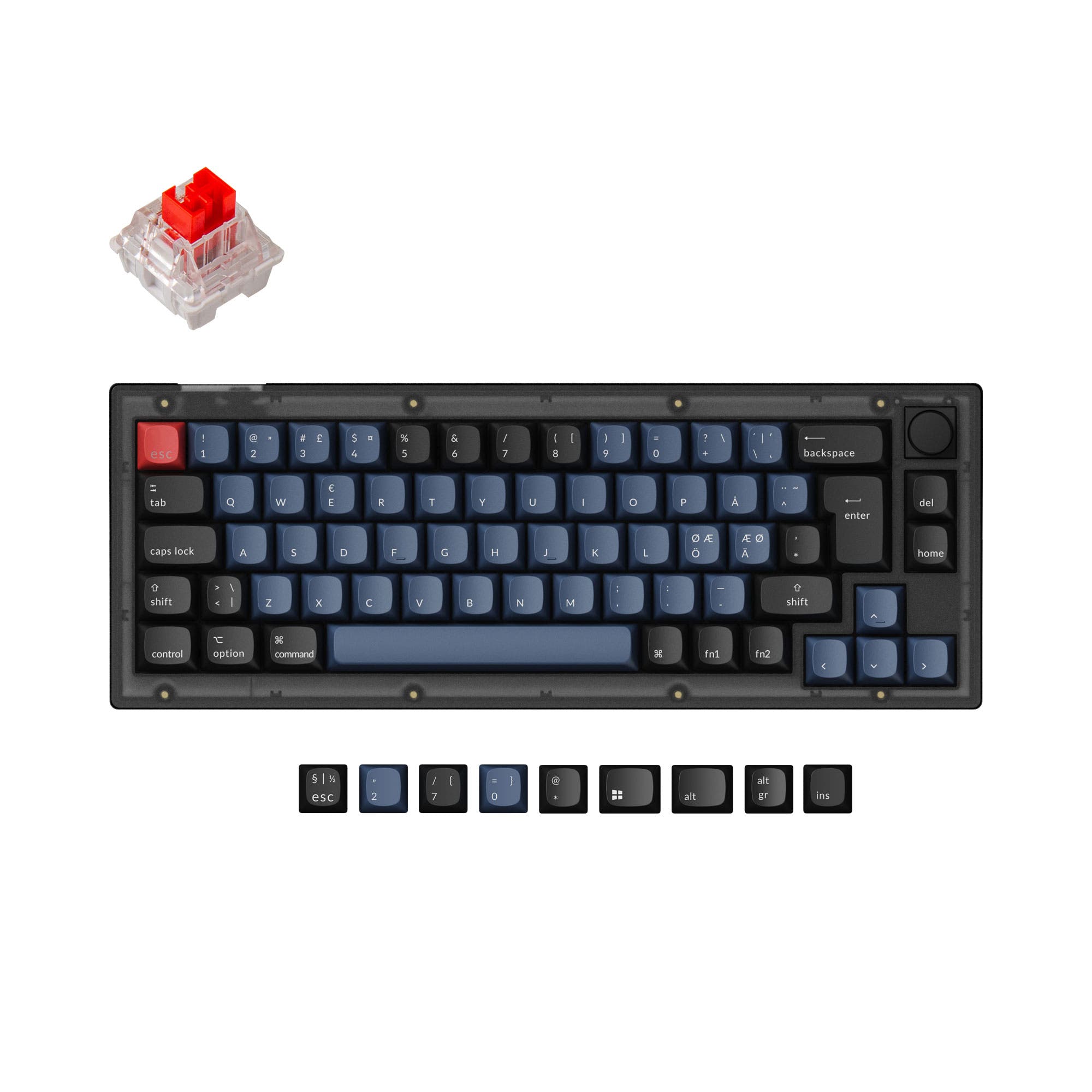
4.9 (17)4.9 · 17 reviews
from$44at Keychron
Which one should you get?
Get the
Keychron V1 Max
Build quality in the top 5% of 75% boards under $100.
- Wireless connectivity with dual-mode support (2.4 GHz and Bluetooth 5.1).
- 75% layout includes a full function row and arrow keys for greater utility.
- Gasket mount design with a PC (polycarbonate) plate for a softer typing feel.
- South-facing LEDs. Shine-through legends stay dark, and some sculpted keycaps can clip the LED.
- No numpad.
Get the
Keychron V2
Build quality in the top 5% of 65% boards under $50.
- Ultra-compact 65% layout saves significant desk space.
- Lower price point makes it an accessible entry point into the QMK/VIA ecosystem.
- Weighs less and has a smaller footprint, making it easier to transport.
- South-facing LEDs. Shine-through legends stay dark, and some sculpted keycaps can clip the LED.
- Missing ISO-Nordic, ISO-IT, ISO-SW. The other board is sold in those layouts.
- 65% layout. No function row and no numpad.
The Keychron V1 Max is the more versatile choice for most users who want a modern wireless experience combined with the functionality of a 75% layout. Its gasket mount and larger battery make it a strong all-rounder for office and gaming. The Keychron V2 is a solid budget-friendly option if you are willing to sacrifice wireless and the function row to get the smallest possible keyboard that still runs QMK and VIA. Your decision ultimately hinges on whether wireless freedom and a full row of function keys are worth the extra cost.
The differences that matter
Skip the 40-row spec sheet. These are the specs that change how each board feels, sounds, and fits your desk.
Keychron V1 Max
Keychron V2
Layout size
75%
65%
Connection
Bluetooth, 2.4 GHz, Wired
Wired
Wireless for several devices and wired for lower latency
Mount style
Gasket Mount, Plate Mount
Plate Mount, Tray Mount
Weight
770 g
855 g
Heavier boards stay planted and lighter ones travel
Layout standard
ANSI, ISO, ISO-DE, ISO-ES, ISO-FR, ISO-IT, ISO-Nordic, ISO-PT, ISO-SW, ISO-UK
ANSI, ISO, ISO-DE, ISO-ES, ISO-FR, ISO-UK
ISO and JIS exist so regional layouts fit
- Keychron V1 Max
- Keychron V2
- Performance
- 8368
- Build quality
- 8687
- Productivity
- 9796
- Customizability
- 9899
- Portability
- 7975
- Hot-swappable
- Max polling rate: 1,000 Hz
- Case material: ABS, Plastic
- Switch options: Clicky, Linear, Tactile
- Knob
- QMK
What will you mostly use it for?
The Keychron V1 Max wins in gaming and office scenarios due to its wireless capabilities and more complete 75% layout, which includes a function row. For programming, both keyboards tie as they offer the same essential firmware customization options with QMK and VIA. The Keychron V2 is preferable for travel because of its smaller size and lack of wireless components to manage. The V1 Max is the better starting point for modders due to its gasket mount design, while content creators will appreciate the dedicated row of keys and versatile knob. The V2's wired-only nature and smaller footprint make it a strict space-saving alternative.
Pick the Keychron V1 Max
- Offers a 2.4 GHz wireless connection with a 1000 Hz polling rate for low-latency gaming.
- Includes a 75% layout with dedicated function row keys and a programmable knob, useful for in-game commands.
- Features a gasket mount design and a PC plate which can provide a softer feel for extended play.
What owners say
Ratings and quotes collected from verified store reviews, including the critical ones.
Keychron V1 Max
18 owner reviews
“Feels great, haven't got a new KB since my Novatouch. Great high end features and feel, DSA caps on it feel good.”
“The dongle does not work after 6 months of using it and they want me to pay to fix it. If you want to buy a keyboard that is good don’t go for keycron”
Keychron V2
17 owner reviews
“Was looking for a good budget board to customize and this keyboard was great! Good price and high quality materials as well as fast shipping. Love it.”
Keychron V1 Max vs V2 specs
Every tracked spec, side by side. Rows marked with a dot differ between the boards.
9 of 27 specs differ
Keychron V1 Max
Keychron V2
Switch options
Hot-swappable
Mount style
Sound dampening
Screw-in stabilizers
Layout size
Layout standard
Ergonomics
Knob
Display
Media keys
Connection
Max polling rate
Battery
USB-C
Case material
Plate material
Keycaps
Weight
Dimensions
Typing angle
Backlight
QMK
VIA
N-key rollover
Mac & Windows
Released
ISO layouts by store
Which stores sell ISO-DE, UK, and the other regional layouts.
Keychron V1 Max
Keychron
ISO-DE, ISO-UK, ISO-Nordic, ISO-SW
Out of stockShips to you
Keychron (DE)
ISO-DE, ISO-UK, ISO-FR, ISO-ES, ISO-IT, ISO-SW, ISO-PT
In stockDoes not ship to you
Keychron V2
Input Gear
ISO-DE
In stockShips to you
Keychron
ISO-DE, ISO-UK, ISO-FR, ISO-ES
In stockShips to you
Keychron (DE)
ISO-DE, ISO-UK, ISO-FR, ISO-ES
In stockDoes not ship to you
Compare prices
Live prices from the stores we track, cheapest in-stock offer first.
Prices in USD are converted to your currency and can change at any time. KeebFinder may earn a commission when you buy through these links, at no extra cost to you.
Lowest price across stores, Amazon excluded.




Keychron V1 Max vs V2: your questions
No, only the Keychron V1 Max supports wireless connectivity. It offers both 2.4 GHz and Bluetooth 5.1 options. The Keychron V2 is a wired-only keyboard that connects via a USB-C cable.
The V1 Max uses a 75% layout, meaning it has 84 or so keys including a function row and arrow keys. The V2 is a 65% keyboard with roughly 68 keys and no dedicated function row, which requires using layer keys to access F-keys.
Both keyboards are excellent for customization. Both feature hot-swappable PCBs that support 3-pin and 5-pin MX switches. The V1 Max has a standard bottom row layout, while the V2's 65% layout may require a specific keycap set to cover its odd-sized modifiers.
Yes, both the V1 Max and V2 fully support QMK firmware and are compatible with VIA and the Keychron Launcher web app for remapping keys and creating macros. The V1 Max uses an ARM Cortex-M4 with 256KB Flash, while the V2 uses an ultra-low-power ARM Cortex-M4 with 128KB Flash.
The V1 Max uses a gasket mount with a PC plate, which provides a softer, more flexible typing feel with sound dampening. The V2 uses a tray mount system with a steel plate, resulting in a more rigid and stiffer typing experience.
The fully assembled V1 Max comes with pre-lubed Gateron Jupiter switches (Red, Brown, or Banana). The fully assembled V2 comes with pre-lubed Keychron K Pro switches (Red, Blue, Brown). Both support replacing them with any 3-pin or 5-pin MX switch.
Yes, both keyboards come with a system toggle switch and include additional keycaps for both macOS and Windows layouts. They are compatible with Windows, macOS, and Linux systems.
Both the Keychron V1 Max and V2 have a 1000 Hz polling rate when connected via wired USB. The V1 Max also achieves 1000 Hz over its 2.4 GHz wireless connection, but the polling rate drops to 90 Hz when using Bluetooth.
Both keyboards offer a version with a programmable aluminum rotary encoder knob. The knob can be customized via the Keychron Launcher to control volume, zoom, brush size, and other functions.
The fully assembled Keychron V1 Max weighs 770 grams, while the fully assembled V2 weighs 855 grams. Despite being larger, the V1 Max is lighter due to its different internal components and PC plate versus the V2's steel plate.
The Keychron V1 Max has a 4000mAh battery. According to Keychron, it can last up to 190 hours with the backlight off and up to 100 hours with RGB on the lowest brightness. The V2 has no battery as it is wired only.
Both keyboards come with double-shot PBT keycaps in an OSA (OEM Spherical Angled) profile. This profile has OEM height and an SA-like spherical top. They are not shine-through keycaps, but the south-facing RGB LEDs work well with them.
Not sold on either?


Still torn?
Answer a few quick questions and the keyboard finder ranks 2,000+ boards by how you will actually use yours.