LUMINKEY Magger68 Ultra HE vs Magger68 PlusUltra HELayout vs Switch Choice
Choose the Magger68 Ultra for pure magnetic switch gaming at 60%, or the Magger68 PlusUltra for a 65% layout with clicky magnetic options and sandwich mounting.
KeebFinder may earn a commission when you buy through these links, at no extra cost to you.


Which one should you get?
Get the
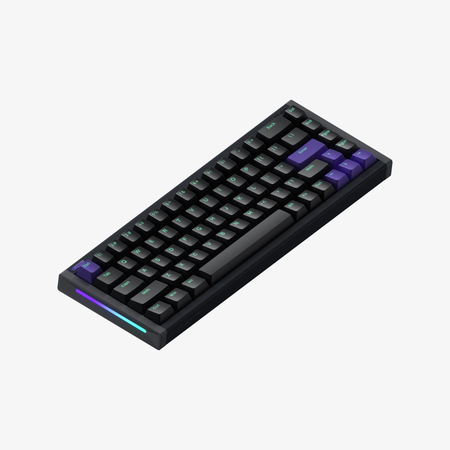
LUMINKEY Magger68 Ultra HE
Layout
Build quality in the top 50% of 60% boards under $200.
- Gateron Magnetic Jade Pro switches with 0.1-3.5mm adjustable actuation for custom feel
- 0.08ms latency and 8000Hz polling rate for competitive gaming responsiveness
- Compact 60% layout saves desk space and is easier to transport
- Magnetic switches only. Standard MX switches will not fit.
- North-facing LEDs. Cherry-profile keycaps can hit the switch housing.
- Compact layout only. No function row, dedicated arrow keys, or numpad.
Get the
LUMINKEY Magger68 PlusUltra HE
Switch Choice
Build quality in the bottom 50% of 65% boards under $150.
- 65% layout includes arrow keys and extra modifiers for easier daily use
- Sandwich mount with sound dampening reduces typing noise and improves acoustics
- Screw-in stabilizers provide more stable key feel for larger keys like spacebar
- Magnetic switches only. Standard MX switches will not fit.
- South-facing LEDs. Shine-through legends stay dark, and some sculpted keycaps can clip the LED.
- 65% layout. No function row and no numpad.
For pure gaming performance in a compact form, the Magger68 Ultra HE is the stronger choice with its faster latency and magnetic Jade Pro switches. If you need arrow keys and a quieter, more moddable board for mixed use, the Magger68 PlusUltra HE offers better layout utility and sound dampening. Your decision comes down to whether you prioritize a smaller footprint or a more versatile daily driver with sandwich mounting.
The differences that matter
Skip the 40-row spec sheet. These are the specs that change how each board feels, sounds, and fits your desk.
LUMINKEY Magger68 Ultra HE
LUMINKEY Magger68 PlusUltra HE
Layout size
60%
65%
Switch options
Magnetic
Clicky, Magnetic
Mount style
Plate Mount
Sandwich Mount
Sound dampening
No
Yes
Keycaps
PBT, PC
PBT
- LUMINKEY Magger68 Ultra HE
- LUMINKEY Magger68 PlusUltra HE
- Performance
- 9691
- Build quality
- 6263
- Productivity
- 6082
- Customizability
- 6369
- Portability
- 7474
- Hall effect (magnetic)
- Rapid trigger
- Connection: Wired
- Hot-swappable
- Max polling rate: 8,000 Hz
- Case material: Aluminum
What will you mostly use it for?
In gaming, the Magger68 Ultra leads with its higher performance score and dedicated magnetic Jade Pro switches optimized for low latency. The Magger68 PlusUltra wins in office, programming, and content creation due to its 65% layout and sound dampening, offering more keys and a quieter feel. For travel, the Ultra's 60% size is more portable, while modders will prefer the PlusUltra for its sandwich mount and screw-in stabilizers. The tie in layout and mount types makes the PlusUltra the more versatile daily driver.
Pick the LUMINKEY Magger68 Ultra HE
- Higher performance score of 96.2 vs 91.4 for competitive gaming
- Gateron Magnetic Jade Pro switches with 0.08ms latency for fast response
- Rapid Trigger and Dynamic Keypath support for per-key actuation control
LUMINKEY Magger68 Ultra HE vs Magger68 PlusUltra HE specs
Every tracked spec, side by side. Rows marked with a dot differ between the boards.
7 of 22 specs differ
LUMINKEY Magger68 Ultra HE
LUMINKEY Magger68 PlusUltra HE
Switch options
Hall effect (magnetic)
Rapid trigger
Hot-swappable
Mount style
Sound dampening
Screw-in stabilizers
Layout size
Layout standard
Ergonomics
Display
Connection
Max polling rate
USB-C
Case material
Plate material
Keycaps
Typing angle
Backlight
N-key rollover
Mac & Windows
Released
Compare prices
Live prices from the stores we track, cheapest in-stock offer first.
Prices in USD are converted to your currency and can change at any time. KeebFinder may earn a commission when you buy through these links, at no extra cost to you.
Lowest price across stores, Amazon excluded.



LUMINKEY Magger68 Ultra HE vs Magger68 PlusUltra HE: your questions
The Magger68 Ultra is a 60% layout with Gateron Magnetic Jade Pro switches and a plate mount, while the PlusUltra is a 65% layout with clicky magnetic switches and a sandwich mount design. The PlusUltra adds arrow keys and sound dampening for better everyday usability.
Yes, the PlusUltra supports 8000Hz polling, rapid trigger, and adjustable actuation from 0.1mm to 3.5mm, making it suitable for competitive gaming. However, the Ultra model has a higher performance score of 96.2 compared to 91.4 due to its dedicated magnetic switches.
The Magger68 PlusUltra features a sandwich mount with sound dampening and liquid silicone, described by the vendor as providing clarity without hollowness. The Ultra uses a plate mount without mention of sound dampening, so the PlusUltra likely offers a quieter and more refined typing sound.
Yes, both the Magger68 Ultra and PlusUltra support Mac and Windows according to the vendor descriptions. They also list Linux compatibility for the Ultra, while the PlusUltra's Linux support is not stated in the provided information.
The Magger68 Ultra uses Gateron Magnetic Jade Pro switches, which are linear magnetic switches with a 0.1mm to 3.5mm adjustable actuation point and 0.08ms latency. They are hot-swappable and use Hall Effect technology for contactless actuation.
Yes, the PlusUltra is hot-swappable and uses magnetic Hall Effect switches. The vendor lists clicky magnetic switches as an option, and you can swap them out for compatible magnetic switches without soldering.
The Magger68 PlusUltra has south-facing RGB, which is better for avoiding interference with thick keycap profiles like Cherry or SA. The Magger68 Ultra uses north-facing RGB, which can cause compatibility issues with some aftermarket keycaps.
No, both the Magger68 Ultra and PlusUltra are wired-only keyboards according to the provided specifications. They connect via USB-C and include an 8K data cable for high-speed data transfer.
Both the Magger68 Ultra and PlusUltra have a polling rate of 8000 Hz, which is eight times higher than standard gaming keyboards. This allows for near-instantaneous input response during fast-paced gaming.
The Magger68 PlusUltra is better suited for programming due to its 65% layout with arrow keys and navigation cluster. The Ultra's 60% layout lacks dedicated arrow keys, which may require using layers for code navigation, though it remains functional with practice.
Not sold on either?




Still torn?
Answer a few quick questions and the keyboard finder ranks 2,000+ boards by how you will actually use yours.