Machenike KT68 vs KT68 ProRetro Design vs Smart Screen
Choose the KT68 for a classic, sound-dampened build at a lower cost, or the KT68 Pro for a modern transparent aesthetic with a customizable screen.


Which one should you get?
Get the
Machenike KT68
Retro Design
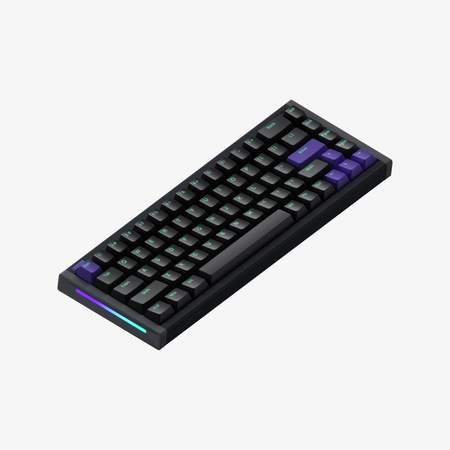
- Retro typewriter-inspired design with a metal and plastic case construction.
- Includes a rotary volume control knob and a dedicated desktop toggle key.
- Vendor description highlights a built-in silicone foam layer for sound dampening.
- Lacks the smart screen found on the Pro model.
- Does not have N-Key Rollover (NKRO) explicitly mentioned in its provided specifications.
- The vendor description does not specify the Bluetooth version.
Get the
Machenike KT68 Pro
Smart Screen
- Features a customizable smart screen above the keyboard.
- Uses a fully transparent ABS case and keycaps to maximize RGB light diffusion.
- Explicitly lists N-Key Rollover (NKRO) for all keys.
- Uses an ABS case instead of a metal/plastic hybrid like the KT68.
- The vendor description does not mention any internal sound-dampening foam.
- Lacks the physical rotary knob and dedicated desktop toggle key of the KT68.
Your choice hinges on prioritizing either practical, quiet typing or modern visual customization. The Machenike KT68 is the better pick for users who value a classic aesthetic, quieter operation, and tangible media controls without needing a screen. Opt for the Machenike KT68 Pro if your main goal is a flashy, transparent centerpiece with a customizable screen, advanced RGB software, and NKRO for gaming, and you are willing to trade some material heft for that feature set.
The differences that matter
Skip the 40-row spec sheet. These are the specs that change how each board feels, sounds, and fits your desk.
Machenike KT68
Machenike KT68 Pro
Case material
Metal, Plastic
ABS
Knob
Yes
No
Display
None
Yes
Sound dampening
Yes
No
Media keys
Yes
No
- Machenike KT68
- Machenike KT68 Pro
- Performance
- 4671
- Build quality
- 4254
- Productivity
- 7660
- Customizability
- 7571
- Portability
- 8990
- Layout size: 65%
- Connection: Bluetooth, 2.4 GHz, Wired
- Hot-swappable
- Battery: 4,000 mAh
- Switch options: Linear, Tactile
- Keycaps: PBT
What will you mostly use it for?
The KT68 Pro takes the lead for gaming and content creation, primarily due to its NKRO, customizable screen, and emphasis on RGB visual effects. The standard KT68 is better suited for office environments thanks to its advertised silent typing and practical media controls. For programming, travel, and core wireless functionality, the two are evenly matched. Modders may lean towards the KT68 for its detailed internal construction featuring a metal plate and silicone dampening.
Pick the Machenike KT68 Pro
- The vendor page for the KT68 Pro lists N-Key Rollover (NKRO) for all keys, which can be beneficial for gaming.
- Its transparent keycaps and case are designed to showcase RGB lighting effects, which may appeal to gamers seeking a vibrant setup.
- The included Gateron North Pole 2.0 switches are advertised as sensitive and accurate.
Machenike KT68 vs KT68 Pro specs
Every tracked spec, side by side. Rows marked with a dot differ between the boards.
6 of 21 specs differ
Machenike KT68
Machenike KT68 Pro
Switch options
Hot-swappable
Sound dampening
Layout size
Layout standard
Ergonomics
Knob
Display
Media keys
Connection
Battery
USB-C
Case material
Plate material
Keycaps
Weight
Dimensions
Backlight
N-key rollover
Mac & Windows
Released
Compare prices
Live prices from the stores we track, cheapest in-stock offer first.
Lowest price across stores, Amazon excluded.



Prices in USD are converted to your currency and can change at any time. KeebFinder may earn a commission when you buy through these links, at no extra cost to you.
Machenike KT68 vs KT68 Pro: your questions
The Machenike KT68 is likely better for quiet office use. Its vendor description explicitly mentions a silent silicone padded structure designed to provide softer acoustics. The KT68 Pro's description focuses on its transparent design and screen, not on specific sound-dampening features.
No, the vendor description for the KT68 Pro does not mention a rotary volume knob. It describes using a toggle switch for volume and mute functions. The standard KT68 includes a physical rotary volume control knob.
Yes, both the Machenike KT68 and KT68 Pro feature hot-swappable PCBs. The KT68's description states it supports both three-pin and five-pin switches. The KT68 Pro is also listed as hot-swappable for 3/5 pin switches.
Both keyboards house a 4000mAh battery. The KT68's vendor page provides specific estimates of up to 200 hours with RGB off and 25 hours with RGB on. The KT68 Pro's description does not provide specific battery life estimates.
The KT68 Pro is designed specifically for RGB display with its fully transparent case and keycaps. Its vendor description also mentions over 20 RGB effects, an audio visualizer, and advanced software for creating custom lighting. The KT68 has RGB with 20 pre-built effects, including musical rhythm, but lacks the transparent light-diffusing design.
The KT68 Pro lists N-Key Rollover (NKRO) for all keys, which is a beneficial feature for gaming to prevent missed inputs. It also comes with Gateron switches advertised as sensitive. However, it lacks the dedicated media controls of the standard KT68.
Both the Machenike KT68 and KT68 Pro use PBT plastic for their keycaps. The KT68 uses dual-tone injection-molded PBT, while the KT68 Pro uses transparent PBT keycaps to allow RGB light to shine through.
The KT68 uses a combination of metal and plastic in its case construction. The KT68 Pro uses an ABS plastic case, which is fully transparent according to its vendor description.
Yes, both the KT68 and KT68 Pro list support for Mac and Windows operating systems in their provided specifications. The KT68 Pro's description also mentions compatibility with iOS and Android.
The Machenike KT68 Pro comes with Gateron North Pole 2.0 switches. You can choose between a Yellow Linear switch with a 50gf operating force or a Brown Tactile switch with a 55gf operating force.
The vendor description for the KT68 mentions driver software that can be used to create musical rhythm backlight effects. The KT68 Pro's description emphasizes a self-developed driver for creating dynamic lighting effects, sharing creations, and customizing macros.
Not sold on either?


Still torn?
Answer a few quick questions and the keyboard finder ranks 2,000+ boards by how you will actually use yours.