Mistel Barocco vs Qwertykeys Neo65Split vs Wireless Build
Choose the Mistel Barocco for its unique split ergonomics, or the Qwertykeys Neo65 for its premium build and wireless flexibility.


Which one should you get?
Get the
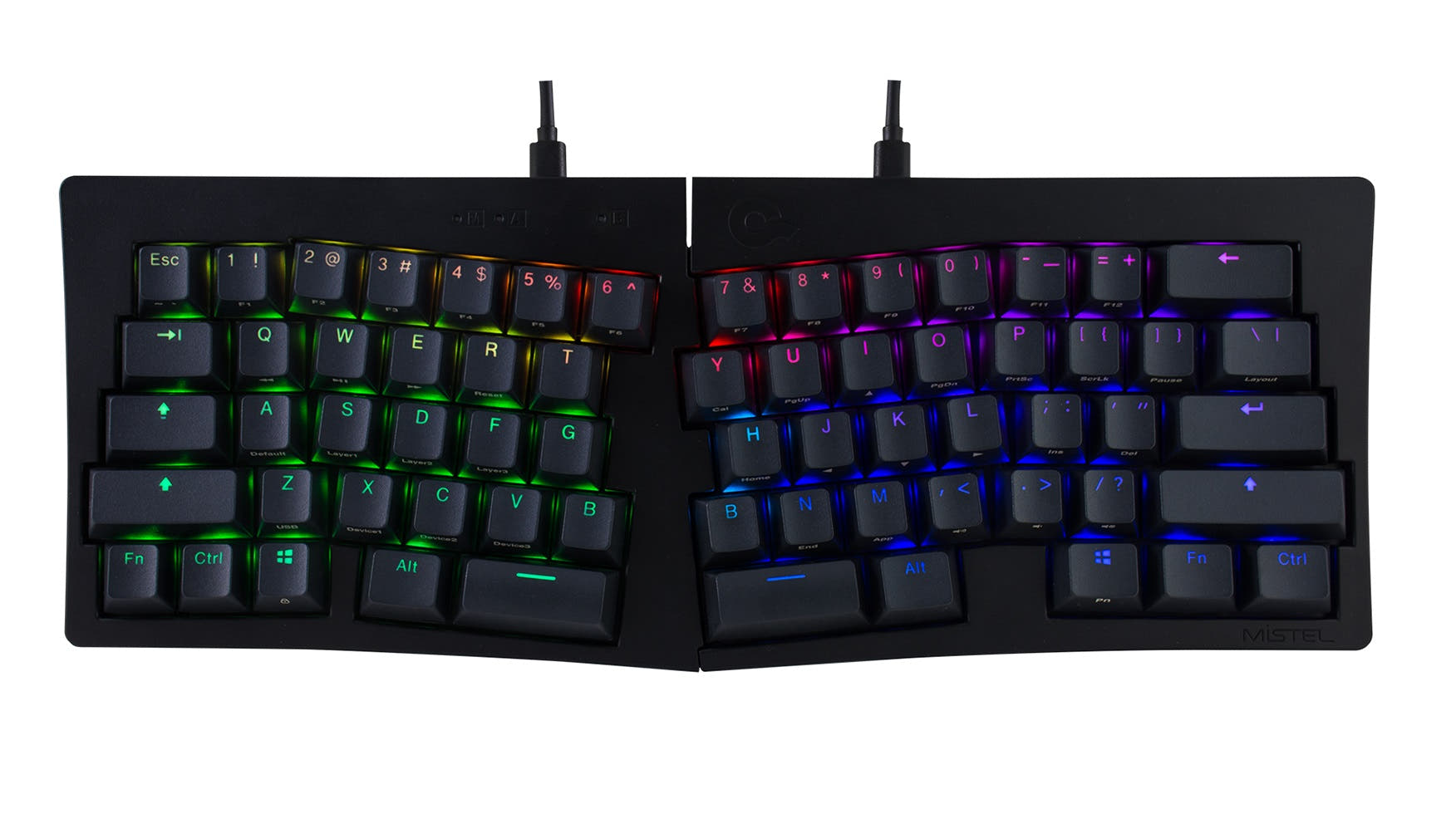
Mistel Barocco
Split
- Unique split design allows for ergonomic separation or conventional use.
- Pre-built with German-made Cherry MX switches in multiple tactile options.
- Native support for QWERTY, Dvorak, and Colemak layouts.
- Wired-only with a mini-USB connector, a less common standard.
- Plastic case and plate construction.
- Not hot-swappable, limiting switch changes without soldering.
Get the
Qwertykeys Neo65
Wireless Build
- Premium aluminum case with optional brass or copper bottom.
- Tri-mode connectivity (wired USB-C, Bluetooth, 2.4 GHz).
- Hot-swappable PCB and VIA support for easy customization.
- Sold primarily as a DIY kit, requiring assembly and your own switches/keycaps.
- Long estimated production and ship time (12 weeks).
- Heavy at 2.5kg, which reduces portability despite its compact size.
Your choice hinges on your core priority. If a unique, ergonomic split typing experience with a ready-to-use product is most important, the Mistel Barocco is the clear choice. If you value premium materials, extensive customization, wireless freedom, and are willing to build your own keyboard, the Qwertykeys Neo65 offers significantly more long-term value and flexibility.
The differences that matter
Skip the 40-row spec sheet. These are the specs that change how each board feels, sounds, and fits your desk.
Mistel Barocco
Qwertykeys Neo65
Layout size
60%
65%
Connection
Wired
Bluetooth, 2.4 GHz, Wired
Hot-swappable
No
Yes
Case material
ABS, Plastic
Aluminum, Brass, Copper
Mount style
Plate Mount
PCB Mount
- Mistel Barocco
- Qwertykeys Neo65
- Performance
- 6857
- Build quality
- 4487
- Productivity
- 4262
- Customizability
- 5068
- Portability
- 6385
- Max polling rate: 1,000 Hz
What will you mostly use it for?
The Qwertykeys Neo65 wins in more categories, particularly for modding, programming, and office use, due to its customizable layout, wireless features, and VIA support. The Mistel Barocco's primary advantage is its unique split design, which benefits travel and ergonomic typing. For gaming and content creation, the choice depends on whether you prioritize wireless freedom and macro programming or split ergonomics and dedicated media keys.
It's a tie
- Both keyboards offer a 1000 Hz polling rate and N-key rollover for reliable input.
- The Mistel Barocco's split design may offer more comfortable wrist positioning for long sessions.
- The Neo65's wireless 2.4 GHz mode offers cable-free desk management.
What owners say
Ratings and quotes collected from verified store reviews, including the critical ones.
Mistel Barocco
No owner reviews collected yet.
Qwertykeys Neo65
8 owner reviews
“The favorite keyboard in my collection, those of us who are dedicated to building mechanical keyboards are essential to have a gem from the Neo series in all its models, greetings.”
Mistel Barocco vs Qwertykeys Neo65 specs
Every tracked spec, side by side. Rows marked with a dot differ between the boards.
13 of 23 specs differ
Mistel Barocco
Qwertykeys Neo65
Switch options
Hot-swappable
Mount style
Sound dampening
Layout size
Layout standard
Ergonomics
Display
Media keys
Connection
Max polling rate
Battery
USB-C
Case material
Plate material
Keycaps
Weight
Dimensions
Typing angle
Backlight
VIA
N-key rollover
Released
Compare prices
Live prices from the stores we track, cheapest in-stock offer first.
Lowest price across stores, Amazon excluded.



Prices in USD are converted to your currency and can change at any time. KeebFinder may earn a commission when you buy through these links, at no extra cost to you.
Mistel Barocco vs Qwertykeys Neo65: your questions
No, the Mistel Barocco is not hot-swappable. According to the vendor listing, it uses plate-mounted, soldered Cherry MX switches. Changing switches would require desoldering and soldering new ones.
No, the Qwertykeys Neo65 is sold as a barebones DIY kit. The kit includes the case, PCB, plate, foams, and accessories, but you must purchase mechanical switches and keycaps separately to complete the build.
The Mistel Barocco is specifically designed with a split layout to minimize wrist discomfort during prolonged use. Its ability to separate the two halves allows for a more natural shoulder-width typing posture that the fixed Neo65 cannot offer.
The Neo65's VIA support allows for extensive key remapping, which typically includes Mac compatibility. Its Bluetooth connectivity also works with most modern operating systems, though specific Mac key legends would depend on your chosen keycaps.
The Mistel Barocco uses a mini-USB connector, as stated in the vendor description. This is an older standard compared to the USB-C port found on the Qwertykeys Neo65.
The Qwertykeys Neo65 supports VIA, a graphical configuration software that allows you to remap keys, create macros, and set up layers without needing to flash the firmware manually.
Only the Qwertykeys Neo65 has a battery, as it offers wireless modes. Its tri-mode hotswap PCB includes two 2200mAh internal batteries. The wired-only Mistel Barocco does not have a battery.
Yes, the vendor description states the right side of the Mistel Barocco can be used alone. Using its macro layer editing, you can map keys from the left side onto the right half to create a fully functional, single-piece keyboard.
The Mistel Barocco uses a standard plate mount. The Qwertykeys Neo65 offers dual mounting: a PCB gasket mount and an isolated top mount, which are included in the kit and affect the typing feel and sound.
Yes, the Qwertykeys Neo65 PCB supports both ANSI and ISO physical layouts, according to the product specifications. You would need to use an ISO-style plate and keycap set to complete the build.
The Qwertykeys Neo65 kit includes a comprehensive foam kit for sound dampening, consisting of a PE Sheet, PCB Foam, and Poron Case Foam. It also comes with two sets of gaskets for different mounting styles.
Not sold on either?




Still torn?
Answer a few quick questions and the keyboard finder ranks 2,000+ boards by how you will actually use yours.