Monsgeek M1 HE vs M1Hall Effect or QMK Modding
Choose the M1 HE for Hall Effect magnetic switches, or the M1 for QMK support and more explicitly documented DIY and sound-dampening options.
KeebFinder may earn a commission when you buy through these links, at no extra cost to you.

from$199at Mechkeys

from$99at Mechkeys
90-day lowLowest price in 90 days
Which one should you get?
Get the
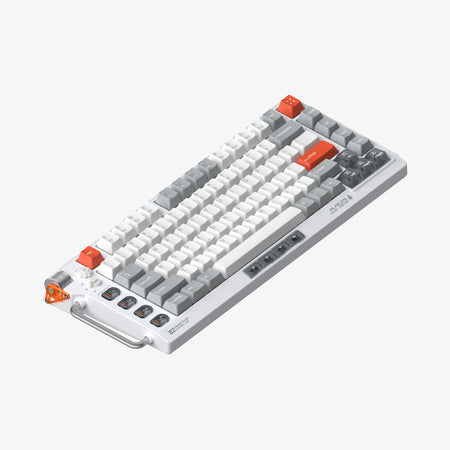
Monsgeek M1 HE
Hall effect
Build quality in the bottom 35% of 75% boards under $200.
- Hall Effect magnetic switches are listed as a core feature.
- The vendor describes a CNC-machined 6-series aluminum alloy chassis.
- The vendor specifies gasket mounting with sandwich cotton layers.
- Magnetic switches only. Standard MX switches will not fit.
Get the
Monsgeek M1
QMK
Build quality in the top 5% of 75% boards under $100.
- QMK and VIA support are listed in the product metadata.
- The vendor describes 3mm case foam, a PET insulation layer, and Poron sound-dampening layers.
- The vendor lists extra Teflon pads and tape for possible Force Break and tape mods.
- South-facing LEDs. Shine-through legends stay dark, and some sculpted keycaps can clip the LED.
Pick the Monsgeek M1 HE if Hall Effect magnetic switches are your priority and you want the vendor-described CNC aluminum chassis and gasket-mounted build. Choose the Monsgeek M1 if QMK support, hot-swapping, and its documented DIY materials are more important. For buyers comparing only layout, RGB, knob support, and multimedia keys, the two share several core features.
The differences that matter
Skip the 40-row spec sheet. These are the specs that change how each board feels, sounds, and fits your desk.
Monsgeek M1 HE
Monsgeek M1
Hall effect (magnetic)
Yes
No
Adjustable actuation helps in games and not in normal typing
Case material
Aluminum
Aluminum, Copper
Switch options
Linear, Magnetic
Clicky, Linear
QMK
No
Yes
The deep option when you want to remap every key
VIA
No
Yes
GUI remapping without compiling firmware
- Monsgeek M1 HE
- Monsgeek M1
- Performance
- 5470
- Build quality
- 5988
- Productivity
- 5198
- Customizability
- 7099
- Portability
- 6165
- Layout size: 75%
- Hot-swappable
- Mount style: Gasket Mount
- Knob
What will you mostly use it for?
The M1 HE has the clearer gaming-specific distinction because it uses Hall Effect magnetic switches, while the M1's N-Key Rollover is also explicitly listed. For programming and hands-on modification, the M1 has the stronger documented feature set, including QMK and VIA support and vendor-described modding materials. Office and content-creation choices are close because both share the 75% layout, multimedia keys, and knob support. Neither listing establishes wireless use, so the travel choice is a tie based on the available details.
Pick the Monsgeek M1 HE
- The M1 HE is explicitly listed with Hall Effect magnetic switches.
- Its vendor description specifies full-key conflict-free operation.
- The M1 lists N-Key Rollover, but its listed switch types are linear and clicky.
Monsgeek M1 HE vs M1 specs
Every tracked spec, side by side. Rows marked with a dot differ between the boards.
13 of 24 specs differ
Monsgeek M1 HE
Monsgeek M1
Switch options
Hall effect (magnetic)
Hot-swappable
Mount style
Sound dampening
Screw-in stabilizers
Layout size
Layout standard
Ergonomics
Knob
Display
Media keys
Connection
USB-C
Case material
Keycaps
Weight
Dimensions
Backlight
QMK
VIA
N-key rollover
Mac & Windows
Released
Compare prices
Live prices from the stores we track, cheapest in-stock offer first.
Prices in USD are converted to your currency and can change at any time. KeebFinder may earn a commission when you buy through these links, at no extra cost to you.
Lowest price across stores, Amazon excluded.



Monsgeek M1 HE vs M1: your questions
The M1 HE is listed with Hall Effect magnetic switches, while the M1 is listed with linear and clicky switches. The M1 metadata also lists QMK and VIA support, and its vendor description details DIY and sound-dampening materials.
Yes, the M1 HE is listed with magnetic switches and Hall Effect. Its vendor description calls the switches premium cream yellow magnetic switches.
The M1 product metadata lists both QMK and VIA support. The vendor page for one M1 version says that version does not support QMK or VIA, so check the exact version before buying.
Both product listings include hot-swappable support. The M1 vendor description specifically identifies TTC hot-swappable sockets for mechanical switches.
The M1 has more modding details documented, including Teflon pads, tape, a 3mm case foam, PET insulation, and Poron layers. The M1 HE is also listed as hot-swappable, but its description does not name comparable DIY extras.
Knob support is listed for both keyboards. The M1 HE vendor says its multi-function knob adjusts volume and brightness.
Both are listed as 75% ANSI keyboards. The M1 HE vendor description further identifies an 82-key arrangement.
The M1 is listed as wired, and its vendor description specifies Type-C wired connectivity. The M1 HE vendor calls it a three-mode keyboard, but the supplied product metadata does not identify its connectivity modes.
The product metadata lists PBT keycaps for the M1 HE and ABS and PC keycaps for the M1. The M1 HE vendor separately describes transparent ASA-profile keycaps, so verify the keycap specification for the version being sold.
Both listings include RGB. The M1 HE vendor describes full-key RGB with bottom-facing LEDs, while the M1 metadata specifies south-facing RGB.
Not sold on either?




Still torn?
Answer a few quick questions and the keyboard finder ranks 2,000+ boards by how you will actually use yours.