Qwertykeys Neo65 vs Razer Huntsman MiniDIY Kit vs Gaming Prebuilt
Choose the Neo65 for a customizable, wireless build experience, or the Huntsman Mini for an immediate, RGB-equipped gaming keyboard.


Which one should you get?
Get the
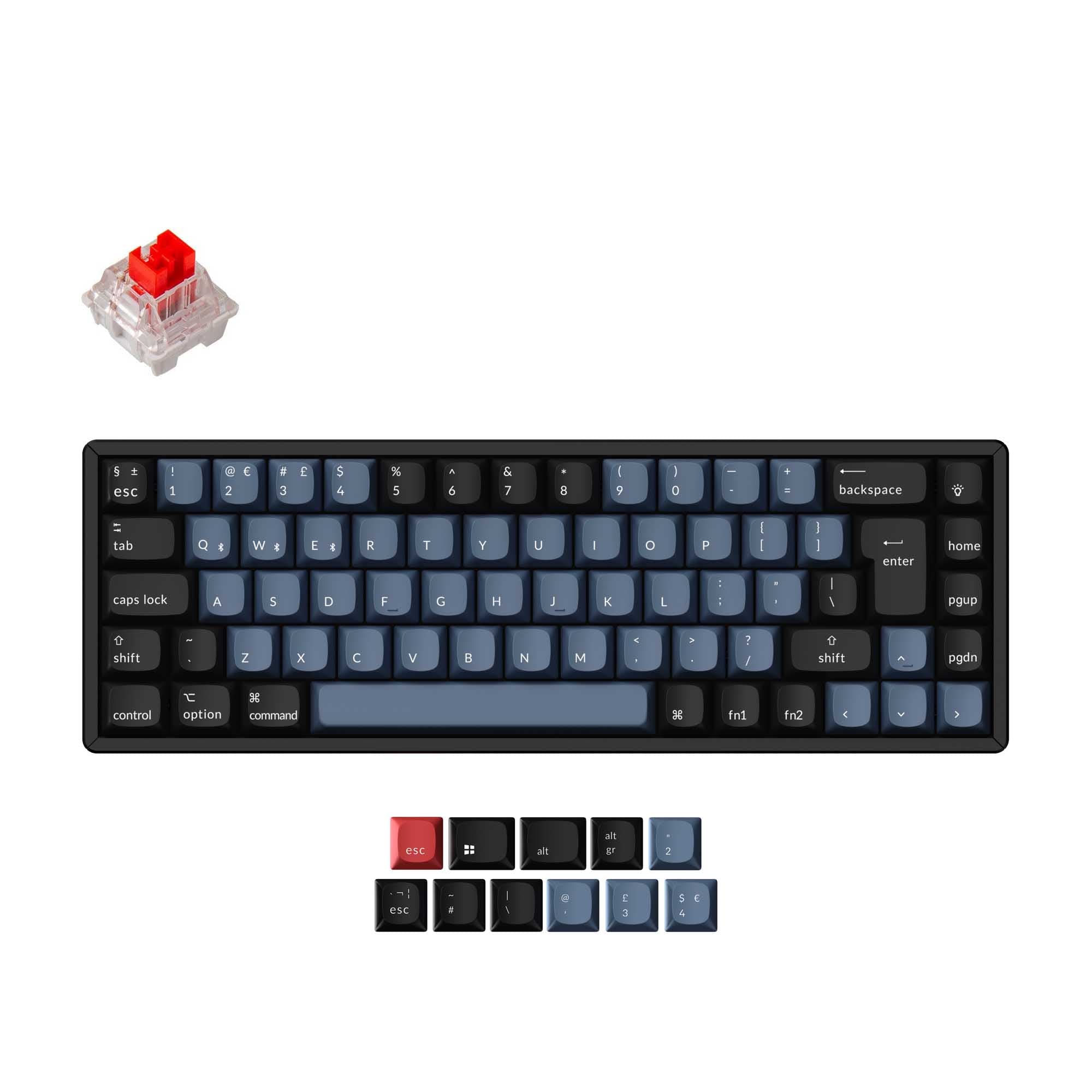
Qwertykeys Neo65
DIY Kit
- Extensive customization with a hot-swappable PCB, multiple plate materials, and dual mounting styles.
- Tri-mode wireless connectivity (Bluetooth, 2.4GHz, wired) with included 2200mAh batteries.
- High-quality construction with an aluminum top case and optional brass or copper bottom weight.
- Very heavy at 2.5kg, reducing portability.
- Long lead time, with the vendor noting an estimated 12-week production and ship time.
- Sold as a barebones kit, requiring separate purchase of switches and keycaps.
Get the
Razer Huntsman Mini
Gaming Prebuilt
- Pre-built and ready to use with Razer optical switches (linear or clicky).
- Includes vibrant per-key RGB lighting (Razer Chroma RGB).
- Lightweight and compact 60% form factor.
- Wired-only connectivity, lacking Bluetooth or 2.4GHz wireless options.
- 60% layout lacks dedicated arrow keys, which may hinder productivity for some.
- Switches are not hot-swappable, limiting future customization.
Your choice fundamentally depends on your willingness to build and customize. The Qwertykeys Neo65 is a project keyboard for enthusiasts who want a premium, wireless, and deeply personal typing instrument. The Razer Huntsman Mini is a straightforward gaming peripheral that works out of the box with flashy lighting and proprietary switches. If you enjoy tinkering, choose the Neo65. If you want to plug in and play, choose the Huntsman Mini.
The differences that matter
Skip the 40-row spec sheet. These are the specs that change how each board feels, sounds, and fits your desk.
Qwertykeys Neo65
Razer Huntsman Mini
Layout size
65%
60%
Connection
Bluetooth, 2.4 GHz, Wired
Wired
Hot-swappable
Yes
No
Case material
Aluminum, Brass, Copper
Aluminum, Plastic
Weight
2,500 g
523 g
- Qwertykeys Neo65
- Razer Huntsman Mini
- Performance
- 5747
- Build quality
- 8742
- Productivity
- 6354
- Customizability
- 6851
- Portability
- 8570
- Max polling rate: 1,000 Hz
What will you mostly use it for?
The Huntsman Mini wins for dedicated gaming and travel due to its plug-and-play nature, optical switches, and lighter weight. The Neo65 is the clear choice for office work, programming, and especially modding, thanks to its wireless connectivity, 65% layout, and extensive customization options. For content creation, the choice depends on whether software-based key remapping or RGB lighting is a higher priority.
Pick the Razer Huntsman Mini
- The Huntsman Mini features Razer's optical switches with a listed 1mm actuation for linear variants, which the manufacturer claims enables faster keystrokes.
- It includes per-key RGB lighting for visual customization and immersion.
- It is a pre-built keyboard, requiring no assembly for immediate use.
What owners say
Ratings and quotes collected from verified store reviews, including the critical ones.
Qwertykeys Neo65
8 owner reviews
“The favorite keyboard in my collection, those of us who are dedicated to building mechanical keyboards are essential to have a gem from the Neo series in all its models, greetings.”
Razer Huntsman Mini
No owner reviews collected yet.
Qwertykeys Neo65 vs Razer Huntsman Mini specs
Every tracked spec, side by side. Rows marked with a dot differ between the boards.
13 of 23 specs differ
Qwertykeys Neo65
Razer Huntsman Mini
Switch options
Hot-swappable
Mount style
Sound dampening
Layout size
Layout standard
Ergonomics
Display
Connection
Max polling rate
Battery
USB-C
Case material
Plate material
Keycaps
Weight
Dimensions
Typing angle
Backlight
VIA
N-key rollover
Mac & Windows
Released
Compare prices
Live prices from the stores we track, cheapest in-stock offer first.
Lowest price across stores, Amazon excluded.



Prices in USD are converted to your currency and can change at any time. KeebFinder may earn a commission when you buy through these links, at no extra cost to you.
Qwertykeys Neo65 vs Razer Huntsman Mini: your questions
No, the Neo65 is sold as a DIY barebones kit. According to the vendor listing, it includes the case, PCB, plate, and accessories, but you must supply and install your own switches and keycaps.
No, the Razer Huntsman Mini is a wired-only keyboard. It connects via its included detachable USB-C cable and does not support Bluetooth or 2.4GHz wireless.
The Razer Huntsman Mini does not have a hot-swappable PCB. Its Razer optical switches are soldered in place, making switch replacement difficult and not intended for end-users.
The vendor listing states the kit includes the keyboard case, weight, PCB, plate, daughterboard, a foam kit (PE sheet, PCB foam, Poron case foam), gaskets, stabilizers, rubber feet, a screwdriver, a keycap puller, a USB-C cable, and a carrying case.
The Razer Huntsman Mini is more beginner-friendly as it is pre-assembled and ready to use. The Qwertykeys Neo65 requires knowledge of keyboard assembly and additional purchases, making it better suited for enthusiasts.
The Razer Huntsman Mini vendor listing explicitly states support for Windows 7+ and MacOS. The Neo65's VIA compatibility typically supports both operating systems, but its specific system support is not detailed in the provided information.
Only the Qwertykeys Neo65 has a battery, with its tri-mode PCB including two 2200mAh internal batteries. The Razer Huntsman Mini is wired and has no battery.
The provided vendor description for the Huntsman Mini does not mention any software or method for key remapping. It highlights Razer Chroma RGB for lighting but not for key reassignment.
The Qwertykeys Neo65 has an 8-degree typing angle, as listed in both the specifications and the vendor description.
Yes, the keycaps on the Huntsman Mini should be replaceable with standard MX-style keycaps, as it uses Razer optical switches with a standard stem compatible with such caps.
No, the Qwertykeys Neo65 PCB specifically has no per-key RGB, according to the vendor's feature list. It may have other indicator lights, but full RGB backlighting is not a feature.
Not sold on either?



![[In-Stock] Flux60 HE(Babao 60 HE)Module](https://cdn.shopify.com/s/files/1/0607/2474/0287/files/WechatIMG4298.png?v=1768195930&width=3840&quality=75)
Still torn?
Answer a few quick questions and the keyboard finder ranks 2,000+ boards by how you will actually use yours.