Nuphy Node75 Low Profile vs WH80 Gaming KeyboardBudget 75% vs Premium Gaming 80%
Choose the Node75 for a versatile, affordable wireless board, or the WH80 for its top-tier gaming performance with magnetic switches.
KeebFinder may earn a commission when you buy through these links, at no extra cost to you.

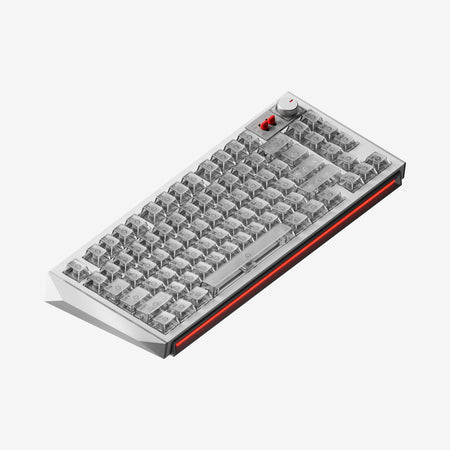
Which one should you get?
Get the
Nuphy Node75 Low Profile
Budget 75%
Build quality in the bottom 35% of 75% boards under $150.
- Triple-mode wireless connectivity with Bluetooth and 2.4 GHz.
- Includes a 3000mAh battery for cordless operation.
- Hot-swappable PCB allows for easy switch changes.
- Low-profile switches and keycaps only. Standard MX keycaps will not fit.
- No numpad.
Get the
Nuphy WH80 Gaming Keyboard
Premium Gaming 80%
Build quality in the top 40% of 80% boards under $300.
- Very high 8000 Hz polling rate for minimal input latency.
- Hall Effect magnetic switches offer high precision and potential for adjustable actuation.
- Vendor claims co-development with Gateron on the Jade Dragon-N switch for improved sound and feel.
- Magnetic switches only. Standard MX switches will not fit.
- South-facing LEDs. Shine-through legends stay dark, and some sculpted keycaps can clip the LED.
- No numpad.
Your budget and primary use case should guide your decision. For most users seeking a reliable, wireless keyboard for mixed use, the Nuphy Node75 presents strong value. If you are a competitive gamer where every millisecond counts and are willing to pay a premium for magnetic switch technology, the Nuphy WH80 is the specialized tool for that job. Consider the WH80's potential lack of wireless connectivity if that is important for your setup.
The differences that matter
Skip the 40-row spec sheet. These are the specs that change how each board feels, sounds, and fits your desk.
Nuphy Node75 Low Profile
Nuphy WH80 Gaming Keyboard
Layout size
75%
80%
Hall effect (magnetic)
No
Yes
Adjustable actuation helps in games and not in normal typing
Rapid trigger
No
Yes
Faster resets help in games and not in normal typing
Battery
3,000 mAh
8,000 mAh
A larger battery means fewer cables during the day
Low profile
Yes
No
- Nuphy Node75 Low Profile
- Nuphy WH80 Gaming Keyboard
- Performance
- 4998
- Build quality
- 5965
- Productivity
- 5390
- Customizability
- 4577
- Portability
- 7988
- Connection: Bluetooth, 2.4 GHz, Wired
- Hot-swappable
- Mount style: Gasket Mount
- Keycaps: PBT
What will you mostly use it for?
The Node75 is the more versatile choice, winning for office use, programming, travel, and content creation due to its wireless features and compact form. The WH80 takes a clear lead for dedicated gaming, leveraging its high polling rate and magnetic switches. For modding, both offer a gasket mount and sound dampening, but their customization paths differ between physical hot-swap and advanced software features.
Pick the Nuphy WH80 Gaming Keyboard
- The WH80 has an 8000 Hz polling rate for lower latency.
- It features Hall Effect magnetic switches for high precision and adjustable actuation.
- The vendor description emphasizes its 0.005mm precision and 0.1ms delay for competitive gaming.
Nuphy Node75 Low Profile vs WH80 Gaming Keyboard specs
Every tracked spec, side by side. Rows marked with a dot differ between the boards.
17 of 28 specs differ
Nuphy Node75 Low Profile
Nuphy WH80 Gaming Keyboard
Switch options
Hall effect (magnetic)
Rapid trigger
Hot-swappable
Mount style
Low profile
Sound dampening
Screw-in stabilizers
Layout size
Layout standard
Ergonomics
Knob
Display
Media keys
Connection
Max polling rate
Battery
USB-C
Case material
Plate material
Keycaps
Weight
Dimensions
Typing angle
Backlight
N-key rollover
Mac & Windows
Released
Compare prices
Live prices from the stores we track, cheapest in-stock offer first.
Prices in USD are converted to your currency and can change at any time. KeebFinder may earn a commission when you buy through these links, at no extra cost to you.
Lowest price across stores, Amazon excluded.



Nuphy Node75 Low Profile vs WH80 Gaming Keyboard: your questions
The provided specifications for the Nuphy WH80 do not list any wireless connectivity options like Bluetooth or 2.4 GHz. In contrast, the Node75 explicitly supports both. For cord-free use, the Node75 is the confirmed choice.
The Node75 uses linear mechanical switches. The vendor description mentions specific variants like Red, Blush, and Brown nano switches, which are described as smooth and ideal for gaming or quiet typing.
The WH80 uses Hall Effect magnetic switches. The product is listed as pre-built, and its customizability may focus on software-based adjustments via NuPhyIO rather than physical hot-swapping. The Node75 is explicitly listed as hot-swappable.
The Node75 offers PBT keycaps and a gasket mount with sound dampening for a good typing experience. The WH80 also has a gasket mount with sound mods and features magnetic switches co-developed with Gateron, which the vendor claims provide a satisfying acoustic profile. Preference between standard and magnetic switches will be subjective.
No, according to the specifications, the Nuphy Node75 does not have RGB lighting. The vendor description mentions dot-matrixed LEDs in a touch zone for function feedback, but not for per-key RGB.
The Nuphy WH80 has an 8000 Hz polling rate, while the Node75 has a 1000 Hz polling rate. A higher polling rate can reduce input latency, which is a key feature highlighted for the WH80's gaming performance.
The Node75 is likely more portable. It has a smaller 75% layout, confirmed wireless connectivity with a battery, and a specified weight. The WH80 has a larger 80% layout, and its portability is less emphasized in the provided details.
Hall Effect switches use magnets and sensors instead of physical metal contacts. According to the WH80's vendor description, this allows for high precision (0.005mm), rapid response (0.1ms delay), and potentially adjustable actuation points via software.
The WH80's vendor description mentions NuPhyIO, a proprietary web-based driver for sophisticated features. There is no specific mention of software for the Node75 in the provided information.
Yes, the Node75 uses a standard ANSI layout and its keycaps are made of PBT. Since it is a mechanical keyboard with Cherry MX-style switches, the keycaps should be compatible with standard replacement sets.
Build quality involves different aspects. The Node75 uses an ABS case and a polycarbonate plate. The WH80's specific case and plate materials are not listed, but it emphasizes a full stack of sound mods and switches co-developed with Gateron. The WH80 appears focused on internal acoustic engineering.
Not sold on either?


Still torn?
Answer a few quick questions and the keyboard finder ranks 2,000+ boards by how you will actually use yours.