Vortex M0110 6.25 vs M0110 7uWired RGB vs Wireless Connectivity
Choose the M0110 7u for wireless flexibility or the M0110 6.25 for wired-only use with RGB lighting.


Which one should you get?
Get the
Vortex M0110 6.25
Wired RGB
- Features south-facing RGB lighting for aesthetics and compatibility with Cherry profile keycaps.
- Vendor description notes support for the Tsangan layout, offering keycap flexibility.
- Includes multi-media keys as a listed extra feature for quick access to controls.
- Lacks any wireless connectivity options, limiting placement flexibility.
- Uses a 6.25u spacebar, which may be less common than the 7u size for aftermarket keycap sets.
Get the
Vortex M0110 7u
Wireless Connectivity
- Offers versatile Bluetooth and 2.4 GHz wireless connectivity alongside a wired USB-C option.
- Uses a standard 7u spacebar, which is widely available in aftermarket keycap sets.
- Wireless functionality enables easy switching between multiple devices.
- Has no RGB or backlighting of any kind.
- The vendor description does not mention support for the Tsangan layout.
- Wireless operation introduces a dependency on battery life.
Your primary need dictates the choice. If wireless freedom and a standard 7u spacebar are priorities, the Vortex M0110 7u is the obvious pick. If you prefer a stationary setup with RGB lighting, Tsangan layout support, and multimedia keys, the wired Vortex M0110 6.25 is the better option. Both are excellent, highly customizable 60% keyboards at a similar price point.
The differences that matter
Skip the 40-row spec sheet. These are the specs that change how each board feels, sounds, and fits your desk.
Vortex M0110 6.25
Vortex M0110 7u
Connection
Wired
Bluetooth, 2.4 GHz, Wired
Backlight
Yes, south-facing
None
Media keys
Yes
No
- Vortex M0110 6.25
- Vortex M0110 7u
- Performance
- 5449
- Build quality
- 7878
- Productivity
- 9191
- Customizability
- 8983
- Portability
- 7387
- Layout size: 60%
- Hot-swappable
- Case material: Plastic
- Switch options: Clicky, Linear, Tactile
- Mount style: Plate Mount
- QMK
What will you mostly use it for?
The wireless M0110 7u is the clear choice for office use and travel due to its connectivity options. The wired M0110 6.25 takes the lead for gaming and content creation, thanks to its RGB lighting and listed multimedia keys. For programming and core modding, both are equally capable, sharing high-end features like QMK and a gasket-mounted hotswap design.
Pick the Vortex M0110 6.25
- The M0110 6.25 offers a wired-only connection, which can provide a more stable link for gaming.
- It features south-facing RGB lighting, a common preference for gaming aesthetics.
- Its listed extra features include multi-media keys, which can be useful for in-game controls.
Vortex M0110 6.25 vs M0110 7u specs
Every tracked spec, side by side. Rows marked with a dot differ between the boards.
3 of 21 specs differ
Vortex M0110 6.25
Vortex M0110 7u
Switch options
Hot-swappable
Mount style
Sound dampening
Screw-in stabilizers
Layout size
Layout standard
Ergonomics
Display
Media keys
Connection
USB-C
Case material
Plate material
Keycaps
Typing angle
Backlight
QMK
VIA
Mac & Windows
Released
Compare prices
Live prices from the stores we track, cheapest in-stock offer first.
Lowest price across stores, Amazon excluded.


Prices in USD are converted to your currency and can change at any time. KeebFinder may earn a commission when you buy through these links, at no extra cost to you.
Vortex M0110 6.25 vs M0110 7u: your questions
The core difference is connectivity and lighting. The M0110 6.25 is wired-only and has south-facing RGB lighting. The M0110 7u offers Bluetooth and 2.4 GHz wireless connectivity but has no backlighting.
Yes. According to the vendor descriptions, both the 6.25u and 7u models feature hotswap sockets that support both 3-pin and 5-pin mechanical switches, allowing for easy switch changes without soldering.
Yes. Both keyboards are fully compatible with QMK and VIA firmware, as stated in their specifications. This allows for deep customization of key mappings, layers, and macros directly through software.
The Vortex M0110 7u is designed for wireless use. It supports both Bluetooth and 2.4 GHz wireless connections, giving you flexibility to connect to multiple devices without cables, while still offering a USB-C wired mode.
Yes. The vendor descriptions for both models list a gasket mount structure, along with a silicone dampener and switch pad. This design aims to provide a softer, more consistent typing feel and reduce case noise.
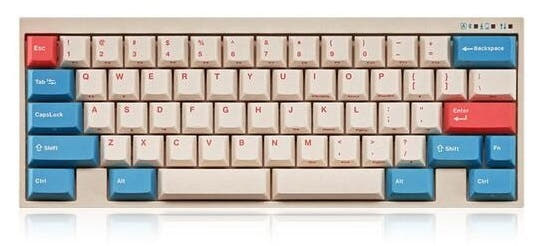
Both models come with OEM profile, dye-sublimated PBT keycaps in a beige colorway. PBT plastic is known for its durability and resistance to shine over time.
The vendor description for the M0110 6.25 states it supports the Tsangan layout. This is a specific 60% layout with a split right shift, split backspace, and a 7u bottom row, offering more flexibility for keycap compatibility and ergonomic positioning.
Both keyboards appear to use the same stabilizer type. Their vendor descriptions list gold screw-in stabilizers, which are generally preferred over clip-in stabilizers as they are more secure and easier to tune for a rattle-free sound.
The product metadata does not specify polling rates or wireless latency performance. For competitive gaming where every millisecond counts, the wired M0110 6.25 may be the safer choice due to the inherent reliability of a direct cable connection.
Yes. Both the Vortex M0110 6.25 and 7u list Mac and Windows support in their extra features. Their vendor descriptions also confirm compatibility with Linux operating systems.
Both keyboards have a 9-degree typing angle, as confirmed in their specifications. This is a common and comfortable angle for most typists.
Not sold on either?


Still torn?
Answer a few quick questions and the keyboard finder ranks 2,000+ boards by how you will actually use yours.