Skyloong GK61 Pro vs GK61 QMK/VIARGB or No RGB?
The GK61 Pro is the better all-rounder with RGB, a larger battery, and sound dampening, but the plain GK61 QMK/VIA is a solid choice if you don't need those features.

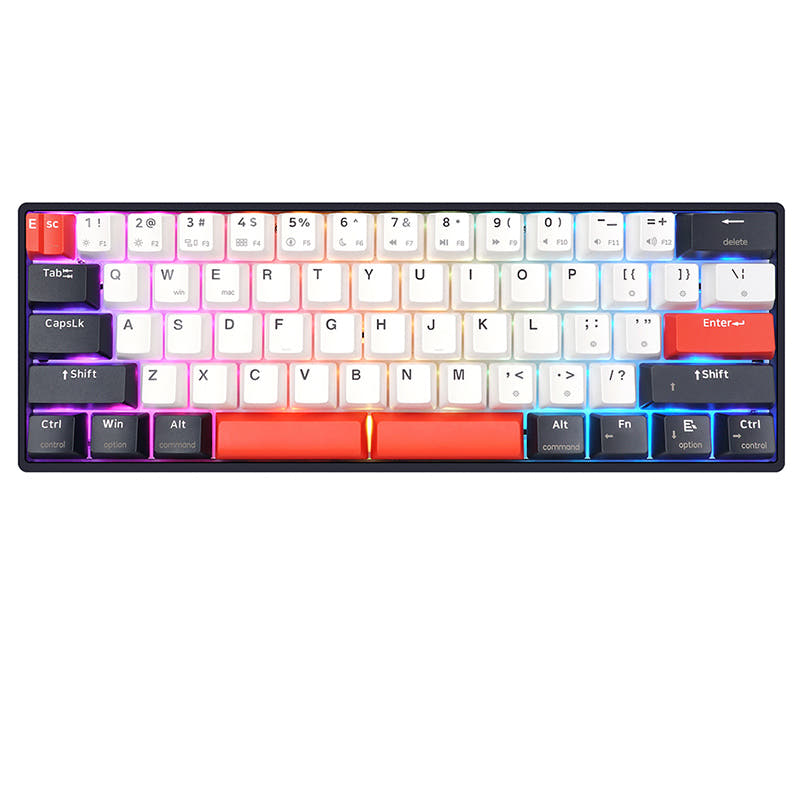
Which one should you get?
Get the
Skyloong GK61 Pro
N-key rollover
- Features 16.8 million RGB with north-facing LEDs for customizable lighting.
- Includes sound dampening with a silicone sandwich pad and switch pads.
- Equipped with a hot-swappable, programmable knob for added functionality.
- Command a higher price than the standard GK61 QMK/VIA.
- QMK and VIA support is noted to be for the wired version only, limiting firmware customization when using wireless modes.
Get the
Skyloong GK61 QMK/VIA
- Typically priced lower than the GK61 Pro, making it a more budget-friendly option.
- Supports QMK and VIA firmware for full remapping and macro support.
- Offers a selection of switches including a lightweight linear (Pink) and a tactile (Blue) option.
- Does not have any RGB lighting, which may be a deal-breaker for some users.
- No sound dampening or specific padding mentioned in the specifications.
- Is listed as sold out in the vendor description, indicating availability issues.
For most users, the Skyloong GK61 Pro is the better investment due to its RGB, larger battery, gasket mount, and sound dampening. The only reason to choose the standard GK61 QMK/VIA is if its lower price is your top priority and you are willing to forgo lighting and advanced sound dampening features. If you plan to use QMK/VIA primarily over a wired connection and value a feature-rich keyboard, the Pro is the clear choice.
The differences that matter
Skip the 40-row spec sheet. These are the specs that change how each board feels, sounds, and fits your desk.
Skyloong GK61 Pro
Skyloong GK61 QMK/VIA
Ergonomics
Standard
Split Spacebar
Case material
ABS, Aluminum
Aluminum
Switch options
Linear
Clicky, Linear, Tactile
Backlight
RGB, north-facing
None
N-key rollover
Yes
No
- Skyloong GK61 Pro
- Skyloong GK61 QMK/VIA
- Performance
- 7852
- Build quality
- 7778
- Productivity
- 6981
- Customizability
- 8884
- Portability
- 8487
- Layout size: 60%
- Connection: Bluetooth, 2.4 GHz, Wired
- Hot-swappable
- Knob
- QMK
- VIA
What will you mostly use it for?
The Skyloong GK61 Pro wins in five of six categories, largely due to its RGB lighting, larger battery, gasket mount, and sound dampening. It is a stronger choice for gaming, office work, modding, content creation, and travel. The two keyboards tie only for programming, as both offer the same QMK/VIA firmware, hot-swap sockets, and compact layout which are the key requirements for that use case.
Pick the Skyloong GK61 Pro
- The GK61 Pro supports N-Key Rollover, which is a spec important for gaming.
- The GK61 Pro offers 16.8 million RGB lighting, which some gamers prefer.
- The vendor suggests Gateron G Pro 3.0 Red and Yellow linear switches on the Pro are suitable for gaming.
Skyloong GK61 Pro vs GK61 QMK/VIA specs
Every tracked spec, side by side. Rows marked with a dot differ between the boards.
7 of 20 specs differ
Skyloong GK61 Pro
Skyloong GK61 QMK/VIA
Switch options
Hot-swappable
Layout size
Layout standard
Ergonomics
Knob
Display
Connection
Battery
USB-C
Case material
Keycaps
Weight
Dimensions
Backlight
QMK
VIA
N-key rollover
Mac & Windows
Released
Compare prices
Live prices from the stores we track, cheapest in-stock offer first.



Prices in USD are converted to your currency and can change at any time. KeebFinder may earn a commission when you buy through these links, at no extra cost to you.
Skyloong GK61 Pro vs GK61 QMK/VIA: your questions
The main differences are that the GK61 Pro features 16.8 million RGB lighting, sound dampening, a larger 4000mAh battery, and a programmable knob, while the standard GK61 QMK/VIA has no RGB and lacks these specific features. Both are hot-swappable, 60% wireless keyboards with QMK/VIA support.
The vendor description for the GK61 Pro specifies that QMK and VIA support is for the wired version. It also mentions Skyloong software for the USB and tri-mode connection, so full firmware customization over wireless may not be available.
The GK61 Pro is generally better for modding because it already comes with a gasket mount, a silicone sandwich pad, and switch pads for sound dampening. This provides a more advanced starting platform compared to the standard GK61, of which the mounting details are not specified.
Both keyboards are hot-swappable. The GK61 Pro supports 3-pin and 5-pin switches like Cherry, Gateron, and Kailh. The standard GK61 QMK/VIA comes with Skyloong's own switches (Rose Pink, Silver, Blue), but being hot-swappable, it likely supports a wide range as well, though the specific pin support is not detailed in the provided text.
The GK61 Pro is worth the extra cost if you want features like RGB lighting, a larger battery, and sound dampening. If your budget is tight and you don't need these extras, the standard GK61 QMK/VIA is a functional and capable alternative.
No, the provided metadata for the standard Skyloong GK61 QMK/VIA lists 'RGB: No', indicating it does not have any RGB lighting. It is a non-backlit keyboard.
The Skyloong GK61 Pro has a stated battery capacity of 4000mAh. The battery capacity for the standard GK61 QMK/VIA is not mentioned in the provided data, but given the Pro's larger size and specific mention of a big battery, it is likely the Pro has better battery life.
Both keyboards have the same weight of 700g and a similar 60% layout, making them equally portable in size. The GK61 Pro has a higher portability score and a much larger battery, which improves its practicality for travel.
Yes, both the Skyloong GK61 Pro and the standard GK61 QMK/VIA are listed as having 'Mac/Win Support' in their extra features, meaning they are compatible with both operating systems out of the box.
The GK61 Pro comes with double-shot PBT keycaps, which are described as being made from high-quality PBT material and built to last. The standard GK61 QMK/VIA comes with spare keycaps in the package, but the material is not specified.
Not sold on either?





Still torn?
Answer a few quick questions and the keyboard finder ranks 2,000+ boards by how you will actually use yours.