Nuphy NuPhyX BH65 Keyboard vs Keychron J2Gaming Latency vs Wireless Flexibility
Choose the Nuphy BH65 HE for competitive gaming with its ultra-low latency and Hall Effect switches, or the Keychron J2 for versatile wireless connectivity and deep software customization.
KeebFinder may earn a commission when you buy through these links, at no extra cost to you.
No reviews
from$139at Nuphy

4.4 (22)4.4 · 22 reviews
from$59at Keychron
Which one should you get?
Get the
Nuphy NuPhyX BH65 Keyboard
Gaming Latency
Build quality in the top 45% of 65% boards under $150.
- Ultra-low latency performance with an 8000 Hz polling rate and 0.125ms delay.
- Hall Effect magnetic switches with adjustable actuation points and Rapid Trigger functionality.
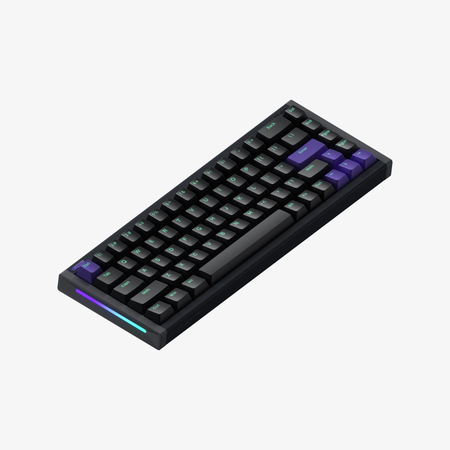
- Sturdy all-aluminum CNC body with a 220 mesh finish for a premium feel and desk stability.
- Magnetic switches only. Standard MX switches will not fit.
- North-facing LEDs. Cherry-profile keycaps can hit the switch housing.
- 65% layout. No function row and no numpad.
Get the
Keychron J2
Wireless Flexibility
Build quality in the top 40% of 75% boards under $100.
- Tri-mode connectivity with Bluetooth 5.2, 2.4 GHz wireless, and wired operation.
- Extensive software support via open-source QMK firmware and the Keychron Launcher/VIA.
- Includes multiple layers of sound-dampening foam (IXPE, PET, EPDM) for a better acoustic experience.
- No numpad.
Your primary need dictates the choice. For competitive gaming where every millisecond counts, the Nuphy BH65 HE's Hall Effect switches and ultra-low latency are unmatched. For a versatile daily keyboard that excels at productivity, supports wireless use, and offers deep customization through QMK/VIA, the Keychron J2 is the more flexible and cost-effective option.
The differences that matter
Skip the 40-row spec sheet. These are the specs that change how each board feels, sounds, and fits your desk.
Nuphy NuPhyX BH65 Keyboard
Keychron J2
Layout size
65%
75%
Hall effect (magnetic)
Yes
No
Adjustable actuation helps in games and not in normal typing
Rapid trigger
Yes
No
Faster resets help in games and not in normal typing
Connection
Wired
Bluetooth, 2.4 GHz, Wired
Wireless for several devices and wired for lower latency
Max polling rate
8,000 Hz
1,000 Hz
Higher polling helps competitive FPS and does nothing for typing
- Nuphy NuPhyX BH65 Keyboard
- Keychron J2
- Performance
- 9670
- Build quality
- 6671
- Productivity
- 6973
- Customizability
- 6186
- Portability
- 7373
- Hot-swappable
- Sound dampening
- Keycaps: PBT
What will you mostly use it for?
The Nuphy BH65 HE is the clear choice for dedicated gaming due to its high-performance specs. The Keychron J2 wins for office use, programming, and travel because of its wireless options and more functional layout. For modding, the J2's QMK/VIA support gives it an edge, while content creators might value either the J2's RGB or the BH65's precision equally.
Pick the Nuphy NuPhyX BH65 Keyboard
- The Nuphy BH65 HE has an 8000 Hz polling rate and a listed ultra-low latency of 0.125ms.
- Its Hall Effect magnetic switches support adjustable Rapid Trigger and other gaming-specific features via its software.
- The vendor description highlights a 16000 Hz full-keyboard scanning frequency for professional esports.
Nuphy NuPhyX BH65 Keyboard vs Keychron J2 specs
Every tracked spec, side by side. Rows marked with a dot differ between the boards.
14 of 27 specs differ
Nuphy NuPhyX BH65 Keyboard
Keychron J2
Switch options
Hall effect (magnetic)
Rapid trigger
Hot-swappable
Mount style
Sound dampening
Layout size
Layout standard
Ergonomics
Display
Media keys
Connection
Max polling rate
Battery
USB-C
Case material
Plate material
Keycaps
Weight
Dimensions
Typing angle
Backlight
QMK
VIA
N-key rollover
Mac & Windows
Released
Compare prices
Live prices from the stores we track, cheapest in-stock offer first.
Prices in USD are converted to your currency and can change at any time. KeebFinder may earn a commission when you buy through these links, at no extra cost to you.
Lowest price across stores, Amazon excluded.



Nuphy NuPhyX BH65 Keyboard vs Keychron J2: your questions
The Nuphy BH65 HE is designed for competitive gaming. It features an 8000 Hz polling rate, Hall Effect magnetic switches with a 0.125ms latency, and software-adjustable Rapid Trigger. These specs, highlighted in its product listing, are aimed at minimizing input delay for esports.
Yes. The Keychron J2 supports Bluetooth 5.2, which can connect to three devices, in addition to a 2.4 GHz wireless mode and a wired USB connection. This makes it easy to switch between a computer, tablet, and phone.
No. The Nuphy BH65 HE is a wired-only keyboard. The manufacturer states this design choice was made to ensure the ultra-low latency and stability required for its magnetic switch technology.
The Keychron J2 has broader firmware support for customization. It works with the open-source QMK firmware and VIA/Keychron Launcher software, allowing for deep key remapping and macro programming. The Nuphy BH65 HE uses its proprietary NuPhy.IO software for customization.
The Nuphy BH65 HE uses proprietary Hall Effect magnetic switches, which allow for adjustable actuation points. The Keychron J2 uses standard mechanical switches (Linear, Tactile, or Clicky variants like Keychron Super Red/Brown/Banana) in a hot-swappable format.
Yes, both keyboards are hot-swappable. The Nuphy BH65 HE supports its magnetic switches. The Keychron J2's hot-swappable version supports almost all 3-pin and 5-pin MX-style mechanical switches from brands like Cherry, Gateron, and Kailh.
The Keychron J2 has RGB backlighting with per-key and zone customization, plus a static white option. The Nuphy BH65 HE does not have RGB lighting; it uses top-emitting LEDs, and its vendor page lists backlight modes but does not specify RGB.
The Nuphy BH65 HE features an all-aluminum CNC body, giving it a substantial, premium feel at 1103g. The Keychron J2's case material is not specified as aluminum in the provided specs, but it includes multiple internal foam layers for sound dampening.
The Keychron J2 is more travel-friendly. It is wireless with a battery, has a receiver storage slot, and its exact weight isn't provided but is likely lower than the BH65 HE's 1103g aluminum build. The BH65 HE is heavy and requires a wired connection.
Both keyboards support Mac and Windows. The Nuphy BH65 HE listing explicitly includes Mac/Win support. The Keychron J2 is typically compatible with both, though the specific listing does not state it, Keychron keyboards are generally known for dual OS support.
Rapid Trigger is a feature that allows a key to be re-triggered without being fully released, enabling faster keystrokes. It is a software feature of the Nuphy BH65 HE's Hall Effect switches, adjustable down to 0.01mm sensitivity via its driver.
The Keychron J2 vendor description mentions multiple layers of acoustic foam, including IXPE, PET, and EPDM. The Nuphy BH65 HE description mentions a 'Floating Shock Absorption Structure' to reduce resonance but does not list specific foam types.
Not sold on either?


Still torn?
Answer a few quick questions and the keyboard finder ranks 2,000+ boards by how you will actually use yours.