Nuphy NuPhyX BH65 Keyboard vs Air75 HEFull-Size vs Low-Profile Hall Effect
Choose the Nuphy BH65 HE for a heavier, full-size aluminum build, or the Air75 HE for a slimmer, lighter low-profile form factor.
KeebFinder may earn a commission when you buy through these links, at no extra cost to you.
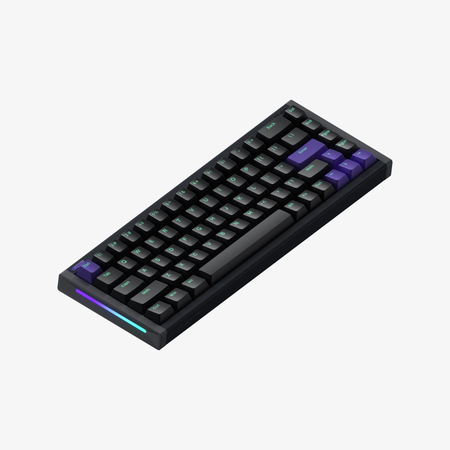
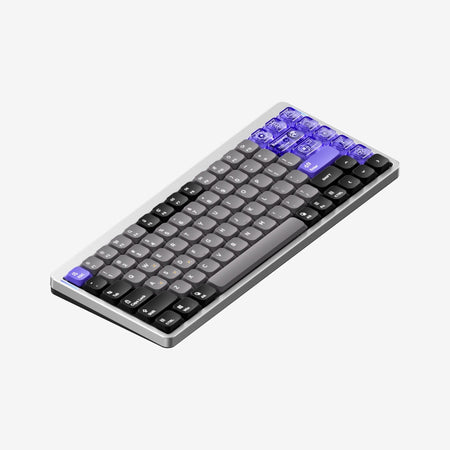
Which one should you get?
Get the
Nuphy NuPhyX BH65 Keyboard
Full-Size
Build quality in the top 45% of 65% boards under $150.
- All-aluminum CNC body provides substantial weight and a premium feel.
- Hot-swappable switch sockets allow for easy switch replacement.
- Open-source 3D printing files are available for custom shell accessories.
- Magnetic switches only. Standard MX switches will not fit.
- North-facing LEDs. Cherry-profile keycaps can hit the switch housing.
- 65% layout. No function row and no numpad.
Get the
Nuphy Air75 HE
Low-Profile Hall Effect
Build quality in the bottom 45% of 75% boards under $150.
- Low-profile design with a thin 18.4mm back height and 3° typing angle.
- 75% layout includes arrow keys and function column in a compact form.
- Includes sound dampening foam and silicone for a cleaner typing sound.
- Magnetic switches only. Standard MX switches will not fit.
- Low-profile switches and keycaps only. Standard MX keycaps will not fit.
- South-facing LEDs. Shine-through legends stay dark, and some sculpted keycaps can clip the LED.
- No numpad.
Your choice hinges on form factor and build. If you prefer a solid, heavy keyboard with a full-size key feel and modding potential, the Nuphy BH65 HE is the clear pick. If you want a sleeker, lighter, and more portable keyboard with a full set of navigation keys and RGB, the Nuphy Air75 HE is the better option. Both deliver top-tier gaming performance.
The differences that matter
Skip the 40-row spec sheet. These are the specs that change how each board feels, sounds, and fits your desk.
Nuphy NuPhyX BH65 Keyboard
Nuphy Air75 HE
Layout size
65%
75%
Low profile
No
Yes
Case material
Aluminum
Aluminum, Plastic
Mount style
Tray Mount
Plate Mount
Weight
1,103 g
702 g
Heavier boards stay planted and lighter ones travel
- Nuphy NuPhyX BH65 Keyboard
- Nuphy Air75 HE
- Performance
- 9698
- Build quality
- 6663
- Productivity
- 6976
- Customizability
- 6168
- Portability
- 7365
- Hall effect (magnetic)
- Rapid trigger
- Connection: Wired
- Hot-swappable
- Max polling rate: 8,000 Hz
- Switch options: Magnetic
What will you mostly use it for?
The Air75 HE wins for office, programming, and travel use due to its more complete key layout, lighter weight, and low-profile design. For modding, the BH65 HE has an edge with its hot-swappable design and open-source accessory files. Gaming and content creation are a tie, as both keyboards deliver identical high-performance Hall Effect features, leaving the decision to personal ergonomic preference.
It's a tie
- Both feature an 8000Hz polling rate and Hall Effect magnetic switches for low latency.
- Both support advanced gaming features like Rapid Trigger and Hyper Tap via the NuPhy.IO software.
- The BH65 HE has a heavier all-aluminum body for stability, while the Air75 HE offers a low-profile design for a different hand position.
Nuphy NuPhyX BH65 Keyboard vs Air75 HE specs
Every tracked spec, side by side. Rows marked with a dot differ between the boards.
11 of 25 specs differ
Nuphy NuPhyX BH65 Keyboard
Nuphy Air75 HE
Switch options
Hall effect (magnetic)
Rapid trigger
Hot-swappable
Mount style
Low profile
Sound dampening
Layout size
Layout standard
Ergonomics
Display
Media keys
Connection
Max polling rate
USB-C
Case material
Plate material
Keycaps
Weight
Dimensions
Typing angle
Backlight
N-key rollover
Mac & Windows
Released
Compare prices
Live prices from the stores we track, cheapest in-stock offer first.
Prices in USD are converted to your currency and can change at any time. KeebFinder may earn a commission when you buy through these links, at no extra cost to you.
Lowest price across stores, Amazon excluded.


Nuphy NuPhyX BH65 Keyboard vs Air75 HE: your questions
The Nuphy BH65 HE is listed with a hot-swappable feature in its metadata. The Air75 HE's specifications do not list hot-swappable as a feature, suggesting its switches may not be designed for user replacement.
This depends on your preference. The Air75 HE has a low-profile design with sound dampening materials, which may suit faster, lighter typing. The BH65 HE has a standard profile with a heavier, all-aluminum build that provides a different tactile experience. The Air75 HE's 75% layout also includes more immediate access keys.
No. According to the specifications for both the Nuphy BH65 HE and Air75 HE, connectivity is listed as 'Wired only'.
Both keyboards have an 8000 Hz polling rate according to their technical specifications. The vendor pages confirm a 'true 8kHz polling rate' for the Air75 HE and an '8kHz USB Polling Rate' for the BH65 HE.
Yes. The vendor descriptions for both models mention adjustable actuation. The Air75 HE page specifies an actuation range from 0.1mm to 3.3mm. The BH65 HE page mentions a maximum scale of 0.01mm for key height precision adjustment.
Both keyboards use the NuPhy.IO web-based driver for customization. According to the vendor pages, this software allows for adjusting RGB lighting, programming macros, and setting advanced features like Rapid Trigger.
The Nuphy BH65 HE is significantly heavier. It weighs 1103 grams, while the Air75 HE weighs 702 grams. This is due to the BH65 HE's all-aluminum body construction.
Yes. According to its 'In the Box' list, the Air75 HE includes 5 extra PBT keycaps and 9 extra PC keycaps in addition to the pre-installed set.
The Nuphy BH65 HE uses PBT keycaps, as listed in its materials specification. Its vendor description does not mention included shine-through or transparent keycaps.
The Nuphy Air75 HE has a typing angle of 3.0 degrees, according to its specifications. Its vendor page also lists adjustable feet for 7.0 and 10.0 degree angles.
Yes. Both the Nuphy BH65 HE and Air75 HE list Mac and Windows support in their extra features. Their vendor pages also mention compatibility with Linux, Android, and iOS.
Not sold on either?


Still torn?
Answer a few quick questions and the keyboard finder ranks 2,000+ boards by how you will actually use yours.