KEEBD Contra vs Zerodate K61Kit or Hall Effect
Get the KEEBD Contra for its DIY kit and tactile switches, or choose the Zerodate K61 for its pre-built Hall Effect design, hot-swap support, and RGB lighting.
KeebFinder may earn a commission when you buy through these links, at no extra cost to you.


Which one should you get?
Get the
KEEBD Contra
Build quality in the bottom 5% of 40% boards under $150.
- DIY kit includes an FR4 switch plate and acrylic bottom plate.
- Tactile switches are listed for the board.
- Switches are soldered. Swapping them means soldering.
- Compact layout only. No function row, dedicated arrow keys, or numpad.
Get the
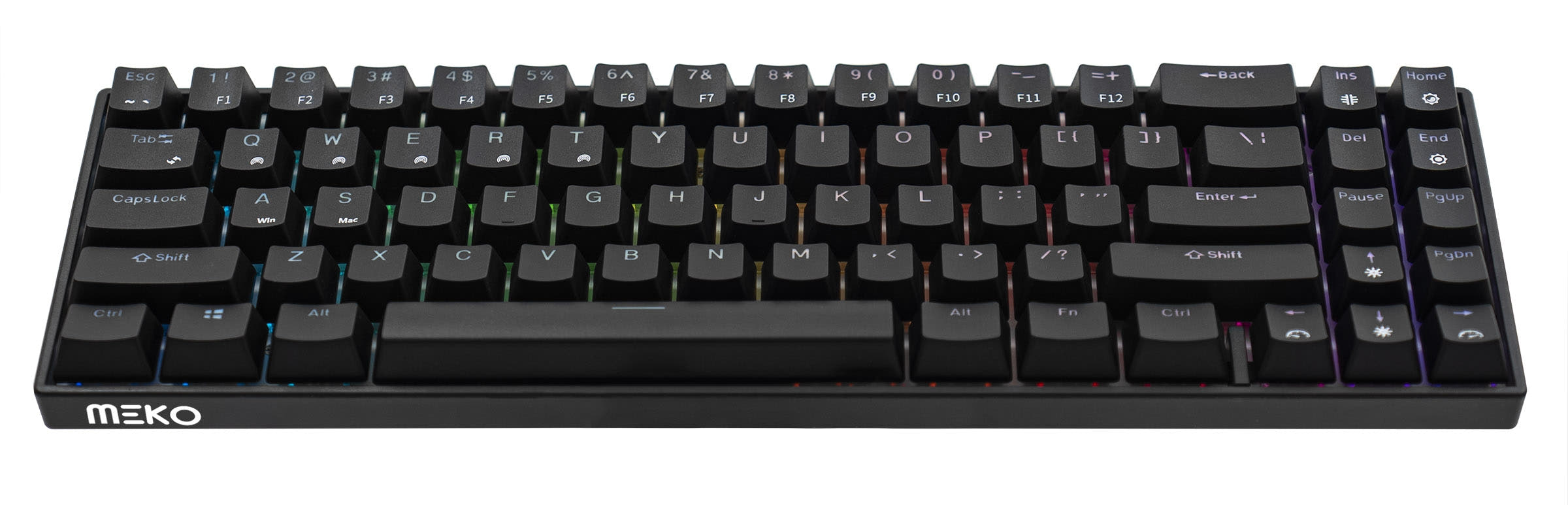
Zerodate K61
Hall effect
Build quality in the top 20% of 60% boards under $50.
- Hall Effect magnetic switches with hot-swap support.
- QMK and VIA support, plus N-Key Rollover.
- RGB lighting and a listed weight of 480g.
- Magnetic switches only. Standard MX switches will not fit.
- Compact layout only. No function row, dedicated arrow keys, or numpad.
Choose the KEEBD Contra if you want a tactile-switch DIY kit with an FR4 plate and acrylic bottom plate. Choose the Zerodate K61 if you want a pre-built Hall Effect keyboard with hot-swappable magnetic switches, RGB, and QMK and VIA support.
The differences that matter
Skip the 40-row spec sheet. These are the specs that change how each board feels, sounds, and fits your desk.
KEEBD Contra
Zerodate K61
Layout size
40%
60%
Hall effect (magnetic)
No
Yes
Adjustable actuation helps in games and not in normal typing
Hot-swappable
No
Yes
Switch changes without soldering
Case material
Acrylic, Plastic
ABS
Switch options
Tactile
Linear, Magnetic
- KEEBD Contra
- Zerodate K61
- Performance
- 5584
- Build quality
- 4174
- Productivity
- 4866
- Customizability
- 5286
- Portability
- 6066
What will you mostly use it for?
The K61 leads in most listed use cases because it arrives pre-built and combines Hall Effect switches, RGB, hot-swap support, and QMK and VIA support. Its 60% layout also provides a little more room than the Contra's 40% layout, while neither board has dedicated arrow keys, a function row, or a numpad. The Contra is the more direct fit for someone who specifically wants a kit to assemble and tactile switches. For travel, the K61's listed weight and dimensions offer concrete reference points.
Pick the Zerodate K61
- Hall Effect magnetic switches are listed for the K61.
- The K61 includes N-Key Rollover and RGB lighting.
KEEBD Contra vs Zerodate K61 specs
Every tracked spec, side by side. Rows marked with a dot differ between the boards.
11 of 19 specs differ
KEEBD Contra
Zerodate K61
Switch options
Hall effect (magnetic)
Hot-swappable
Screw-in stabilizers
Layout size
Layout standard
Ergonomics
Display
Connection
Case material
Plate material
Keycaps
Weight
Dimensions
Backlight
QMK
VIA
N-key rollover
Released
Compare prices
Live prices from the stores we track, cheapest in-stock offer first.
Prices in USD are converted to your currency and can change at any time. KeebFinder may earn a commission when you buy through these links, at no extra cost to you.
- Check on Amazon
Amazon
Check price


- Check on Amazon
Amazon
Check price

KEEBD Contra vs Zerodate K61: your questions
The Zerodate K61 is the more gaming-oriented pick based on its listed Hall Effect magnetic switches, N-Key Rollover, and RGB lighting. The Contra instead offers tactile switches in a DIY kit.
Yes, the K61 is listed as hot-swappable and uses magnetic switches. Its compatibility rule specifies that standard MX switches will not fit.
The Contra's switches are soldered, so replacing them requires soldering. Its vendor description lists MX switches as required for completion, but the product metadata specifies soldered switch sockets.
No, it is listed as a DIY kit or barebones board. The vendor describes kit components including an FR4 switch plate and an acrylic bottom plate.
Yes, QMK support and VIA support are listed for the K61. The Contra's listed extra features do not include either one.
The Zerodate K61 is listed with RGB lighting. The KEEBD Contra is listed without RGB.
The Contra is a 40% keyboard, while the K61 is a 60% keyboard. Both have compact layouts without a function row, dedicated arrow keys, or a numpad.
No, the K61 is specified for magnetic switches, and standard MX switches will not fit. Its hot-swap support is for its magnetic switch type.
The K61 is listed at 480g and measures 40 x 290 x 101 mm, which gives buyers concrete size and weight figures to consider. It is wired-only, so it is not a wireless option.
The K61 has listed QMK and VIA support, and its 60% layout is larger than the Contra's 40% layout. Neither board includes dedicated arrow keys, a function row, or a numpad.
Yes, tactile switches are listed for the Contra. The K61 is listed with linear magnetic switches, so the switch types differ.
Choose the Contra if you want a DIY kit with an FR4 switch plate and acrylic bottom plate, and are comfortable with soldered switches. Choose the K61 for hot-swappable magnetic switches and its listed QMK and VIA support.
Not sold on either?


Still torn?
Answer a few quick questions and the keyboard finder ranks 2,000+ boards by how you will actually use yours.