Createkeebs LuminKey80 WK vs Jamesdonkey R4TKL vs 75% Wireless Keyboard
Choose the LuminKey80 for a larger layout and VIA support, or the R4 for a more compact size with RGB lighting.
KeebFinder may earn a commission when you buy through these links, at no extra cost to you.


Which one should you get?
Get the
Createkeebs LuminKey80 WK
TKL
Build quality in the top 20% of 80% boards under $200.
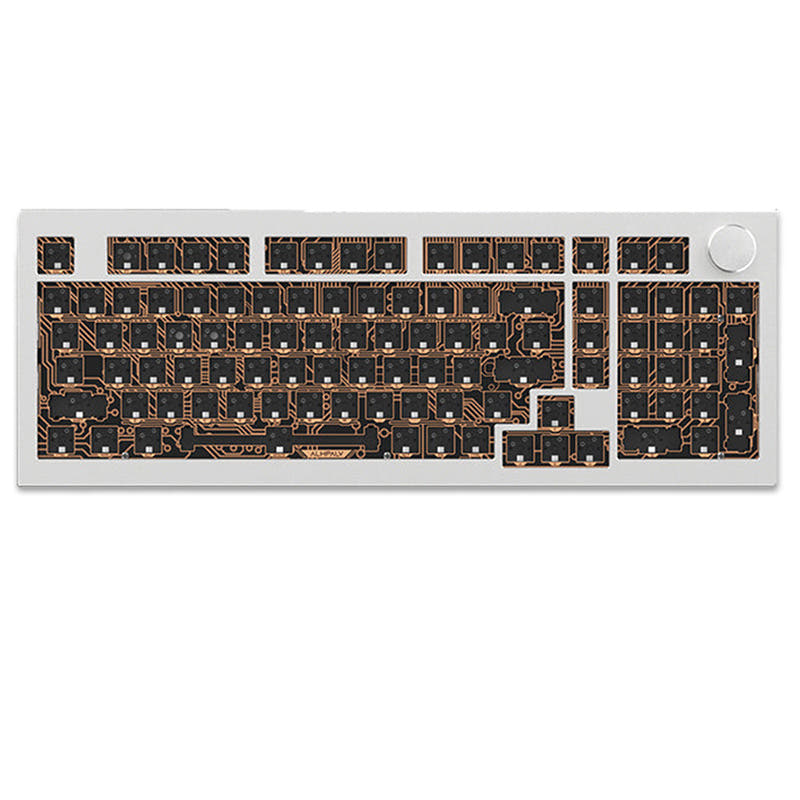
- Supports both ANSI and ISO physical layouts.
- Offers firmware customization via both QMK and VIA.
- Includes a detailed accessory kit with foam, stabilizers, and an aluminum artisan keycap in the barebones version.
- No numpad.
Get the
Jamesdonkey R4
75% Wireless Keyboard
Build quality in the top 50% of 75% boards under $200.
- More compact 75% layout saves desk space.
- Features south-facing RGB backlighting and a chassis RGB light strip.
- Includes a dedicated multimedia volume knob.
- South-facing LEDs. Shine-through legends stay dark, and some sculpted keycaps can clip the LED.
- No ISO layout. ISO-DE, UK, and other ISO variants are not offered.
- No numpad.
Your priority should dictate the choice. If you value a larger layout, maximum firmware customization with VIA, and no need for RGB, the Createkeebs LuminKey80 is the clear pick. If you prefer a smaller footprint, vibrant RGB lighting, and a volume knob, the Jamesdonkey R4 is the better option, assuming its QMK-based software meets your needs.
The differences that matter
Skip the 40-row spec sheet. These are the specs that change how each board feels, sounds, and fits your desk.
Createkeebs LuminKey80 WK
Jamesdonkey R4
Layout size
80%
75%
Battery
4,400 mAh
4,000 mAh
A larger battery means fewer cables during the day
Mount style
Plate Mount
Gasket Mount
Knob
No
Yes
VIA
Yes
No
GUI remapping without compiling firmware
- Createkeebs LuminKey80 WK
- Jamesdonkey R4
- Performance
- 5454
- Build quality
- 7667
- Productivity
- 8263
- Customizability
- 8479
- Portability
- 7777
- Connection: Bluetooth, 2.4 GHz, Wired
- Hot-swappable
- Case material: Aluminum
- QMK
What will you mostly use it for?
The LuminKey80 wins for office use and programming due to its TKL layout and superior firmware support with VIA. The Jamesdonkey R4 is better for travel and content creation, thanks to its smaller 75% form factor and built-in RGB lighting with a knob. For gaming and modding, the boards are closely matched, with the LuminKey80 having a slight edge for modders due to its documented accessory kit.
It's a tie
- Both offer tri-mode wireless connectivity with 2.4 GHz for low latency.
- Both feature aluminum cases for a stable typing platform.
- The R4 vendor page mentions a 2ms response time, while the LuminKey80's latency performance is not specifically detailed.
Createkeebs LuminKey80 WK vs Jamesdonkey R4 specs
Every tracked spec, side by side. Rows marked with a dot differ between the boards.
9 of 23 specs differ
Createkeebs LuminKey80 WK
Jamesdonkey R4
Switch options
Hot-swappable
Mount style
Layout size
Layout standard
Ergonomics
Knob
Display
Media keys
Connection
Battery
USB-C
Case material
Plate material
Keycaps
Weight
Dimensions
Typing angle
Backlight
QMK
VIA
Mac & Windows
Released
ISO layouts by store
Which stores sell ISO-DE, UK, and the other regional layouts.
Createkeebs LuminKey80 WK
Listed on the product, not split by store: ISO.
Jamesdonkey R4
No ISO layout at the stores we track.
Compare prices
Live prices from the stores we track, cheapest in-stock offer first.
Prices in USD are converted to your currency and can change at any time. KeebFinder may earn a commission when you buy through these links, at no extra cost to you.
Lowest price across stores, Amazon excluded.


- Check on Amazon
Amazon
Check price

Createkeebs LuminKey80 WK vs Jamesdonkey R4: your questions
The Jamesdonkey R4 is smaller. It uses a 75% layout, while the Createkeebs LuminKey80 is an 80% (TKL) keyboard. The R4's dimensions are listed as 329mm x 150mm x 45mm.
No, the Createkeebs LuminKey80 does not have RGB lighting according to its specifications. The Jamesdonkey R4 does feature south-facing RGB backlighting and an RGB light strip.
Yes, both keyboards support key remapping via QMK firmware. The Createkeebs LuminKey80 also supports VIA, which allows for real-time graphical configuration without flashing firmware.
The pre-built version of the Createkeebs LuminKey80 comes with Createkeebs x Gateron Sylva linear switches, as stated in the vendor description.
The Jamesdonkey R4 includes a multimedia volume knob. The Createkeebs LuminKey80 does not mention having a knob in its features.
Yes, both the Createkeebs LuminKey80 and the Jamesdonkey R4 have hot-swappable PCBs, allowing you to change switches without soldering.
Both keyboards utilize a gasket mount design. The Jamesdonkey R4 vendor page additionally states it can be configured for a top-mounted structure.
The Jamesdonkey R4 comes with dual-tone injection-molded PBT keycaps, as per the manufacturer's description.
The Createkeebs LuminKey80 vendor description explicitly lists Mac compatibility. Mac compatibility for the Jamesdonkey R4 is not explicitly stated in the provided information.
According to the vendor, the barebones kit includes the aluminum case, copper weight and badge, hotswap PCB, USB-C daughter board, two 2200mAh batteries, polycarbonate plate, Gateron stabilizers, a foam kit, an aluminum artisan keycap, and necessary tools.
The Createkeebs LuminKey80 has a slightly larger 4400mAh battery. The Jamesdonkey R4 has a 4000mAh battery.
Not sold on either?



Still torn?
Answer a few quick questions and the keyboard finder ranks 2,000+ boards by how you will actually use yours.