DOIO KB64G 01 vs Qwertykeys QK65 V2 ClassicWired Macro Kit vs Wireless 65%
Choose the DOIO KB64G01 for extensive macro controls and a wired-only setup, or the QK65 V2 Classic for wireless flexibility and a more traditional 65% layout.
KeebFinder may earn a commission when you buy through these links, at no extra cost to you.

Which one should you get?
Get the
DOIO KB64G 01
Wired Macro Kit
Build quality in the top 10% of 60% boards under $200.
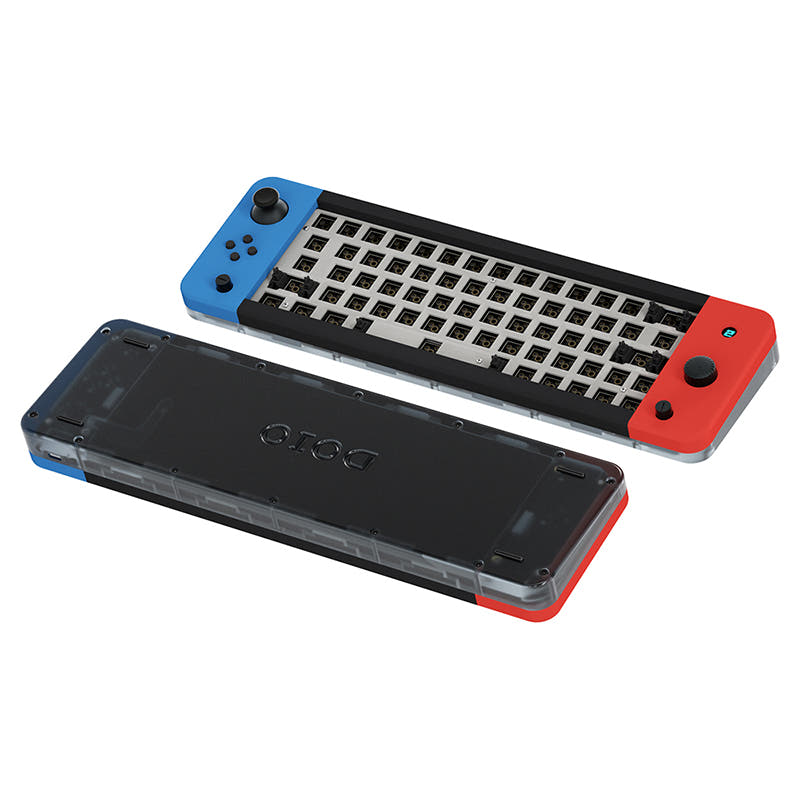
- Unique control set with three CNC aluminum knobs, a joystick, and four small buttons.
- Integrated OLED screen for displaying layer or system information.
- Extensive programmability via VIA and QMK support with four function layers.
- Compact layout only. No function row, dedicated arrow keys, or numpad.
Get the
Qwertykeys QK65 V2 Classic
Wireless 65%
Build quality in the top 30% of 65% boards under $200.
- Versatile tri-mode connectivity with Bluetooth, 2.4Ghz, and wired USB.
- Includes two 2200mAh batteries for wireless use.
- Comes with a comprehensive accessory kit including stabilizers, tools, a coiled cable, and a protective case.
- 65% layout. No function row and no numpad.
Your primary need dictates the choice. If you want a highly specialized, wired command center for gaming or creative work with unparalleled macro control, the DOIO KB64G01 is the clear pick. If you need a versatile, wireless-ready daily driver with a more traditional layout and excellent out-of-the-box accessories, the Qwertykeys QK65 V2 Classic is the better option.
The differences that matter
Skip the 40-row spec sheet. These are the specs that change how each board feels, sounds, and fits your desk.
DOIO KB64G 01
Qwertykeys QK65 V2 Classic
Layout size
60%
65%
Connection
Wired
Bluetooth, 2.4 GHz, Wired
Wireless for several devices and wired for lower latency
Knob
Yes
No
Display
OLED
None
A case display rather than a typing feature
QMK
Yes
No
The deep option when you want to remap every key
- DOIO KB64G 01
- Qwertykeys QK65 V2 Classic
- Performance
- 6847
- Build quality
- 8773
- Productivity
- 8960
- Customizability
- 9671
- Portability
- 7483
- Hot-swappable
- Mount style: Gasket Mount
- VIA
- Sound dampening
- Plate material: Polycarbonate
What will you mostly use it for?
The DOIO KB64G01 wins in scenarios demanding high customizability and direct control, such as gaming, programming, and content creation, thanks to its unique macro inputs. The Qwertykeys QK65 V2 Classic is better suited for mobile and office use where wireless connectivity and a more standard layout are key advantages. For modding, the DOIO offers more distinctive components to work with.
Pick the DOIO KB64G 01
- The DOIO KB64G01 includes three programmable aluminum knobs and a joystick for direct macro control.
- Its vendor description is explicitly marketed as a 'game-enhanced' kit for a customized gaming experience.
- It features RGB backlighting, which the QK65 V2 Classic lacks.
DOIO KB64G 01 vs Qwertykeys QK65 V2 Classic specs
Every tracked spec, side by side. Rows marked with a dot differ between the boards.
9 of 20 specs differ
DOIO KB64G 01
Qwertykeys QK65 V2 Classic
Hot-swappable
Mount style
Sound dampening
Layout size
Layout standard
Ergonomics
Knob
Display
Connection
Battery
USB-C
Case material
Plate material
Weight
Dimensions
Backlight
QMK
VIA
Mac & Windows
Released
Compare prices
Live prices from the stores we track, cheapest in-stock offer first.
Prices in USD are converted to your currency and can change at any time. KeebFinder may earn a commission when you buy through these links, at no extra cost to you.
Lowest price across stores, Amazon excluded.


- Check on Amazon
Amazon
Check price

DOIO KB64G 01 vs Qwertykeys QK65 V2 Classic: your questions
Only the Qwertykeys QK65 V2 Classic offers wireless connectivity. It supports Bluetooth and 2.4Ghz modes in addition to a wired USB connection. The DOIO KB64G01 is a wired-only keyboard that connects via USB-C.
No. The product specifications and vendor description for the QK65 V2 Classic list no RGB lighting. The DOIO KB64G01, however, does include RGB backlighting.
According to the vendor page, the QK65 V2 Classic kit includes the case, PCB, polycarbonate plate, foam, stabilizers, two 2200mAh batteries, a 2.4Ghz dongle, and several accessories. The accessories are a protective case, screwdriver, switch puller, keycap puller, and a coiled USB-C cable.
Yes. The DOIO KB64G01 is fully programmable using VIA software, and its vendor description states the three-knob macro pad is for creating macros and tweaking settings. It also supports QMK firmware for advanced customization.
The QK65 V2 Classic may be slightly more approachable. Its vendor description highlights a simplified assembly process with magnetic connectors and clips, and it comes with all necessary tools. The DOIO has more complex components like an OLED screen and multiple knobs to install.
Yes, both the DOIO KB64G01 and the Qwertykeys QK65 V2 Classic feature hot-swappable PCBs. This allows you to change mechanical switches without soldering.
The manufacturer states the integrated OLED screen is used to accurately gauge layer status. This helps users see which of the four programmable function layers is currently active.
The DOIO KB64G01 uses two layers of Poron foam for sound absorption, a Poron bottom foam, and a sandwich foam. The QK65 V2 Classic includes an upgraded Poron case foam set and additional PE sheet and PCB foam.
The Qwertykeys QK65 V2 Classic, as a 65% layout, includes dedicated arrow keys. The DOIO KB64G01 is a 60% layout and does not have dedicated arrow keys; they must be accessed via a function layer.
The DOIO KB64G01 case is confirmed to be made of 6063 anodized aluminum with a CNC translucent acrylic base. The vendor description for the QK65 V2 Classic does not explicitly state its case material.
The QK65 V2 Classic's tri-mode connectivity should work with both operating systems via Bluetooth or USB. The DOIO KB64G01 vendor page specifically lists Mac/Win support and provides separate software downloads for each OS.
Not sold on either?


Still torn?
Answer a few quick questions and the keyboard finder ranks 2,000+ boards by how you will actually use yours.