Ducky Miya Pro vs Mistel MD600 V365% vs Split 60% Keyboard
Choose the Ducky Miya Pro for a traditional compact layout with arrow keys, or the Mistel MD600 V3 for an ergonomic split design.
KeebFinder may earn a commission when you buy through these links, at no extra cost to you.

from$109at MK
90-day lowLowest price in 90 days

from$104at MK
90-day lowLowest price in 90 days
Which one should you get?
Get the
Ducky Miya Pro
65%
Build quality in the bottom 20% of 65% boards under $150.
- 65% layout includes dedicated arrow keys and a few extra navigation keys.
- Features thick dye-sublimated PBT keycaps in a Varmilo profile.
- Includes an aluminum plate, which may offer a more rigid typing feel.
- Switches are soldered. Swapping them means soldering.
- South-facing LEDs. Shine-through legends stay dark, and some sculpted keycaps can clip the LED.
- 65% layout. No function row and no numpad.
Get the
Mistel MD600 V3
Split 60% Keyboard
Build quality in the bottom 15% of 60% boards under $150.
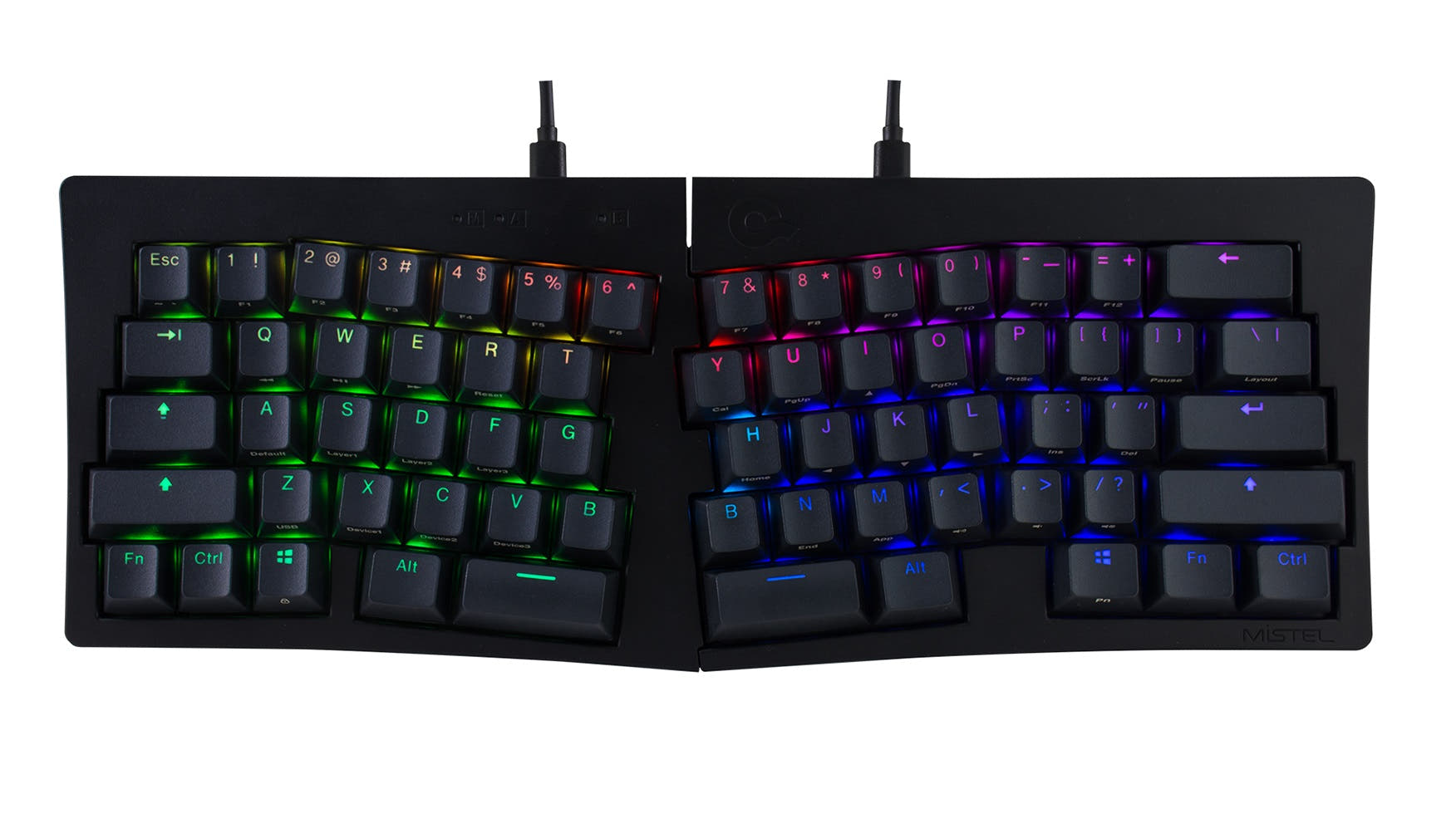
- Unique split 60% form factor promotes ergonomic shoulder and wrist positioning.
- Features per-key RGB backlighting and double-shot PBT keycaps.
- Listing includes a stated 1000 Hz polling rate.
- Switches are soldered. Swapping them means soldering.
- No ISO layout. ISO-DE, UK, and other ISO variants are not offered.
- Compact layout only. No function row, dedicated arrow keys, or numpad.
Your primary need dictates the choice. If you want a compact keyboard that minimizes desk space but keeps arrow keys readily accessible, the Ducky Miya Pro is the straightforward option. If you prioritize ergonomics and are willing to learn layers for missing keys, the Mistel MD600 V3's split design offers tangible comfort benefits for long-term use.
The differences that matter
Skip the 40-row spec sheet. These are the specs that change how each board feels, sounds, and fits your desk.
Ducky Miya Pro
Mistel MD600 V3
Layout size
65%
60%
Ergonomics
Standard
Split
Layout standard
ANSI, ISO
ANSI
ISO and JIS exist so regional layouts fit
Plate material
Aluminum, Plastic
Plastic
Backlight
White, south-facing
RGB
RGB for looks and low light rather than speed
- Ducky Miya Pro
- Mistel MD600 V3
- Performance
- 5955
- Build quality
- 4645
- Productivity
- 5460
- Customizability
- 5252
- Portability
- 7195
- Connection: Wired
- Case material: ABS, Plastic
- Switch options: Clicky, Linear, Silent, Tactile
- Mount style: Plate Mount
- Keycaps: PBT
What will you mostly use it for?
The Mistel MD600 V3 wins for office use, travel, and content creation due to its ergonomic split design, macro keys, and portable half-use capability. The Ducky Miya Pro is better suited for gaming and programming, where its dedicated arrow keys and traditional 65% layout are more immediately practical. For modding, both boards present similar limitations and opportunities, resulting in a tie.
Pick the Ducky Miya Pro
- The Ducky Miya Pro's 65% layout retains dedicated arrow keys, which are useful in some games.
- Its non-split, traditional form factor may be more stable for aggressive key presses.
- The Mistel's split design could be less ideal for gaming postures that favor a unified board.
Ducky Miya Pro vs Mistel MD600 V3 specs
Every tracked spec, side by side. Rows marked with a dot differ between the boards.
7 of 17 specs differ
Ducky Miya Pro
Mistel MD600 V3
Switch options
Mount style
Layout size
Layout standard
Ergonomics
Display
Media keys
Connection
Max polling rate
USB-C
Case material
Plate material
Keycaps
Backlight
N-key rollover
Mac & Windows
Released
ISO layouts by store
Which stores sell ISO-DE, UK, and the other regional layouts.
Ducky Miya Pro
MK
ISO
Out of stockShips to you
Mistel MD600 V3
No ISO layout at the stores we track.
Compare prices
Live prices from the stores we track, cheapest in-stock offer first.
Prices in USD are converted to your currency and can change at any time. KeebFinder may earn a commission when you buy through these links, at no extra cost to you.
Lowest price across stores, Amazon excluded.


Ducky Miya Pro vs Mistel MD600 V3: your questions
The Ducky Miya Pro has dedicated arrow keys. It uses a 65% layout that retains the arrow cluster along with a few other navigation keys. The Mistel MD600 V3 is a 60% layout and does not have dedicated arrow keys, requiring the use of a function layer to access them.
No, neither keyboard supports hot-swap sockets. The product listings for both explicitly state 'Hotswap: No'. To change the switches on either board, you would need to desolder the existing switches and solder in new ones.
Yes, the Mistel MD600 V3 features per-key RGB backlighting according to its vendor description. The Ducky Miya Pro, in contrast, only has single-color white LED backlighting.
The vendor description for the Mistel MD600 V3 lists a 1000 Hz polling rate. A polling rate for the Ducky Miya Pro is not specified in the provided information.
Yes, the Mistel product listing specifically notes that the left side of the MD600 V3 can be used alone. This could be useful for extreme space saving or specific ergonomic setups.
Both keyboards use PBT plastic keycaps, which are known for their durability and resistance to shine. The Ducky Miya Pro uses dye-sublimated keycaps in a Varmilo profile, while the Mistel MD600 V3 uses double-shot PBT keycaps.
Yes, both the Ducky Miya Pro and Mistel MD600 V3 listings confirm Mac and Windows compatibility. The Mistel's listing also explicitly mentions Linux compatibility.
The Mistel MD600 V3 has a unique advantage for portability. Since its left half can be used alone, it offers a more compact travel option. While both are wired and compact, the Mistel's split design allows the halves to be packed separately or used in a minimal configuration.
No, they do not. The Ducky Miya Pro's vendor listing explicitly states 'QMK Compatible: No' and 'VIA Compatible: No'. There is no mention of QMK or VIA support for the Mistel MD600 V3 in the provided information.
The Ducky Miya Pro uses an aluminum plate, which typically provides a stiffer, more resonant typing feel. The Mistel MD600 V3 uses a plastic plate, which can offer a slightly more flexible and potentially quieter typing experience.
Potentially yes. The Mistel MD600 V3's description mentions an additional USB-micro port on the right side specifically to connect a numpad. This feature is not mentioned for the Ducky Miya Pro.
The Mistel MD600 V3 is designed for better ergonomics due to its split layout. A split keyboard allows you to position each half to match the natural width of your shoulders, which can reduce strain. The Ducky Miya Pro has a traditional, non-split design but does include two-stage height-adjustable feet.
Not sold on either?




Still torn?
Answer a few quick questions and the keyboard finder ranks 2,000+ boards by how you will actually use yours.