Ducky Frozen Llama One 2 Mini vs Neo Neo60 Core
Choose the Ducky for a ready-to-use RGB keyboard with PBT keycaps, or the Neo60 Core for wireless connectivity, hot-swap switches, and an aluminum case.
KeebFinder may earn a commission when you buy through these links, at no extra cost to you.


Which one should you get?
Get the
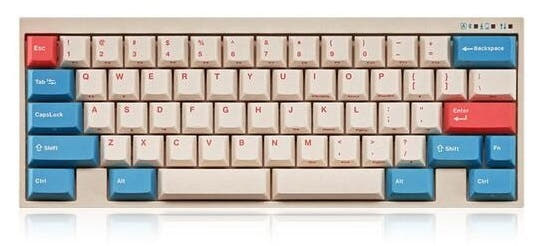
Ducky Frozen Llama One 2 Mini
Build quality in the bottom 20% of 60% boards under $150.
- Pre-built 60% ANSI keyboard with RGB lighting and N-Key Rollover.
- PBT double-shot keycaps, with 10 additional purple keycaps listed by the vendor.
- Multimedia keys and vendor-listed Mac and Windows support.
- Switches are soldered. Swapping them means soldering.
- No ISO layout. ISO-DE, UK, and other ISO variants are not offered.
Get the
Neo Neo60 Core
Hot-swappable
Build quality in the top 45% of 60% boards under $150.
- Bluetooth, 2.4 GHz, and wired USB-C connectivity, with a listed 4400mAh battery.
- Hot-swap support and ANSI or ISO layout options.
- Aluminum case and stainless steel external weight, according to the vendor.
Choose the Ducky Frozen Llama One 2 Mini if you want a pre-built wired keyboard with RGB, PBT keycaps, and multimedia keys. Choose the Neo60 Core if wireless connectivity, ISO layout support, or hot-swap customization matters more. Before buying the Neo, confirm the included parts: its vendor listing describes a barebones DIY kit without switches, keycaps, or a plate.
The differences that matter
Skip the 40-row spec sheet. These are the specs that change how each board feels, sounds, and fits your desk.
Ducky Frozen Llama One 2 Mini
Neo Neo60 Core
Connection
Wired
Bluetooth, 2.4 GHz, Wired
Wireless for several devices and wired for lower latency
Hot-swappable
No
Yes
Switch changes without soldering
Case material
Plastic
Aluminum
Sound dampening
No
Yes
Layout standard
ANSI
ANSI, ISO
ISO and JIS exist so regional layouts fit
- Ducky Frozen Llama One 2 Mini
- Neo Neo60 Core
- Performance
- 6954
- Build quality
- 4663
- Productivity
- 5456
- Customizability
- 5845
- Portability
- 7186
- Layout size: 60%
- Mount style: Plate Mount
What will you mostly use it for?
The Ducky is the simpler pick for buyers who want RGB, multimedia keys, and included PBT keycaps without assembling a kit. The Neo takes more categories where wireless use, ISO layout, and switch or build customization matter. Gaming is a close call: Ducky brings RGB and switch choices, while Neo lists a 1000 Hz polling rate and wireless modes. For travel, consider the Neo's wireless options and battery, but note that the vendor describes it as a DIY barebones kit.
It's a tie
- The Ducky is wired-only and includes RGB lighting and N-Key Rollover.
- The Neo60 Core supports wired USB-C and lists a 1000 Hz polling rate.
- The Ducky vendor listing identifies several Cherry MX switch options, while the Neo is hot-swappable.
Ducky Frozen Llama One 2 Mini vs Neo Neo60 Core specs
Every tracked spec, side by side. Rows marked with a dot differ between the boards.
9 of 21 specs differ
Ducky Frozen Llama One 2 Mini
Neo Neo60 Core
Switch options
Hot-swappable
Mount style
Sound dampening
Layout size
Layout standard
Ergonomics
Display
Media keys
Connection
Max polling rate
Battery
USB-C
Case material
Plate material
Keycaps
Typing angle
Backlight
N-key rollover
Mac & Windows
Released
ISO layouts by store
Which stores sell ISO-DE, UK, and the other regional layouts.
Ducky Frozen Llama One 2 Mini
No ISO layout at the stores we track.
Neo Neo60 Core
Listed on the product, not split by store: ISO.
Compare prices
Live prices from the stores we track, cheapest in-stock offer first.
Prices in USD are converted to your currency and can change at any time. KeebFinder may earn a commission when you buy through these links, at no extra cost to you.
Lowest price across stores, Amazon excluded.
- Check on Amazon
Amazon
Check price



Ducky Frozen Llama One 2 Mini vs Neo Neo60 Core: your questions
No. Its listed connectivity is wired only, using USB-C. The vendor describes the cable as detachable.
Yes. The Neo60 Core lists Bluetooth, 2.4 GHz, and wired connectivity. Its vendor listing also says a 2.4 GHz dongle is included.
Its switches are soldered, so switching them requires soldering. The vendor lists Cherry MX Black, Brown, Blue, Red, Silver, and Silent Red options.
Yes, the Neo60 Core lists hot-swap support. Its vendor listing describes a 1.6mm non-flex-cut hotswap PCB.
The vendor describes the Neo60 Core as a barebones DIY kit that does not include switches, keycaps, or a plate. Confirm the exact configuration with the seller before ordering.
The Neo60 Core supports ANSI and ISO layouts. The Ducky Frozen Llama One 2 Mini is ANSI, and its compatibility rules say ISO variants are not offered.
Yes, the Ducky lists RGB lighting. Its vendor description also mentions RGB lighting modes.
The Neo60 Core is listed without LED backlighting. The Ducky Frozen Llama One 2 Mini lists RGB lighting.
The Neo60 Core has Bluetooth and 2.4 GHz wireless options, and lists a 4400mAh battery. The Ducky is described by its vendor as lightweight and portable, but it is wired-only.
The Neo60 Core lists an aluminum case and plate options including aluminum, plastic, POM, FR4, and carbon fiber. Its vendor listing also specifies a stainless steel external weight.
Yes, the product lists Mac/Windows support, and the vendor also lists Mac compatibility. It connects through a wired USB-C connection.
The Neo60 Core lists a 1000 Hz polling rate. Its vendor description also lists a maximum polling rate of 1000 Hz.
Not sold on either?




Still torn?
Answer a few quick questions and the keyboard finder ranks 2,000+ boards by how you will actually use yours.