Not sure which keyboard to choose? Try the Keyboard Finder now!

Compare Qwertykeys Neo65 vs Neo Neo60 Core Differences Side by Side

This comparison is for buyers deciding between two compact, wireless mechanical keyboard kits from related brands. Both are tri-mode, hot-swappable barebones kits with similar pricing, making the choice difficult. The core trade-off is the 65% layout of the Neo65 against the 60% layout of the Neo60 Core, which dictates your need for dedicated arrow keys versus ultimate desk space savings.

76
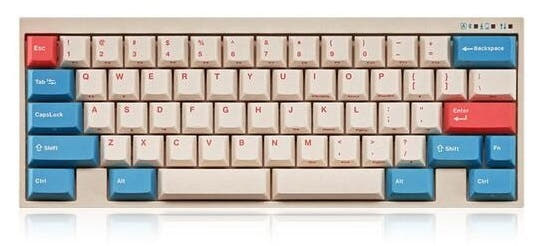
Qwertykeys Neo65 Cu Keyboard
77
Neo60 Core Keyboard Kit

Select a keyboard to compare

5.0 (2)
0.0 (0)
  • Available in a 65% layout
  • Uses a PCB Mount mounting style
  • Equipped with a 2200 mAh battery
  • Weighs about 2500 g
  • Sized at 19 x 292 x 109 mm
  • Made with a Aluminum, Brass, Copper case
  • Available in a 60% layout
  • Supports QMK firmware
  • Uses a Plate Mount mounting style
  • Equipped with a 4400 mAh battery
  • Sized at 18 x 293 x 109 mm
  • Made with a Aluminum case
Scores
  • Performance: 57.5
  • Build Quality: 87.1
  • Productivity: 62.3
  • Customizability: 68.3
  • Portability: 85.6
Scores
  • Performance: 61.6
  • Build Quality: 82.4
  • Productivity: 69
  • Customizability: 78
  • Portability: 85.8
Name
Qwertykeys Neo65
Name
Neo Neo60 Core
Release year
2025
Release year
2025
Switch Options
-
Switch Options
-
Profile
Normal Profile
Profile
Normal Profile
Hot Swappable
 
Hot Swappable
 
Layout Size
65%
Layout Size
60%
Layout Standard
ANSI, ISO
Layout Standard
ANSI, ISO
Layout Ergonomics
Normal
Layout Ergonomics
Normal
Knob Support
 
Knob Support
 
Display Support
 
Display Support
 
Mac/Win Support
 
Mac/Win Support
 
Multi-Media Keys
 
Multi-Media Keys
 
USB-C
 
USB-C
 
USB passthrough
 
USB passthrough
 
Connection
Bluetooth, 2.4 GHz, Wired, Wireless
Connection
Bluetooth, 2.4 GHz, Wired, Wireless
Polling Rate
1000 Hz
Polling Rate
1000 Hz
Battery capacity
2200 mAh
Battery capacity
4400 mAh
Hall Effect Support
 
Hall Effect Support
 
QMK Support
 
QMK Support
 
VIA Support
 
VIA Support
 
VIAL Support
 
VIAL Support
 
N-Key Rollover
 
N-Key Rollover
 
Rapid Trigger
 
Rapid Trigger
 
Mount Style
PCB Mount
Mount Style
Plate Mount
Screw in Stabilizers
 
Screw in Stabilizers
 
Sound Dampening
 
Sound Dampening
 
Backlight
 
Backlight
 
Case Colors
Case Colors
Case Material
Aluminum, Brass, Copper
Case Material
Aluminum
Keycaps Material
-
Keycaps Material
-
Dimensions
19 x 292 x 109 mm
Dimensions
18 x 293 x 109 mm
Weight
2500g
Weight
-
*Something incorrect or missing? Please
let me know
!

Pros and Trade-offs

Your priority should be layout. If you regularly use arrow keys and prefer a more complete out-of-box kit, the Qwertykeys Neo65 is the clear choice, despite its longer lead time. Opt for the Neo Neo60 Core only if maximizing compactness is your absolute goal and you are comfortable using layered keys for arrows. Be prepared to source a plate separately for the Neo60 Core.

Qwertykeys Neo65

  • +65% layout includes dedicated arrow and navigation keys.
  • +Premium material options include brass or copper bottom cases and stainless steel weights.
  • +Includes VIA support for easy software-free key remapping.
  • +Comes with a plate, four plate material choices, and a full foam kit.
  • +Kit includes a carrying case, stabilizers, and assembly tools.

  • Heavier 2500g weight reduces portability.
  • Made-to-order with a listed 12-week estimated production and ship time.
  • Lacks per-key RGB lighting.

Neo Neo60 Core

  • +More compact 60% layout saves desk space.
  • +Screwless design with two assembly options (PCB gasket and O-ring mount).
  • +Bottom orbit logo plate stores the 2.4 GHz USB dongle.
  • +Lighter and smaller form factor enhances portability.

  • 60% layout lacks dedicated arrow keys, requiring a function layer.
  • Kit does not include a plate; it must be purchased separately.
  • Vendor listing shows it as out of stock or unavailable.
  • Lacks explicitly stated VIA support in the provided description.

Which Keyboard Is Better for Your Needs?

The Qwertykeys Neo65 is the more versatile choice for productivity-focused tasks like office work and programming due to its 65% layout with arrow keys and VIA support. It also leads in modding potential with more material choices. The Neo Neo60 Core wins for travel thanks to its smaller 60% footprint and clever dongle storage. For gaming and general use, the Neo65's layout and heft are advantages, while content creators face a tie on core wireless features.

GamingQwertykeys Neo65
  • The 65% layout includes dedicated arrow keys, which are useful for certain game genres and menus.
  • Its dual mounting system (PCB gasket and isolated top mount) may offer more tuning options for feel.
  • It has a heavier 2500g build, which can provide more stability during intense use.
OfficeQwertykeys Neo65
  • The 65% layout retains arrow keys and a few navigation keys, reducing reliance on layers for common tasks.
  • It includes VIA support for easy key remapping without installing software.
  • The vendor description notes it includes a carrying case, useful for transport between workspaces.
ProgrammingQwertykeys Neo65
  • Dedicated arrow keys are highly valuable for navigating code.
  • VIA support allows for creating custom layers for macros and shortcuts.
  • The inclusion of a plate in the kit provides more immediate build completion compared to the Neo60 Core.
TravelNeo Neo60 Core
  • The 60% layout is more compact, saving space in a bag.
  • It features a screwless design with O-ring mount option, which may facilitate easier disassembly.
  • Its orbit logo bottom plate doubles as storage for the 2.4 GHz USB dongle.
ModdingQwertykeys Neo65
  • Offers a wider selection of case materials including brass and copper bottom cases.
  • Provides four plate material options (Carbon Fiber, Aluminum, PC, PP) for tuning sound and feel.
  • Includes a comprehensive foam kit with PE sheet, PCB foam, and Poron case foam.
Content CreationTie
  • Both offer tri-mode connectivity for flexible device switching.
  • Both are hot-swappable, allowing for switch changes to suit typing or gaming preferences.
  • Both lack per-key RGB, which may be a negative for stream aesthetics but benefits battery life.

Frequently Asked Questions (FAQ)


Discover similar products

You might also like similar products in that price range:

75
$110
Qwertykeys Neo60 Cu Keyboard
Qwertykeys Neo60
60%,
Hotswap,
Wireless,
Wired,
VIA,
Alu case,
PCB Mount

99
$129
Keychron K2 HE Wireless Magnetic Switch Custom Keyboard
Keychron K2 HE
75%,
Hotswap,
Wireless,
Wired,
RGB/ White LEDs,
Knob,
VIA,
QMK,
HE,
Rapid trigger,
Alu case,
Tray Mount

93
$105
MonsGeek M1W Aluminum Wireless Gasket DIY Kit
Monsgeek M1W
75%,
Hotswap,
Wireless,
Wired,
RGB,
Knob,
VIA,
QMK,
Alu case,
Gasket Mount

94
$100
Keychron Q8 Pro (Alice Layout) QMK/VIA Wireless Custom Mechanical Keyboard
Keychron Q8 Pro
65%,
Hotswap,
Wireless,
Wired,
RGB,
Knob,
VIA,
QMK,
Alu case,
Gasket Mount

100
$104
Lemokey P1 QMK/VIA Custom Gaming Keyboard
Keychron Lemokey P1
75%,
Hotswap,
Wireless,
Wired,
RGB,
Knob,
VIA,
QMK,
Alu case,
Gasket Mount

94
$129
WOBKEY Rainy 75 Pro Keyboard
WOBKEY Rainy75 Pro
75%,
Hotswap,
Wireless,
Wired,
RGB,
VIA,
QMK,
Alu case,
Gasket Mount

98
$94
Keychron V1 Max QMK Wireless Custom Mechanical Keyboard ISO Layout Collection
Keychron V1 Max
75%,
Hotswap,
Wireless,
Wired,
RGB,
Knob,
VIA,
QMK,
Gasket Mount

93
$119
Rainy 75 WOBKey Keyboard Kit
WOBKEY Rainy75
75%,
Hotswap,
Wireless,
Wired,
RGB,
VIA,
QMK,
Alu case,
Gasket Mount

87
$95
Womier RD75 Pro Aluminum 75% Hotswap Wireless Keyboard
Womier RD75 Pro
75%,
Hotswap,
Wireless,
Wired,
RGB,
VIA,
QMK,
Alu case,
Gasket Mount

94
$94
Keychron V3 Max QMK Wireless Custom Mechanical Keyboard ISO Layout Collection
Keychron V3 Max
80%,
Hotswap,
Wireless,
Wired,
RGB,
Knob,
VIA,
QMK,
Gasket Mount