Ducky Peter Pan One 2 Pro vs AULA F108 Pro V2
Choose the AULA F108 Pro V2 for hot-swap and wireless flexibility, or the Ducky Peter Pan One 2 Pro for its illustrated theme and included extras.
KeebFinder may earn a commission when you buy through these links, at no extra cost to you.
No reviews
from$114at MK

4.3 (3)4.3 · 3 reviews
from$97at Epomaker
90-day lowLowest price in 90 days
Which one should you get?
Get the
Ducky Peter Pan One 2 Pro
Build quality in the bottom 35% of 100% boards under $150.
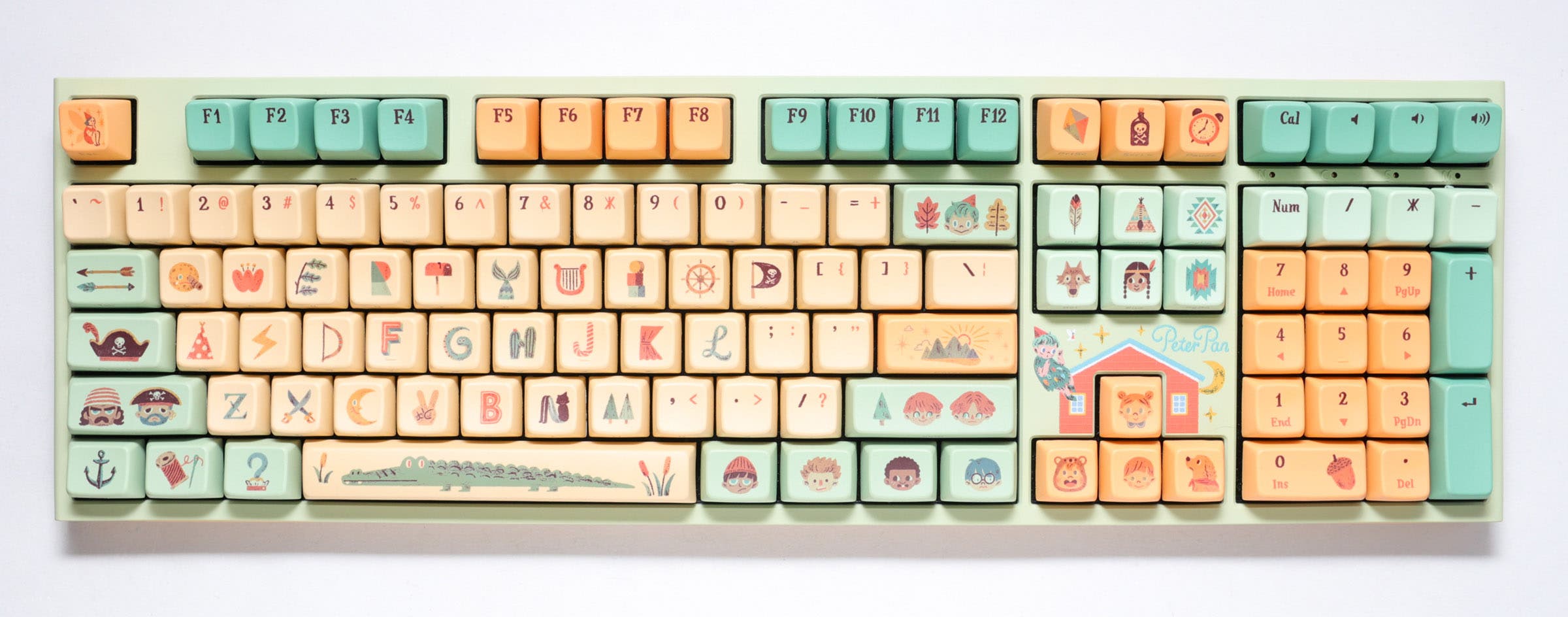
- Peter Pan artwork from Ducky’s Dimanche collaboration appears on the keycaps and top case.
- MDA-profile PBT dye-sub keycaps include laser-engraved Mandarin phonetic symbols on the front of the alpha keys.
- EVA sound dampener and Q-Bounce synthetic padding are listed by the vendor.
- Switches are soldered. Swapping them means soldering.
Get the
AULA F108 Pro V2
Hot-swappable
Build quality in the top 30% of 100% boards under $100.
- Offers Bluetooth, 2.4 GHz, and wired connectivity.
- Hot-swappable PCB supports 3- or 5-pin mechanical switches.
- Gasket mount, polycarbonate plate, and seven listed sound-dampening layers.
- South-facing LEDs. Shine-through legends stay dark, and some sculpted keycaps can clip the LED.
Pick the AULA F108 Pro V2 if you want wireless connectivity, switch swapping without soldering, and features such as an LCD screen and RGB. Choose the Ducky Peter Pan One 2 Pro if its illustrated design, multimedia keys, white lighting, and included notepad and keychain matter more than wireless or hot-swap support.
The differences that matter
Skip the 40-row spec sheet. These are the specs that change how each board feels, sounds, and fits your desk.
Ducky Peter Pan One 2 Pro
AULA F108 Pro V2
Connection
Wired
Bluetooth, 2.4 GHz, Wired
Wireless for several devices and wired for lower latency
Hot-swappable
No
Yes
Switch changes without soldering
Case material
ABS
ABS, Plastic
Mount style
Plate Mount
Gasket Mount
Display
None
LCD
A case display rather than a typing feature
- Ducky Peter Pan One 2 Pro
- AULA F108 Pro V2
- Performance
- 5188
- Build quality
- 4865
- Productivity
- 6975
- Customizability
- 5066
- Portability
- 4463
- Layout size: 100%
- Sound dampening
- Keycaps: PBT
What will you mostly use it for?
The AULA takes the gaming, programming, travel, and modding picks on the strength of its wireless modes, hot-swap PCB, and stated gaming features. For office use, its gasket mount and layered dampening are a strong fit, though the Ducky’s multimedia keys and sound dampener offer a simpler alternative. Content creation is a close call: the Ducky favors dedicated multimedia controls and themed keycaps, while the AULA supplies a screen and RGB. Both remain full-size boards, which limits their appeal when desk space or portability is the priority.
Pick the AULA F108 Pro V2
- The AULA lists an 8000 Hz polling rate and N-key rollover.
- It supports wired, 2.4 GHz, and Bluetooth connections, while the Ducky is wired-only.
- Its linear switches and south-facing RGB distinguish its gaming setup.
Ducky Peter Pan One 2 Pro vs AULA F108 Pro V2 specs
Every tracked spec, side by side. Rows marked with a dot differ between the boards.
9 of 22 specs differ
Ducky Peter Pan One 2 Pro
AULA F108 Pro V2
Switch options
Hot-swappable
Mount style
Sound dampening
Layout size
Layout standard
Ergonomics
Display
Media keys
Connection
Max polling rate
Battery
USB-C
Case material
Plate material
Keycaps
Weight
Dimensions
Backlight
N-key rollover
Mac & Windows
Released
Compare prices
Live prices from the stores we track, cheapest in-stock offer first.
Prices in USD are converted to your currency and can change at any time. KeebFinder may earn a commission when you buy through these links, at no extra cost to you.
Lowest price across stores, Amazon excluded.



Ducky Peter Pan One 2 Pro vs AULA F108 Pro V2: your questions
No. Its listed connectivity is wired only, using USB-C. The AULA F108 Pro V2 also supports Bluetooth and 2.4 GHz wireless connections.
Yes. Its hot-swap PCB supports 3- or 5-pin mechanical switches, so switch changes do not require soldering. The Ducky’s switches are soldered and require soldering to swap.
The AULA has an 8000 Hz polling rate, N-key rollover, and linear switches. It also supports wired and 2.4 GHz modes, while the Ducky is wired-only.
Yes. The AULA supports Bluetooth, 2.4 GHz, and wired USB-C connectivity. The Ducky Peter Pan One 2 Pro is wired-only.
The vendor describes MDA-profile PBT dye-sub keycaps with a hand-drawn Peter Pan theme. It also lists laser-engraved Mandarin phonetic symbols on the front of the alpha keys.
The AULA uses PBT keycaps with a Cherry profile, and its vendor description specifies double-shot construction. Its south-facing LEDs may leave shine-through legends dark.
Yes. The product listing identifies an LCD screen, and the vendor describes it as a mini pixel screen that can show custom GIFs and live status. The Ducky has no screen listed.
The AULA has a gasket mount and a seven-layer sound-dampening structure, with components including PO foam, PET pads, IXPE, and bottom silicone. The Ducky lists an EVA sound dampener and Q-Bounce synthetic padding, but no matching layer count.
Yes. Both are listed as 100% ANSI keyboards, and the Ducky vendor description specifies 108 keys. The AULA vendor also describes its layout as full-size with 108 keys.
The AULA is easier to change at the switch level because its PCB is hot-swappable for 3- or 5-pin mechanical switches. The Ducky’s switches are soldered, so changing them requires soldering.
No, its listed lighting is white LED backlighting. The AULA F108 Pro V2 has south-facing per-key RGB.
Both have full-size layouts, and the AULA weighs 1329g, so neither is a compact option. The AULA has a 10000mAh battery and wireless connections, while the Ducky requires a wired connection.
Not sold on either?


Still torn?
Answer a few quick questions and the keyboard finder ranks 2,000+ boards by how you will actually use yours.