Ducky One 2 SF vs Leopold FC630MBTWired 65% vs Wireless 60%
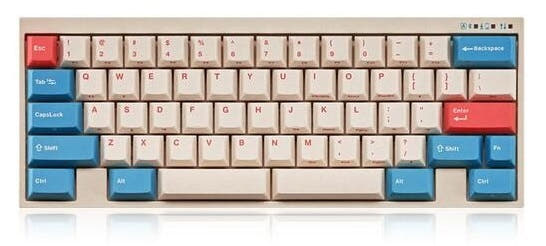
Choose the Ducky One 2 SF for a wired layout with dedicated arrow keys, or the Leopold FC630MBT for wireless freedom and a quieter typing experience.
KeebFinder may earn a commission when you buy through these links, at no extra cost to you.


Which one should you get?
Get the
Ducky One 2 SF
Wired 65%
Build quality in the bottom 15% of 65% boards under $100.
- 65% layout includes dedicated arrow, Delete, Page Up, and Page Down keys.
- Features north-facing RGB backlighting with 3528 SMD LEDs.
- Explicitly lists a 1000Hz polling rate for its wired USB-C connection.
- Switches are soldered. Swapping them means soldering.
- North-facing LEDs. Cherry-profile keycaps can hit the switch housing.
- 65% layout. No function row and no numpad.
Get the
Leopold FC630MBT
Wireless 60%
Build quality in the bottom 20% of 60% boards under $100.
- Dual connectivity with Bluetooth 5.1 wireless and wired USB-C.
- Includes a sound absorbing pad and foam for enhanced acoustics.
- Built with an FR4 dual-layer PCB and plate, as noted in the product description.
- Switches are soldered. Swapping them means soldering.
- North-facing LEDs. Cherry-profile keycaps can hit the switch housing.
- No ISO layout. ISO-DE, UK, and other ISO variants are not offered.
- Compact layout only. No function row, dedicated arrow keys, or numpad.
Your primary need dictates the choice. If you require dedicated arrow keys and navigation cluster in a compact form and value RGB lighting, the wired Ducky One 2 SF is the clear pick. If wireless flexibility, a quieter typing experience due to internal dampening, and maximum compactness are your goals, the Leopold FC630MBT is the better option, despite its more minimal 60% layout.
The differences that matter
Skip the 40-row spec sheet. These are the specs that change how each board feels, sounds, and fits your desk.
Ducky One 2 SF
Leopold FC630MBT
Layout size
65%
60%
Connection
Wired
Bluetooth, Wired
Wireless for several devices and wired for lower latency
Case material
Plastic
ABS
Sound dampening
No
Yes
Layout standard
ANSI, ISO
ANSI
ISO and JIS exist so regional layouts fit
- Ducky One 2 SF
- Leopold FC630MBT
- Performance
- 6755
- Build quality
- 4447
- Productivity
- 5451
- Customizability
- 5445
- Portability
- 6877
- Switch options: Clicky, Linear, Silent, Tactile
- Mount style: Plate Mount
- Keycaps: PBT
What will you mostly use it for?
The Ducky One 2 SF is the stronger choice for gaming, programming, and content creation, primarily due to its 65% layout with dedicated navigation keys and its specified high-polling-rate wired connection. The Leopold FC630MBT wins for office use and travel, leveraging its Bluetooth wireless capability and integrated sound-dampening materials. For modding, they are evenly matched as traditional pre-built boards with quality stock components.
Pick the Ducky One 2 SF
- The Ducky One 2 SF has a specified 1000Hz polling rate for wired connectivity.
- Its 65% layout retains dedicated arrow keys, which are often used in gaming.
- North-facing RGB lighting is present for visual customization.
Ducky One 2 SF vs Leopold FC630MBT specs
Every tracked spec, side by side. Rows marked with a dot differ between the boards.
9 of 18 specs differ
Ducky One 2 SF
Leopold FC630MBT
Switch options
Mount style
Sound dampening
Layout size
Layout standard
Ergonomics
Display
Media keys
Connection
Max polling rate
USB-C
Case material
Plate material
Keycaps
Backlight
N-key rollover
Mac & Windows
Released
ISO layouts by store
Which stores sell ISO-DE, UK, and the other regional layouts.
Ducky One 2 SF
Listed on the product, not split by store: ISO.
Leopold FC630MBT
No ISO layout at the stores we track.
Compare prices
Live prices from the stores we track, cheapest in-stock offer first.
Prices in USD are converted to your currency and can change at any time. KeebFinder may earn a commission when you buy through these links, at no extra cost to you.
Lowest price across stores, Amazon excluded.


Ducky One 2 SF vs Leopold FC630MBT: your questions
The Ducky One 2 SF has dedicated arrow keys. It is a 65% keyboard, which retains the arrow cluster along with Delete, Page Up, and Page Down keys. The Leopold FC630MBT is a 60% keyboard and does not have dedicated arrow keys, requiring the use of a function layer to access them.
Yes, the Leopold FC630MBT offers wireless connectivity via Bluetooth 5.1. It can also be used in a wired mode with its included USB-C cable. The keyboard is powered by three AAA batteries for wireless operation.
Yes, the Ducky One 2 SF features RGB backlighting. The vendor description specifies it uses 3528 SMD RGB LEDs with north-facing switch orientation.
The Leopold FC630MBT is likely better for a quiet office. Its product description explicitly mentions it includes a sound absorbing pad and foam for enhanced acoustics. Pairing it with silent switch options like Cherry MX2A Silent Red would further reduce noise.
Both keyboards offer Cherry MX switch options. The Ducky One 2 SF lists variants with Cherry MX and Kailh BOX switches. The Leopold FC630MBT comes installed with the newer Cherry MX2A line of switches, which includes options like Brown, Blue, Red, Black, Silent Red, and Speed Silver.
Yes, both keyboards use standard Cherry MX stem keycaps, making them replaceable with most aftermarket sets. The Ducky uses an OEM profile, while the Leopold uses an SS2 profile, which may affect the typing feel but not physical compatibility.
Yes. The Leopold FC630MBT has a USB-C port for wired connectivity, and the vendor characteristics list a USB-C connection on the keyboard side. This indicates the cable is detachable.
The Ducky One 2 SF listing mentions it includes 10 additional PBT double-shot colorful keycaps and may come with a random 'Year of' zodiac spacebar. The Leopold FC630MBT includes three AAA batteries for its wireless function.
The Leopold's vendor description specifically lists Windows compatibility. For the Ducky One 2 SF, the vendor characteristics explicitly state compatibility with Mac and Linux in addition to Windows. The Leopold may still function, but explicit support is not listed in the provided information.
A key material difference is in the plate. The Ducky One 2 SF uses a plastic plate, while the Leopold FC630MBT uses an FR4 plate, which is a fiberglass composite often chosen for its acoustic properties. Both cases are plastic (Ducky: plastic, Leopold: ABS).
The Leopold FC630MBT has an edge for travel due to its smaller 60% size and wireless Bluetooth capability, allowing you to use it without a cable. Its use of standard AAA batteries also means you don't need to find a power outlet to charge it.
Not sold on either?



Still torn?
Answer a few quick questions and the keyboard finder ranks 2,000+ boards by how you will actually use yours.