Leopold FC630MBT vs FC630MBT V2
Choose the FC630MBT for its vendor-listed Windows compatibility and lower listed price, or the V2 for its off-white look and higher portability rating in the supplied category data.
KeebFinder may earn a commission when you buy through these links, at no extra cost to you.

Which one should you get?
Get the
Leopold FC630MBT
Build quality in the bottom 20% of 60% boards under $100.
- The vendor description explicitly lists Windows compatibility.
- The vendor description specifies grey PBT keycaps with black legends.
- Switches are soldered. Swapping them means soldering.
- North-facing LEDs. Cherry-profile keycaps can hit the switch housing.
Get the
Leopold FC630MBT V2
Build quality in the bottom 25% of 60% boards under $150.
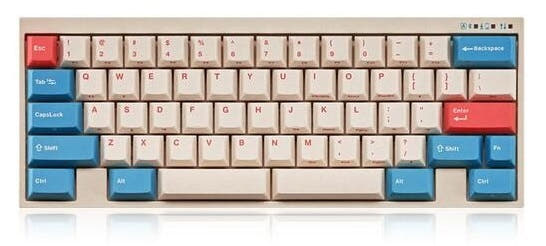
- The vendor description lists an off-white keycap color with red legends.
- The supplied portability category rating is higher than the FC630MBT's.
- Switches are soldered. Swapping them means soldering.
- North-facing LEDs. Cherry-profile keycaps can hit the switch housing.
Choose the FC630MBT if you need the vendor-listed Windows compatibility and prefer its listed grey keycaps. Choose the V2 for its off-white and red-legend appearance or its slightly higher portability rating, but avoid relying on it for Windows, Mac, or Linux use based on its vendor listing.
The differences that matter
Skip the 40-row spec sheet. These are the specs that change how each board feels, sounds, and fits your desk.
- Leopold FC630MBT
- Leopold FC630MBT V2
- Performance
- 5557
- Build quality
- 4747
- Productivity
- 5151
- Customizability
- 4545
- Portability
- 7780
- Layout size: 60%
- Connection: Bluetooth, Wired
- Case material: ABS
- Switch options: Clicky, Linear, Silent, Tactile
- Mount style: Plate Mount
- Sound dampening
What will you mostly use it for?
The FC630MBT is the safer choice if Windows compatibility matters, based on its vendor listing. The V2 has a slight edge for portability in the supplied category ratings, although both share Bluetooth and a compact 60% layout. For gaming, modding, and general content work, their listed feature sets are very similar. The V2 vendor listing reports no compatibility with Windows, Mac, or Linux, so verify the intended setup before buying.
It's a tie
- Both list N-Key Rollover and Bluetooth, wired, and wireless connectivity.
- Both list north-facing RGB and the same switch-type choices.
Leopold FC630MBT vs FC630MBT V2 specs
Every tracked spec, side by side. Rows marked with a dot differ between the boards.
0 of 16 specs differ
Leopold FC630MBT
Leopold FC630MBT V2
Switch options
Mount style
Sound dampening
Layout size
Layout standard
Ergonomics
Display
Media keys
Connection
USB-C
Case material
Plate material
Keycaps
Backlight
N-key rollover
Released
Compare prices
Live prices from the stores we track, cheapest in-stock offer first.
Prices in USD are converted to your currency and can change at any time. KeebFinder may earn a commission when you buy through these links, at no extra cost to you.
Lowest price across stores, Amazon excluded.


Leopold FC630MBT vs FC630MBT V2: your questions
Their listed core specifications are very similar, including the 60% ANSI layout, connectivity options, PBT keycaps, and FR4 plate. The vendor descriptions differ on keycap color and compatibility details.
The V2 vendor listing says it is not Windows compatible. The FC630MBT vendor description explicitly lists Windows compatibility, so check the V2 details with the seller if Windows use is essential.
The FC630MBT vendor description explicitly lists Windows compatibility. Its listed connection options include USB-C and Bluetooth.
Its vendor listing says it is not compatible with Mac or Linux. Confirm compatibility with the seller before choosing the V2 for either system.
No, both keyboards list soldered switches. Changing switches requires soldering.
Both list north-facing LEDs, and their compatibility notes warn that Cherry-profile keycaps can hit the switch housing. Consider that restriction before replacing the keycaps.
The FC630MBT vendor description lists grey keycaps with black legends. The V2 description lists off-white keycaps with red legends.
Both list Bluetooth and wired connectivity in their specifications. The FC630MBT vendor description specifies Bluetooth 5.1, while the V2 vendor description also specifies Bluetooth 5.1.
No, both are listed as 60% keyboards with an ANSI layout. Each vendor description specifies 60 keys.
Both list sound dampening as an extra feature. The vendor descriptions identify a sound-absorbing pad and foam.
The V2 has the higher portability category rating in the supplied comparison data. Both are 60% keyboards and list Bluetooth connectivity.
Both have soldered switches, so replacing them requires soldering rather than a simple socket swap. Their north-facing LEDs may also affect compatibility with Cherry-profile keycaps.
Not sold on either?


Still torn?
Answer a few quick questions and the keyboard finder ranks 2,000+ boards by how you will actually use yours.