AULA F75 vs Xinmeng M75 ProGaming Performance vs TFT Screen
Choose the AULA F75 for a proven, performance-focused experience, or the Xinmeng M75 for its unique display and potentially higher-end materials.
KeebFinder may earn a commission when you buy through these links, at no extra cost to you.

4.5 (510)4.5 · 510 reviews
from$42at Epomaker
90-day lowLowest price in 90 days

No reviews
from$49at Velocifire
90-day lowLowest price in 90 days
Which one should you get?
Get the
AULA F75
Gaming Performance
Build quality in the top 30% of 75% boards under $50.
- Includes verified gaming features like a 1000 Hz polling rate and Rapid Trigger support.
- Detailed five-layer sound dampening with Poron foam, IXPE, PET, and silicone pads.
- High user satisfaction reflected in over 2000 reviews with a 4.56/5 average rating.
- North-facing LEDs. Cherry-profile keycaps can hit the switch housing.
- South-facing LEDs. Shine-through legends stay dark, and some sculpted keycaps can clip the LED.
Get the
Xinmeng M75 Pro
TFT Screen
Build quality in the top 40% of 75% boards under $50.
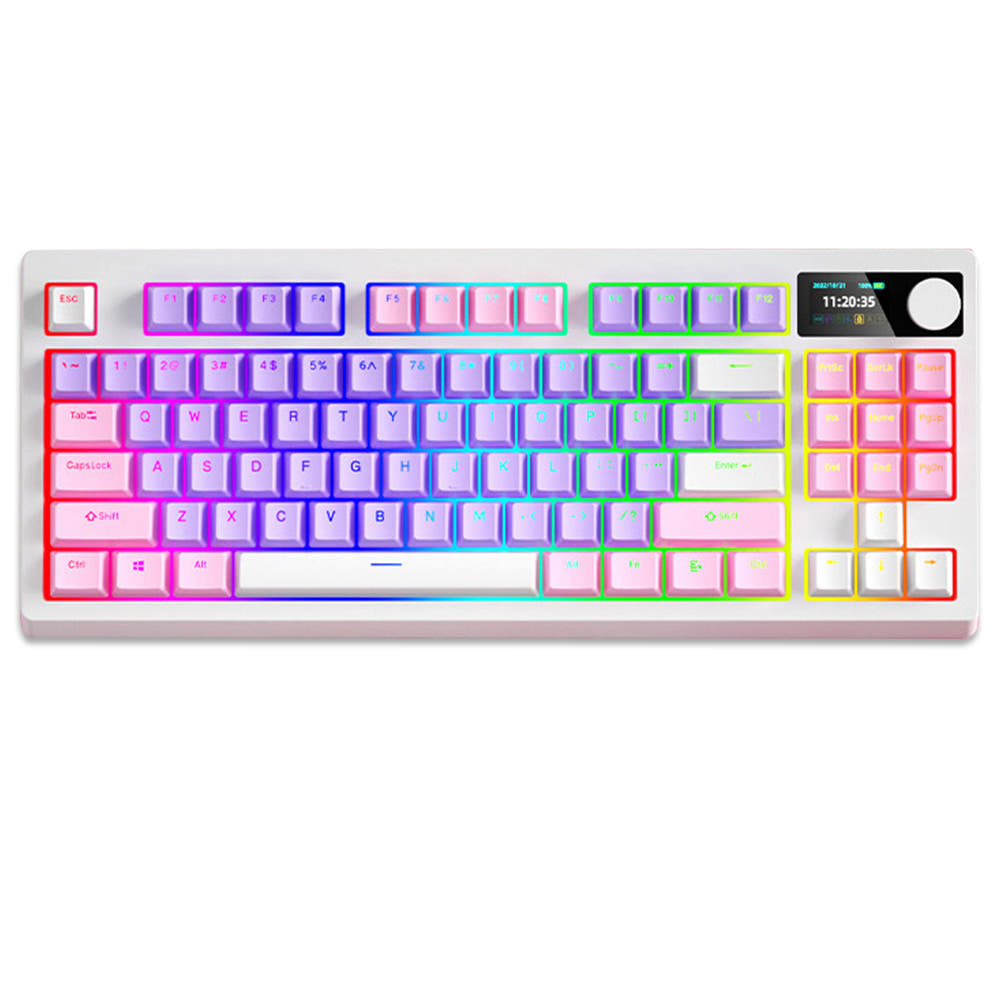
- Features a unique 0.85-inch TFT screen that can display custom images, GIFs, and system info.
- Larger 5000mAh battery with claimed battery life of up to 15 days with RGB off.
- Slimmer 20mm profile for a potentially more portable form factor.
Your choice depends on what you value more: proven performance or novel features. The AULA F75 is the safer, more feature-complete option for most users, especially gamers and typists. The Xinmeng M75 is the more speculative pick for those who prioritize a sleek look, a customizable screen, and maximum battery life, and are comfortable without extensive user feedback.
The differences that matter
Skip the 40-row spec sheet. These are the specs that change how each board feels, sounds, and fits your desk.
AULA F75
Xinmeng M75 Pro
Battery
4,000 mAh
5,000 mAh
A larger battery means fewer cables during the day
Display
None
TFT
A case display rather than a typing feature
Weight
1,023 g
900 g
Heavier boards stay planted and lighter ones travel
Keycaps
ABS, PBT
PBT
Screw-in stabilizers
Yes
No
Easier to tune than the plate-mount stabs you get prebuilt
- AULA F75
- Xinmeng M75 Pro
- Performance
- 8181
- Build quality
- 7673
- Productivity
- 9381
- Customizability
- 8279
- Portability
- 8380
- Layout size: 75%
- Connection: Bluetooth, 2.4 GHz, Wired
- Hot-swappable
- Max polling rate: 1,000 Hz
- Case material: Plastic
- Switch options: Linear, Silent
What will you mostly use it for?
The AULA F75 is the stronger choice for gaming, office use, and modding due to its verified performance specs, silent switch availability, and detailed internal construction. The Xinmeng M75 wins for travel and content creation, thanks to its slimmer profile, larger battery, and unique customizable TFT display. For programming, both keyboards are equally capable with their shared core layout and hot-swap features.
Pick the AULA F75
- The AULA F75 lists a 1000 Hz polling rate and Rapid Trigger support, which are explicitly mentioned gaming features.
- Its vendor description emphasizes an 'ultra-responsive low-latency' connection for gaming.
- The Xinmeng M75 listing does not specify a polling rate or mention gaming-specific trigger modes.
AULA F75 vs Xinmeng M75 Pro specs
Every tracked spec, side by side. Rows marked with a dot differ between the boards.
10 of 23 specs differ
AULA F75
Xinmeng M75 Pro
Switch options
Hot-swappable
Mount style
Sound dampening
Screw-in stabilizers
Layout size
Layout standard
Ergonomics
Knob
Display
Media keys
Connection
Max polling rate
Battery
USB-C
Case material
Keycaps
Weight
Dimensions
Backlight
N-key rollover
Mac & Windows
Released
Compare prices
Live prices from the stores we track, cheapest in-stock offer first.
Prices in USD are converted to your currency and can change at any time. KeebFinder may earn a commission when you buy through these links, at no extra cost to you.
Lowest price across stores, Amazon excluded.





AULA F75 vs Xinmeng M75 Pro: your questions
The AULA F75 is the better choice for competitive gaming. Its specifications include a 1000 Hz polling rate and support for Rapid Trigger, features directly associated with reduced input latency. The Xinmeng M75's listing does not mention a specific polling rate or these gaming-centric features.
According to the vendor description, the Xinmeng M75's 5000mAh battery provides up to 7 days of use with the RGB lighting turned on. The screen itself likely consumes some power, but the overall battery capacity is larger than the AULA F75's 4000mAh battery, which may help offset the drain.
Yes, both keyboards feature hot-swappable sockets. This allows you to easily remove and replace the mechanical switches without soldering, enabling customization of the typing feel and sound to your personal preference.
The AULA F75 is likely the quieter option. Its metadata specifies it offers silent linear switches, and its vendor description details a five-layer sound-dampening internal design with multiple foam and padding layers specifically to reduce typing noise. The Xinmeng M75's switch type is not specified.
Both the AULA F75 and Xinmeng M75 support three-mode connectivity. This includes a wired USB-C connection, a 2.4 GHz wireless connection using a dongle, and Bluetooth for connecting to multiple devices.
Both keyboards use PBT keycaps, which are more resistant to shine and wear compared to ABS plastic. The AULA F75 specifically uses Cherry-profile double-shot PBT keycaps, a detail highlighted by its vendor as being durable.
Both keyboards feature per-key RGB backlighting. The AULA F75 has dedicated software for Windows to customize its 16.8 million color lighting. The Xinmeng M75's vendor mentions customizable lighting effects and a musical rhythmic mode, but does not specify if dedicated software is required.
According to the vendor listing, the AULA F75 comes with the keyboard, a 2.4G wireless dongle, a Type-C cable, a 2-in-1 keycap and switch puller tool, and a user manual.
Both keyboards use a gasket mount design, which typically provides a softer, more flexible typing feel by suspending the plate and PCB on rubber gaskets. The AULA F75's vendor calls it a gasket structure, while the Xinmeng M75's vendor specifies a leaf-spring gasket-mounted structure.
The AULA F75's construction is explicitly detailed with a five-layer internal design that includes two layers of Poron foam, an IXPE switch pad, a PET sound enhancement pad, and a bottom silicone pad. The Xinmeng M75 also mentions five-layered internal padding with IXPE and PORON, but with less specific detail.
The Xinmeng M75 product listing does not explicitly state Mac/Win support. The AULA F75, however, includes 'Mac/Win Support' in its listed extra features, confirming cross-platform compatibility.
Not sold on either?




Still torn?
Answer a few quick questions and the keyboard finder ranks 2,000+ boards by how you will actually use yours.