Not sure which keyboard to choose? Try the Keyboard Finder now!

Compare Epomaker Carbon60 vs Luma40 Differences Side by Side

This comparison is for buyers deciding between two compact, low-profile wireless keyboards from Epomaker. The choice hinges on layout preference and physical size. The Carbon60 offers a traditional 60% ANSI layout, while the Luma40 uses a radical 40% ortholinear grid. Both support QMK/VIA, triple-mode connectivity, and hot-swapping, making the decision about ergonomics and key accessibility.

-30% off
82
EPOMAKER Carbon60
87
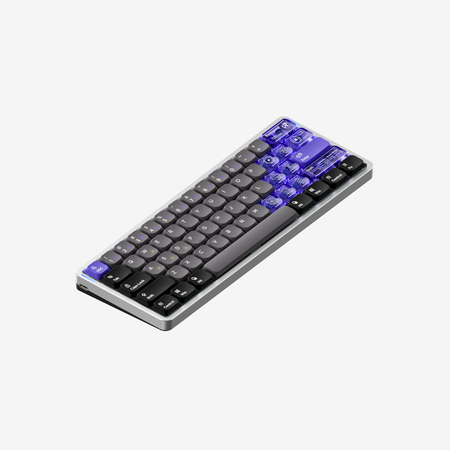
EPOMAKER LUMA40

Select a keyboard to compare

4.9 (10)
5.0 (3)
  • Has Tactile, Linear switch options
  • Available in a 60% layout
  • Offers Normal ergonomics
  • Equipped with a 3000 mAh battery
  • Weighs about 500 g
  • Sized at 27 x 102 x 297 mm
  • Made with a Carbon Fiber case
  • Features ABS keycaps
  • Offers Yes, Rgb, South-face, Rgb South-face RGB lighting
  • Has Clicky, Linear switch options
  • Available in a 40% layout
  • Offers Ortholinear ergonomics
  • Uses a Tray Mount mounting style
  • Equipped with a 1450 mAh battery
  • Weighs about 410 g
  • Sized at 21 x 240 x 87 mm
  • Made with a Aluminum case
  • Features PC keycaps
  • Offers Yes, Rgb, North-face, Rgb North-face RGB lighting
Scores
  • Performance: 74.1
  • Build Quality: 75.5
  • Productivity: 82.8
  • Customizability: 86.3
  • Portability: 88.2
Scores
  • Performance: 73.8
  • Build Quality: 81.4
  • Productivity: 88.8
  • Customizability: 86.2
  • Portability: 85.4
Name
Epomaker Carbon60
Name
Epomaker Luma40
Release year
2025
Release year
2025
Switch Options
Tactile, Linear
Switch Options
Clicky, Linear
Profile
Low Profile
Profile
Low Profile
Hot Swappable
 
Hot Swappable
 
Layout Size
60%
Layout Size
40%
Layout Standard
ANSI
Layout Standard
ANSI
Layout Ergonomics
Normal
Layout Ergonomics
Ortholinear
Knob Support
 
Knob Support
 
Display Support
 
Display Support
 
Mac/Win Support
 
Mac/Win Support
 
Multi-Media Keys
 
Multi-Media Keys
 
USB-C
 
USB-C
 
USB passthrough
 
USB passthrough
 
Connection
Bluetooth, 2.4 GHz, Wired, Wireless
Connection
Bluetooth, 2.4 GHz, Wired, Wireless
Polling Rate
1000 Hz
Polling Rate
1000 Hz
Battery capacity
3000 mAh
Battery capacity
1450 mAh
Hall Effect Support
 
Hall Effect Support
 
QMK Support
 
QMK Support
 
VIA Support
 
VIA Support
 
VIAL Support
 
VIAL Support
 
N-Key Rollover
 
N-Key Rollover
 
Rapid Trigger
 
Rapid Trigger
 
Mount Style
-
Mount Style
Tray Mount
Screw in Stabilizers
 
Screw in Stabilizers
 
Sound Dampening
 
Sound Dampening
 
Backlight
 
Rgb, South-face
Backlight
 
Rgb, North-face
Case Colors
Case Colors
Case Material
Carbon Fiber
Case Material
Aluminum
Keycaps Material
ABS
Keycaps Material
PC
Dimensions
27 x 102 x 297 mm
Dimensions
21 x 240 x 87 mm
Weight
500g
Weight
410g
*Something incorrect or missing? Please
let me know
!

Pros and Trade-offs

Your primary layout preference dictates the choice. If you want a compact keyboard that still feels familiar, the Carbon60 is the safer bet with its excellent battery. If you desire a minimalist, ergonomic experiment and prioritize desk space, the Luma40's ortholinear design in an aluminum case is compelling. Both are well-equipped with customization features.

Epomaker Carbon60

  • +Larger 3000mAh battery for extended wireless use.
  • +Traditional 60% ANSI layout with dedicated arrow keys is more familiar.
  • +South-facing RGB LEDs allow compatibility with more aftermarket keycaps.
  • +Carbon fiber case and plate construction.
  • +Includes three layers of sound-dampening foam.

  • ABS double-shot keycaps may show wear over time.
  • Larger and heavier than the Luma40.
  • No stabilizers are mentioned, which could affect larger key feel.

Epomaker Luma40

  • +Ultra-compact 40% ortholinear layout saves desk space.
  • +CNC-cut aluminum case offers a premium build material.
  • +Includes a detachable wrist strap with tools and three extra switches.
  • +Lower listed wireless latency in 2.4GHz mode (5ms).
  • +Flat typing angle and low-profile design may reduce wrist strain.

  • Smaller 1450mAh battery results in shorter usage time.
  • Ortholinear layout has a steep learning curve and requires heavy layer use.
  • North-facing RGB LEDs may cause interference with some cherry-profile keycaps.
  • Silk-screen printed legends on PC keycaps may wear off.

Which Keyboard Is Better for Your Needs?

The Carbon60 wins for gaming, office use, and content creation due to its more accessible layout and superior battery. The Luma40 is the choice for programming and travel, leveraging its ortholinear ergonomics and smaller footprint. For modding, both are equally capable with hot-swap sockets and programmability, though they use different low-profile switch types.

GamingEpomaker Carbon60
  • The Carbon60's 60% layout provides dedicated arrow keys, which are commonly used in games.
  • Its listed 2.4GHz latency is 10ms, compared to the Luma40's 5ms, though both are suitable for most gaming.
  • The traditional staggered layout may be easier to adapt to for gaming compared to the Luma40's ortholinear grid.
OfficeEpomaker Carbon60
  • The Carbon60's 61-key layout requires fewer layers for common office functions like arrows and punctuation.
  • Its larger 3000mAh battery offers significantly longer life (up to 176 hours off) compared to the Luma40's 1450mAh battery.
  • The traditional layout is more familiar for shared or multi-user office environments.
ProgrammingEpomaker Luma40
  • The Luma40's ortholinear layout is promoted by the manufacturer for reducing finger strain during long typing sessions.
  • Full programmability via VIA allows creating efficient layers for symbols and brackets, compensating for the lack of dedicated keys.
  • The included detachable wrist strap with tools adds portability for developers on the go.
TravelEpomaker Luma40
  • The Luma40 is more compact, with dimensions of 240x87mm versus the Carbon60's 297x102mm.
  • It is lighter at 410g compared to the Carbon60's 500g.
  • The included detachable wrist strap facilitates carrying.
ModdingTie
  • Both keyboards are hot-swappable and support QMK/VIA firmware for deep customization.
  • Both feature sound-dampening foam layers (Carbon60 has three, Luma40 has two).
  • Each uses a different switch ecosystem (Carbon60: Gateron Low Profile 2.0; Luma40: Kailh Low Profile).
Content CreationEpomaker Carbon60
  • The Carbon60's south-facing RGB lighting is compatible with a wider range of aftermarket keycaps without interference.
  • Its double-shot ABS keycaps may offer more durable legends than the Luma40's silk-screen printed PC keycaps.
  • The standard layout allows for easier use of dedicated media or shortcut keys without layer programming.

Frequently Asked Questions (FAQ)


Discover similar products

You might also like similar products in that price range:

84
$83
Keychron K7 Pro QMK/VIA Wireless Custom Mechanical Keyboard ISO Layout Collection
Keychron K7 Pro
65%,
Hotswap,
Wireless,
Wired,
RGB/ White LEDs,
VIA,
QMK,
Alu case,
Tray Mount

94
$84
Keychron K3 Max QMK/VIA Wireless Custom Mechanical Keyboard ISO Layout Collection
Keychron K3 Max
75%,
Hotswap,
Wireless,
Wired,
RGB/ White LEDs,
VIA,
QMK,
Alu case,
Plate Mount

87
$83
Keychron K3 Pro QMK/VIA Wireless Mechanical Keyboard ISO Layout Collection
Keychron K3 Pro
75%,
Hotswap,
Wireless,
Wired,
RGB/ White LEDs,
VIA,
QMK,
Alu case,
Tray Mount

88
$85
Keychron K17 Max QMK Wireless Custom Mechanical Keyboard ISO Layout Collection
Keychron K17 Max
96%,
Hotswap,
Wireless,
Wired,
RGB/ White LEDs,
Knob,
VIA,
QMK,
Alu case,
PCB Mount

83
$94
Keychron K3 QMK Wireless Mechanical Keyboard (ISO Layout) - Version 3
Keychron K3 V3
75%,
Hotswap,
Wireless,
Wired,
RGB/ White LEDs,
VIA,
QMK,
Alu case,
Top Mount

77
$90
Keychron K3 QMK Wireless Mechanical Keyboard (ISO Layout) - Version 3
Keychron K3 QMK V3
75%,
Hotswap,
Wireless,
Wired,
RGB,
QMK,
HE,
Alu case,
Plate Mount

85
$110
Nuphy Air60V2 Low Profile Mechanical Keyboard Kit
Nuphy Air60 V2
60%,
Hotswap,
Wireless,
Wired,
RGB,
VIA,
QMK,
Alu case

86
$94
Keychron K5 Max QMK Wireless Custom Mechanical Keyboard ISO Layout Collection
Keychron K5 Max
100%,
Hotswap,
Wireless,
Wired,
RGB/ White LEDs,
VIA,
QMK,
Alu case,
PCB Mount

85
$106
Keychron K1 Max QMK Wireless Custom Mechanical Keyboard ISO Layout Collection
Keychron K1 Max
80%,
Hotswap,
Wireless,
Wired,
RGB/ White LEDs,
VIA,
QMK,
Alu case,
PCB Mount

84
$94
Keychron K1 QMK Wireless Mechanical Keyboard (ISO Layout) - Version 6
Keychron K1 V6
80%,
Hotswap,
Wireless,
Wired,
RGB/ White LEDs,
VIA,
QMK,
HE,
Alu case,
Top Mount