Epomaker G84 HE vs Gamakay TK75HE V2Battery Life vs Display
Choose the Epomaker G84 HE for superior wireless endurance and a softer typing feel, or the Gamakay TK75HE V2 for its integrated screen and more rigid construction.


Which one should you get?
Get the
Epomaker G84 HE
Battery Life
- Large 8000mAh battery for extended wireless use.
- Gasket mount design with multiple foam layers (Poron, IXPE, silicone) for a softer typing feel and sound.
- Tri-mode connectivity includes Bluetooth, 2.4 GHz, and wired.
- Heavier at 1000g, which reduces portability.
- Lacks a built-in screen, which the competitor has.
- Uses plate-mounted stabilizers, which some modders prefer to replace.
Get the
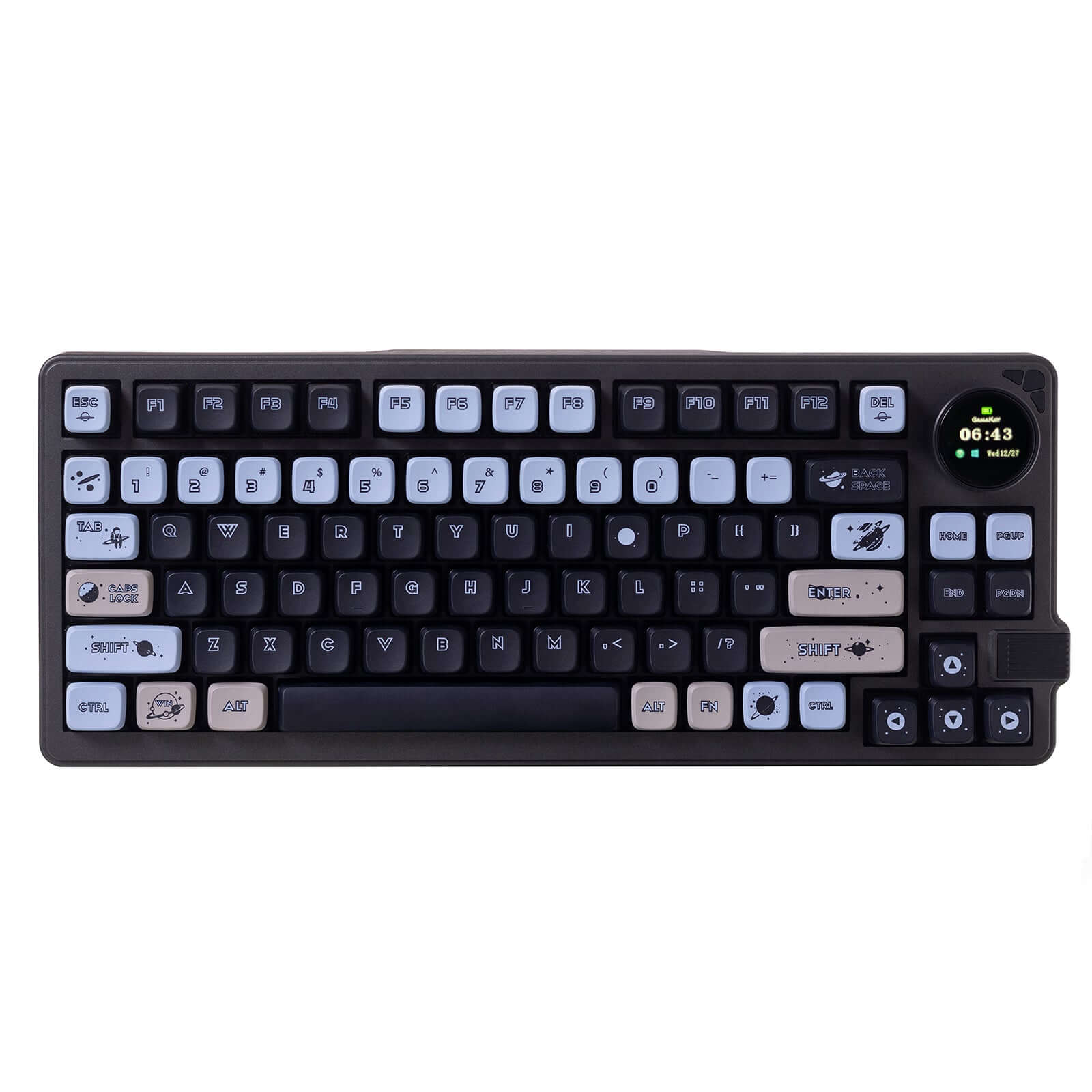
Gamakay TK75HE V2
Display
- Includes a TFT screen for displaying information or graphics.
- Lighter weight (840g) and slightly smaller dimensions than the Epomaker.
- Confirmed support for ISO DE and ISO UK layouts in its vendor description.
- Smaller 4000mAh battery, half the capacity of the Epomaker.
- Connectivity is listed as just 'Wireless' and 'Wired', with no explicit mention of Bluetooth in the metadata.
- Top mount design may offer a different, potentially less cushioned, sound and feel compared to gasket mount.
Your primary need dictates the choice. For a keyboard that will stay on a desk and prioritize wireless longevity, a softer acoustic profile, and tri-mode flexibility, the Epomaker G84 HE is the clear pick. If you value a built-in screen, a lighter build for occasional transport, or require specific ISO layouts, the Gamakay TK75HE V2 is the better option, accepting its shorter battery life.
The differences that matter
Skip the 40-row spec sheet. These are the specs that change how each board feels, sounds, and fits your desk.
Epomaker G84 HE
Gamakay TK75HE V2
Layout size
80%
75%
Connection
Bluetooth, 2.4 GHz, Wired
Wired, Wireless
Battery
8,000 mAh
4,000 mAh
Switch options
Linear, Magnetic
Magnetic
Mount style
Gasket Mount
Top Mount
- Epomaker G84 HE
- Gamakay TK75HE V2
- Performance
- 9899
- Build quality
- 6063
- Productivity
- 7683
- Customizability
- 5973
- Portability
- 8579
- Hall effect (magnetic)
- Rapid trigger
- Hot-swappable
- Max polling rate: 8,000 Hz
- Case material: ABS
- Sound dampening
What will you mostly use it for?
The Epomaker G84 HE wins for office use and content creation due to its exceptional battery life and detailed sound dampening. The Gamakay TK75HE V2 is better for travel and programming, thanks to its lighter weight, built-in screen, and confirmed ISO layout support. For core gaming performance and modding potential, the keyboards are evenly matched, leaving the choice to secondary features.
It's a tie
- Both keyboards feature an 8000 Hz polling rate for low latency.
- Both support rapid trigger and hall effect magnetic switches for adjustable actuation.
- Both have N-key rollover for simultaneous key presses.
What owners say
Ratings and quotes collected from verified store reviews, including the critical ones.
Epomaker G84 HE
29 owner reviews
“Lovely keyboard apart from the software and the lightbar on the logo having no inapp customisation Otherwise perfect It could also have more colour options”
Gamakay TK75HE V2
No owner reviews collected yet.
Epomaker G84 HE vs Gamakay TK75HE V2 specs
Every tracked spec, side by side. Rows marked with a dot differ between the boards.
12 of 25 specs differ
Epomaker G84 HE
Gamakay TK75HE V2
Switch options
Hall effect (magnetic)
Rapid trigger
Hot-swappable
Mount style
Sound dampening
Layout size
Layout standard
Ergonomics
Knob
Display
Connection
Max polling rate
Battery
USB-C
Case material
Plate material
Keycaps
Weight
Dimensions
Typing angle
Backlight
N-key rollover
Mac & Windows
Released
Compare prices
Live prices from the stores we track, cheapest in-stock offer first.
Lowest price across stores, Amazon excluded.



Prices in USD are converted to your currency and can change at any time. KeebFinder may earn a commission when you buy through these links, at no extra cost to you.
Epomaker G84 HE vs Gamakay TK75HE V2: your questions
The Epomaker G84 HE has a significantly larger 8000mAh battery. The Gamakay TK75HE V2 has a 4000mAh battery, offering roughly half the capacity for wireless use.
The product metadata lists its connectivity as 'Wired' and 'Wireless'. The vendor description mentions 'Tri-mode Wireless Bluetooth Wired', but for a definitive specification, it is best to consult the manufacturer's official manual or specifications list.
The Epomaker G84 HE uses a gasket mount, where the plate is suspended by rubber or silicone gaskets for a softer, more cushioned typing feel. The Gamakay TK75HE V2 uses a top mount, where the plate is screwed directly into the top of the case, typically resulting in a more rigid and consistent feel.
Yes, both keyboards are hot-swappable for magnetic switches. The Gamakay vendor description explicitly states its keyboard is compatible with most magnetic switches on the market.
The Epomaker G84 HE is designed with a gasket mount and lists five specific layers of sound dampening materials including Poron foam, IXPE, and silicone. This typically leads to a deeper, more muted sound profile compared to a standard top-mounted board like the Gamakay.
Yes, both keyboards list Mac/Win support in their metadata. The Epomaker G84 HE vendor description further notes a physical switch to toggle between Mac and Windows modes.
The Epomaker G84 HE uses Cherry profile keycaps according to its technical specifications. The Gamakay TK75HE V2 vendor description also states it uses PBT Cherry-profile keycaps.
The Gamakay TK75HE V2 lists 'Knob Support' as a feature, suggesting it can accommodate a rotary encoder. The Epomaker G84 HE does not list this feature.
Yes. The Epomaker G84 HE has north-facing RGB with double-shot, shine-through PBT keycaps. The Gamakay TK75HE V2 also has RGB and uses translucent PBT keycaps for shine-through, according to its vendor page.
The Gamakay TK75HE V2 is more portable. It is lighter (840g vs 1000g) and has smaller dimensions (325x136x20 mm vs 347x146x42 mm) than the Epomaker G84 HE.
Both the Epomaker G84 HE and the Gamakay TK75HE V2 have an 8000 Hz polling rate, which provides very low latency for competitive gaming.
Not sold on either?




Still torn?
Answer a few quick questions and the keyboard finder ranks 2,000+ boards by how you will actually use yours.