Nuphy Halo75 V2 vs Keychron V1 MaxAluminum vs Plastic Build
Choose the Nuphy Halo75 V2 for premium materials and immersive RGB, or the Keychron V1 Max for extensive layout options and deep customizability.
KeebFinder may earn a commission when you buy through these links, at no extra cost to you.
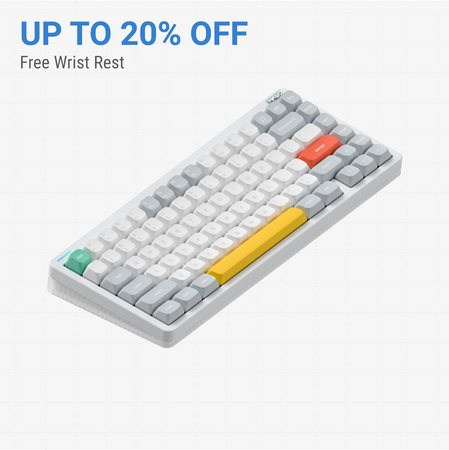
No reviews
from$126at Nuphy

4.9 (14)4.9 · 14 reviews
from$94at MK
Which one should you get?
Get the
Nuphy Halo75 V2
Aluminum
Build quality in the top 15% of 75% boards under $150.
- Premium build with an aluminum top case and ABS bottom.
- Advanced RGB lighting system with Halolight 2.0, side columns, and SignalRGB support.
- Includes a comprehensive 6-piece sound dampening stack (plate foam, switch pad, sound damper, etc.).
- South-facing LEDs. Shine-through legends stay dark, and some sculpted keycaps can clip the LED.
- No ISO layout. ISO-DE, UK, and other ISO variants are not offered.
Get the
Keychron V1 Max
Plastic Build
Build quality in the top 5% of 75% boards under $100.
- Extensive layout support including ANSI and multiple ISO variants (DE, UK, Nordic, etc.).
- Available as a barebones DIY kit for maximum customization from the start.
- Includes screw-in PCB stabilizers for a more stable typing feel.
- South-facing LEDs. Shine-through legends stay dark, and some sculpted keycaps can clip the LED.
Your choice hinges on what you value more in a keyboard. If a premium, tactile experience with immersive lighting and a pre-tuned sound is your goal, the Nuphy Halo75 V2 is the compelling option. If your priority is flexibility—whether through a barebones build, specific ISO layouts, or a lighter travel board—the Keychron V1 Max offers superior customizability at a potentially lower cost.
The differences that matter
Skip the 40-row spec sheet. These are the specs that change how each board feels, sounds, and fits your desk.
Nuphy Halo75 V2
Keychron V1 Max
Case material
ABS, Aluminum
ABS, Plastic
Switch options
Mechanical
Clicky, Linear, Tactile
Mount style
Gasket Mount
Gasket Mount, Plate Mount
Knob
No
Yes
Weight
1,020 g
770 g
Heavier boards stay planted and lighter ones travel
- Nuphy Halo75 V2
- Keychron V1 Max
- Performance
- 7983
- Build quality
- 8186
- Productivity
- 8897
- Customizability
- 8998
- Portability
- 8178
- Layout size: 75%
- Connection: Bluetooth, 2.4 GHz, Wired
- Hot-swappable
- Battery: 4,000 mAh
- Max polling rate: 1,000 Hz
- QMK
What will you mostly use it for?
The Keychron V1 Max wins in categories demanding flexibility: its barebones option and numerous ISO layouts make it ideal for modders and international programmers, while its lighter weight benefits travel. The Nuphy Halo75 V2 takes the lead for office use with silent switch options and a premium build, and for content creation with its advanced, multi-zone RGB ecosystem. Gaming is a tie, as both provide the core performance specs gamers need.
It's a tie
- Both offer a 1000Hz polling rate in 2.4GHz and wired modes for low latency.
- Both feature N-key rollover and hot-swappable sockets for switch preference.
- Both have south-facing RGB to avoid interference with Cherry-profile keycaps.
Nuphy Halo75 V2 vs Keychron V1 Max specs
Every tracked spec, side by side. Rows marked with a dot differ between the boards.
12 of 27 specs differ
Nuphy Halo75 V2
Keychron V1 Max
Switch options
Hot-swappable
Mount style
Sound dampening
Screw-in stabilizers
Layout size
Layout standard
Ergonomics
Knob
Display
Media keys
Connection
Max polling rate
Battery
USB-C
Case material
Plate material
Keycaps
Weight
Dimensions
Typing angle
Backlight
QMK
VIA
N-key rollover
Mac & Windows
Released
ISO layouts by store
Which stores sell ISO-DE, UK, and the other regional layouts.
Nuphy Halo75 V2
No ISO layout at the stores we track.
Keychron V1 Max
Keychron
ISO-DE, ISO-UK, ISO-Nordic, ISO-SW
Out of stockShips to you
Keychron (DE)
ISO-DE, ISO-UK, ISO-FR, ISO-ES, ISO-IT, ISO-SW, ISO-PT
In stockDoes not ship to you
Compare prices
Live prices from the stores we track, cheapest in-stock offer first.
Prices in USD are converted to your currency and can change at any time. KeebFinder may earn a commission when you buy through these links, at no extra cost to you.
Lowest price across stores, Amazon excluded.



Nuphy Halo75 V2 vs Keychron V1 Max: your questions
The Nuphy Halo75 V2 features a hybrid aluminum and ABS construction, giving it a more premium, solid feel. The Keychron V1 Max uses an ABS plastic case, which is lighter but less dense. Build quality preference depends on whether you value the heft and material of metal or the practical lightness of plastic.
Yes. The Keychron V1 Max listing states compatibility with macOS, Windows, and Linux. It includes a system toggle and an additional set of keycaps for both Windows and macOS layouts, allowing you to save a separate layout for each system.
Yes. The Nuphy Halo75 V2 is available with the Cherry Silent Red Clear-Top switch, which is specifically designed for quiet operation. The vendor description notes this switch aims to eliminate noise and scratchiness.
The Keychron V1 Max is more oriented toward deep customization. It is sold as a barebones kit (without switches and keycaps), includes screw-in PCB stabilizers, and supports a wide array of ISO layouts. The Nuphy Halo75 V2 is hot-swappable and uses QMK/VIA but is only sold pre-built.
The standard keycaps on both are not shine-through, as they use south-facing RGB LEDs to avoid interference with Cherry-profile keycaps. However, Nuphy sells optional 'Canopus shine-through' keycaps separately for the Halo75 V2.
Both the Nuphy Halo75 V2 and Keychron V1 Max offer a 1000Hz polling rate in their 2.4GHz wireless and wired modes, which is suitable for gaming. Their Bluetooth modes operate at a lower polling rate for power efficiency.
According to Keychron's specifications, the V1 Max has a 4000mAh battery providing up to 190 hours with backlighting off, and up to 100 hours with RGB at its lowest brightness. Actual results will vary with use.
A wrist rest is not included in the standard box contents for the Halo75 V2. However, Nuphy sells matching 'Twotone' acrylic and hardwood wrist rests separately on their product page.
Yes. Both keyboards support the open-source QMK and VIA firmware, allowing for extensive key remapping, macro creation, and layer customization directly through a browser-based interface.
The Keychron V1 Max is the clear choice for international users. It is available in numerous ISO layouts including UK, German, French, Spanish, and Nordic. The Nuphy Halo75 V2 is only listed with an ANSI layout.
Both keyboards use a gasket mount design. The Nuphy Halo75 V2 specifically uses a PCB gasket mount, while the Keychron V1 Max listing states a gasket mount design with a polycarbonate plate to reduce acoustic resonance.
The vendor descriptions do not explicitly state if the stabilizers are pre-lubed. The Keychron V1 Max uses screw-in PCB stabilizers, which are generally easier to mod and lube yourself compared to plate-mounted stabilizers.
Not sold on either?


Still torn?
Answer a few quick questions and the keyboard finder ranks 2,000+ boards by how you will actually use yours.