Jamesdonkey R3 HE vs Keychron LemoKey P1 HE8K Wired vs Wireless Gaming
Choose the Jamesdonkey R3 TMR HE for maximum wired gaming performance, or the Keychron P1 HE for wireless flexibility and a more versatile layout.


Which one should you get?
Get the
Jamesdonkey R3 HE
8K Wired
- Higher 8000 Hz polling rate for potentially lower latency in wired mode.
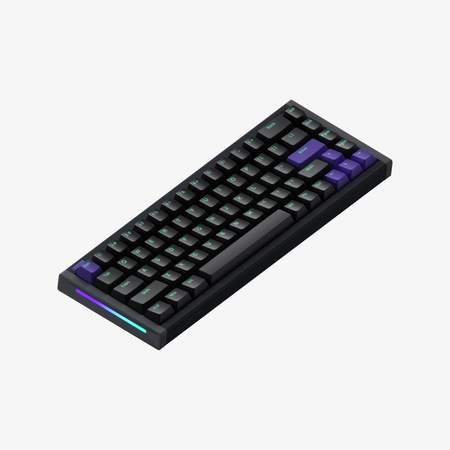
- More compact and lighter 65% aluminum chassis.
- Vendor claims a new TMR sensor for stable operation with reduced temperature drift.
- Wired-only connectivity with no wireless option.
- 65% layout lacks dedicated function row and navigation cluster.
- Web-based driver software may offer less customization than QMK/VIA.
Get the
Keychron LemoKey P1 HE
Wireless Gaming
- Triple-mode wireless connectivity (Bluetooth, 2.4 GHz, wired).
- Extensive software support with QMK, VIA, and the Lemokey Launcher web app.
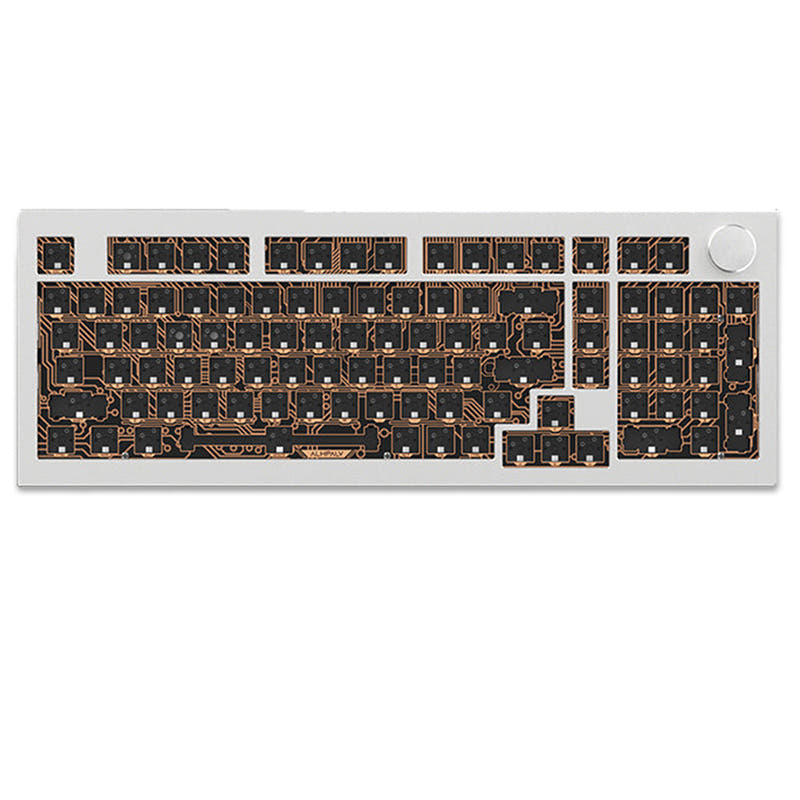
- 75% layout includes function keys, arrows, and a navigation cluster.
- Heavier at 1800g, making it less portable.
- Lower 1000 Hz polling rate compared to the R3's 8000 Hz.
- Higher price point than the Jamesdonkey model.
Your primary need dictates the choice. If your desk is dedicated to a single PC and your priority is squeezing out every millisecond of latency for competitive gaming, the Jamesdonkey R3 TMR HE's 8K wired focus is compelling. For virtually any other scenario, including multi-device use, office work, programming, or deep customization, the Keychron P1 HE's wireless versatility, superior layout, and robust software ecosystem make it the more adaptable and feature-rich keyboard.
The differences that matter
Skip the 40-row spec sheet. These are the specs that change how each board feels, sounds, and fits your desk.
Jamesdonkey R3 HE
Keychron LemoKey P1 HE
Layout size
65%
75%
Connection
Wired
Bluetooth, 2.4 GHz, Wired
Max polling rate
8,000 Hz
1,000 Hz
Case material
Aluminum
Aluminum, Metal
Switch options
Magnetic
Clicky, Linear, Magnetic, Tactile
- Jamesdonkey R3 HE
- Keychron LemoKey P1 HE
- Performance
- 9193
- Build quality
- 5988
- Productivity
- 5497
- Customizability
- 5796
- Portability
- 6681
- Hall effect (magnetic)
- Rapid trigger
- Hot-swappable
- Mount style: Gasket Mount
- Sound dampening
What will you mostly use it for?
The Keychron P1 HE wins in most productivity and customization-focused categories due to its wireless versatility, 75% layout, and extensive software support. The Jamesdonkey R3 TMR HE takes the lead specifically for dedicated, wired competitive gaming and is the more portable option. For modding and programming, the P1 HE's open-source firmware is a significant advantage, while the R3's lighter weight and smaller size benefit travel.
Pick the Jamesdonkey R3 HE
- Higher 8000 Hz polling rate compared to 1000 Hz.
- Wired-only connection eliminates potential wireless latency.
- Vendor description highlights an 8K polling rate and 0.125ms response time as eSports-level.
What owners say
Ratings and quotes collected from verified store reviews, including the critical ones.
Jamesdonkey R3 HE
No owner reviews collected yet.
Keychron LemoKey P1 HE
1 owner reviews
“As a survivor with 4800 hours on chernarus i need this keyboard, getting this asap. DayZ was a second life investment of time and im not regretful. The opportunities it allows are countless, ive learned how to read some russian by the map where i now know…”
Jamesdonkey R3 HE vs Keychron LemoKey P1 HE specs
Every tracked spec, side by side. Rows marked with a dot differ between the boards.
16 of 28 specs differ
Jamesdonkey R3 HE
Keychron LemoKey P1 HE
Switch options
Hall effect (magnetic)
Rapid trigger
Hot-swappable
Mount style
Sound dampening
Screw-in stabilizers
Layout size
Layout standard
Ergonomics
Knob
Display
Connection
Max polling rate
Battery
USB-C
Case material
Plate material
Keycaps
Weight
Dimensions
Typing angle
Backlight
QMK
VIA
N-key rollover
Mac & Windows
Released
Compare prices
Live prices from the stores we track, cheapest in-stock offer first.
Lowest price across stores, Amazon excluded.




Prices in USD are converted to your currency and can change at any time. KeebFinder may earn a commission when you buy through these links, at no extra cost to you.
Jamesdonkey R3 HE vs Keychron LemoKey P1 HE: your questions
The Jamesdonkey R3 TMR HE has a higher polling rate of 8000 Hz. The Keychron P1 HE offers a 1000 Hz polling rate in its 2.4 GHz and wired modes.
Yes. The Keychron P1 HE supports triple-mode connectivity, including Bluetooth 5.2, 2.4 GHz wireless, and wired USB-C. The Jamesdonkey R3 is wired-only.
The Jamesdonkey R3 uses a 65% layout, which lacks a dedicated function row and navigation cluster. The Keychron P1 HE uses a 75% layout, which retains the function row, arrow keys, and a compact navigation cluster.
Yes, but the methods differ. The Keychron P1 HE supports deep customization via QMK and VIA open-source firmware. The Jamesdonkey R3 uses a web-based driver software for configuration, as stated in its vendor description.
Yes, both keyboards feature hot-swappable sockets for magnetic (hall effect) switches. However, the Keychron P1 HE is listed as compatible exclusively with Gateron double-rail magnetic switches.
The Keychron P1 HE is generally better for office work. Its 75% layout provides more readily accessible keys, wireless connectivity reduces cable clutter, and the programmable knob is useful for media control.
Yes, the Keychron P1 HE includes an aluminum rotary encoder (knob) that is programmable for functions like volume control or zoom, according to its product listing.
The Jamesdonkey R3 uses dye-sublimation PBT combined with silk-screen PC keycaps in a dual-tone theme. The Keychron P1 HE uses double-shot PBT keycaps, available in shine-through and non-shine-through versions.
The Keychron P1 HE specifically lists screw-in PCB stabilizers. The stabilizer type for the Jamesdonkey R3 is not detailed in the provided specifications.
The Keychron P1 HE is significantly heavier, weighing 1800g. The Jamesdonkey R3 TMR HE weighs 1112g, making it the lighter of the two.
Yes, the Keychron P1 HE product listing includes Mac/Win support in its extra features, indicating compatibility with macOS.
Yes, both the Jamesdonkey R3 TMR HE and the Keychron P1 HE list rapid trigger as a feature in their specifications.
Not sold on either?






Still torn?
Answer a few quick questions and the keyboard finder ranks 2,000+ boards by how you will actually use yours.