Keychron C4 HE vs K10 ProWired Speed vs Wireless Versatility
Choose the C4 HE for raw gaming performance with magnetic switches and 8000 Hz, or the K10 Pro for wireless flexibility and deeper customization.

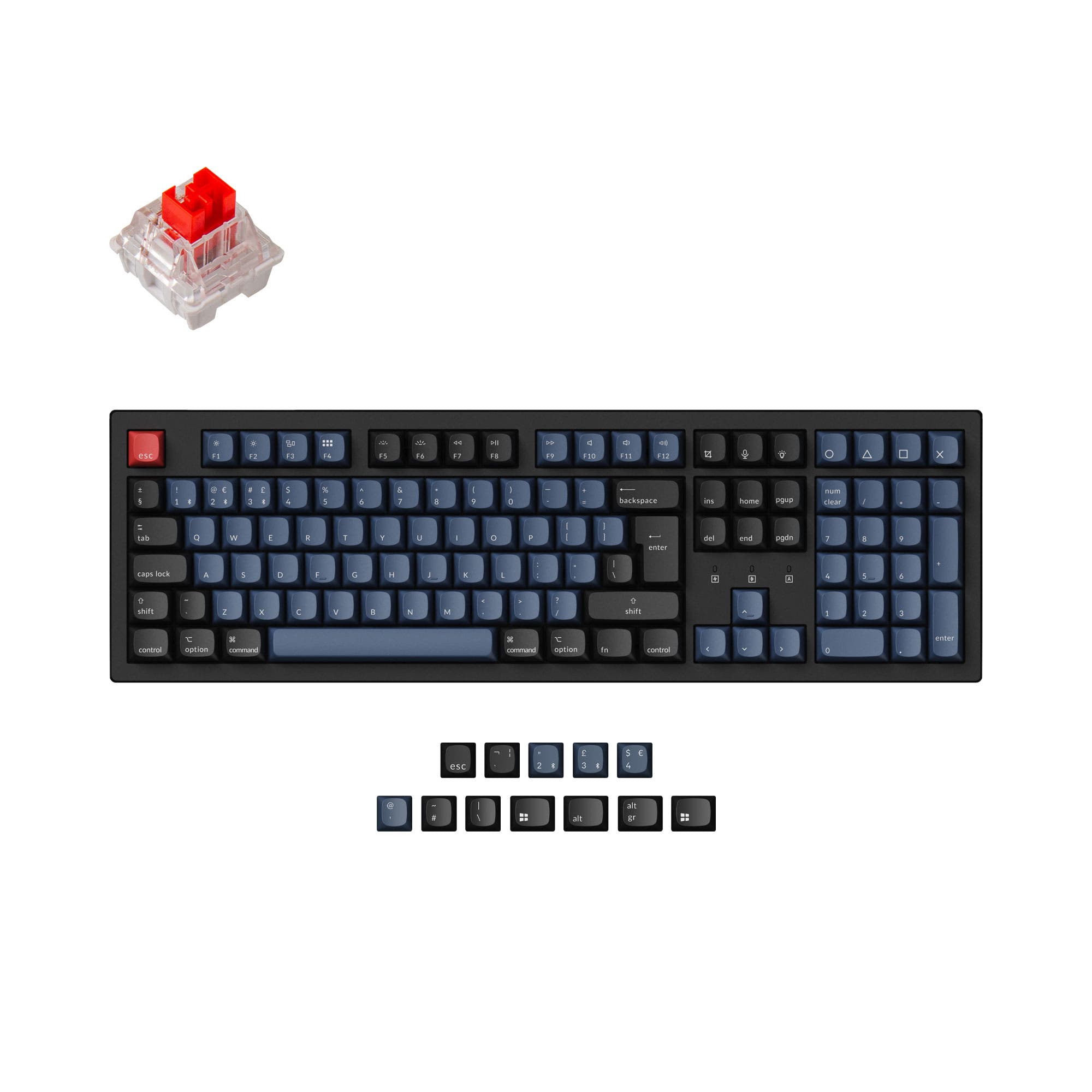
Which one should you get?
Get the
Keychron C4 HE
Wired Speed
- Hall Effect magnetic switches with adjustable actuation for customizable response
- 8000 Hz polling rate significantly reduces input lag for competitive gaming
- Gasket mount with EVA acoustic foam for a refined typing sound and feel
- Wired-only design limits desk setup flexibility and portability
- Compatible only with Hall Effect magnetic switches, not standard MX switches
- No customer reviews available to assess long-term reliability
Get the
Keychron K10 Pro
Wireless Versatility
- Wireless Bluetooth 5.1 connection with a large 4000mAh battery for extended use
- Full QMK firmware support for advanced key remapping and macros
- Available in multiple ANSI and ISO layouts including German, French, and Nordic
- 1000 Hz polling rate is lower than the C4 HE's 8000 Hz for competitive play
- Tray mount construction with plate-mounted stabilizers on some versions may feel less premium
- Some versions lack sound-absorbing foam and silicone pad, affecting typing acoustics
If your primary need is the fastest possible gaming performance with magnetic switch precision, the Keychron C4 HE's 8000 Hz polling and Hall Effect switches make it a solid wired choice. If you value wireless freedom, the ability to swap in any MX mechanical switch, and a layout that includes ISO options, the Keychron K10 Pro is more versatile for everyday productivity and on-the-go use. Both keyboards are similarly priced, so the deciding factor is whether wired speed or wireless flexibility matters more to you.
The differences that matter
Skip the 40-row spec sheet. These are the specs that change how each board feels, sounds, and fits your desk.
Keychron C4 HE
Keychron K10 Pro
Hall effect (magnetic)
Yes
No
Connection
Wired
Bluetooth, Wired
Max polling rate
8,000 Hz
1,000 Hz
Case material
Plastic
ABS, Plastic, Steel
Mount style
Gasket Mount
PCB Mount, Plate Mount, Tray Mount
- Keychron C4 HE
- Keychron K10 Pro
- Performance
- 8981
- Build quality
- 8389
- Productivity
- 9595
- Customizability
- 9296
- Portability
- 4553
- Layout size: 100%
- Hot-swappable
- Switch options: Clicky, Linear, Tactile
- QMK
- VIA
- Sound dampening
What will you mostly use it for?
The C4 HE wins in gaming and modding due to its magnetic switches and high polling rate, which appeal to enthusiasts seeking cutting-edge performance. The K10 Pro is the better choice for office, programming, and travel because of its wireless Bluetooth capability, battery life, and broad MX switch compatibility. For content creation, both keyboards tie because the full-size layout, media keys, and programmability serve similar needs regardless of connectivity type.
Pick the Keychron C4 HE
- Hall Effect magnetic switches with adjustable actuation for rapid, precise input
- 8000 Hz polling rate for lower latency and faster signal transmission
- Designed for competitive split-second gaming scenarios
What owners say
Ratings and quotes collected from verified store reviews, including the critical ones.
Keychron C4 HE
No owner reviews collected yet.
Keychron K10 Pro
14 owner reviews
“it's heavy. feels good. I didn't really look the whole inventory over, I just needed something and took a gamble. not disappointed. gonna need the expensive one now.”
“Saturday night I logged off my Mac. Sunday afternoon I tried logging in but the keyboard would not connect over BT. Finally got it connected via USB-C. But the keys were messed up. F1-F12 were brightness, volume etc. not F1-F12 . All my customizations were…”
Keychron C4 HE vs K10 Pro specs
Every tracked spec, side by side. Rows marked with a dot differ between the boards.
13 of 27 specs differ
Keychron C4 HE
Keychron K10 Pro
Switch options
Hall effect (magnetic)
Hot-swappable
Mount style
Sound dampening
Screw-in stabilizers
Layout size
Layout standard
Ergonomics
Display
Media keys
Connection
Max polling rate
Battery
USB-C
Case material
Plate material
Keycaps
Weight
Dimensions
Typing angle
Backlight
QMK
VIA
N-key rollover
Mac & Windows
Released
Compare prices
Live prices from the stores we track, cheapest in-stock offer first.
Lowest price across stores, Amazon excluded.



Prices in USD are converted to your currency and can change at any time. KeebFinder may earn a commission when you buy through these links, at no extra cost to you.
Keychron C4 HE vs K10 Pro: your questions
No, the Keychron C4 HE is designed specifically for Hall Effect magnetic switches, such as the pre-installed Keychron Ultra-fast Lime Magnetic Switch. Standard MX mechanical 3-pin or 5-pin switches are not compatible with the C4 HE's magnetic sensing mechanism.
The Keychron K10 Pro is generally better for programming due to its full QMK and VIA support for deep key remapping, macros, and custom layers. It also offers hot-swappable MX switch compatibility and is available in ISO layouts favored by many European programmers. The C4 HE is also programmable via the Launcher web app but is limited to magnetic switches.
Yes, the K10 Pro includes keycaps for both macOS and Windows systems, along with a dedicated toggle on the top of the keyboard for switching between the two operating systems. The product listing confirms Mac/Win support and includes extra keycaps for both platforms.
The Keychron C4 HE features an 8000 Hz polling rate, which can be adjusted to 1000 Hz or 4000 Hz via the Launcher web app. The Keychron K10 Pro has a standard 1000 Hz polling rate out of the box. The higher polling rate on the C4 HE reduces input lag, benefiting competitive gaming.
Yes, the Keychron K10 Pro supports both Bluetooth 5.1 wireless connectivity and a USB Type-C wired connection. It can connect to up to three devices wirelessly and has a built-in 4000mAh battery for extended use. It is not a fully wireless keyboard as it requires the USB-C cable for charging and initial QMK configuration.
The Keychron C4 HE includes advanced EVA acoustic foam as standard, along with a steel plate and a gasket mount design, which together provide a peaceful typing sound. The K10 Pro's sound dampening varies by version; the Black Fully Assembled version does not include sound-absorbing foam or a silicone pad, while other versions do.
Yes, the Keychron C4 HE comes with Keychron Ultra-fast Lime Magnetic Switches that feature adjustable actuation points. This can be configured through the Keychron Launcher web app, allowing you to set the point at which a keypress registers for more precise control.
The Keychron C4 HE weighs 970g, making it lighter and more compact for a wired board. The Keychron K10 Pro weighs 1495g, which is substantially heavier and provides more desk stability but is less portable for travel. Both have similar dimensions around 445 mm by 138 mm.
Yes, both the Keychron C4 HE and Keychron K10 Pro offer hot-swappable versions. However, the C4 HE is only compatible with Hall Effect magnetic switches, while the K10 Pro's hot-swappable sockets support almost all 3-pin and 5-pin MX style mechanical switches. Note that the K10 Pro Black Fully Assembled version is not hot-swappable.
The Keychron C4 HE features north-facing RGB LED backlights with over 22 modes that can be customized via the Launcher web app. The Keychron K10 Pro uses south-facing RGB or white backlight options, which are less likely to interfere with Cherry-profile keycap upgrades. Both offer extensive tuning for hue, saturation, brightness, and effects.
No, the Keychron C4 HE is a wired-only keyboard with a USB Type-C connection and does not support Bluetooth or multiple device pairing. The Keychron K10 Pro, on the other hand, can pair with up to three devices via Bluetooth 5.1 for seamless switching.
No, the Keychron C4 HE is only available in ANSI layout with a 100% full-size form factor. In contrast, the Keychron K10 Pro offers a wide range of ISO layouts including UK, German, French, Spanish, Swiss, and Nordic variants, making it a better choice for users who require a non-ANSI layout.
Not sold on either?


Still torn?
Answer a few quick questions and the keyboard finder ranks 2,000+ boards by how you will actually use yours.