Keychron J1 vs K1 Max
Choose the Keychron J1 for a more compact, lighter 75% layout and lower entry price, or the K1 Max for superior build quality with an aluminum frame, a massive 4000mAh battery, and broader ISO layout availability.
KeebFinder may earn a commission when you buy through these links, at no extra cost to you.

3.0 (5)3.0 · 5 reviews
from$59at Keychron

3.3 (16)3.3 · 16 reviews
from$89at Keychron
Down 42% this monthDown 42% this month
Which one should you get?
Get the
Keychron J1
Build quality in the top 40% of 75% boards under $100.
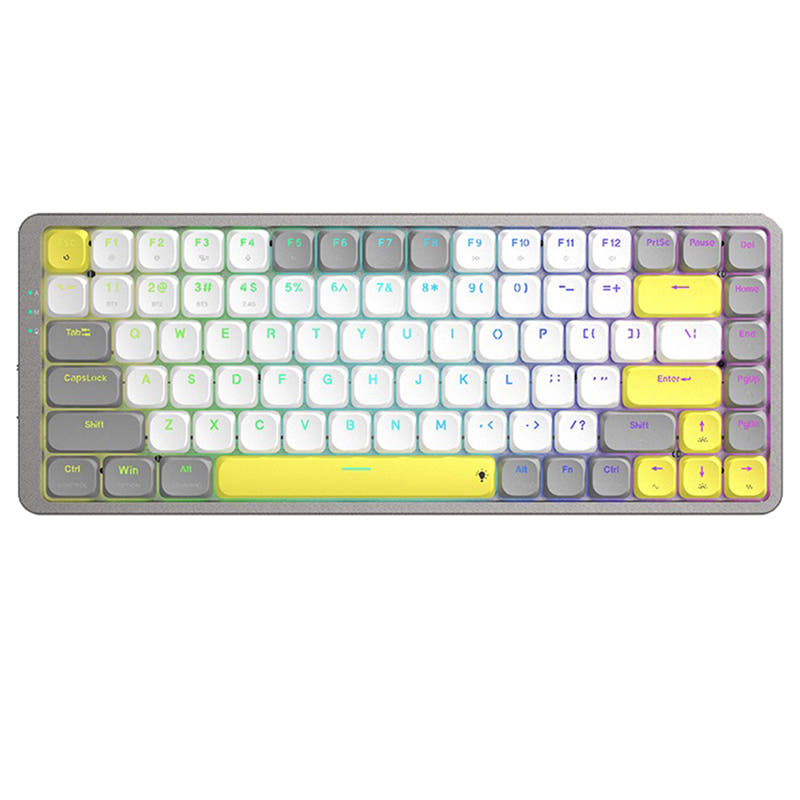
- Compact 75% layout with 82 keys saves desk space.
- Includes a built-in receiver compartment for the 2.4 GHz dongle.
- Lighter overall weight at 661g for easier portability.
- Low-profile switches and keycaps only. Standard MX keycaps will not fit.
- North-facing LEDs. Cherry-profile keycaps can hit the switch housing.
- No ISO layout. ISO-DE, UK, and other ISO variants are not offered.
- No numpad.
Get the
Keychron K1 Max
Battery
Build quality in the top 10% of 80% boards under $100.
- Sturdy build quality with a combination of ABS plastic and an aluminum frame.
- Large 4000mAh battery provides substantially longer wireless use between charges.
- Available in multiple ISO layouts including UK, German, Swiss, and Nordic.
- Low-profile switches and keycaps only. Standard MX keycaps will not fit.
- North-facing LEDs. Cherry-profile keycaps can hit the switch housing.
- No numpad.
Your decision hinges on portability versus premium endurance. Opt for the Keychron J1 if you need the smallest possible low-profile travel companion with a built-in dongle slot and a lower price. Choose the Keychron K1 Max if you prefer a more robust aluminum build, a massive 4000mAh battery for long office sessions, and the flexibility of ISO layout options.
The differences that matter
Skip the 40-row spec sheet. These are the specs that change how each board feels, sounds, and fits your desk.
Keychron J1
Keychron K1 Max
Layout size
75%
80%
Battery
2,000 mAh
4,000 mAh
A larger battery means fewer cables during the day
Case material
ABS
ABS, Aluminum, Plastic
Weight
661 g
608 g
Heavier boards stay planted and lighter ones travel
Layout standard
ANSI
ANSI, ISO, ISO-DE, ISO-Nordic, ISO-UK
ISO and JIS exist so regional layouts fit
- Keychron J1
- Keychron K1 Max
- Performance
- 8282
- Build quality
- 7182
- Productivity
- 8990
- Customizability
- 8689
- Portability
- 8073
- Connection: Bluetooth, 2.4 GHz, Wired
- Hot-swappable
- Low profile
- Max polling rate: 1,000 Hz
- Switch options: Clicky, Linear, Tactile
- QMK
What will you mostly use it for?
For gaming, both keyboards perform identically with 1000 Hz polling and NKRO, resulting in a tie. The K1 Max wins in the office, programming, and content creation categories, driven by its larger battery, aluminum frame, and dedicated function row. The J1 takes the travel category thanks to its smaller 75% footprint and built-in receiver storage. For modding, both platforms offer equal potential with hot-swap sockets and open-source firmware.
It's a tie
- Both offer a 1000 Hz polling rate over 2.4 GHz and wired modes for low latency.
- Both include N-Key Rollover for wireless and wired modes.
- Both support a Last Key Priority (LKP) feature, as stated for the J1, to reduce directional delay.
What owners say
Ratings and quotes collected from verified store reviews, including the critical ones.
Keychron J1
5 owner reviews
“I like everything about this keyboard: the keys, their profile, the typing sound of the banana switch, the shape of the keyboard itself, and its size. There are no battery issues either; it holds a charge surprisingly long, and I don't remember the last time…”
“Almost perfect keyboard for me, low profile, etc., but battery dies too fast, i'd say 2-3 days max. and when it dies it does not reconnect when charging cable is plugged in, you have to toggle wired mode, plug in the cable and then toggle wireless mode for it…”
Keychron K1 Max
16 owner reviews
“My first better keyboard and I am absolutely satisfied. We'll see how it works after a longer time. I just thought of one small thing, I have nowhere to hide the receiver when I leave with just the laptop and I want to leave the keyboard at home. Like you can…”
“Beware of the double-clicking issue. I have got 2 units of this. They're both having the same problem and worse.”
Keychron J1 vs K1 Max specs
Every tracked spec, side by side. Rows marked with a dot differ between the boards.
10 of 26 specs differ
Keychron J1
Keychron K1 Max
Switch options
Hot-swappable
Mount style
Low profile
Sound dampening
Layout size
Layout standard
Ergonomics
Display
Media keys
Connection
Max polling rate
Battery
USB-C
Case material
Plate material
Keycaps
Weight
Dimensions
Typing angle
Backlight
QMK
VIA
N-key rollover
Mac & Windows
Released
ISO layouts by store
Which stores sell ISO-DE, UK, and the other regional layouts.
Keychron J1
No ISO layout at the stores we track.
Keychron K1 Max
Keychron
ISO-DE, ISO-UK, ISO-Nordic
Out of stockShips to you
Keychron (DE)
ISO-DE, ISO-UK
Out of stockDoes not ship to you
Compare prices
Live prices from the stores we track, cheapest in-stock offer first.
Prices in USD are converted to your currency and can change at any time. KeebFinder may earn a commission when you buy through these links, at no extra cost to you.
Lowest price across stores, Amazon excluded.




Keychron J1 vs K1 Max: your questions
The Keychron K1 Max has a significantly larger 4000mAh battery compared to the J1's 2000mAh battery. Customer reviews for the J1 report battery life lasting only 2-3 days on a charge, suggesting the K1 Max will offer substantially longer wireless runtime.
Yes, both keyboards are available in hot-swappable versions, allowing you to change switches without soldering. However, both are currently only compatible with Gateron and Keychron low-profile mechanical switches, as QMK does not support low-profile optical switches.
The Keychron J1 is better for travel due to its smaller 75% layout and lighter weight. It also features a built-in receiver compartment for storing the 2.4 GHz dongle, which is a convenient feature for on-the-go use.
Yes, both the Keychron J1 and K1 Max support QMK firmware and can be configured using the Keychron Launcher web app. This allows for full key remapping, macro creation, and customization without needing to install software.
The Keychron J1 has a compact 75% layout with 82 keys, while the K1 Max has a larger 80% TKL layout with 88 keys. The K1 Max includes a dedicated function row and more keys, which is a key difference for users who need those extra keys.
The Keychron K1 Max has a more premium build quality, featuring an aluminum frame combined with ABS plastic. In contrast, the Keychron J1 uses a full ABS frame, which feels less sturdy and has had some customer reports of bent units.
The Keychron K1 Max is available in multiple ISO layouts including UK-ISO, German DE-ISO, Swiss-ISO, and Nordic-ISO. The Keychron J1 is listed only with an ANSI layout, making the K1 Max the clear choice for users needing an ISO keyboard.
Both keyboards come with low-profile double-shot PBT keycaps. The J1's keycaps are designed for oil resistance and long-term use, while the K1 Max uses LSA (low profile spherical-angled) profile PBT keycaps for a different feel.
Yes, both keyboards feature advanced acoustic foam inside, including IXPE and latex foam layers. The manufacturer states this is designed to provide silent keystrokes, enhanced comfort, and superior key switch support and durability.
The Keychron K1 Max is likely more suitable for programmers due to its 80% layout that includes a dedicated function row. While both support QMK/VIA remapping, the extra keys on the K1 Max provide more immediate accessibility for shortcuts and macros.
Yes, both keyboards can connect to up to three devices via Bluetooth. The J1 uses Bluetooth 5.2, while the K1 Max uses Bluetooth 5.1. They also support 2.4 GHz and wired connections for flexible multi-device setups.
The Keychron J1 has a fixed typing angle of 19 degrees. The Keychron K1 Max does not have a fixed angle specified in its dimensions but instead offers three levels of adjustable typing angle for ergonomic support.
Not sold on either?




Still torn?
Answer a few quick questions and the keyboard finder ranks 2,000+ boards by how you will actually use yours.