Keychron J1 vs K1 V6
Choose the J1 for a more compact 75% layout with PBT keycaps, or the K1 V6 for a wider 80% TKL layout with an aluminum frame and adjustable typing angles.
KeebFinder may earn a commission when you buy through these links, at no extra cost to you.

3.0 (5)3.0 · 5 reviews
from$59at Keychron

5.0 (2)5.0 · 2 reviews
from$74at Keychron
Which one should you get?
Get the
Keychron J1
Sound dampening
Build quality in the top 40% of 75% boards under $100.
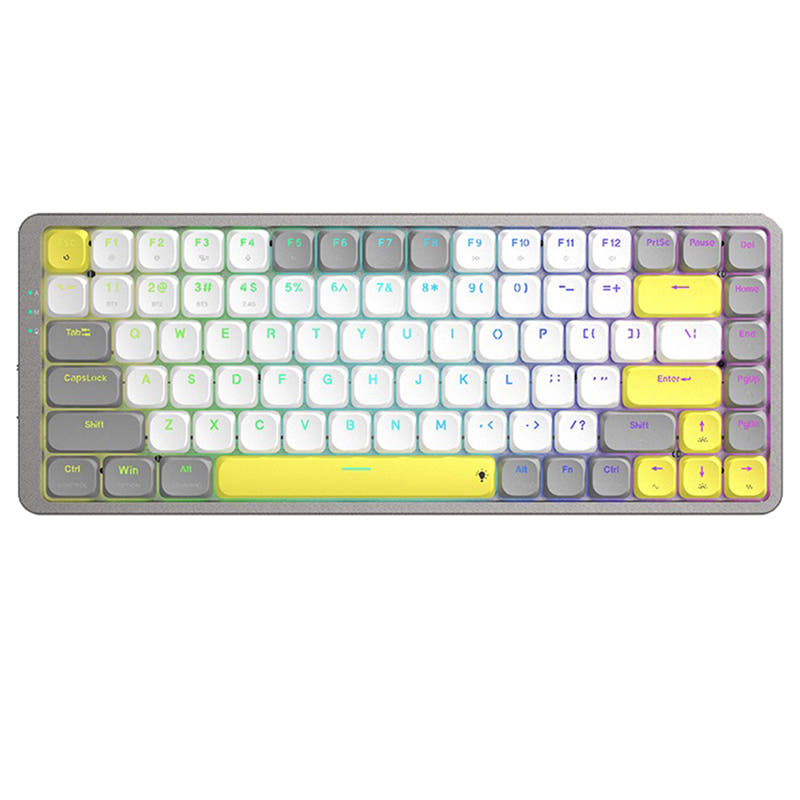
- PBT double-shot keycaps are more durable and oil-resistant than the K1 V6's ABS keycaps.
- Built-in receiver compartment for the 2.4 GHz dongle prevents loss during travel.
- Advanced IXPE and latex acoustic foam for quieter typing.
- Low-profile switches and keycaps only. Standard MX keycaps will not fit.
- North-facing LEDs. Cherry-profile keycaps can hit the switch housing.
- No ISO layout. ISO-DE, UK, and other ISO variants are not offered.
- No numpad.
Get the
Keychron K1 V6
Build quality in the top 20% of 80% boards under $100.
- Aluminum frame and top mount construction offers a more premium and stable typing feel.
- Three adjustable typing angles (3.37°, 4.2°, and 6.7°) for better ergonomic support.
- Redesigned stabilizers reduce wobble on larger keys like the space bar and enter key.
- Low-profile switches and keycaps only. Standard MX keycaps will not fit.
- North-facing LEDs. Cherry-profile keycaps can hit the switch housing.
- No numpad.
If you prioritize a compact layout for travel and want more durable PBT keycaps, the Keychron J1 is the better fit. For a more traditional TKL layout with an aluminum frame, adjustable angles, and a solid modding foundation, choose the K1 V6. Keep in mind that the J1 has reported battery and Bluetooth issues, while the K1 V6 offers a more premium build but with less portability.
The differences that matter
Skip the 40-row spec sheet. These are the specs that change how each board feels, sounds, and fits your desk.
Keychron J1
Keychron K1 V6
Layout size
75%
80%
Connection
Bluetooth, 2.4 GHz, Wired
Bluetooth, Wired
Wireless for several devices and wired for lower latency
Case material
ABS
ABS, Aluminum
Weight
661 g
596 g
Heavier boards stay planted and lighter ones travel
Sound dampening
Yes
No
- Keychron J1
- Keychron K1 V6
- Performance
- 8282
- Build quality
- 7178
- Productivity
- 8980
- Customizability
- 8688
- Portability
- 8073
- Hot-swappable
- Battery: 2,000 mAh
- Low profile
- Max polling rate: 1,000 Hz
- Switch options: Clicky, Linear, Tactile
- QMK
What will you mostly use it for?
For office and travel use, the J1 wins due to its PBT keycaps and compact form factor. The K1 V6 is better for programming and modding thanks to its larger TKL layout and aluminum build. Gaming and content creation are a tie between both keyboards, as they share similar wireless performance and customization capabilities. Personal preference for layout size and build materials will ultimately drive the choice.
It's a tie
- Both offer a 1000 Hz polling rate in wired and 2.4 GHz modes for competitive gaming.
- Both support N-Key Rollover (NKRO) for precise key registration.
- The J1 features Last Key Priority (LKP) for smoother directional changes in games like Valorant.
- The K1 V6 has a top mount and aluminum plate for a more stable typing feel, though both use low-profile switches.
What owners say
Ratings and quotes collected from verified store reviews, including the critical ones.
Keychron J1
5 owner reviews
“I like everything about this keyboard: the keys, their profile, the typing sound of the banana switch, the shape of the keyboard itself, and its size. There are no battery issues either; it holds a charge surprisingly long, and I don't remember the last time…”
“Almost perfect keyboard for me, low profile, etc., but battery dies too fast, i'd say 2-3 days max. and when it dies it does not reconnect when charging cable is plugged in, you have to toggle wired mode, plug in the cable and then toggle wireless mode for it…”
Keychron K1 V6
2 owner reviews
“Love it! My first mechanical, now typing is a beautiful experience, I enjoy coming back to the keyboard! Remapped with Makros, so I have my apps at the fingertip. I am experiencing some minor bugs like "Enter"-key "stuck", meaning the keyboard typed enter…”
Keychron J1 vs K1 V6 specs
Every tracked spec, side by side. Rows marked with a dot differ between the boards.
11 of 26 specs differ
Keychron J1
Keychron K1 V6
Switch options
Hot-swappable
Mount style
Low profile
Sound dampening
Layout size
Layout standard
Ergonomics
Display
Media keys
Connection
Max polling rate
Battery
USB-C
Case material
Plate material
Keycaps
Weight
Dimensions
Typing angle
Backlight
QMK
VIA
N-key rollover
Mac & Windows
Released
ISO layouts by store
Which stores sell ISO-DE, UK, and the other regional layouts.
Keychron J1
No ISO layout at the stores we track.
Keychron K1 V6
Keychron
ISO-DE, ISO-UK, ISO-Nordic, ISO-SW
In stockShips to you
Keychron (DE)
ISO-DE, ISO-UK, ISO-SW
Out of stockDoes not ship to you
Compare prices
Live prices from the stores we track, cheapest in-stock offer first.
Prices in USD are converted to your currency and can change at any time. KeebFinder may earn a commission when you buy through these links, at no extra cost to you.
Lowest price across stores, Amazon excluded.



Keychron J1 vs K1 V6: your questions
The K1 V6 has a better build quality on paper with an aluminum frame and top mount, while the J1 uses an all-ABS plastic frame. Customer reviews for the J1 also mention units arriving bent, which is not a reported issue for the K1 V6.
Yes, both keyboards offer a hot-swappable version. They are compatible with Gateron or Keychron low-profile mechanical switches, but the K1 V6 specifically supports Keychron Milk POM switches. QMK firmware does not support low-profile optical switches on either model.
Both keyboards are suitable for macOS. They include keycaps for both Windows and macOS, offer Mac-specific multimedia function keys, and can have separate keymaps configured for each OS via the Keychron Launcher web app.
Yes, both the J1 and K1 V6 support per-key RGB lighting. You can customize the color of each key individually using the Keychron Launcher web app. The K1 V6's ABS shine-through keycaps provide a more vibrant backlight effect compared to the J1's PBT keycaps.
The K1 V6 likely has better battery life based on user reports. The J1 has customer complaints of battery draining in 2-3 days without backlight. Both have a 2000mAh battery, but the K1 V6's Bluetooth polling rate (90 Hz) is lower than the J1's (125 Hz), which may contribute to longer life.
Yes, both keyboards support a 2.4 GHz wireless connection with a 1000 Hz polling rate, which is suitable for competitive gaming. The J1 also features Last Key Priority (LKP) for smoother directional input in FPS games.
The J1 has a 75% layout with 82 keys, which is more compact and saves desk space. The K1 V6 has an 80% TKL layout with 87 keys, providing dedicated function keys and arrow keys that are more spaced out.
No, the K1 V6 does not have a built-in receiver compartment. The J1 includes a storage slot at the top right corner of the keyboard for the 2.4 GHz Type-A receiver, which is more convenient for travel.
Both keyboards are equally customizable as they support open-source QMK firmware and VIA. You can remap keys, create macros, and adjust lighting using the Keychron Launcher web app. The K1 V6 has an aluminum plate, which may be preferred for modding stabilizers and foam.
The J1 comes with low-profile double-shot PBT keycaps, which are more durable and resistant to shine. The K1 V6 comes with LSA profile (low spherical angle) shine-through ABS keycaps, which offer a better backlight effect but are less resistant to long-term wear.
Not sold on either?




Still torn?
Answer a few quick questions and the keyboard finder ranks 2,000+ boards by how you will actually use yours.