Keychron J1 vs K1 V5Gaming Features vs Ultra-Slim Design
Choose the J1 for competitive gaming features and deep customization, or the K1 V5 for a proven ultra-slim design with a simpler setup.


Which one should you get?
Get the
Keychron J1
Gaming Features
- Dedicated 2.4 GHz wireless with 1000 Hz polling rate for gaming.
- Full QMK and VIA firmware support for deep customization.
- Includes advanced IXPE and latex acoustic foam for sound dampening.
- Some user reviews report quality control issues like a bent frame.
- Battery life complaints in user reviews suggest it may be short.
- Limited to low-profile mechanical switches, with no optical switch option mentioned.
Get the
Keychron K1 V5
Ultra-Slim Design
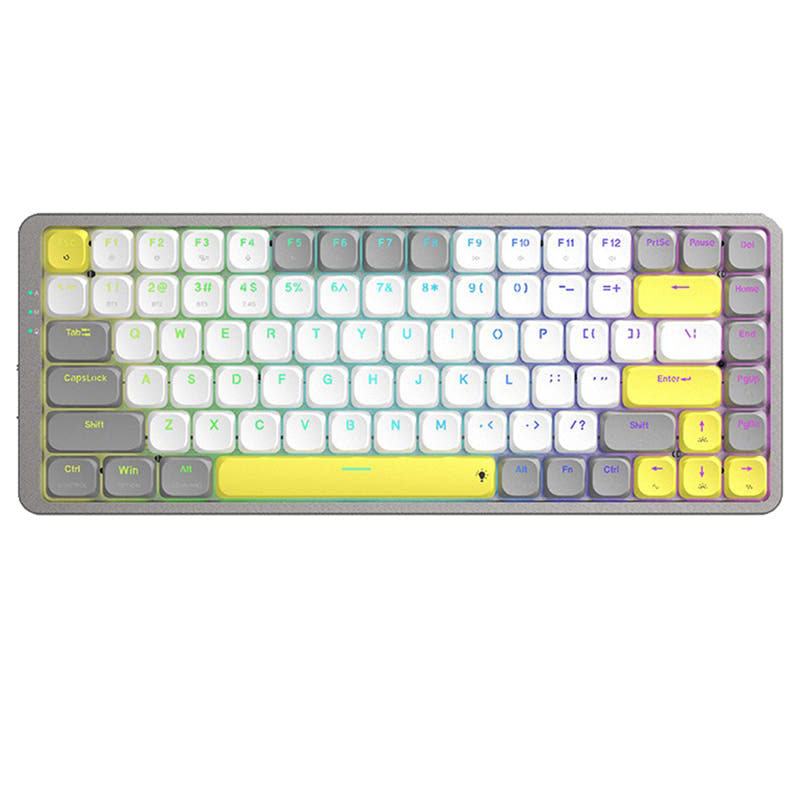
- Ultra-slim 18mm profile design for a low desk footprint.
- Available with hot-swappable low-profile optical switches for easy customization.
- Extremely high volume of positive user reviews indicating good satisfaction.
- Lacks a 2.4 GHz wireless connection, relying solely on Bluetooth and wired modes.
- Does not support QMK or VIA firmware for advanced programming.
- Uses ABS keycaps, which may develop shine faster than PBT.
Select the Keychron J1 if your primary needs are competitive gaming latency, extensive key reprogramming via QMK/VIA, or modding with pre-installed sound foam. Opt for the Keychron K1 V5 if you prioritize a sleek, ultra-thin aesthetic, a hot-swappable optical switch option, and a keyboard with a large base of verified positive reviews for daily reliability.
The differences that matter
Skip the 40-row spec sheet. These are the specs that change how each board feels, sounds, and fits your desk.
Keychron J1
Keychron K1 V5
Layout size
75%
80%
Connection
Bluetooth, 2.4 GHz, Wired
Bluetooth, Wired
Case material
ABS
Aluminum, Plastic
QMK
Yes
No
VIA
Yes
No
- Keychron J1
- Keychron K1 V5
- Performance
- 8264
- Build quality
- 7167
- Productivity
- 8967
- Customizability
- 8669
- Portability
- 8074
- Hot-swappable
- Battery: 2,000 mAh
- Low profile
- Switch options: Clicky, Linear, Tactile
What will you mostly use it for?
The J1 is the clear choice for gaming and programming due to its high-performance wireless mode and extensive programmability. For office use and travel, the K1 V5's proven slim design and user satisfaction give it the edge. Modders will prefer the J1's open firmware and pre-installed foams, while content creators will find capable low-profile options in both.
Pick the Keychron J1
- Includes a 2.4 GHz wireless mode with a 1000 Hz polling rate for low latency.
- Features Last Key Priority (LKP) for smoother directional changes in games.
- Offers a 1000 Hz polling rate in wired mode as well.
What owners say
Ratings and quotes collected from verified store reviews, including the critical ones.
Keychron J1
5 owner reviews
“I like everything about this keyboard: the keys, their profile, the typing sound of the banana switch, the shape of the keyboard itself, and its size. There are no battery issues either; it holds a charge surprisingly long, and I don't remember the last time…”
“Almost perfect keyboard for me, low profile, etc., but battery dies too fast, i'd say 2-3 days max. and when it dies it does not reconnect when charging cable is plugged in, you have to toggle wired mode, plug in the cable and then toggle wireless mode for it…”
Keychron K1 V5
1,458 owner reviews
“Cant beat this keyboard. Everything I wanted for a great price. Great for Mac and just as good as any keyboard for PC. I use ti for my work pc and personal Mac.”
Keychron J1 vs K1 V5 specs
Every tracked spec, side by side. Rows marked with a dot differ between the boards.
10 of 25 specs differ
Keychron J1
Keychron K1 V5
Switch options
Hot-swappable
Mount style
Low profile
Sound dampening
Layout size
Layout standard
Ergonomics
Display
Media keys
Connection
Max polling rate
Battery
USB-C
Case material
Keycaps
Weight
Dimensions
Typing angle
Backlight
QMK
VIA
N-key rollover
Mac & Windows
Released
Compare prices
Live prices from the stores we track, cheapest in-stock offer first.
Lowest price across stores, Amazon excluded.


Prices in USD are converted to your currency and can change at any time. KeebFinder may earn a commission when you buy through these links, at no extra cost to you.
Keychron J1 vs K1 V5: your questions
The Keychron J1 is better suited for gaming. It includes a dedicated 2.4 GHz wireless mode with a 1000 Hz polling rate for lower latency, a feature the K1 V5 lacks. The J1 also has Last Key Priority (LKP) for smoother directional changes in fast-paced games.
The Keychron K1 V5 does not support QMK or VIA firmware according to its product listing, limiting deep key reprogramming. The J1, however, fully supports both QMK and VIA, allowing for extensive remapping and macro creation through the Keychron Launcher web app.
Yes. The Keychron J1 comes with low-profile double-shot PBT keycaps, which are generally more resistant to oil and shine. The Keychron K1 V5 uses ABS keycaps, which can develop a shiny appearance with prolonged use.
The Keychron K1 V5 offers a hot-swappable version, but only for its low-profile Keychron optical switches. The listing states the Gateron low-profile mechanical version is not hot-swappable. The J1 also offers a hot-swappable version for Gateron/Keychron low-profile mechanical switches.
The Keychron K1 V5 is notably thinner. Its manufacturer description highlights an 18mm ultra-slim body design. The J1's specifications list a 19-degree typing angle but do not emphasize an ultra-slim profile as a key feature.
Yes, both the Keychron J1 and K1 V5 are compatible with macOS and Windows. Each includes keycaps for both operating systems, allowing you to switch the layout physically and often via a switch on the keyboard.
The Keychron J1 supports Bluetooth, 2.4 GHz wireless, and wired USB-C connections. The Keychron K1 V5 supports Bluetooth and wired USB-C connections, but does not have a 2.4 GHz wireless mode.
According to its product description, the Keychron J1 contains advanced IXPE acoustic foam for smooth keystrokes and resilient latex foam for key switch support and responsiveness. This pre-installed foam aims to provide a quieter typing experience.
The product listings do not provide directly comparable battery life figures. However, user reviews for the J1 mention the battery dying in 2-3 days, suggesting potential concerns. The K1 V5's listing provides lab test estimates for its 2000mAh battery but real-world performance may vary.
No. Both keyboards are designed for low-profile switches only. The J1 is compatible with Gateron/Keychron low-profile mechanical switches. The K1 V5 listing explicitly states its low-profile optical and mechanical versions are not compatible with normal profile MX-style switches.
Yes. The Keychron J1 features a built-in receiver compartment, a storage slot at the top right corner to hold the 2.4 GHz USB Type-A receiver when not in use or during travel.
Not sold on either?




Still torn?
Answer a few quick questions and the keyboard finder ranks 2,000+ boards by how you will actually use yours.