Not sure which keyboard to choose? Try the Keyboard Finder now!

Compare Keychron J1 vs K3 HE Differences Side by Side

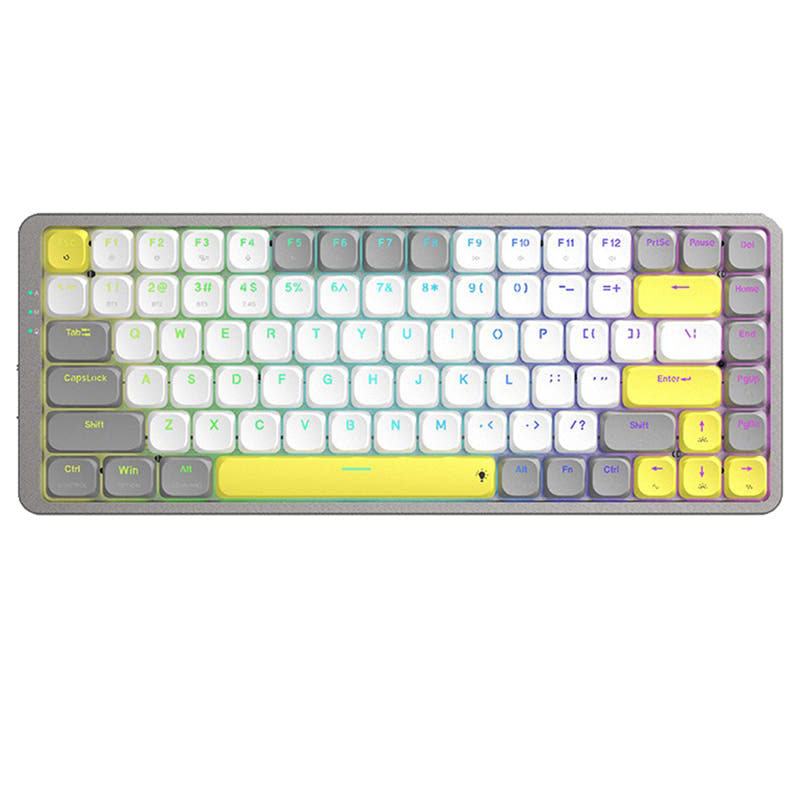
This comparison is for users seeking a low-profile 75% mechanical keyboard who are torn between traditional switch versatility and the new frontier of magnetic switches. Both keyboards are wireless, hot-swappable, and support QMK/VIA for deep customization. The decision is hard because while the J1 offers a broader switch selection and a lower price, the K3 HE introduces adjustable actuation points, rapid trigger, and analog mode, potentially revolutionizing gameplay. We'll break down how these core differences affect real-world use to help you decide which upgrade is right for you.

82
Keychron J1 QMK Wireless Mechanical Keyboard
77
Keychron K3 HE Wireless Magnetic Switch Custom Keyboard

Select a keyboard to compare

2.8 (8)
0.0 (0)
  • Released in 2025
  • Has Linear, Tactile, Clicky switch options
  • Connects via USB-C
  • Features N-key rollover
  • Has built-in sound dampening
  • Runs at a 1000 Hz polling rate
  • Equipped with a 2000 mAh battery
  • Weighs about 661 g
  • Sized at 23 x 327 x 144 mm
  • Made with a ABS case
  • Offers Yes, Rgb, White, North-face, Rgb North-face, White North-face RGB lighting
  • Released in 2026
  • Has Linear, Tactile, Clicky, Magnetic switch options
  • Utilizes Hall effect sensors
  • Uses a Tray Mount mounting style
  • Offers Yes, North-face RGB lighting
Scores
  • Performance: 81.5
  • Build Quality: 70.9
  • Productivity: 89
  • Customizability: 86.4
  • Portability: 80.2
Scores
  • Performance: 70.9
  • Build Quality: 72.2
  • Productivity: 68.5
  • Customizability: 84.2
  • Portability: 77.9
Name
Keychron J1
Name
Keychron K3 HE
Release year
2025
Release year
2026
Switch Options
Linear, Tactile, Clicky
Switch Options
Linear, Tactile, Clicky, Magnetic
Profile
Low Profile
Profile
Low Profile
Hot Swappable
 
Hot Swappable
 
Layout Size
75%
Layout Size
75%
Layout Standard
ANSI
Layout Standard
ANSI
Layout Ergonomics
Normal
Layout Ergonomics
Normal
Knob Support
 
Knob Support
 
Display Support
 
Display Support
 
Mac/Win Support
 
Mac/Win Support
 
Multi-Media Keys
 
Multi-Media Keys
 
USB-C
 
USB-C
 
USB passthrough
 
USB passthrough
 
Connection
Bluetooth, 2.4 GHz, Wired, Wireless
Connection
Bluetooth, 2.4 GHz, Wired, Wireless
Polling Rate
1000 Hz
Polling Rate
-
Battery capacity
2000 mAh
Battery capacity
-
Hall Effect Support
 
Hall Effect Support
 
QMK Support
 
QMK Support
 
VIA Support
 
VIA Support
 
VIAL Support
 
VIAL Support
 
N-Key Rollover
 
N-Key Rollover
 
Rapid Trigger
 
Rapid Trigger
 
Mount Style
-
Mount Style
Tray Mount
Screw in Stabilizers
 
Screw in Stabilizers
 
Sound Dampening
 
Sound Dampening
 
Backlight
 
Rgb, White, North-face
Backlight
 
North-face
Case Colors
Case Colors
Case Material
ABS
Case Material
-
Keycaps Material
PBT
Keycaps Material
PBT
Dimensions
23 x 327 x 144 mm
Dimensions
-
Weight
661g
Weight
-
*Something incorrect or missing? Please
let me know
!

Pros and Trade-offs

For gamers seeking the absolute best in performance and customization, the Keychron K3 HE is the clear choice with its game-changing magnetic switch technology. However, if your priorities are a more traditional typing experience, robust acoustic dampening, and a lower entry price, the Keychron J1 delivers exceptional value for a wireless low-profile custom board. Your final decision hinges on whether you value cutting-edge features or classic versatility and cost.

Keychron J1

  • +Lower starting price point, making it a more accessible custom keyboard.
  • +Features advanced IXPE and latex acoustic foam for a quieter, more refined typing sound.
  • +Offers a classic switch choice with Linear, Tactile, and Clicky options to suit traditionalists.
  • +Includes a built-in receiver compartment for the 2.4 GHz dongle.

  • Case material is ABS plastic, which may feel less premium than aluminum or wood.
  • Customer reviews report potential Bluetooth disconnection issues and short battery life (2-3 days per some users).
  • Typing angle is fixed at 19 degrees, offering less adjustability.

Keychron K3 HE

  • +Features groundbreaking magnetic switches with adjustable actuation points, rapid trigger, and analog mode.
  • +Boasts a more premium build quality with an aluminum plate and a unique aluminum plus wood frame.
  • +Lighter weight at 575g enhances portability.
  • +Includes a complex internal structure with multiple foam and film layers for sound customization.

  • Comes at a higher price point with only one vendor in stock.
  • Magnetic switches are limited to one type (Keychron Ultra-Fast Lime), reducing traditional switch variety.
  • The LSA keycaps are not shine-through, which may disappoint users who want per-key RGB backlighting to be visible through legends.

Which Keyboard Is Better for Your Needs?

The K3 HE emerges as the clear winner for gaming due to its advanced magnetic switch features. For office use, the J1's lower cost and quieter acoustics make it a more practical choice. In travel, the K3 HE's lighter weight gives it a slight edge. For programming and content creation, both keyboards are tied, offering identical customization and layout advantages. The modding community will find the K3 HE's unique switch technology and complex internal layering more exciting to explore.

GamingKeychron K3 HE
  • The K3 HE's magnetic switches support adjustable actuation points, rapid trigger, and analog mode for a competitive edge.
  • Features like LKP and Snap Click, tailored for titles like Valorant, are built into the K3 HE.
  • The K3 HE offers a 1000 Hz polling rate on 2.4 GHz and wired modes, same as the J1, but with more advanced switch tech.
OfficeKeychron J1
  • The J1 is more affordable, making it a safer choice for a general office upgrade.
  • The J1 includes advanced IXPE and latex acoustic foam for a quieter, more comfortable typing experience.
  • The J1 has a broader switch choice (Linear, Tactile, Clicky) to suit different typing preferences in a shared workspace.
  • The J1's battery is 2000mAh, which, while reviewed as short, is a stated capacity for daily work.
ProgrammingTie
  • Both keyboards offer a 75% layout, QMK and VIA support, and are programmable for custom macros and keymaps.
  • The J1 provides a comfortable typing angle of 19 degrees and advanced acoustic foam for a pleasant typing experience.
  • The K3 HE offers a more premium build with an aluminum plate and wood frame, which may appeal to some typists, plus tactile feedback from magnetic switches.
TravelKeychron K3 HE
  • The K3 HE is lighter at 575g compared to the J1's 661g, making it slightly easier to carry.
  • Both support 2.4 GHz and Bluetooth for flexible device connectivity on the go.
ModdingKeychron K3 HE
  • The K3 HE's unique magnetic switches offer novel modding possibilities, including adjustable actuation and 4-in-1 action keys.
  • The K3 HE's hot-swappable nature allows for easy switch swapping within its magnetic ecosystem.
  • The K3 HE features a multi-layered internal structure with sound-absorbing foam, silicone bottom pad, and PET film for advanced acoustic tuning.
Content CreationTie
  • Both are fully programmable with QMK/VIA, allowing for custom macros to streamline video editing and design workflows.
  • Both provide a wireless 75% layout, saving desk space and reducing clutter.

Frequently Asked Questions (FAQ)


Discover similar products

You might also like similar products in that price range:

86
$67
Keychron K1 Pro QMK/VIA Wireless Custom Mechanical Keyboard ISO Layout Collection
Keychron K1 Pro
80%,
Hotswap,
Wireless,
Wired,
RGB/ White LEDs,
VIA,
QMK,
Alu case,
Tray Mount

85
$106
Keychron K1 Max QMK Wireless Custom Mechanical Keyboard ISO Layout Collection
Keychron K1 Max
80%,
Hotswap,
Wireless,
Wired,
RGB/ White LEDs,
VIA,
QMK,
Alu case,
PCB Mount

87
$67
Keychron K13 Pro QMK/VIA Wireless Custom Mechanical Keyboard ISO Layout Collection
Keychron K13 Pro
80%,
Hotswap,
Wireless,
Wired,
RGB/ White LEDs,
VIA,
QMK,
Alu case,
Tray Mount

84
$109
Keychron K13 Max QMK Wireless Custom Mechanical Keyboard ISO Layout Collection
Keychron K13 Max
80%,
Hotswap,
Wireless,
Wired,
RGB/ White LEDs,
VIA,
QMK,
Alu case,
PCB Mount

83
$67
Keychron K9 Pro QMK/VIA Wireless Custom Mechanical Keyboard
Keychron K9 Pro
60%,
Hotswap,
Wireless,
Wired,
RGB/ White LEDs,
VIA,
QMK,
Alu case,
Tray Mount

89
$99
Keychron K15 Max (Alice Layout) QMK Wireless Custom Mechanical Keyboard
Keychron K15 Max
75%,
Hotswap,
Wireless,
Wired,
RGB/ White LEDs,
VIA,
QMK,
Alu case,
PCB Mount

88
$69
Keychron K5 Pro QMK/VIA Wireless Custom Mechanical Keyboard ISO Layout Collection
Keychron K5 Pro
100%,
Hotswap,
Wireless,
Wired,
RGB/ White LEDs,
VIA,
QMK,
Alu case,
Tray Mount

68
$96
Keychron K3 Ultra-slim Wireless Mechanical Keyboard (Version 2)
Keychron K3 V2
75%,
Hotswap,
Wireless,
Wired,
RGB/ White LEDs,
Alu case,
Tray Mount

96
$54
Keychron V3 QMK Custom Mechanical Keyboard ISO Layout Collection
Keychron V3
80%,
Hotswap,
Wired,
RGB/ White LEDs,
Knob,
VIA,
QMK,
Tray Mount

85
$113
Keychron K9 Max QMK Wireless Custom Mechanical Keyboard
Keychron K9 Max
60%,
Hotswap,
Wireless,
Wired,
RGB/ White LEDs,
VIA,
QMK