Not sure which keyboard to choose? Try the Keyboard Finder now!

Compare Keychron J1 vs S1 Differences Side by Side

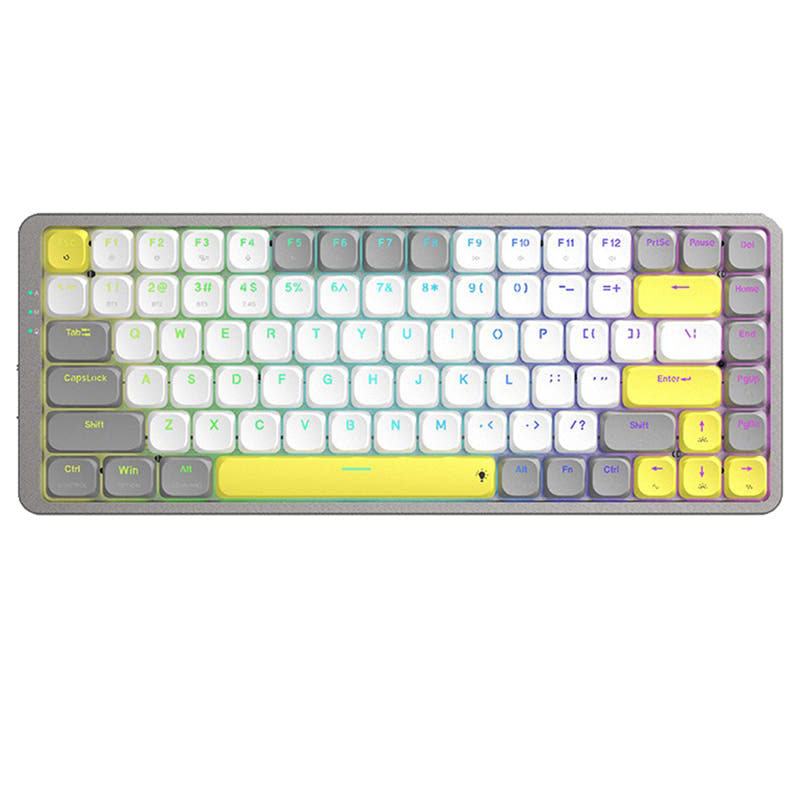
This comparison is for buyers choosing between two low-profile 75% keyboards from Keychron that share a similar layout but diverge sharply in materials and connectivity. The J1 brings Bluetooth and 2.4 GHz wireless with a lightweight ABS frame, while the S1 offers a full CNC aluminum body with a steel plate and wired-only operation. The decision is hard because both support QMK/VIA customization and hot-swappable switches, but each sacrifices a key feature the other provides.

82
Keychron J1 QMK Wireless Mechanical Keyboard - Image: 3
85
Keychron S1 QMK Custom Mechanical Keyboard

Select a keyboard to compare

2.8 (8)
4.8 (18)
  • Released in 2025
  • Has built-in sound dampening
  • Supports Bluetooth, 2.4 GHz, Wired, Wireless connectivity
  • Equipped with a 2000 mAh battery
  • Weighs about 661 g
  • Sized at 23 x 327 x 144 mm
  • Made with a ABS case
  • Offers Yes, Rgb, White, North-face, Rgb North-face, White North-face RGB lighting
  • Released in 2022
  • Provides dedicated media keys
  • Uses a Tray Mount mounting style
  • Supports Wired, Wired only connectivity
  • Weighs about 960 g
  • Sized at 8 x 118 x 310 mm
  • Made with a Aluminum case
  • Offers Yes, Rgb, North-face, Rgb North-face RGB lighting
Scores
  • Performance: 81.5
  • Build Quality: 70.9
  • Productivity: 89
  • Customizability: 86.4
  • Portability: 80.2
Scores
  • Performance: 81.5
  • Build Quality: 81.6
  • Productivity: 80.1
  • Customizability: 89.6
  • Portability: 62.8
Name
Keychron J1
Name
Keychron S1
Release year
2025
Release year
2022
Switch Options
Linear, Tactile, Clicky
Switch Options
Linear, Tactile, Clicky
Profile
Low Profile
Profile
Low Profile
Hot Swappable
 
Hot Swappable
 
Layout Size
75%
Layout Size
75%
Layout Standard
ANSI
Layout Standard
ANSI
Layout Ergonomics
Normal
Layout Ergonomics
Normal
Knob Support
 
Knob Support
 
Display Support
 
Display Support
 
Mac/Win Support
 
Mac/Win Support
 
Multi-Media Keys
 
Multi-Media Keys
 
USB-C
 
USB-C
 
USB passthrough
 
USB passthrough
 
Connection
Bluetooth, 2.4 GHz, Wired, Wireless
Connection
Wired, Wired only
Polling Rate
1000 Hz
Polling Rate
1000 Hz
Battery capacity
2000 mAh
Battery capacity
-
Hall Effect Support
 
Hall Effect Support
 
QMK Support
 
QMK Support
 
VIA Support
 
VIA Support
 
VIAL Support
 
VIAL Support
 
N-Key Rollover
 
N-Key Rollover
 
Rapid Trigger
 
Rapid Trigger
 
Mount Style
-
Mount Style
Tray Mount
Screw in Stabilizers
 
Screw in Stabilizers
 
Sound Dampening
 
Sound Dampening
 
Backlight
 
Rgb, White, North-face
Backlight
 
Rgb, North-face
Case Colors
Case Colors
Case Material
ABS
Case Material
Aluminum
Keycaps Material
PBT
Keycaps Material
PBT
Dimensions
23 x 327 x 144 mm
Dimensions
8 x 118 x 310 mm
Weight
661g
Weight
960g
*Something incorrect or missing? Please
let me know
!

Pros and Trade-offs

The Keychron J1 is the clear choice for users who need wireless capability and portability, offering Bluetooth and 2.4 GHz connections in a lighter package. The Keychron S1 is better suited for those who prioritize build quality and a premium typing feel, with its all-aluminum body and higher user satisfaction. Your decision should hinge on whether wireless freedom or a solid metal chassis matters more for your daily use.

Keychron J1

  • +Supports Bluetooth, 2.4 GHz, and wired connections for flexible device pairing
  • +Includes IXPE acoustic foam and latex foam for a quieter typing experience
  • +Built-in receiver compartment prevents losing the 2.4 GHz dongle
  • +Offers per-key and mix RGB lighting zones for personalized backlight effects
  • +Weighs 661g, making it significantly lighter and more travel-friendly

  • ABS case material feels less premium compared to the S1's aluminum construction
  • User reviews report Bluetooth connectivity drops and rapid battery drain (2-3 days per charge)
  • Low-profile hot-swap is limited to Gateron or Keychron low-profile mechanical switches only

Keychron S1

  • +Full CNC machined aluminum body and steel plate offer a solid, premium build
  • +Weighs 960g, providing a stable typing platform that resists sliding
  • +Adjustable feet allow two typing angles (3° and 6°) for ergonomic comfort
  • +Higher customer review rating (4.8/5 from 18 reviews) indicates strong user satisfaction
  • +Stems and stabilizers are aligned for compatibility with low profile, XDA, and DSA keycaps

  • Wired-only connectivity limits desk cable management and portability
  • Non-shine-through PBT keycaps make the RGB backlight less visible in low light
  • Some user reviews mention quality control issues with stabilizer lubrication and sticky keys

Which Keyboard Is Better for Your Needs?

The J1 takes the lead in Gaming, Office, Travel, and Content Creation primarily due to its wireless functionality, lighter weight, and LKP feature. The S1 wins in Modding thanks to its all-metal body and higher customizability score, while Programming ends in a tie because both keyboards offer QMK/VIA support and the same layout. Overall, the J1 is the more versatile choice for users who value mobility and multi-device workflows, while the S1 appeals to those who want a premium typing foundation for customization.

GamingKeychron J1
  • Supports 2.4 GHz wireless with a 1000 Hz polling rate for low-latency gaming
  • Includes Last Key Priority (LKP) for smoother directional changes in competitive titles
  • Lighter weight at 661g makes it easier to reposition during LAN or desk setups
OfficeKeychron J1
  • Wireless connectivity (Bluetooth and 2.4 GHz) offers desk clutter reduction and device switching
  • Built-in receiver compartment keeps the dongle safe and accessible
  • Includes both Mac and Windows keycaps with separate keymaps for each OS
ProgrammingTie
  • Both support QMK and VIA for full key remapping and macro creation
  • Both feature a 75% layout with 82 keys, offering dedicated function rows and arrow keys
  • Both include low-profile PBT keycaps with oil resistance for long coding sessions
TravelKeychron J1
  • Weighs 661g versus 960g for the S1, making it more portable
  • Supports wireless modes (Bluetooth and 2.4 GHz) so no cable is needed on the go
  • Compact dimensions (23 x 327 x 144 mm) are easier to pack than the S1's 8 x 118 x 310 mm profile
ModdingKeychron S1
  • Full CNC aluminum body and steel plate provide a sturdier foundation for modifications
  • Hot-swappable PCB supports Gateron low profile MX switches, and the straight-line stem design allows compatibility with XDA and DSA keycaps
  • Higher customizability score (89.6 vs 86.4) indicates better modding potential in its price tier
Content CreationKeychron J1
  • Bluetooth 5.2 can connect to three devices, allowing easy switching between a computer, tablet, and phone
  • Wireless freedom reduces cable interference in a video or audio setup
  • 12 multimedia keys offer quick access to controls for editing and playback

Frequently Asked Questions (FAQ)


Discover similar products

You might also like similar products in that price range:

86
$67
Keychron K1 Pro QMK/VIA Wireless Custom Mechanical Keyboard ISO Layout Collection
Keychron K1 Pro
80%,
Hotswap,
Wireless,
Wired,
RGB/ White LEDs,
VIA,
QMK,
Alu case,
Tray Mount

87
$67
Keychron K13 Pro QMK/VIA Wireless Custom Mechanical Keyboard ISO Layout Collection
Keychron K13 Pro
80%,
Hotswap,
Wireless,
Wired,
RGB/ White LEDs,
VIA,
QMK,
Alu case,
Tray Mount

84
$94
Keychron K1 QMK Wireless Mechanical Keyboard (ISO Layout) - Version 6
Keychron K1 V6
80%,
Hotswap,
Wireless,
Wired,
RGB/ White LEDs,
VIA,
QMK,
HE,
Alu case,
Top Mount

83
$67
Keychron K9 Pro QMK/VIA Wireless Custom Mechanical Keyboard
Keychron K9 Pro
60%,
Hotswap,
Wireless,
Wired,
RGB/ White LEDs,
VIA,
QMK,
Alu case,
Tray Mount

94
$84
Keychron K3 Max QMK/VIA Wireless Custom Mechanical Keyboard - Image: 3
Keychron K3 Max
75%,
Hotswap,
Wireless,
Wired,
RGB/ White LEDs,
VIA,
QMK,
Alu case,
Plate Mount

88
$69
Keychron K5 Pro QMK/VIA Wireless Custom Mechanical Keyboard (US ANSI Layout) - Image: 3
Keychron K5 Pro
100%,
Hotswap,
Wireless,
Wired,
RGB/ White LEDs,
VIA,
QMK,
Alu case,
Tray Mount

87
$83
Keychron K3 Pro QMK/VIA Wireless Custom Mechanical Keyboard - Image: 3
Keychron K3 Pro
75%,
Hotswap,
Wireless,
Wired,
RGB/ White LEDs,
VIA,
QMK,
Alu case,
Tray Mount

96
$54
Keychron V3 QMK Custom Mechanical Keyboard - Custom order
Keychron V3
80%,
Hotswap,
Wired,
RGB/ White LEDs,
Knob,
VIA,
QMK,
Tray Mount

93
$62
Keychron K6 Pro QMK/VIA Wireless Mechanical Keyboard ISO Layout Collection
Keychron K6 Pro
65%,
Hotswap,
Wireless,
Wired,
RGB/ White LEDs,
VIA,
QMK,
Alu case,
Tray Mount

84
$83
Keychron K7 Pro QMK/VIA Wireless Custom Mechanical Keyboard ISO Layout Collection
Keychron K7 Pro
65%,
Hotswap,
Wireless,
Wired,
RGB/ White LEDs,
VIA,
QMK,
Alu case,
Tray Mount