Not sure which keyboard to choose? Try the Keyboard Finder now!

Compare Keychron J1 vs V10 Differences Side by Side

This comparison is for buyers deciding between two very different 75% keyboards. The Keychron J1 is a wireless, low-profile option built for portability and fast actuation. The Keychron V10 is a wired ergonomic Alice-layout board with a heavier, more customizable build. The decision is difficult because both offer QMK/VIA support and hot-swappable switches but target completely different priorities: mobility versus ergonomic typing comfort. Users should weigh the value of multi-device wireless connectivity against the V10's specialized split layout and higher build quality scores.

82
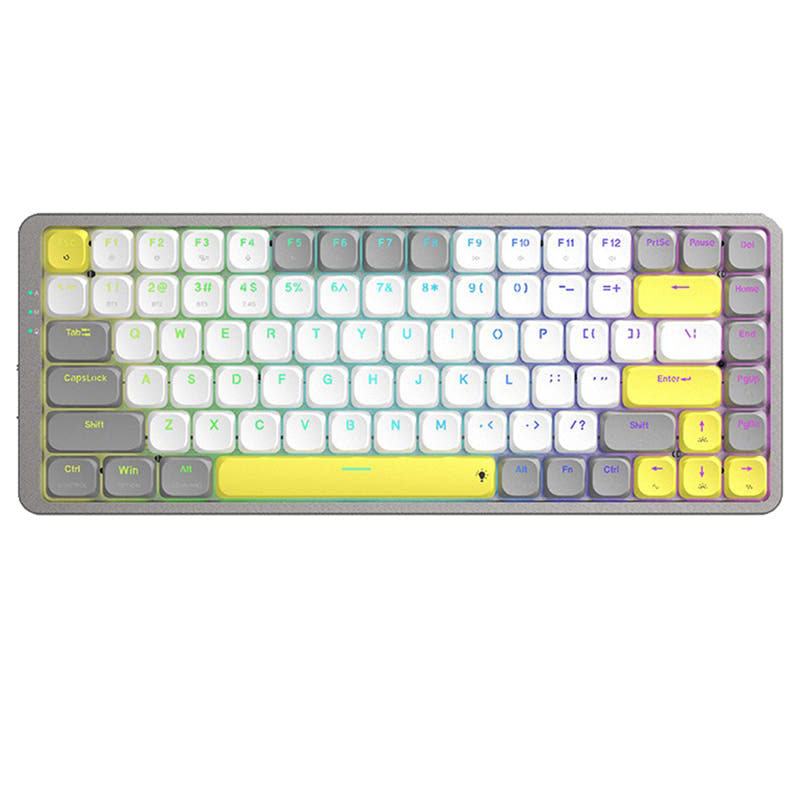
Keychron J1 QMK Wireless Mechanical Keyboard
92
Keychron V10 (Alice Layout) QMK Custom Mechanical Keyboard ISO Layout Collection

Select a keyboard to compare

2.8 (8)
4.9 (16)
  • Released in 2025
  • Features a low-profile design
  • Built with the ANSI layout standard
  • Offers Normal ergonomics
  • Features N-key rollover
  • Supports Bluetooth, 2.4 GHz, Wired, Wireless connectivity
  • Equipped with a 2000 mAh battery
  • Weighs about 661 g
  • Sized at 23 x 327 x 144 mm
  • Made with a ABS case
  • Features PBT keycaps
  • Offers Yes, Rgb, White, North-face, Rgb North-face, White North-face RGB lighting
  • Released in 2022
  • Built with the ISO, ISO-ES, ISO-FR, ISO-Nordic, ISO-SW, ANSI, ISO-DE layout standard
  • Offers Alice ergonomics
  • Comes with a knob
  • Includes screw-in stabilizers
  • Uses a Tray Mount mounting style
  • Supports Wired, Wired only connectivity
  • Weighs about 1230 g
  • Sized at 27 x 141 x 387 mm
  • Made with a Plastic, ABS case
  • Features ABS, PBT, keycaps
  • Offers Yes, Rgb, South-face, Rgb South-face RGB lighting
Scores
  • Performance: 81.5
  • Build Quality: 70.9
  • Productivity: 89
  • Customizability: 86.4
  • Portability: 80.2
Scores
  • Performance: 72.2
  • Build Quality: 84.8
  • Productivity: 100
  • Customizability: 97.6
  • Portability: 63.3
Name
Keychron J1
Name
Keychron V10
Release year
2025
Release year
2022
Switch Options
Linear, Tactile, Clicky
Switch Options
Linear, Tactile, Clicky
Profile
Low Profile
Profile
Normal Profile
Hot Swappable
 
Hot Swappable
 
Layout Size
75%
Layout Size
75%
Layout Standard
ANSI
Layout Standard
ISO, ISO-ES, ISO-FR, ISO-Nordic, ISO-SW, ANSI, ISO-DE
Layout Ergonomics
Normal
Layout Ergonomics
Alice
Knob Support
 
Knob Support
 
Display Support
 
Display Support
 
Mac/Win Support
 
Mac/Win Support
 
Multi-Media Keys
 
Multi-Media Keys
 
USB-C
 
USB-C
 
USB passthrough
 
USB passthrough
 
Connection
Bluetooth, 2.4 GHz, Wired, Wireless
Connection
Wired, Wired only
Polling Rate
1000 Hz
Polling Rate
1000 Hz
Battery capacity
2000 mAh
Battery capacity
-
Hall Effect Support
 
Hall Effect Support
 
QMK Support
 
QMK Support
 
VIA Support
 
VIA Support
 
VIAL Support
 
VIAL Support
 
N-Key Rollover
 
N-Key Rollover
 
Rapid Trigger
 
Rapid Trigger
 
Mount Style
-
Mount Style
Tray Mount
Screw in Stabilizers
 
Screw in Stabilizers
 
Sound Dampening
 
Sound Dampening
 
Backlight
 
Rgb, White, North-face
Backlight
 
Rgb, South-face
Case Colors
Case Colors
Case Material
ABS
Case Material
Plastic, ABS
Keycaps Material
PBT
Keycaps Material
ABS, PBT,
Dimensions
23 x 327 x 144 mm
Dimensions
27 x 141 x 387 mm
Weight
661g
Weight
1230g
*Something incorrect or missing? Please
let me know
!

Pros and Trade-offs

If you need a wireless keyboard for travel or gaming with a low-profile feel, the Keychron J1 is the clear pick. However, if you spend long hours typing and value an ergonomic layout with robust customization, the Keychron V10 is the better investment. The V10 also wins on build quality and user satisfaction, while the J1 compromises on battery life and reliability. Choose based on whether mobility or ergonomic comfort matters more to your daily workflow.

Keychron J1

  • +Wireless connectivity with Bluetooth 5.2 and 2.4 GHz, plus a 1000 Hz polling rate in 2.4 GHz and wired modes.
  • +Low-profile design with 661g weight and a built-in receiver compartment for easy travel.
  • +Low-profile PBT keycaps and switches with 1.3mm actuation for faster, quieter typing.
  • +QMK and VIA support through the Keychron Launcher web app for easy key remapping.
  • +Includes keycaps for both macOS and Windows with additional esc and enter keys.

  • User reviews report Bluetooth connectivity drops and a battery that lasts only 2-3 days without backlight.
  • Only compatible with Gateron or Keychron low-profile mechanical switches, limiting hot-swap options.
  • Average review score of 2.8/5 from 8 reviews, with some users reporting bent units or intermittent shut-downs.

Keychron V10

  • +Ergonomic Alice layout designed for a more natural hand position and reduced typing strain.
  • +High build quality with a steel plate, screw-in PCB stabilizers, and a 1230g weight for stability.
  • +Hot-swappable PCB supports both 3-pin and 5-pin MX switches, and south-facing RGB works with Cherry-profile keycaps.
  • +Available as a fully assembled version or barebones kit, and includes a knob for volume or customization.

  • Wired-only connectivity, which limits desk setup flexibility and portability.
  • Heavy chunky design at 1230g is not suited for travel or small workspaces.
  • Some user reviews note layout quirks like missing right-side Ctrl key and USB cable strain risk.

Which Keyboard Is Better for Your Needs?

The Keychron J1 wins for Gaming and Travel due to its wireless flexibility and low-profile speed. The Keychron V10 dominates in Office, Programming, and Modding thanks to its ergonomic Alice layout, knob, and barebones option. For Content Creation, it is a tie because both keyboards offer programmable features that suit different workflows. Overall, the choice hinges on whether you prioritize portability and wireless or an ergonomic, deeply customizable typing experience.

GamingKeychron J1
  • The J1 supports 2.4 GHz wireless with a 1000 Hz polling rate and low-profile switches with 1.3mm actuation for faster key presses.
  • The V10 is wired-only and uses a heavy 1230g chassis with a tray mount design, less ideal for competitive gaming.
  • Keychron advertises Last Key Priority (LKP) on the J1 for smoother directional changes in games like Valorant.
OfficeKeychron V10
  • The V10's Alice layout promotes a more natural hand position, reducing strain during extended typing sessions.
  • It includes a left knob for volume control and extra macro keys that can be programmed for office workflows.
  • The V10 scores 100/100 in Productivity and has a 4.9/5 average from user reviews, indicating high satisfaction.
ProgrammingKeychron V10
  • The V10's QMK and VIA support allow deep customization of layers and macros, and the knob adds quick access to functions.
  • Screw-in PCB stabilizers provide a more stable typing feel on larger keys, which programmers often rely on.
  • The V10 supports both 3-pin and 5-pin MX switches, offering more switch choices for a preferred typing feel.
TravelKeychron J1
  • The J1 weighs only 661g with a built-in receiver compartment, making it easy to carry and use on the go.
  • It offers Bluetooth 5.2, 2.4 GHz, and wired connectivity, allowing connection to laptops, tablets, and phones.
  • Its low-profile design and 19 degree typing angle suit a variety of workspaces without a wrist rest.
ModdingKeychron V10
  • The V10 is available as a barebones kit, allowing users to select their own switches and keycaps from the start.
  • It features a steel plate, screw-in PCB stabilizers, and south-facing RGB that avoids interference with Cherry-profile keycaps.
  • The V10 scores 97.6/100 in Customizability and uses tray mount, which is familiar and mod-friendly.
Content CreationTie
  • The J1 offers wireless connectivity for a cleaner desk setup and low-profile switches for quiet typing during recordings.
  • The V10's knob and macro keys can be programmed for video editing shortcuts and its ergonomic layout reduces fatigue.
  • Both keyboards support QMK/VIA for custom keymaps, but the V10's heavier build may feel more premium on a desk.

Frequently Asked Questions (FAQ)


Discover similar products

You might also like similar products in that price range:

86
$67
Keychron K1 Pro QMK/VIA Wireless Custom Mechanical Keyboard ISO Layout Collection
Keychron K1 Pro
80%,
Hotswap,
Wireless,
Wired,
RGB/ White LEDs,
VIA,
QMK,
Alu case,
Tray Mount

93
$59
Keychron Q8 (Alice Layout) QMK Custom Mechanical Keyboard
Keychron Q8
65%,
Hotswap,
Wired,
RGB,
Knob,
VIA,
QMK,
Alu case,
Gasket Mount

87
$67
Keychron K13 Pro QMK/VIA Wireless Custom Mechanical Keyboard ISO Layout Collection
Keychron K13 Pro
80%,
Hotswap,
Wireless,
Wired,
RGB/ White LEDs,
VIA,
QMK,
Alu case,
Tray Mount

92
$59
Keychron Q7 QMK Custom Mechanical Keyboard
Keychron Q7
70%,
Hotswap,
Wired,
RGB,
Knob,
VIA,
QMK,
Alu case,
Gasket Mount

83
$67
Keychron K9 Pro QMK/VIA Wireless Custom Mechanical Keyboard
Keychron K9 Pro
60%,
Hotswap,
Wireless,
Wired,
RGB/ White LEDs,
VIA,
QMK,
Alu case,
Tray Mount

93
$59
Keychron Q2 QMK Custom Mechanical Keyboard
Keychron Q2
65%,
Hotswap,
Wired,
RGB,
Knob,
VIA,
QMK,
Alu case,
Gasket Mount

88
$69
Keychron K5 Pro QMK/VIA Wireless Custom Mechanical Keyboard ISO Layout Collection
Keychron K5 Pro
100%,
Hotswap,
Wireless,
Wired,
RGB/ White LEDs,
VIA,
QMK,
Alu case,
Tray Mount

92
$59
Keychron Q4 QMK Custom Mechanical Keyboard
Keychron Q4
60%,
Hotswap,
Wired,
RGB,
Knob,
VIA,
QMK,
Alu case,
Gasket Mount

96
$54
Keychron V3 QMK Custom Mechanical Keyboard ISO Layout Collection
Keychron V3
80%,
Hotswap,
Wired,
RGB/ White LEDs,
Knob,
VIA,
QMK,
Tray Mount

94
$59
Keychron K8 Pro QMK/VIA Wireless Mechanical Keyboard
Keychron K8 Pro
80%,
Hotswap,
Wireless,
Wired,
RGB/ White LEDs,
VIA,
QMK,
Alu case,
Tray Mount