Keychron J1 vs V2 MaxLow-Profile vs Gasket-Mount Customization
Choose the Keychron J1 for a low-profile, compact layout, or the V2 Max for superior build customization and a larger battery.
KeebFinder may earn a commission when you buy through these links, at no extra cost to you.

3.0 (5)3.0 · 5 reviews
from$59at Keychron

Which one should you get?
Get the
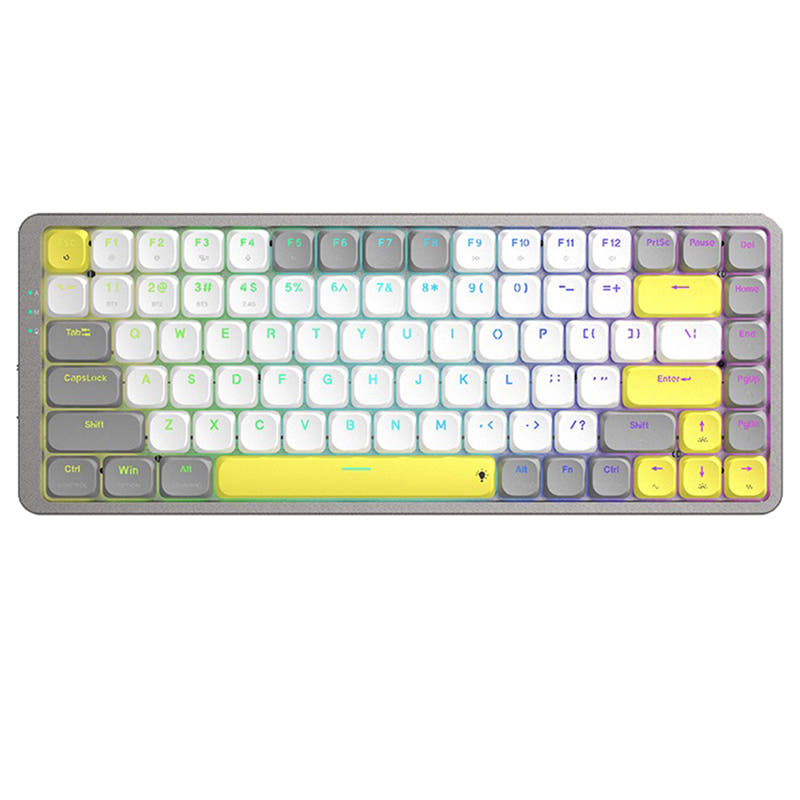
Keychron J1
Low-Profile
Build quality in the top 40% of 75% boards under $100.
- Unique low-profile mechanical switches with a fast 1.3mm actuation point.
- 75% layout includes function row and navigation keys for productivity.
- Includes advanced IXPE and latex acoustic foam for sound dampening.
- Low-profile switches and keycaps only. Standard MX keycaps will not fit.
- North-facing LEDs. Cherry-profile keycaps can hit the switch housing.
- No numpad.
Get the
Keychron V2 Max
Gasket-Mount Customization
Build quality in the top 10% of 65% boards under $100.
- Gasket mount design with a polycarbonate plate for a softer, customizable typing feel.
- Large 4000mAh battery for extended wireless operation.
- Includes screw-in PCB stabilizers and supports a wide range of 3-pin/5-pin MX switches.
- South-facing LEDs. Shine-through legends stay dark, and some sculpted keycaps can clip the LED.
- 65% layout. No function row and no numpad.
Your primary need dictates the choice. If a sleek, fast, low-profile keyboard with a compact but functional 75% layout is your goal, the Keychron J1 is the suitable option. If you value deep customization, a premium gasket-mount typing feel, and much longer battery life in a more minimal 65% form factor, the Keychron V2 Max is the better investment. Both deliver on programmability, but their physical designs cater to different preferences.
The differences that matter
Skip the 40-row spec sheet. These are the specs that change how each board feels, sounds, and fits your desk.
Keychron J1
Keychron V2 Max
Layout size
75%
65%
Battery
2,000 mAh
4,000 mAh
A larger battery means fewer cables during the day
Low profile
Yes
No
Case material
ABS
ABS, Plastic
Knob
No
Yes
- Keychron J1
- Keychron V2 Max
- Performance
- 8279
- Build quality
- 7186
- Productivity
- 8995
- Customizability
- 8699
- Portability
- 8089
- Connection: Bluetooth, 2.4 GHz, Wired
- Hot-swappable
- Max polling rate: 1,000 Hz
- Switch options: Clicky, Linear, Tactile
- QMK
- VIA
What will you mostly use it for?
The J1 takes the lead for gaming and office use due to its low-profile speed features and more expansive 75% layout. The V2 Max is the clear choice for modders and travelers, thanks to its gasket-mount construction, barebones option, and double-sized battery. For programming, both are equally capable due to their extensive QMK/VIA support, making it a layout preference. Content creators may prefer the V2 Max for its physical knob.
Pick the Keychron J1
- The J1's Last Key Priority (LKP) feature is listed by Keychron to prioritize the last key pressed for smoother directional changes in games.
- Its low-profile switches have a 1.3mm actuation point, which Keychron states is about 35% faster than standard switches.
- Both share a 1000 Hz polling rate in 2.4 GHz and wired modes.
Keychron J1 vs V2 Max specs
Every tracked spec, side by side. Rows marked with a dot differ between the boards.
12 of 28 specs differ
Keychron J1
Keychron V2 Max
Switch options
Hot-swappable
Mount style
Low profile
Sound dampening
Screw-in stabilizers
Layout size
Layout standard
Ergonomics
Knob
Display
Media keys
Connection
Max polling rate
Battery
USB-C
Case material
Plate material
Keycaps
Weight
Dimensions
Typing angle
Backlight
QMK
VIA
N-key rollover
Mac & Windows
Released
Compare prices
Live prices from the stores we track, cheapest in-stock offer first.
Prices in USD are converted to your currency and can change at any time. KeebFinder may earn a commission when you buy through these links, at no extra cost to you.
Lowest price across stores, Amazon excluded.



Keychron J1 vs V2 Max: your questions
The core difference is the typing experience and layout. The J1 is a low-profile keyboard with a 75% layout and north-facing RGB. The V2 Max is a standard-profile, gasket-mount keyboard with a 65% layout, south-facing RGB, and a much larger battery.
The Keychron V2 Max has a larger 4000mAh battery, while the J1 has a 2000mAh battery. According to lab tests listed for the V2 Max, it can last up to 190 hours with backlighting off, suggesting significantly longer wireless runtime than the J1.
No, only the V2 Max supports standard Cherry MX switches. Its hot-swap sockets are compatible with most 3-pin and 5-pin MX mechanical switches. The J1 is only compatible with specific Gateron and Keychron low-profile mechanical switches.
Yes, both the Keychron J1 and V2 Max are compatible with macOS, Windows, and Linux. They include keycap sets for both Mac and Windows layouts and have a system toggle switch to switch between OS modes.
This is subjective. The J1 offers a low-profile, potentially faster typing experience with a 19-degree angle. The V2 Max uses a gasket-mounted polycarbonate plate and screw-in stabilizers, which are designed to provide a softer, more cushioned, and quieter typing feel.
Yes, the Keychron V2 Max product listing shows 'Fully Assembled Knob' and 'Barebone Knob' as available types, confirming it includes or supports a rotary knob for media control or customization.
No, the Keychron V2 Max comes with OSA profile double-shot PBT keycaps that are listed as 'not shine-through'. Its south-facing RGB LEDs are designed to provide underglow lighting rather than shine through the key legends.
Yes, both keyboards fully support QMK and VIA firmware. This allows for extensive key remapping, macro creation, and lighting customization through the Keychron Launcher web app or directly via VIA.
The V2 Max is narrower due to its 65% layout, but it is heavier at 696g versus the J1's 661g. The V2 Max's larger battery and inclusion of dual receiver types with magnetic storage may make it more convenient for extended travel use.
Both the Keychron J1 and V2 Max offer a 1000 Hz polling rate when using their 2.4 GHz wireless dongle or in wired mode. This provides low latency suitable for gaming.
Some user reviews for the J1 mention a battery that drains in a few days and occasional Bluetooth connectivity issues where the keyboard disconnects. Another review cited receiving a unit with a slightly bent frame.
According to its product page, the fully assembled V2 Max includes the keyboard, double-shot PBT keycaps, Gateron Jupiter switches, a Type-C cable, a Type-A to Type-C adapter, and both Type-C and Type-A 2.4 GHz receivers.
Not sold on either?




Still torn?
Answer a few quick questions and the keyboard finder ranks 2,000+ boards by how you will actually use yours.