Keychron K0 Max vs K1 V6Numpad vs 80% Keyboard
Choose the K0 Max if you need a programmable macro pad, or the K1 V6 if you want a full 80% TKL typing experience.
KeebFinder may earn a commission when you buy through these links, at no extra cost to you.

4.1 (11)4.1 · 11 reviews
from$64at Keychron

5.0 (2)5.0 · 2 reviews
from$74at Keychron
Which one should you get?
Get the
Keychron K0 Max
Numpad
Build quality in the top 5% of Numpad boards under $100.
- Dedicated 27-key number pad with macro column and rotary encoder knob.
- Ultra-slim design using Keychron Milk POM switches, 33% slimmer than normal profile switches.
- Advanced IXPE and latex acoustic foam for quiet and responsive keystrokes.
- Low-profile switches and keycaps only. Standard MX keycaps will not fit.
- North-facing LEDs. Cherry-profile keycaps can hit the switch housing.
- No ISO layout. ISO-DE, UK, and other ISO variants are not offered.
- Numpad only. This is not a full keyboard.
Get the
Keychron K1 V6
80% Keyboard
Build quality in the top 20% of 80% boards under $100.
- Full 87-key TKL layout with dedicated arrow keys and 12 multimedia keys.
- 3-level adjustable typing angle (3.37°, 4.2°, 6.7°) for ergonomic support.
- Larger 2000mAh battery for extended wireless use without frequent charging.
- Low-profile switches and keycaps only. Standard MX keycaps will not fit.
- North-facing LEDs. Cherry-profile keycaps can hit the switch housing.
- No numpad.
The K0 Max is best for users who already have a keyboard and need a programmable numpad to boost productivity. The K1 V6 is the right choice for those seeking a primary TKL keyboard with wireless flexibility. Your decision hinges on whether you need a dedicated number pad or a full typing layout.
The differences that matter
Skip the 40-row spec sheet. These are the specs that change how each board feels, sounds, and fits your desk.
Keychron K0 Max
Keychron K1 V6
Layout size
Numpad
80%
Connection
Bluetooth, 2.4 GHz, Wired
Bluetooth, Wired
Wireless for several devices and wired for lower latency
Battery
750 mAh
2,000 mAh
A larger battery means fewer cables during the day
Case material
Aluminum, Plastic
ABS, Aluminum
Switch options
Clicky, Linear, Silent, Tactile
Clicky, Linear, Tactile
- Keychron K0 Max
- Keychron K1 V6
- Performance
- 7982
- Build quality
- 8578
- Productivity
- 9580
- Customizability
- 9288
- Portability
- 8673
- Hot-swappable
- Low profile
- Max polling rate: 1,000 Hz
- QMK
- VIA
What will you mostly use it for?
The K0 Max wins for office and content creation due to its dedicated numpad and macro knob. The K1 V6 is better for gaming and programming thanks to its full TKL layout and adjustable typing angles. Both tie for modding as each offers hot-swappable switches and QMK support. For travel, the K0 Max is more portable with its smaller footprint.
Pick the Keychron K1 V6
- 87-key TKL layout provides full gaming controls including a dedicated row of function keys.
- Offers 12 multimedia keys for quick in-game adjustments.
- 3-level adjustable typing angle (3.37°, 4.2°, 6.7°) for ergonomic wrist support during long sessions.
- Higher portability score (86 vs 73) suggests lighter carry for LAN events.
What owners say
Ratings and quotes collected from verified store reviews, including the critical ones.
Keychron K0 Max
11 owner reviews
“Perfect addition to my Nuphy Air75 v2. The keys line up well, and this gives me a knob and 10-key when I’m at my desk!”
“The K0 MAX is just right with its red Gateron switches! Typing on it feels really natural. 2 Stars less because the battery needs to be loaded again after 3 or four days of occasional usage.”
Keychron K1 V6
2 owner reviews
“Love it! My first mechanical, now typing is a beautiful experience, I enjoy coming back to the keyboard! Remapped with Makros, so I have my apps at the fingertip. I am experiencing some minor bugs like "Enter"-key "stuck", meaning the keyboard typed enter…”
Keychron K0 Max vs K1 V6 specs
Every tracked spec, side by side. Rows marked with a dot differ between the boards.
13 of 28 specs differ
Keychron K0 Max
Keychron K1 V6
Switch options
Hot-swappable
Mount style
Low profile
Sound dampening
Screw-in stabilizers
Layout size
Layout standard
Ergonomics
Knob
Display
Media keys
Connection
Max polling rate
Battery
USB-C
Case material
Plate material
Keycaps
Weight
Dimensions
Typing angle
Backlight
QMK
VIA
N-key rollover
Mac & Windows
Released
ISO layouts by store
Which stores sell ISO-DE, UK, and the other regional layouts.
Keychron K0 Max
No ISO layout at the stores we track.
Keychron K1 V6
Keychron
ISO-DE, ISO-UK, ISO-Nordic, ISO-SW
In stockShips to you
Keychron (DE)
ISO-DE, ISO-UK, ISO-SW
Out of stockDoes not ship to you
Compare prices
Live prices from the stores we track, cheapest in-stock offer first.
Prices in USD are converted to your currency and can change at any time. KeebFinder may earn a commission when you buy through these links, at no extra cost to you.
Lowest price across stores, Amazon excluded.



Keychron K0 Max vs K1 V6: your questions
Yes, both the K0 Max and K1 V6 support Mac and Windows operating systems. The K0 Max comes with Mac/Win support built-in, while the K1 V6 includes keycaps for both macOS and Windows along with additional esc and enter keys for seamless switching.
Yes, the K1 V6 is an 87-key 80% TKL keyboard that functions as a complete typing device. It includes all essential keys except a dedicated number pad, making it suitable for everyday typing, coding, and gaming without needing an external numpad.
Both the K0 Max and K1 V6 hot-swappable versions are compatible with Keychron Milk POM switches and Gateron/Keychron low-profile mechanical switches. They do not support low-profile optical switches due to QMK firmware limitations.
Yes, the K0 Max features a rotary encoder knob on the left side. This knob can be programmed using QMK firmware for functions like volume control, scrolling, or other custom actions within the Keychron Launcher web app.
The K1 V6 offers a 1000 Hz polling rate in wired mode. In Bluetooth wireless mode, the polling rate drops to 90 Hz, which the manufacturer notes is still suitable for casual gaming and typing.
The K0 Max has 27 keys in a dedicated numpad layout. It is designed as a separate number pad with a macro column and rotary encoder knob, allowing it to function as a customizable input device rather than a full keyboard.
Yes, the K1 V6 is available in multiple ISO layouts including UK-ISO, German DE-ISO, Swiss-ISO, and Nordic-ISO. These versions include extra keycaps suitable for both Mac and Windows devices.
The K0 Max comes with low-profile double-shot PBT keycaps. These keycaps are made of durable non-backlight shine through PBT material with excellent oil resistance, designed for long-term typing use.
Yes, the K1 V6 RGB version offers 22+ dynamic backlight settings. It also includes a white backlight version with 14 unique modes. Both versions allow fine-tuning of hue, saturation, brightness, and effect speed.
The K0 Max has a 750mAh battery, while the K1 V6 has a larger 2000mAh battery. User reviews for the K0 Max note that the battery may need charging every 3-4 days with occasional use, suggesting the K1 V6 offers longer runtime.
Yes, both keyboards support QMK firmware and the Keychron Launcher web app for programming. You can reassign keys and create macros through the web app in Chrome, Opera, or Edge browsers without downloading additional software.
The K1 V6 weighs 596 grams according to the specification. This makes it heavier than a typical numpad but reasonable for a full TKL keyboard, with dimensions of 25 x 346 x 119 mm.
Not sold on either?


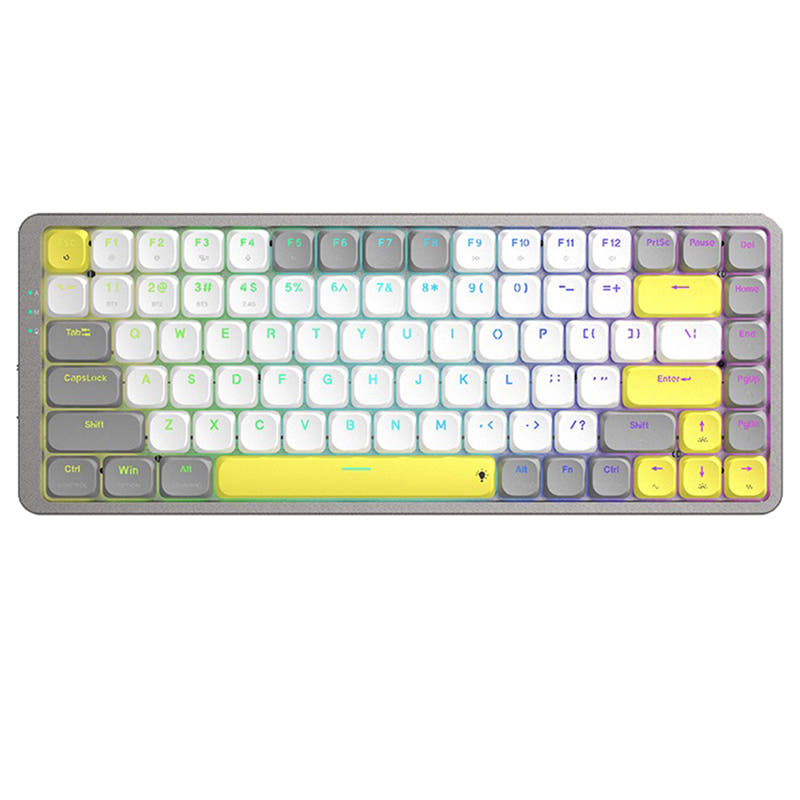


Still torn?
Answer a few quick questions and the keyboard finder ranks 2,000+ boards by how you will actually use yours.