Keychron K0 Max vs K1 V5Numpad vs 80% Low-Profile
Choose the K0 Max if you need a dedicated, programmable numpad with QMK, or the K1 V5 if you want a full 80% low-profile keyboard for everyday typing.
KeebFinder may earn a commission when you buy through these links, at no extra cost to you.

4.1 (11)4.1 · 11 reviews
from$64at Keychron

4.8 (1,458)4.8 · 1,458 reviews
from$54at Keychron
Which one should you get?
Get the
Keychron K0 Max
Numpad
Build quality in the top 5% of Numpad boards under $100.
- QMK and VIA support for extensive keymap and macro customization.
- Features a rotary encoder knob and a macro column for extra input control.
- Ultra-slim design using Keychron Milk POM low-profile switches, 33% slimmer than standard switches.
- Low-profile switches and keycaps only. Standard MX keycaps will not fit.
- North-facing LEDs. Cherry-profile keycaps can hit the switch housing.
- Numpad only. This is not a full keyboard.
Get the
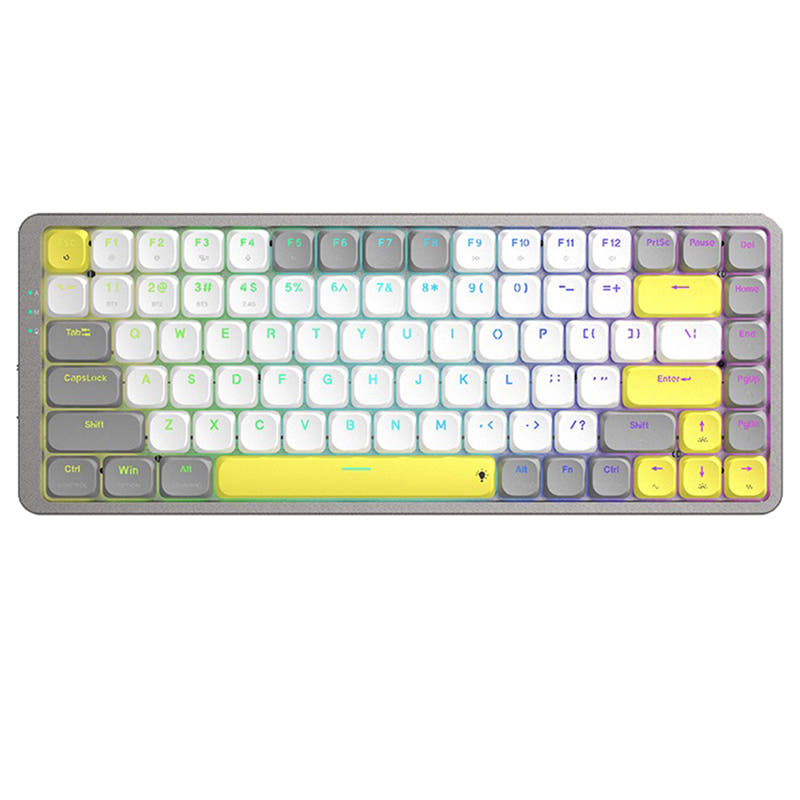
Keychron K1 V5
80% Low-Profile
Build quality in the top 40% of 80% boards under $100.
- Full 80% layout with dedicated arrow keys and function row is versatile for general use.
- Large 2000mAh battery with a reported up to 190 hours of use (backlight off) for white backlight version.
- Highly rated by customers with a 4.8/5 average from over 1400 reviews.
- Low-profile switches and keycaps only. Standard MX keycaps will not fit.
- North-facing LEDs. Cherry-profile keycaps can hit the switch housing.
- No numpad.
Choose the Keychron K0 Max if you need a powerful, programmable numpad for gaming, data entry, or creative work and are okay with recharging more frequently. Opt for the Keychron K1 V5 if you want a reliable, full-featured low-profile keyboard for everyday typing and office productivity with excellent battery life. The choice comes down to whether a specialized numpad or a complete 80% keyboard better fits your workspace.
The differences that matter
Skip the 40-row spec sheet. These are the specs that change how each board feels, sounds, and fits your desk.
Keychron K0 Max
Keychron K1 V5
Layout size
Numpad
80%
Connection
Bluetooth, 2.4 GHz, Wired
Bluetooth, Wired
Wireless for several devices and wired for lower latency
Battery
750 mAh
2,000 mAh
A larger battery means fewer cables during the day
Switch options
Clicky, Linear, Silent, Tactile
Clicky, Linear, Tactile
Mount style
Plate Mount
Tray Mount
- Keychron K0 Max
- Keychron K1 V5
- Performance
- 7963
- Build quality
- 8567
- Productivity
- 9567
- Customizability
- 9270
- Portability
- 8674
- Hot-swappable
- Low profile
- Case material: Aluminum, Plastic
What will you mostly use it for?
The K0 Max wins in Gaming and Travel due to its 1000 Hz polling, NKRO, and compact portability. It also takes the lead in Modding and Content Creation thanks to QMK/VIA support, hot-swappable switches, and a dedicated encoder. The K1 V5 is the better choice for Office tasks with its full layout, long battery life, and multi-media keys. For Programming, it is a tie because both offer unique advantages: the K1 V5 has a full layout while the K0 Max allows deep customization.
Pick the Keychron K0 Max
- Features a 1000 Hz polling rate in 2.4 GHz and wired modes for low latency.
- Includes N-Key Rollover (NKRO) support in both wireless and wired modes.
- Offers a dedicated macro column and rotary encoder for custom game commands.
What owners say
Ratings and quotes collected from verified store reviews, including the critical ones.
Keychron K0 Max
11 owner reviews
“Perfect addition to my Nuphy Air75 v2. The keys line up well, and this gives me a knob and 10-key when I’m at my desk!”
“The K0 MAX is just right with its red Gateron switches! Typing on it feels really natural. 2 Stars less because the battery needs to be loaded again after 3 or four days of occasional usage.”
Keychron K1 V5
1,458 owner reviews
“Cant beat this keyboard. Everything I wanted for a great price. Great for Mac and just as good as any keyboard for PC. I use ti for my work pc and personal Mac.”
Keychron K0 Max vs K1 V5 specs
Every tracked spec, side by side. Rows marked with a dot differ between the boards.
14 of 24 specs differ
Keychron K0 Max
Keychron K1 V5
Switch options
Hot-swappable
Mount style
Low profile
Sound dampening
Screw-in stabilizers
Layout size
Layout standard
Ergonomics
Knob
Display
Media keys
Connection
Max polling rate
Battery
USB-C
Case material
Keycaps
Backlight
QMK
VIA
N-key rollover
Mac & Windows
Released
Compare prices
Live prices from the stores we track, cheapest in-stock offer first.
Prices in USD are converted to your currency and can change at any time. KeebFinder may earn a commission when you buy through these links, at no extra cost to you.
Lowest price across stores, Amazon excluded.


Keychron K0 Max vs K1 V5: your questions
Yes, the Keychron K0 Max supports both QMK firmware and the Keychron Launcher web app for customization. This allows you to remap keys, create macros, and adjust settings without installing software on all operating systems.
The K1 V5 is offered in both hot-swappable and solder versions. The hot-swappable option is only compatible with Keychron low-profile optical switches, while the non-swappable version uses Gateron low-profile mechanical switches.
The K0 Max is a dedicated wireless numpad with a macro column and a rotary knob, designed for additional input and customization. The K1 V5 is a full 80% low-profile keyboard intended for primary typing with a focus on comfort and battery life.
The K1 V5 has a significantly larger battery at 2000mAh, with the manufacturer reporting up to 190 hours of use (backlight off) for the white backlight version. User reviews of the K0 Max indicate a much shorter battery life of only a few days with light use.
Yes, it is suitable for gaming due to its 1000 Hz polling rate over 2.4 GHz and wired connections. It also supports N-Key Rollover (NKRO) and has a macro column for assigning game functions.
Yes, the K1 V5 is designed with a Mac layout and includes keycaps for both Windows and Mac operating systems. You can switch between operating systems using a button on the side panel.
The K0 Max comes with low-profile double-shot PBT keycaps. These are designed to be durable and resistant to oil, with a unique LSA (low profile spherical-angled) profile for a different typing feel.
Yes, the K1 V5 is a low-profile keyboard with a body thickness of only 18mm. It uses low-profile Gateron mechanical or Keychron optical switches to achieve its slim design.
The K0 Max is offered with Keychron Milk POM switches, available in Linear (Red) and Tactile (Brown and Banana) options. These switches are pre-lubed and designed for a deeper sound signature.
Yes, the K1 V5 is available in both white backlight and RGB backlight versions. The RGB version offers 18 types of effects and 4 adjustable brightness levels.
No, the K1 V5 does not support QMK or VIA, so macro programming is not available. It relies on onboard controls for adjusting backlight settings and using multi-media keys.
The Keychron K0 Max is specifically designed for number work as a dedicated numpad. Its macro column and rotary encoder can also be programmed for data entry shortcuts, making it a strong choice for spreadsheet and accounting tasks.
Not sold on either?


Still torn?
Answer a few quick questions and the keyboard finder ranks 2,000+ boards by how you will actually use yours.