Keychron K1 V6 vs K3TKL vs 75% Low-Profile Showdown
Choose the K1 V6 for superior gaming performance, QMK/VIA customization, and build quality; choose the K3 if portability and an ultra-compact layout are higher priorities.
KeebFinder may earn a commission when you buy through these links, at no extra cost to you.

5.0 (2)5.0 · 2 reviews
from$74at Keychron

No reviews
from$105at Keychron (DE)
Which one should you get?
Get the
Keychron K1 V6
TKL
Build quality in the top 20% of 80% boards under $100.
- QMK and VIA firmware support for deep key remapping and macros.
- 1000 Hz wired polling rate and N-Key Rollover for gaming.
- Three-level adjustable typing angles (3.37°, 4.2°, 6.7°) for ergonomic setup.
- Low-profile switches and keycaps only. Standard MX keycaps will not fit.
- North-facing LEDs. Cherry-profile keycaps can hit the switch housing.
- Missing ISO-FR. The other board is sold in those layouts.
- No numpad.
Get the
Keychron K3
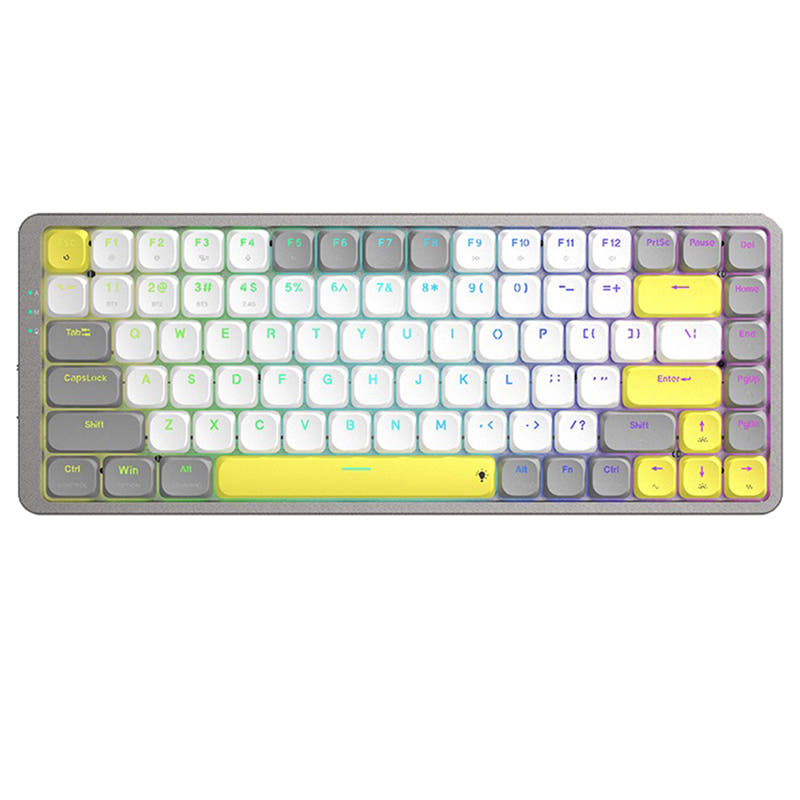
75% Low-Profile Showdown
Build quality in the bottom 40% of 75% boards under $150.
- More compact 75% layout saves desk space and packs easier for travel.
- Lighter weight (not specified but described as lightweight) improves portability.
- Hot-swappable low-profile optical switches with MX-styled stem.
- Low-profile switches and keycaps only. Standard MX keycaps will not fit.
- North-facing LEDs. Cherry-profile keycaps can hit the switch housing.
- Missing ISO-DE, ISO-UK, ISO-Nordic. The other board is sold in those layouts.
- No numpad.
The Keychron K1 V6 is the clear winner for anyone who needs a low-profile keyboard with top-tier gaming performance, deep firmware customization, and a solid typing experience. Its TKL layout and ergonomic adjustments also make it suitable for office and programming tasks. The K3 remains a good choice for budget-conscious buyers or those who value a smaller, lighter board for travel, but it lacks the advanced features and build quality of the K1 V6.
The differences that matter
Skip the 40-row spec sheet. These are the specs that change how each board feels, sounds, and fits your desk.
Keychron K1 V6
Keychron K3
Layout size
80%
75%
Battery
2,000 mAh
1,550 mAh
A larger battery means fewer cables during the day
Mount style
Top Mount
Plate Mount
QMK
Yes
No
The deep option when you want to remap every key
VIA
Yes
No
GUI remapping without compiling firmware
- Keychron K1 V6
- Keychron K3
- Performance
- 8264
- Build quality
- 7861
- Productivity
- 8066
- Customizability
- 8868
- Portability
- 7380
- Connection: Bluetooth, Wired
- Hot-swappable
- Low profile
- Case material: ABS, Aluminum
- Switch options: Clicky, Linear, Tactile
What will you mostly use it for?
The K1 V6 wins in five out of six categories, making it the stronger all-around choice for users who prioritize performance, customization, and ergonomics. Its QMK/VIA firmware, higher polling rate, and TKL layout are particularly suited for gaming, programming, and office work. The K3 only takes the Travel category due to its lighter and more compact design, which appeals to those who need maximum portability.
Pick the Keychron K1 V6
- 1000 Hz wired polling rate provides lower latency, while the K3's polling rate is not stated.
- N-Key Rollover (NKRO) confirmed for both wireless and wired modes.
- ARM architecture MCU with 256KB Flash offers better performance headroom.
- Acoustic foam layers (IXPE, latex, EPDM) reduce case ping and improve audio.
Keychron K1 V6 vs K3 specs
Every tracked spec, side by side. Rows marked with a dot differ between the boards.
11 of 25 specs differ
Keychron K1 V6
Keychron K3
Switch options
Hot-swappable
Mount style
Low profile
Layout size
Layout standard
Ergonomics
Display
Media keys
Connection
Max polling rate
Battery
USB-C
Case material
Plate material
Keycaps
Weight
Dimensions
Typing angle
Backlight
QMK
VIA
N-key rollover
Mac & Windows
Released
ISO layouts by store
Which stores sell ISO-DE, UK, and the other regional layouts.
Keychron K1 V6
Keychron
ISO-DE, ISO-UK, ISO-Nordic, ISO-SW
In stockShips to you
Keychron (DE)
ISO-DE, ISO-UK, ISO-SW
Out of stockDoes not ship to you
Keychron K3
Keychron (DE)
ISO-FR
In stockDoes not ship to you
Compare prices
Live prices from the stores we track, cheapest in-stock offer first.
Prices in USD are converted to your currency and can change at any time. KeebFinder may earn a commission when you buy through these links, at no extra cost to you.
Lowest price across stores, Amazon excluded.



Keychron K1 V6 vs K3: your questions
The Keychron K1 V6 is the better choice for gaming. It offers a 1000 Hz wired polling rate and N-Key Rollover (NKRO) in both wired and wireless modes, which reduces input latency and ensures all keystrokes register. The K3's polling rate is not specified, making it less reliable for fast-paced competitive play.
Yes, the Keychron K1 V6 supports both QMK and VIA firmware. Users can remap any key or create macros using the Keychron Launcher web app, or use the VIA graphical interface for live configuration via a wired connection.
The K1 V6 likely offers a better typing experience due to its enhanced acoustic foam layers (IXPE, latex, EPDM), which reduce noise and provide a quieter, more comfortable keystroke. It also features three adjustable typing angles (3.37°, 4.2°, 6.7°) for ergonomic support, while the K3 has only two-level adjustable rubber feet.
Yes, the Keychron K3 comes with extra keycaps for both macOS and Windows. It includes a Mac multimedia keys layout out of the box and also supports Windows, making it compatible with both operating systems.
The K1 V6 is compatible with Keychron Milk POM low-profile switches (linear red, tactile brown, tactile banana) and Gateron/Keychron low-profile mechanical switches. It does not support low-profile optical switches because QMK firmware does not support them.
The Keychron K3 is more portable due to its lighter weight (not specified but described as lightweight) and more compact 75% layout. Its slim profile, with switches that are 40% slimmer than conventional switches, makes it easier to fit into bags for travel.
Yes, the K3 is hot-swappable, but only for low-profile Keychron Optical switches. It uses an MX-styled stem, but conventional MX mechanical switches are not compatible. The hot-swap feature allows switch changes without soldering.
The Keychron K1 V6 has a 2000mAh battery, while the Keychron K3 has a 1550mAh rechargeable li-polymer battery. The K3's battery life is rated at up to 34 hours with backlight at lowest brightness.
The 80% TKL layout of the K1 V6 is larger than the 75% layout of the K3. The TKL layout has 87 keys and includes a dedicated function row and navigation cluster, while the 75% layout is more compact and omits some keys to save space.
It depends on your needs. The K1 V6 justifies its higher price with QMK/VIA support, a higher 1000 Hz wired polling rate, enhanced acoustic foam, and a more adjustable ergonomic design. If these features are important for your gaming or programming workflow, the extra cost is worthwhile.
Not sold on either?





Still torn?
Answer a few quick questions and the keyboard finder ranks 2,000+ boards by how you will actually use yours.