Keychron K1 V6 vs Lemokey X3Wireless or Full Size
Choose the K1 V6 for low-profile wireless flexibility and ISO layouts, or the Lemokey X3 for a wired full-size layout with a numpad.
KeebFinder may earn a commission when you buy through these links, at no extra cost to you.

5.0 (2)5.0 · 2 reviews
from$74at Keychron

3.0 (4)3.0 · 4 reviews
from$49at Keychron
Which one should you get?
Get the
Keychron K1 V6
Build quality in the top 15% of 80% boards under $100.
- Bluetooth and wired connectivity, with a 2000 mAh battery.
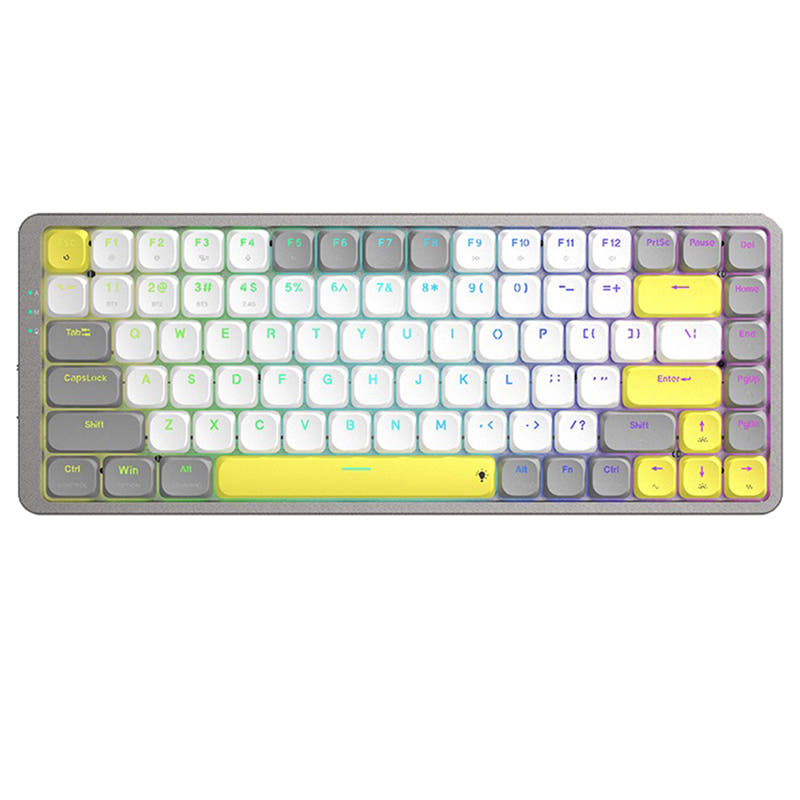
- 80% low-profile layout available in ANSI and several ISO variants.
- Hot-swappable option, QMK support, and VIA support.
- Low-profile switches and keycaps only. Standard MX keycaps will not fit.
- North-facing LEDs. Cherry-profile keycaps can hit the switch housing.
- No numpad.
Get the
Keychron Lemokey X3
Build quality in the top 10% of 100% boards under $100.
- 100% full-size ANSI layout with a numpad.
- Gasket mount, polycarbonate plate, and sound-absorbing and case foam.
- Hot-swappable option with QMK and VIA support.
- North-facing LEDs. Cherry-profile keycaps can hit the switch housing.
- No ISO layout. ISO-DE, UK, and other ISO variants are not offered.
Choose the Keychron K1 V6 if wireless connectivity, low-profile keys, or an ISO layout is central to your setup. Pick the Lemokey X3 if you want a full-size ANSI keyboard with a numpad, gasket mount, and wired-only operation. For switch changes, check that the K1 V6's low-profile switch limitation fits your plans.
The differences that matter
Skip the 40-row spec sheet. These are the specs that change how each board feels, sounds, and fits your desk.
Keychron K1 V6
Keychron Lemokey X3
Layout size
80%
100%
Connection
Bluetooth, Wired
Wired
Wireless for several devices and wired for lower latency
Low profile
Yes
No
Case material
ABS, Aluminum
ABS, Plastic
Mount style
Top Mount
Gasket Mount
- Keychron K1 V6
- Keychron Lemokey X3
- Performance
- 8283
- Build quality
- 7885
- Productivity
- 8096
- Customizability
- 8891
- Portability
- 7347
- Hot-swappable
- Max polling rate: 1,000 Hz
- Switch options: Clicky, Linear, Tactile
- QMK
- VIA
- Keycaps: ABS
What will you mostly use it for?
The K1 V6 is the more travel-friendly and flexible desk option, particularly if Bluetooth or an ISO layout matters. The X3 takes the edge for full-size workflows and wired gaming, while both offer substantial keymap customization. Modding is a close call: both have hot-swap and firmware support, but their switch and build details differ. Consider whether the K1 V6's low-profile switch ecosystem suits your plans.
Pick the Keychron Lemokey X3
- The Lemokey X3 has a 1000 Hz polling rate and N-key rollover.
- Its gasket mount and sound-absorbing foam are specified as features of the keyboard.
- The K1 V6 also has a 1000 Hz wired polling rate, but its polling rate is listed as 125 Hz in Bluetooth mode.
What owners say
Ratings and quotes collected from verified store reviews, including the critical ones.
Keychron K1 V6
2 owner reviews
“Love it! My first mechanical, now typing is a beautiful experience, I enjoy coming back to the keyboard! Remapped with Makros, so I have my apps at the fingertip. I am experiencing some minor bugs like "Enter"-key "stuck", meaning the keyboard typed enter…”
Keychron Lemokey X3
4 owner reviews
“After a disappointing experience with a razer blackwidow keyboard I wasn't sure where to turn. I got this lemokey and love it. I am not a fan of RGB products requiring a program to constantly run in the background. I consolidated all rgb accessories into one…”
“The Numpad enter never worked. The L is really hard to get to register. The base bends like paper and overall its really cheap quality.”
Keychron K1 V6 vs Lemokey X3 specs
Every tracked spec, side by side. Rows marked with a dot differ between the boards.
13 of 27 specs differ
Keychron K1 V6
Keychron Lemokey X3
Switch options
Hot-swappable
Mount style
Low profile
Sound dampening
Screw-in stabilizers
Layout size
Layout standard
Ergonomics
Display
Media keys
Connection
Max polling rate
Battery
USB-C
Case material
Plate material
Keycaps
Weight
Dimensions
Typing angle
Backlight
QMK
VIA
N-key rollover
Mac & Windows
Released
ISO layouts by store
Which stores sell ISO-DE, UK, and the other regional layouts.
Keychron K1 V6
Keychron
ISO-DE, ISO-UK, ISO-Nordic, ISO-SW
In stockShips to you
Keychron (DE)
ISO-DE, ISO-UK, ISO-SW
Out of stockDoes not ship to you
Keychron Lemokey X3
No ISO layout at the stores we track.
Compare prices
Live prices from the stores we track, cheapest in-stock offer first.
Prices in USD are converted to your currency and can change at any time. KeebFinder may earn a commission when you buy through these links, at no extra cost to you.
Lowest price across stores, Amazon excluded.



Keychron K1 V6 vs Lemokey X3: your questions
Yes. Its listed connectivity includes Bluetooth and wired use, and its battery is 2000 mAh. The Lemokey X3 is wired only.
Yes, the Lemokey X3 has a 100% layout with a numpad. The Keychron K1 V6 is an 80% layout and its compatibility rules specify that it has no numpad.
The K1 V6 is listed in ANSI and ISO variants, including UK, German, Swedish, and Nordic layouts. The Lemokey X3 is ANSI only.
No, the K1 V6 is limited to low-profile switches and keycaps, so standard MX keycaps will not fit. Its north-facing LEDs can also interfere with Cherry-profile keycaps.
Both are listed with hot-swappable options. The K1 V6's hot-swap version supports low-profile mechanical switches, while the X3 is also offered in a hot-swappable version.
The K1 V6 is the lighter, smaller option at 596 g with an 80% layout, and it supports Bluetooth. The X3 weighs 807 g, uses a full-size layout, and requires a wired connection.
Yes, both product listings include QMK and VIA support. Keychron describes browser-based Launcher tools for remapping keys and creating macros on both models.
Both are listed with a 1000 Hz polling rate for wired use. The K1 V6 vendor description lists 125 Hz in Bluetooth mode, while the X3 is wired only.
The K1 V6 uses a top mount with an aluminum plate, while the Lemokey X3 uses a gasket mount with a polycarbonate plate. Keychron also describes sound-absorbing foam and case foam in the X3.
The K1 V6 vendor description names IXPE and latex acoustic foam, paired with EPDM foam. The X3 description cites sound-absorbing foam and case foam alongside its gasket mount.
Both keyboards have north-facing LEDs, and their compatibility rules warn that Cherry-profile keycaps can hit the switch housing. The K1 V6 also requires low-profile keycaps, and standard MX keycaps will not fit.
Choose the Lemokey X3 if you want a full-size layout with a numpad; the K1 V6 has no numpad. Both support QMK and VIA for keymap customization and macros.
Not sold on either?




Still torn?
Answer a few quick questions and the keyboard finder ranks 2,000+ boards by how you will actually use yours.